
Firebase Alternatives for Predictable Pricing

Nov 12, 202617 min read
Firebase, Google's app development platform, costs $0 on the Spark plan until you hit its free quotas, a ceiling that teams wiring up backends with tools like Activepieces tend to find generous at the prototype stage.

A Firebase alternative is a backend-as-a-service platform, such as Supabase or Appwrite, that supplies the same core services as Firebase (database, authentication, file storage and serverless functions) but typically with predictable pricing and a portable, often open-source, SQL-based data model.
Blaze charges per use with no ceiling unless you build one yourself, so you need to set a spending cap on Blaze to avoid bill shock, according to Devshot.
Blaze has no fixed fee, so its catch is always usage, never a seat count. The table maps four common situations to a plan, and that is the point to take from it.
| Situation | Plan | Monthly cost | The catch that pushes it up |
|---|---|---|---|
| Prototype | Spark | $0 | Quotas are fixed, so you outgrow them quickly |
| App under free quotas | Spark | $0 | Services stop at the limit, and Google Cloud features are unavailable |
| Growing app with spikes | Blaze | $0 base plus metered usage | One bad query or loop is billed in full |
| Google Cloud features | Blaze | Metered usage | Each feature adds its own meter to the same bill |
Nothing on Spark can overspend, and that is the safety. The price of it is that your app stops when traffic arrives.
For a solo project or prototype, stay on Spark at $0. Nothing can bill you, so a half-built app can't surprise you.
For a team of 5 running a live app with real users, Blaze is usually required, and from there the bill follows traffic.
A bug on Blaze can be expensive: one SaaS startup's bug ran up $100,000, a sum no five-person team has in reserve.
For a team of 25 needing SSO and admin controls, Firebase doesn't price by seat, so team size doesn't change your plan. Admin controls come through Google Cloud access management, which means you're configuring a second platform.
Every Cloud service you switch on adds a meter. A stolen Gemini API key produced an $82,314.44 bill, and a leaked key can bill you like that on any metered account.
Heavy read or API volume
This is where Blaze costs the most, because Firestore charges per document read. Vaki's Firestore reads cost $30,356.56, so a chatty screen or a polling job, including one fed by Activepieces, is a line item rather than a rounding error.

After three bills like those, many teams start looking elsewhere.
Why teams leave Firebase
When the bill jumps without warning, the NoSQL data is awkward to query and moving out means rewriting for Google's stack, teams leave Firebase.
Why people leave Firebase
Picture a two-person agency in Lagos or Nairobi, paying in dollars against a naira or shilling budget, waking up to a bill larger than a year of revenue.
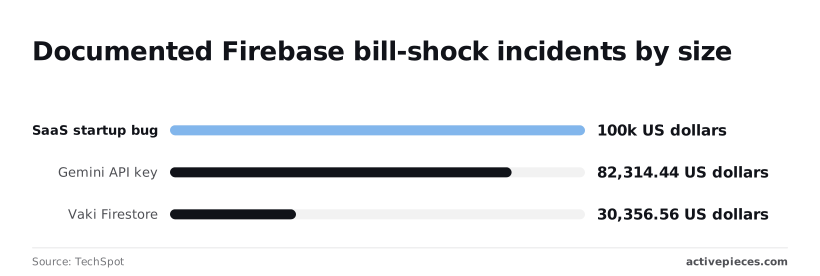
$82,314.44 in 48 hours: that is where a Gemini API key that normally costs $180 a month ended up, about 457 times the usual spend, so two days of activity cost as much as 457 months of normal monthly usage.
The chart shows how far these surprises run. A small team has no cushion for that.
Nor are those bills the only reason people leave. Firestore stores documents, so a question like "orders by customer last quarter" needs hand-built indexes or exported data. Once your app depends on Firebase's own libraries, switching means rewriting every data call.
49% of prior Firebase users said no when State of Databases asked whether they would start a new project on it; 19% said yes and 32% maybe, which means nearly half those who know Firebase would not choose it again.
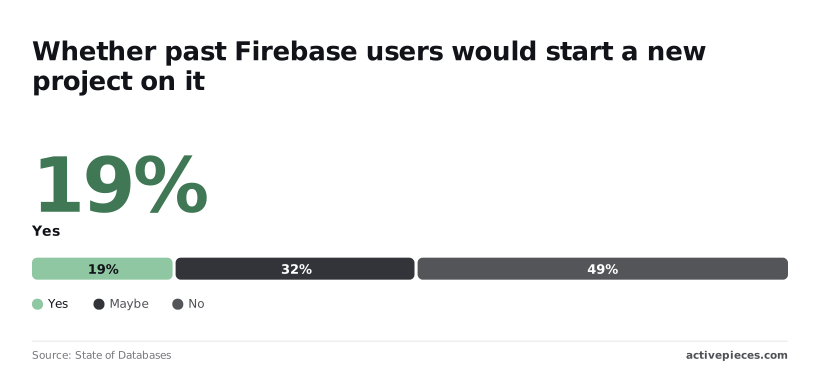
Only about one in five is a confident repeat customer, and nearly half wouldn't return.
I ranked options on four things:
- whether the monthly cost can be predicted or capped
- whether your data exports in a standard format
- whether you can query it in SQL
- whether you can self-host to escape a vendor
| Option type | Price model | Core strength | Main limit | Suits |
|---|---|---|---|---|
| Firebase | Per read, write and call | Mobile sync, fast start | Open-ended bills, proprietary data | Mobile-first apps |
| Open-source SQL backend | Flat tier or your own server | Portable data, real SQL | You run more yourself | Cost-sensitive web and mobile teams |
| Managed SQL database | Fixed instance price | Mature, predictable | No built-in auth or sync | Teams with their own backend code |
The strongest case for staying, and the answer
If your users sit on patchy mobile data, stay. Firebase's best argument is offline mobile sync: the app keeps working on a bad connection and reconciles later, and few alternatives replicate it out of the box.

That matters more than the bill, so set budget alerts and API key restrictions.
If your app is mostly online, most of that advantage disappears, and the 49% who wouldn't start again are the likelier guide.
If you are running this arithmetic for your own team, see what the same workload costs on Activepieces.
Supabase for online applications
For an app that lives online, Supabase is the first alternative to try: a hosted, open-source backend built on Postgres, with auth, storage and realtime bundled in.
Predictable pricing
Your bill follows database size and resources, not how many times a screen re-reads a document. Supabase sells a free starter plan, a paid plan, a team plan and custom enterprise terms, with metered charges for extras such as storage, bandwidth and compute.
Your bill follows database size and resources, not how many times a screen re-reads a document.
When a bug loops a query on Supabase, spend caps are on by default on Pro, but if you turn them off, extra usage is billed. Check the spend-cap setting before launch, since that's what turns "predictable" from a claim into a ceiling.
Supabase portable Postgres data and SQL exports
Because your data sits in ordinary tables, you can query it in SQL. You can export it with standard Postgres tools and restore it on any Postgres host, including a cheap server in your own country.
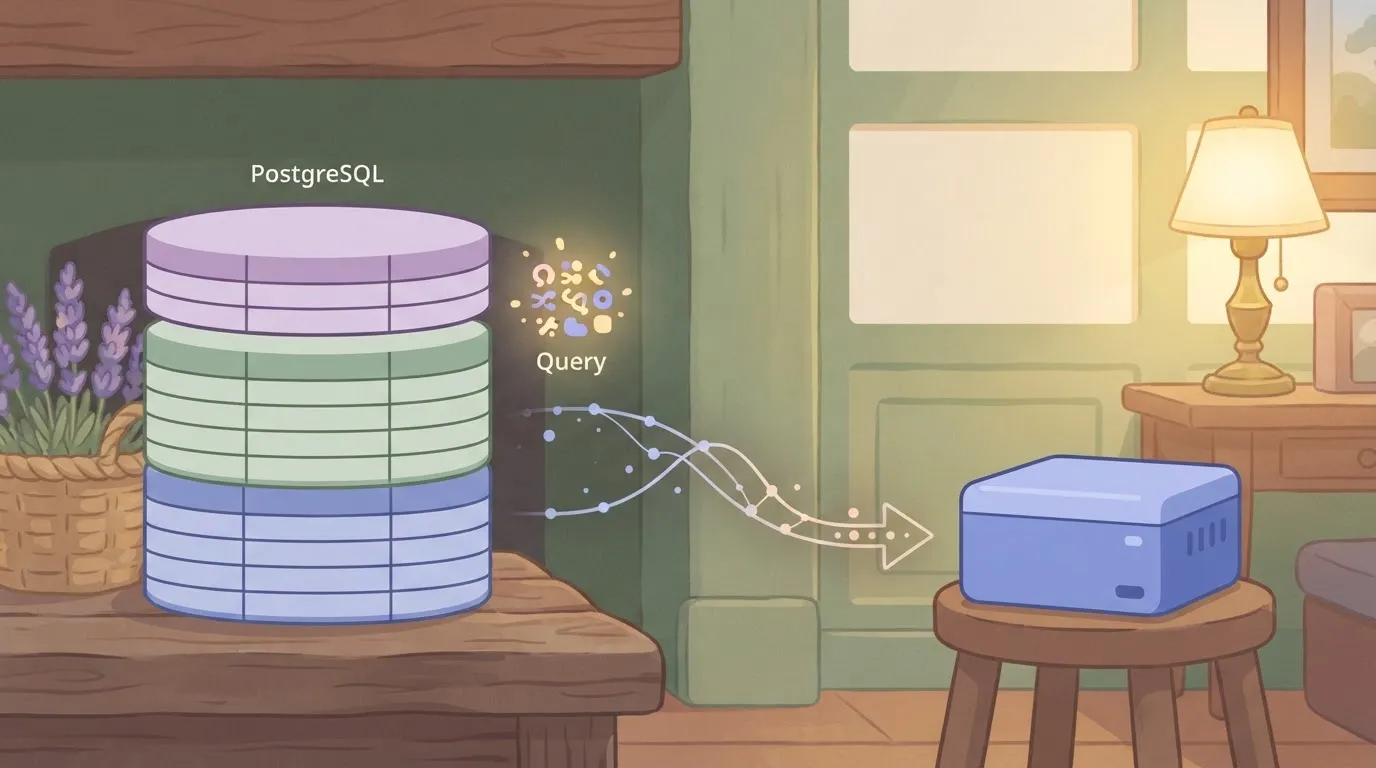
If you've ever untangled a spreadsheet where every tab used different column names, you'll like having one schema that every report and script reads the same way.
The platform itself is open source, so self-hosting stays available if the hosted price or region ever stops working for you.
What the move costs you
Don't expect your Firestore documents to copy across as they are. You'll redesign them as related tables, and that takes real planning time.
Access control moves into row-level security, which are policies written in SQL on each table. They're powerful, but a missing policy either locks users out or exposes rows, and the failure is easy to miss until production.
Offline sync is also weaker. Supabase doesn't ship the built-in local cache and automatic reconnect merge that Firebase's mobile SDKs give you, so apps used on patchy connections need extra work.
Who Supabase suits best
Supabase suits web-first and mostly online products, especially teams that already know SQL or want an exit route. If your field staff work for hours without signal, it's the wrong swap.
Appwrite for self-hosted backends (source) is an open-source backend that runs on Appwrite Cloud or on a server you control, so it fits teams that have signal and want to stop paying by usage. It covers the same ground as Firebase: authentication, a database, file storage and server functions.
Appwrite Cloud plans and self-hosting
Appwrite Cloud is the hosted route, with a free tier to start on. Self-hosting is the exit from vendor billing: you run the same software in containers on your own hardware, and the invoice becomes your server cost.

Start with the free auth allowance, because it is the figure that matters first. According to Freetier.watch, the free tiers compare like this:
| Provider | Free monthly active users |
|---|---|
| Appwrite | 75,000 |
| Supabase | 50,000 |
| Auth0 | 25,000 |
| Cognito | 10,000 |
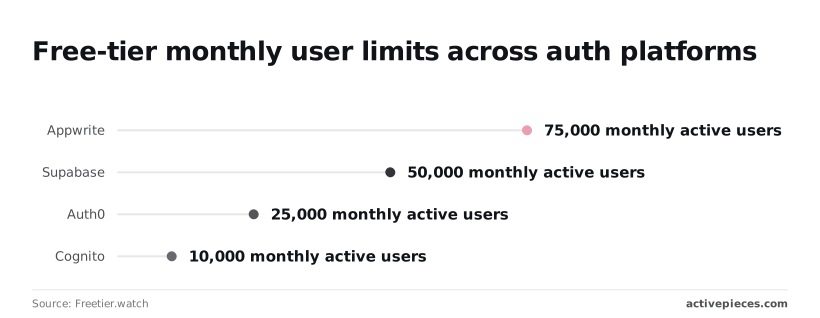
So an app with 60,000 monthly users stays free on Appwrite but would already be paying on the other three. An app at 20,000 would pay on Cognito alone.
What you get is control of your data and your costs. Because the code is open, you can move from Cloud to your own server, or the reverse, without rewriting the app.
The generous free auth tier gives a small team room to grow before the first bill arrives.
If you self-host, you become the operations team. You handle updates, backups, uptime and security patches, and a failure at 2am is your failure.
For an organisation with no one who has run a server, that cost can outweigh the saving, and Cloud then becomes the sensible choice. Appwrite also gives you no offline mobile sync comparable to Firebase's.
Appwrite suits small and mid-sized teams building web or mobile apps with a steady connection, especially where budgets are fixed and a surprise bill isn't survivable.
It suits teams who want SQL-free simplicity but portable data, and who either have someone to run a server or are content to pay for Cloud.
Worth checking against a plan that does not meter every step: one credit covers a whole run on Activepieces.
AWS Amplify for AWS teams
AWS Amplify is Amazon's framework and hosting service for web and mobile apps. It suits teams who'd rather stay inside AWS than leave Firebase's model behind, but it isn't a simpler or cheaper-to-predict replacement.
Amplify has no single plan price. You pay AWS's usage rates for each service the app touches, so the bill is usage-based in the same way Firebase's is. If usage-based billing is why you're leaving Firebase, moving here changes the vendor and keeps the problem.
If your company already runs on AWS, Amplify slots into accounts, permissions and billing your team already manages.
Your finance person already knows the AWS invoice, and your engineers can reach the underlying services directly when the framework runs out of road. That matters more than any feature list.
Open the invoice for a modest Amplify app and you won't find one line called "Amplify". You'll find a separate charge for each integration underneath it:
- build minutes
- hosting storage and data served
- AppSync requests (AppSync is AWS's managed GraphQL API service)
- DynamoDB reads and writes (DynamoDB is AWS's NoSQL database)
- Cognito users (Cognito handles sign-in)
- Lambda invocations (Lambda runs your server-side functions)
One busy screen in the app can move several meters at once, because each line has its own meter and its own way of surprising you.
For a small team billed in dollars while earning in a weaker currency, that spread of meters is hard to forecast.
And the data lands in DynamoDB, which is still NoSQL and still tied to AWS, so the portability complaint stays unsolved.
Amplify suits teams already committed to AWS, with someone who can read the bill line by line and set billing alarms. It's a poor fit for a small team that wants one predictable monthly number or SQL data it can move elsewhere.
Activepieces
Activepieces is open-source workflow automation with an MIT-licensed core, not a Firebase backend, and it can take over the Cloud Functions-style glue whose usage-based billing makes a Firebase bill hard to predict. It sits beside whatever backend you choose.
What it does and does not replace
If you were hoping one tool would replace all of Firebase, it won't.
Your backend still owns the database, authentication and hosting, and Activepieces only runs the "when this happens, do that" jobs around them, with unlimited flows on every plan, including free, so the number of jobs you hand it isn't what gets billed.

You still need a separate backend for those three.
Take from it that Activepieces connects to your backend through triggers and never replaces any part of it.
Because the glue lives outside the backend, moving the backend later doesn't mean rewriting every notification you built.
Three triggers cover most of what small teams write functions for:
- A webhook, so your app or a payment provider can call a flow when something happens.
- A schedule, for the nightly report or the weekly reminder nobody should send by hand.
- A sign-up sync, which passes new users from your auth system to a spreadsheet, a CRM or a mailing list.
Each flow can end in a Slack message or an email. Someone who doesn't write code can then read and edit the flow. In a small team, that means one person leaving doesn't strand a function nobody else can read.
Pricing and self-hosting
Because the Activepieces core is MIT-licensed, you can run it on a server you already pay for. The cost then depends on your own hosting, not on how many times a flow fires.
That suits teams in places where a surprise bill in dollars is a real problem. You take on the upkeep: updates, backups and uptime become your job.
A hosted version exists for teams that'd rather not run it: the free plan is $0 for 1,000 credits a month with unlimited flows, and the Activepieces pricing page lists 1 credit per flow run, any number of steps, so a ten-step flow costs the same as a two-step one.

Zapier's pricing page bills the same flow per task, and Make's bills it per module.
Checklist for preparing to leave Firebase
Pull your own usage numbers first, set a budget alert, pick a replacement by need, and migrate one feature. If your app depends on offline mobile sync, staying on Firebase is the better call.
Since I can't hand you confirmed prices for any alternative, your own bill is the only budget baseline you can trust. The steps below run in order, and each one feeds the next.
- Open the Firebase billing console and write down your reads, writes and egress for the last few months.
- Set a budget alert so a runaway query or a buggy loop emails you before it hits your card.
- Choose by need: Supabase if you want SQL on Postgres, Appwrite if you want to self-host, Amplify if your infrastructure already lives on AWS.
- Migrate one feature, run it alongside the old one, and compare.
Do step four before anyone promises the whole move to a manager. A pilot tells you what the migration actually costs in hours, which matters more than any pricing page when your team is small and nobody has spare weekends.
Measure your Firebase usage before switching
Size each meter separately, since reads, writes and egress are the three that drive a usage-based bill. A chatty screen that re-reads the same documents on every open looks very different from a nightly export that pulls data out.
Knowing which meter dominates tells you whether SQL joins would shrink your bill or whether egress is the real culprit. Check which currency your card is billed in, too, because a dollar invoice swings with the exchange rate.
Pilot one feature
Pick something self-contained with low stakes, such as a settings table or a lead-tracker form, and rebuild it on your chosen platform.
Export the data, load it, and see how much of the shape survives the trip from documents to tables. If you rely on devices working offline and syncing later, test that first. It's the one thing most likely to send you back.
Cloud Functions are your server-side code, and they often hold business rules nobody wrote down.
List every function, note what triggers it, and mark which ones the new platform can replace with database rules, its own functions or a small service you run. Leave the rest on Firebase until the pilot proves the move.
Common questions about Firebase alternatives
Is there a free alternative to Firebase?
Yes, several, and the free part usually means a hosted free plan or software you run yourself. Supabase and Appwrite both offer hosted free tiers suited to prototypes and small internal tools.
Their code is open source, so you can run them on your own server at no licence cost.
Check the current limits before you put a client's live app on a free hosted plan, since free hosted plans have limits, such as paused idle projects.
Can I migrate Firestore data to Postgres?
Yes, but plan for a remodel, not a file copy. Firestore stores nested documents and subcollections, while Postgres (the open-source SQL database behind Supabase) wants rows, columns and foreign keys.
You export from Firestore, decide which nested fields become their own tables, load the result, then rewrite every query in your app.
Run both systems side by side on one feature first, as the pilot advice above says.
Is Supabase really cheaper than Firebase?
For many apps it's cheaper, and the bigger gain is that the bill is predictable. Firebase's Firestore charges for individual reads and writes, so one badly written screen that re-fetches data can inflate your month.
Supabase bills mainly by plan tier and resource use, which makes a budget easier to set. A small app with light traffic may see little difference, so price your own read and write volume against both before deciding.
Can I self-host a Firebase alternative?
Yes. Supabase, Appwrite and PocketBase (a single-binary backend aimed at small projects) can all run on infrastructure you control. You trade the vendor's bill for your own time: backups, upgrades, security patches and a person who's awake when the server falls over.
If your team has no one who wants that job, a managed plan is often the cheaper choice once you count wages.
Does Firebase have an open-source version?
No. Firebase's backend is a proprietary Google service, and you can't run the real thing yourself.
Its client SDKs are open source, but they talk to Google's servers. That's why leaving means adopting a different backend, such as Supabase, Appwrite or PocketBase, instead of moving Firebase to your own machine.
If your app depends on Firebase's offline mobile sync, test that feature in the replacement first.
Related reading
References
Running the numbers
See what the same workload costs here.
Free forever plan, and every paid plan self-hosts at no extra cost.
See pricing Talk to sales