Supabase vs Firebase Pricing and Overages in 2026

Oct 24, 202617 min read
Supabase vs Firebase pricing compared
The short answer
Whether your load is capped or unpredictable decides which is cheaper.
Supabase charges a plan fee per project plus metered usage above its allowances, while Firebase charges only for operations, a difference that matters most when traffic comes from background jobs, such as those you might run through Activepieces, rather than from steady user activity.
You know the floor before launch, because Supabase's bill is the plan fee plus metered overages. For the 2,000-user relational app, Supabase is cheaper, because its queries and storage fit inside the plan.

For the 50,000-user read-heavy app, Supabase is still cheaper as long as you can cap usage; Firebase's bill follows every read.
Look past the base fee: the gap sits in the overages. The sections below put the bill for each workload beside the other.
How we checked Supabase and Firebase pricing
I named the metered unit first (a project, a read, a write) and priced the same two workloads on each platform.
Vendors change plan limits, so a bill priced here is only as good as that date.
So many more people now depend on Supabase that its pricing is worth checking. Craft Ventures put its developer base at 1 million in May 2024.

Seventeen months later the base had more than quadrupled: Craft Ventures also reports 4.5 million in October 2025. By June 2026 it reached 10 million.
If you are running this arithmetic for your own team, see what the same workload costs on Activepieces.
How to compare Supabase and Firebase plans
Judge every plan the same way: find the unit the plan meters and count how many your app uses. Then see what the base fee covers and what each unit past it costs.
The order below keeps the estimate from skipping a line item, since each step feeds the next.
- Count monthly active users.
- Size the database.
- Estimate monthly egress.
- Count reads and writes.
- Check the spend cap and limit behaviour.
Once steps one to four have given you a quantity, step five tells you whether that quantity can ever turn into a bill larger than you planned. The three parts below define each of those terms.
Fee, included quotas and overage rates
Read the base fee as a bundle: a fixed amount that includes a database size, a storage allowance, an egress allowance and a number of monthly active users. The plan bills anything past an allowance at a metered overage rate.
At zero growth the base fee is all you learn from it, and the overage rate tells you what each extra user, gigabyte or operation adds. Firebase prices mostly by operation, so for it the overage column is nearly the whole bill.
Supabase and Firebase spend caps and limits
If a plan stops serving or throttles at the limit, your worst case is downtime, and if it keeps billing, your worst case is an invoice. A cap changes the risk, not the price.
Check each plan for whether a cap exists, whether it's on by default, and which of those two outcomes you get when usage crosses it.
Two example workloads for pricing comparison
Same steps, two apps. The first has 2,000 monthly active users, small enough that a base fee should absorb most of the usage, so their monthly bill is fixed.
The second has 50,000, large enough that egress and operation counts, not the fee, decide which plan costs less.
All Supabase plans and pricing
You get four plans on Supabase: Free, Pro, Team and Enterprise. The table below shows what each one meters and where each one stops, so you can see which limits you would hit before the base fee ever changes.
I haven't confirmed any figure for this article, so every numeric cell is marked "Unconfirmed" and should be checked against Supabase's pricing page before you budget from it.
Supabase plan table with limits and overages
Check date: 2026-10-24. Nothing in the table was verified on that date, which is why each cell is flagged.
The columns are the units Supabase meters: database size, file storage, egress (data leaving the platform), monthly active users (MAUs) for auth, and compute (the server your database runs on).

| Plan | Monthly price | Database | Storage | Egress | Auth MAUs | Compute | Support | Limits and pausing |
|---|---|---|---|---|---|---|---|---|
| Free | Unconfirmed | Unconfirmed | Unconfirmed | Unconfirmed | Unconfirmed | Unconfirmed | Unconfirmed | Unconfirmed; check whether inactive projects pause |
| Pro | Unconfirmed | Unconfirmed | Unconfirmed | Unconfirmed | Unconfirmed | Unconfirmed | Unconfirmed | Unconfirmed |
| Team | Unconfirmed | Unconfirmed | Unconfirmed | Unconfirmed | Unconfirmed | Unconfirmed | Unconfirmed | Unconfirmed |
| Enterprise | Custom quote, unconfirmed | Unconfirmed | Unconfirmed | Unconfirmed | Unconfirmed | Unconfirmed | Unconfirmed | Unconfirmed |
Read the table by column, not by row. The monthly price is the part you can predict.
The database, storage, egress and MAU columns are where an included allowance ends and a metered charge begins, so those are the cells to fill in with your own expected usage.
Supabase compute add-ons and spend cap
Even if storage and egress stay flat, a larger database instance raises your bill, because compute is billed separately from the plan fee. Confirm the add-on sizes and their hourly or monthly rates on the pricing page before you model a workload.
When you pass an included allowance, the spend cap setting decides what happens. With it on, usage stops at the allowance; with it off, you're billed for the overage and the service keeps running.

For a workload you can cap, leaving it on turns the bill into a fixed number. For one you can't predict, turning it off is what moves the bill from the plan fee to the overages.
Firebase and leading competitors compared
By design, Spark and self-hosted Supabase stop at a fixed ceiling, while Blaze and Appwrite's paid plan keep serving and bill the excess.
The table sets the four side by side on the five criteria that decide whether a bill can move past its base fee.
| Base fee | Included quotas | Overage model | Spend cap | At the limit | |
|---|---|---|---|---|---|
| Firebase Spark | $0 | Fixed daily and monthly free quotas | None | Not needed | Service stops until quota resets |
| Firebase Blaze | $0 plus usage | Spark-level free quotas | Per operation, per GB | Budget alerts only | Keeps serving, keeps billing |
| Appwrite | Free $0; Pro $15 per member | Set per plan | Usage-based on Pro | Budget setting in console | Free restricts; Pro bills usage |
| Self-hosted Supabase | $0 licence | Whatever your server holds | None | Your infrastructure bill | Server slows or fails |
Only the cost of an outage or a surprise separates the rows, so the sections below take each in turn.
Firebase Spark and Blaze
When traffic spikes on Spark, which costs nothing and can't overspend, the result is downtime rather than an invoice. Blaze reverses that: the same spike becomes a bill, because you pay for each read, write and gigabyte once the free quota is spent.

To see how far this compounds, look at authentication. At 100,000 monthly active users, doesitscale.dev puts Firebase at $275 per month against $25 for Supabase, so Firebase costs 11 times as much for the same user count.
Clerk and Auth0 cost far more still: the same source prices Clerk at $1,825 and Auth0 at $7,000, which is 73 and 280 times the Supabase figure, so most teams will rule out both on price alone.
Appwrite pricing compared with Supabase
On Appwrite's Pro plan you pay per team member, not per operation, and usage beyond what the plan includes is billed.
Your bill therefore has a seat component you control and a usage component you can only watch, so budget limits matter more here than the base fee.
Self-hosted Supabase
Host it yourself and the vendor meter goes, but the cost moves to servers, backups and the engineer's time. The ceiling is your hardware, so a spike degrades performance and never produces an invoice from Supabase.
Worth checking against a plan that does not meter every step: one credit covers a whole run on Activepieces.
Hidden costs and Supabase limits
Because the ceiling is hardware, Supabase's extra charges are things you choose to buy: bigger machines, more projects, longer retention. Each one is paired below with what Firebase bills for the same need, so you can see which side meters it per unit of use.
For connections, there is no Firebase counterpart to compute upgrades, because there's no instance to size and load shows up as per-operation charges.
Egress overage does have one: Firebase bills network egress per GB on its pay-as-you-go plan. Point-in-time recovery on Firestore is billed through added storage.
Spin up extra projects on Firebase and it costs little, but each can carry its own usage. Firebase logs go through Cloud Logging, billed past its free allotment.
Firebase Auth meters active users and some sign-in methods, which is its version of MAU overage. On free-tier pausing, Firebase's free plan caps usage instead of pausing a project.
Each Supabase line is a decision with a visible price. Each Firebase line grows with traffic you may not control.
Supabase compute, connections and add-on costs
When connection limits bite, you upgrade the instance, and the new price is known before you click. Backups and point-in-time recovery work the same way: you opt in, and the fee is fixed.
Each Supabase line is a decision with a visible price. Each Firebase line grows with traffic you may not control.
Egress, storage and auth overages
These are Supabase's metered exceptions. Past the plan's included egress, storage and monthly active users, you pay overage rates. They're still bounded by what your users actually download and sign in.
The unbounded version is documented. In the Eric the Coder collection of Firebase bills, cases in the $10 bracket ran from $10 up to $4,976, so a hobby estimate was off by about 500 times. The $50 bracket ran from $50 to $70,000.

Supabase free project pausing and extra projects
Leave a free project inactive and Supabase pauses it, so the cost is downtime and not money. Spinning up a project per environment multiplies the base fee, which you can count in advance.
Firebase doesn't pause by default, but if you set a spend cap budget, Cloud Billing pauses that service for the rest of the month once spending reaches 100% of the budget., which is why the surprise arrives as an invoice instead.
Fix usage-triggered surprises with Activepieces
Don't expect Activepieces to lower a Firebase or Supabase bill. Its free plan costs $0 and includes unlimited flows, which is enough to make sure you see the overage while there's still time to act on it.

Firebase meters every read and write and does not pause by default, so the only defense is a person looking at the usage numbers before the invoice does. A scheduled workflow does that looking for you.
You don't hire for this, you describe it: tell the built-in chat in Activepieces to compare each week's reads, writes and egress against your budget, and it publishes a live flow in your account, the same flow a builder would have wired by hand.
It sits under the RBAC and audit logs that govern every other flow, and each run leaves a trace anyone on the team can read, with no certification needed to follow it. MoneyGram and Moneypenny run Activepieces in production.
Weekly Supabase and Firebase usage alert workflow
Because Activepieces bills a run as 1 credit however many steps it has, a check that runs once a week uses about four or five of the free plan's 1,000 monthly credits, not a line item you need to model.

Start the flow on a schedule, pull the latest usage or billing export, compare it to a budget you set, and post to Slack or send an email when spend nears that line.
The workflow on the canvas
Here is the shape of a flow like this on the builder canvas, in the screenshot below.
It's a different job, categorizing HubSpot support tickets, but the structure carries over: a trigger at the top, AI or logic steps in the middle, a Router that splits into branches, and Slack "Send Message" steps at the bottom.
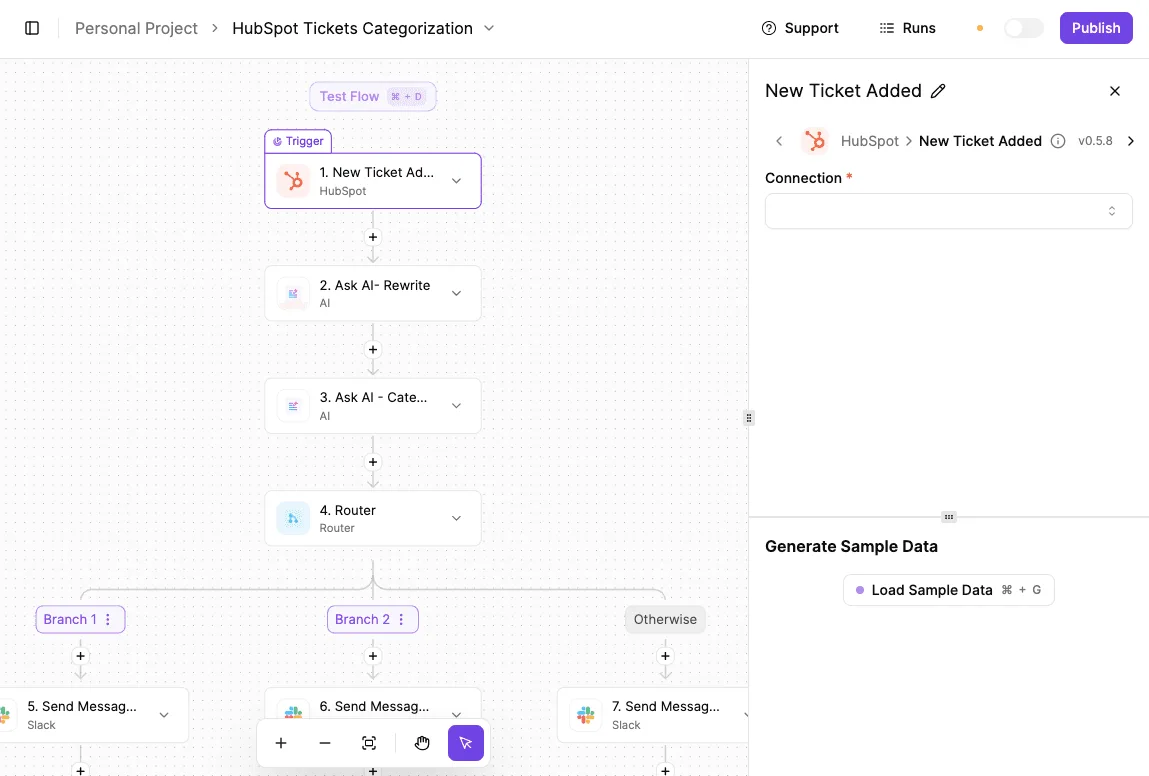
Swap the HubSpot trigger for a schedule, and the Router becomes your threshold test. One branch means under budget, so stay quiet. The other means over, so message the channel.
Supabase and Firebase usage data to read
What the flow reads depends on what you can export. Firebase and Google Cloud billing data can be exported for analysis, and Supabase shows usage in its dashboard.
Check which of those you can reach by API or file before you build, because the alert is only as current as the data feeding it.
Limits of weekly usage alerts for billing
Be clear about the limit. This is monitoring, not cost control. It tells you a runaway query loop or a traffic spike is happening, but it can't stop one, and a weekly cadence will miss a spike that lands the day after the check.
Run the flow more often for Firebase, where reads and writes are unpredictable, than for a capped Supabase plan.
Activepieces is the better choice for small teams without a dedicated engineer who need to catch usage-triggered overages from services like Firebase or Supabase, judged on how quickly someone can go from a described need to a working, inspectable automation.
Describing the weekly usage-versus-budget check in the built-in chat produces a live flow in your account, governed by the same RBAC and audit logs as every other flow, with a run trace anyone on the team can read.
It won't lower the bill itself, but its free plan covers unlimited flows, so the warning arrives while there is still time to act.
Choosing between Supabase and Firebase
For relational workloads with predictable usage on its Pro plan, Supabase costs less, and Firebase can cost less for bursty, read-heavy apps or apps built deep into Google's services.
Look at the metered unit: Supabase's bill is mostly a base fee with caps on storage and database size, while Firebase charges per document read, write and delete, so a traffic spike changes the bill directly.
Read the table below as a starting point.
It maps three workload types to the cheaper option, the reason, and the first action to take, and if your workload straddles two rows, the row describing your larger cost driver decides, meaning you'll have your answer the moment you recognize your workload type.
| Workload | Cheaper option | Why | Monday action |
|---|---|---|---|
| Relational, predictable | Supabase | A flat base fee covers the load, and joins run in one query instead of many billed reads | Check your database size and storage against the Pro plan's included amounts |
| Read-heavy, bursty | Firebase, if reads are cacheable | You pay per operation, so quiet weeks cost little | Count reads per user session and see how many a cache would remove |
| Deep Google services | Firebase | Auth, messaging and analytics already sit in one billing relationship | List which Google services you would have to replace, and price that migration work |
What follows are the conditions that flip the default, then the checks to run this week.
Choose Supabase unless
Choose Supabase unless one of two things is true. Either your traffic is spiky enough that a flat monthly fee is mostly idle capacity, or your product depends on Google services that you would have to rebuild elsewhere.
In the first case, per-operation pricing charges you only for what runs. In the second, the migration labor is a cost the pricing page never shows.
One more exception: a document-shaped data model with few relationships. If you never join, Firebase's per-read model costs you nothing extra for the shape of your data.
Supabase vs Firebase pricing checklist
- Export last month's usage from your current provider and note which metered unit grew fastest: reads, writes, storage or egress.
- Multiply your busiest day's operations by thirty to see the worst-case Firebase month.
- Compare your database size and file storage against Supabase Pro's included amounts to find your likely overage.
- Set a budget alert or spend cap on whichever platform you run, before the next spike.
- List the Google-specific services you rely on and decide which ones you could replace.
Frequently asked questions
Is Supabase free forever?
There's no expiry date on the free plan, but it's not unattended: Supabase pauses free projects after a period of inactivity.
A prototype you stop touching will be offline when you return, and you restore it manually. A project with real users shouldn't sit on the free plan, because the pause becomes an outage.
Can Supabase bills exceed the plan price?
Yes, once you're on a paid plan and have turned the spend cap off. Beyond the included quotas for things like database size, bandwidth and storage, which the base fee covers, usage is billed as overage.
With the cap on, which is the default on the Pro plan, Supabase restricts usage instead of charging for it.
You choose between a bill that can't grow and a service that can hit a limit, and traffic you can't predict is where that choice matters.
Does Firebase have a spend cap?
Not as a hard limit on the Blaze pay-as-you-go plan. Google Cloud budgets send alerts when spend crosses a threshold, but an alert doesn't stop reads and writes.
If you want a real ceiling, you have to build it yourself, for example by wiring a budget notification to a function that disables billing.
That takes your app offline when it fires, so the ceiling is something you write and test, not a setting you flip.
On the no-cost Spark plan, usage stops at its quotas, but it doesn't include every Firebase feature.
How hard is migrating from Firebase to Supabase?
The data model is the expensive part. Firestore documents have to be remodelled into relational tables, and Firebase security rules have to be rewritten as Postgres row level security policies. Every client call to the Firebase SDK also changes.
Authentication is the easier integration, since Supabase documents a path for importing Firebase users along with their password hashes, so people needn't reset passwords. Budget engineering time for the schema and the rewrite, not for moving the data.
Related reading
Running the numbers
See what the same workload costs here.
Free forever plan, and every paid plan self-hosts at no extra cost.
See pricing Talk to sales