Firebase Studio Pricing 2026 Explained for Builders

Nov 4, 202615 min read
3 workspaces on the standard account, 30 with the Developer Program: that count, not a headline price, separates the tiers of Firebase Studio, Google's browser-based, Gemini-assisted app workspace.
Firebase Studio pricing today: every plan, price and limit
The unit that matters is the workspace, so the question is how many separate projects you keep open at once, not how many seats you buy, which is as true for automation tools like Activepieces as it is for anything else you pay for per team.
Read the table for what each tier costs and where it stops. A count gates the first two rows, while the third has no count and only what you consume limits it, so you pay for every read against row three.
I couldn't confirm the cells marked unverified on the check date.
| Plan | Monthly price | Inclusions | Limit forcing upgrade |
|---|---|---|---|
| No-cost preview | $0 | Browser workspace with Gemini assistance, 3 workspaces | The fourth workspace |
| Developer Program | Unverified | Up to 30 workspaces | The thirty-first workspace |
| Blaze add-on | Unverified; billed by usage | Metered Firebase and Google Cloud services | None stated; spend scales with use |
Firebase Studio workspace limits that force an upgrade

When a team keeps a prototype, a staging copy and a client project open at once, it hits the standard cap quickly. The Firebase Studio page sets it at 3 workspaces. That's enough for one app plus a sandbox and a throwaway, and no more.
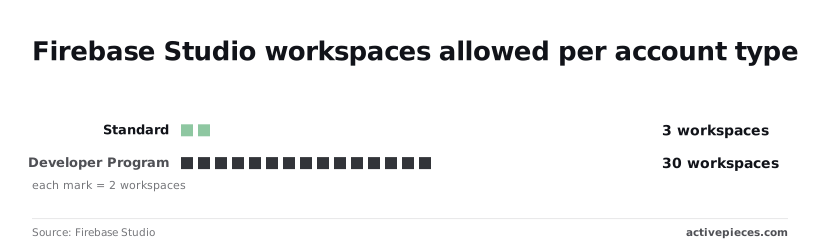
The same page lists 30 workspaces under the Developer Program, a tenfold increase, which means workspace count stops being your constraint long before the bill does.
There is no ceiling to hit on the Blaze add-on, only a meter that runs. It's pay-as-you-go billing for services your app calls, so it is different in kind from the other two rows.

The page leaves out three things:
- the Developer Program's monthly price
- a per-request rate for Gemini calls
- any spend cap on Blaze
Without them, the plan row tells you what you may open, not what you'll pay.
If you are running this arithmetic for your own team, see what the same workload costs on Activepieces.
What one named builder actually pays each month
If you run a few workspaces, prompt Gemini daily and serve one deployed app, you pay nothing for the workspace itself. The bill appears only when the app's metered usage outruns its free quota.
Take one builder, call her Amara. She keeps a few active workspaces, prompts Gemini in the editor every working day, and has one deployed app using Firebase Authentication and Firestore. Price her in this order, because each step is a different meter:
- Count workspaces against the cap of 3, or 30 if she is in the higher-limit program. Under the cap, workspaces cost nothing, so this line decides whether she can work at all, not what she pays.
- Count daily Gemini prompts against the allowance. Heavy prompting hits a ceiling before it hits an invoice, so it is a pacing limit first.
- Count Firestore reads and writes against 50,000 and 20,000 a day. Past those, Google bills every extra operation, so this is where a popular app starts costing money.
- Add Authentication, which is metered by users, not by prompts.
- Total the free bill, then the paid bill.
Bill on the free tier
If Amara stays under the workspace cap, inside the prompt allowance and below the daily Firestore quota, the total is zero.
Her real exposure is a day when her app's traffic crosses the read or write line, because quota overage turns a free project into a metered one without any plan change.
Bill on a paid plan
On the paid route, the workspace line may rise, but the larger movement is in the metered services. Her bill becomes the workspace charge plus Firestore operations above quota, plus Authentication usage, plus any Gemini calls the app makes on her behalf.
Hidden costs and quotas builders hit after launch
For most apps with real users, the free quotas run out within days of launch. The bill is set by metered reads, writes, function calls and model tokens, not by the Studio plan.
Blaze billing and the free quotas behind it
Firestore, the database most Studio projects use, meters three operations:
- reads
- writes
- deletes
Per the Google Cloud pricing page, the free daily quota is 50,000 reads, 20,000 writes and 20,000 deletes.
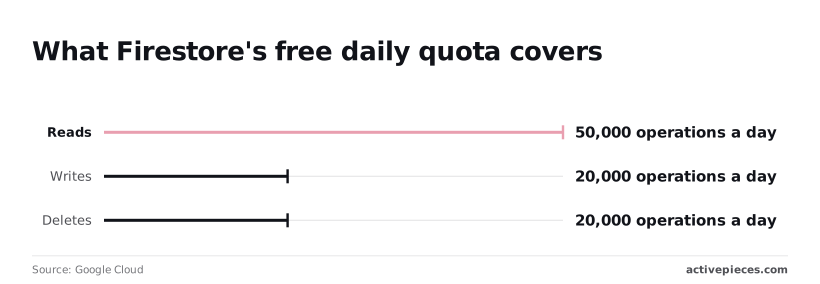
Take from it how small the free line is: the reads allowance is only 50,000 a day.
After 2,000 views, a feed screen that loads 25 documents has used the whole read quota. A few hundred active users can pass that in an afternoon.
Writes are tighter still. At 20,000 a day, an app that saves one record per user action reaches the cap with 20,000 actions. Deletes also stop at 20,000, which matters for cleanup jobs that clear old records in bulk.

What the Firebase Blaze plan adds to pricing
Once you pass those limits, billing has to be on. That means moving the project to the Blaze plan, which charges per operation. App Hosting and Cloud Functions also need Blaze, so the upgrade comes with the first deploy, not with the first big month.
Model tokens and workspace limits
Send long history with every request in a chat feature and you pay for that history each time. Gemini calls inside your app are metered by tokens, not by seats, so cost grows with conversation length.

Run several projects and you hit the count before you hit any dollar figure. Workspaces are capped, and each one has its own CPU, memory and disk allowance, which means the fix is housekeeping or a paid tier, not code.
Reads dominate. Past the free 50,000, the $0.03 per 100,000 rate looks tiny, yet a screen that fires 10 extra reads per load multiplies the line tenfold, which is why a negligible per-read cost becomes substantial.
Per-operation metering is what makes that multiplication bite, and Activepieces bills the other way: its pricing page sets 1 credit per flow run, so a ten-step flow costs what a two-step one does, where Zapier charges per task.
Splitting work into smaller, more reliable steps then carries no penalty.
The strongest case that Firebase Studio is cheap enough to ignore
While traffic is small, the case for ignoring the price is at its strongest. The workspace costs little or nothing, free quotas cover a prototype, and spend grows only when users show up. For a prototype, that argument holds.
I'm not reproducing a plan-by-plan price table here, because the workspace is the flat part of the bill and the flat part isn't what moves. The meters that move are function invocations, database reads and writes, and model tokens.
So the opposing view is right about the sticker and silent about the invoice.
Why Firebase metered services have no spending cap
Hit the workspace quota and you meet a visible wall; that's the limit that pushes you to a higher plan. The metered services have no such wall.
Past their free allowance, Firebase and Google Cloud keep serving requests and keep billing for them. Nothing prompts you to upgrade, so nothing makes you stop and reprice the workload before the usage arrives.
You get an email, and that is all. A Google Cloud budget alert says spend has crossed a threshold, but by default it doesn't halt the services that are spending. A loop that never ends will therefore keep running after the email arrives.
Runaway Firebase bills on record and their cost
$30,000 in 72 hours in 2018, $72,000 overnight in 2020, and more than $100,000 in a single month in 2024: publicly reported cases show the scale this reaches, which means this has actually happened.
The ceiling on a runaway bill hasn't stayed put, and none of the three was a plan-price problem.
Look at the reported causes and they are the ones this workload invites: query loops that re-read data on every pass, and AI calls with no limit on how many a user can trigger.
Both bill per operation, so a bug costs the same as success would, only faster.
The free quota is a starting balance, not a ceiling. The cap that works is the one you write into the code yourself, because the alerts won't write it for you.
The free quota is a starting balance, not a ceiling.
Worth checking against a plan that does not meter every step: one credit covers a whole run on Activepieces.
Firebase Studio against Cursor, Replit, Lovable and Bolt
Firebase Studio is the only one of these five whose bill is mostly the backend. Cursor's bill tracks token usage and the other three meter credits, so none of their sticker prices predicts your month.
The table shows the unit each tool meters and what happens when you run out. Read it for what stops or what starts billing, because that decides whether a cap protects you.
| Tool | Limit forcing upgrade | Behavior at limit | Hosting/backend included |
|---|---|---|---|
| Firebase Studio | Workspace quota, then metered Gemini, Firebase and Google Cloud use | Usage bills to your Cloud account | Yes, but metered |
| Cursor | Included model usage | Heavier use bills as usage | No, editor only |
| Replit | Plan credits | Top up or upgrade | Yes, deployments |
| Lovable | Monthly message credits | Top up or upgrade | Yes, with a connected database |
| Bolt | Token allowance | Top up or upgrade | Yes, via its hosting |
Prices change often, so confirm each on the vendor's pricing page before you commit.
Usage pricing drifts a long way from a plan price, and Cursor shows it. Heavy users reported monthly bills of 44.16 $ (Dunlop), 131 $ (Ellman), 348.56 $ (nthypes), 560 $ (Jillani) and 580 $ (Bordet).
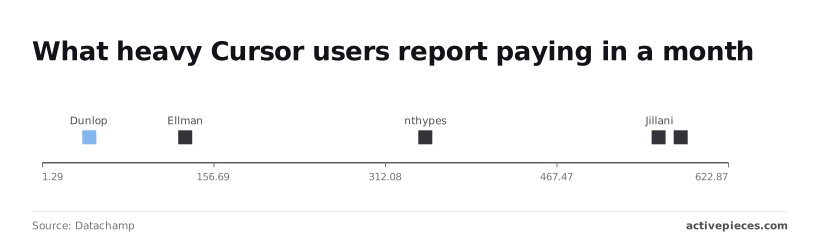
That's a thirteenfold spread on one tool, so the entry price tells you almost nothing about a heavy month.
Cursor ships no hosting, so you add a host and a database and pay each separately. Replit, Lovable and Bolt bundle hosting, but a busy app can outgrow the bundle. Firebase Studio bundles the most, and that's where its metering sits.
Cursor suits a developer who already has hosting and can watch tokens. Replit, Lovable and Bolt suit a non-specialist who wants one bill and a fixed credit ceiling. Firebase Studio suits someone already on Google Cloud, provided they write the cap into the code.
Price the workload first, then pick the plan on Monday
Estimate your daily prompts and deployed apps, set a budget cap with alerts, then choose the plan, because the metered Gemini, Firebase and Google Cloud usage decides the bill. A cap in the code only works if you know what number to put in it.
A three-step pricing check
First, count the workload. Estimate prompts per day for the whole team, and count the apps you'll deploy, since each deployed app brings its own metered hosting and database usage.
A plan that looks cheap for one person can cost far more once several people prompt all day.
Second, put a ceiling on it. Set a budget cap in Google Cloud and add alerts below it, so you hear about a runaway loop while there's still room to stop it.
An alert at the cap itself tells you only after the money is gone.
Third, check the source. Pricing pages change, so write down the date you read them and the date you'll read them again.
Before you open the editor, settle what is on the sheet below. It shows what you must know to compare plans, and what to take from it is that every line is a decision you make, not a figure the vendor hands you:
- Expected prompts per day
- Number of deployed apps
- Budget cap amount
- Alert thresholds, set below the cap
- Pricing page recheck date
If you can't fill one in, that gap is where a surprise bill will come from.
Where an automation tool fits with Firebase Studio
When automations run around the app, such as notifications, syncs or scheduled jobs, they belong on their own line, not folded into the Firebase Studio estimate.
Count how many flow runs a month you expect, then price that same job on Activepieces, whose free plan includes 1,000 credits a month, and add it as a separate total.
If the app needs no such jobs, the line stays empty, and that's a fine result.
What Activepieces does about this
The problem in this article is a bill that follows the meter and not the plan, so the useful thing to ask of any automation tool is what its meter counts. Activepieces counts flow runs.
Its pricing page sets 1 credit per flow run, and the free plan includes 1,000 credits a month.
A flow with ten steps costs what a flow with two steps costs, so a bug that adds steps does not multiply the line the way an extra ten reads per screen multiplies a Firestore bill.
That matters for the jobs that tend to sit around a Firebase Studio app: sending a notification when a record is written, syncing users to a CRM, running a nightly cleanup.
Each of those is a flow you can price before it runs, as runs per month times one credit.
It goes on the sheet as its own line, separate from the Gemini, Firestore and Cloud Functions estimate, and it does not drift as the app gets busier unless the number of triggers does.
Activepieces cannot cap what Google bills you, and it does not replace the budget cap and the limits written into your code. What it can do is take the glue work off the metered path.
A scheduled job that would otherwise be a Cloud Function invoked on every pass becomes a flow with a known run count, which is one fewer place for a loop to bill you without warning.
If you want to check the claim rather than take it from us, count the flow runs you expect in a month and compare that figure with the free 1,000 credits. If the count fits, the line is zero.
If it does not, you will know the overage as a number before you commit, which is the habit this whole article argues for.
Frequently asked questions
Is Firebase Studio free to use?
Yes, the workspace itself has a free allowance, but the services your app calls are billed separately once you go past their own free usage. The free part covers the coding environment up to a workspace quota.
Gemini calls, Firebase products and Google Cloud resources each carry their own meter, so a free workspace can still produce a bill if the app is busy.
Do I need a credit card to deploy an app from Firebase Studio? Generally yes, for production hosting. Deploying to Firebase's backend hosting typically requires a project on the pay-as-you-go Blaze plan, and that plan needs a billing account.
You can build and preview without one. Check the current Firebase pricing page for which products still run on the no-cost plan before you assume a prototype can go live without a card.
What happens when I hit my Gemini usage limit?
Expect assistant features to slow down or stop until the limit resets or you move to a higher tier. Which of those two happens depends on whether you are using the built-in assistant or calling Gemini through your own API key or Google Cloud project.
On the built-in assistant, the plan's limits bound you. Calls from your own project are metered and billed, so there the risk is a larger invoice, not a stopped feature. Set budget alerts in the Google Cloud console so the second case doesn't surprise you.
Can I export my project and leave Firebase Studio?
Yes. Firebase Studio is built on the open-source Code OSS editor, and your project is ordinary code. You can push it to a Git repository or download it, then run it elsewhere.
What doesn't move for free is the infrastructure. If the app depends on Firebase Authentication, Firestore or Cloud Functions, you either keep paying for those or rewrite against another backend. Count that rewrite as your real exit cost.
Has Firebase Studio pricing changed since launch? Yes. It began as a no-cost preview, and Google has since tied workspace allowances to its developer program tiers.
Treat any price you read in a blog post, this one included, as a snapshot. The Firebase and Google Developer Program pages are the source to check before you commit a budget.
Related reading
References
Running the numbers
See what the same workload costs here.
Free forever plan, and every paid plan self-hosts at no extra cost.
See pricing Talk to sales