
Flowise Alternatives in 2026: Top Picks Compared

Oct 17, 202616 min read
When the reason is that you outgrew a chatbot builder, need agents that act inside business apps with approvals, or need enterprise control, a different tool wins each time. No single one wins on all three.

1. Flowise alternatives: the short answer and criteria
What Flowise is, in one definition
Flowise is an open source, low-code builder for LLM applications. You wire nodes together on a canvas to make chatbots, retrieval flows and agents. That suits a prototype well, and it explains most of the complaints below.
Why people leave Flowise
You will see the same log line most often: a workflow that works in the canvas and breaks the moment it needs to touch a real system. The agent answers fine, but nobody can say who approved the action, or where it runs.
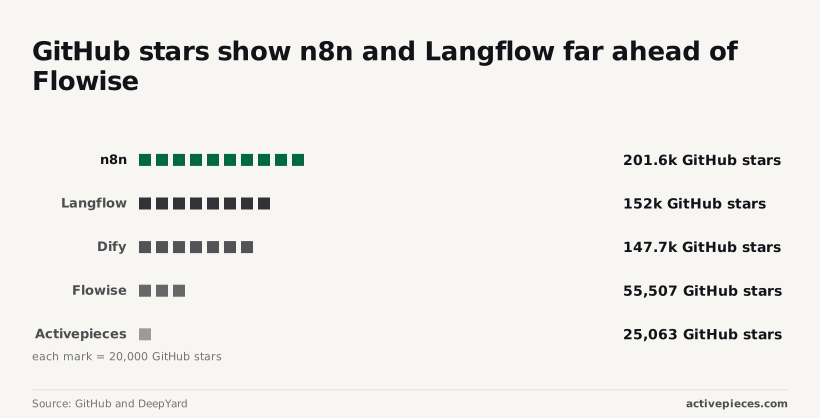
Popularity doesn't settle this. According to GitHub and DeepYard, n8n has 201,567 GitHub stars, Langflow has 152,041, Dify has 147,742, Flowise has 55,507 and Activepieces has 25,063.
The agent answers fine, but nobody can say who approved the action, or where it runs.
Against Flowise, n8n has about 3.6 times the stars, and Langflow and Dify each have about 2.7 times. Stars measure attention, not fit, so a tool with fewer than half Flowise's count can still be the right exit for your reason.

The four criteria and the date facts were checked
Same four points for every tool, each with one source of evidence. All vendor pages were checked on 17 October 2026.
Price is what you pay as runs, seats or hosting grow, and the evidence is the vendor's public pricing page. Core strength is the job the tool does best, and the evidence is the vendor's documentation, not its marketing copy.
Main limit is the point where the tool stops helping, and the evidence is the documented behaviour, such as a missing feature or a plan restriction.
Who it suits is the team and reason for leaving that match the first three, and it's our reading of the evidence, labelled as such.
If a vendor doesn't publish something, it's left out rather than guessed, so a missing price means the page didn't state one. The tool profiles that follow apply these four points in the same order.
The fastest way to settle a shortlist is to try one. Activepieces is free to try, no credit card.
Comparison table of Flowise alternatives
Use the table to drop the tools that miss your reason for leaving before you read any profile. It puts the four alternatives and Flowise side by side on price, core strength, main limit and who each suits.
How to read the Flowise alternatives table
Read the limit column first. A strength you don't need costs you nothing, but a limit that hits your exact failure will bite in week two.
| Tool | Price | Core strength | Main limit | Who it suits |
|---|---|---|---|---|
| Langflow | Open source, free to self-host; hosted pricing not published | Visual flow builder with components you can edit in code | Approval steps and business-app actions are mostly yours to build | Developers prototyping retrieval and agent flows |
| Dify | Open source with tiered cloud plans; per-run pricing not published | Full LLM app platform with retrieval and prompt tooling | Self-hosting licence carries extra conditions beyond a standard open source one | Teams shipping LLM apps with a managed workflow |
| n8n | Source-available, free to self-host; cloud priced by workflow executions | Broad integration library on a general workflow engine | Licence is source-available, not open source; agents sit on top of the workflow engine | Ops teams automating across business apps |
| Activepieces | MIT-licensed core, free to self-host; unlimited flows on every plan, including free | No-code automation with an AI agent step across its 741 integrations | Agent logic lives as a step inside a flow, not on a standalone agent canvas | Teams wanting agents that act inside business apps |
| Flowise (baseline) | Open source, free to self-host; cloud plans not published | Chatflow and agent builder for chatbots and retrieval | Approvals and business-app actions are thin | Chatbot and retrieval prototypes |
Source: each vendor's pricing page, documentation and repository licence file, checked 2026-10-17. Re-check before you budget, because cloud tiers change.
Now that the table has given the shape of each tool, the question is how much weight to put on popularity.
GitHub stars as a popularity signal
Don't read stars as usage: they count how many people bookmarked a repository, not how many run it in production. They change daily, so I don't print a ranking that would be stale by the time you read it.
Use them as a community-size signal: more stars usually means more tutorials and faster answers to your error message. They say nothing about whether the tool handles approvals or your apps.
What each vendor does not publish
You will find plan tiers from several vendors, but not what a single agent run costs, which makes cloud pricing per run the gap that matters most. Agent runs make many model calls.

Until you measure your own volume, treat any monthly estimate as a guess.
Then there is approval behaviour: documentation rarely says what happens to a paused run when the approver is slow.
Langflow as a Flowise alternative
If your problem is the chatbot builder and not the business process around it, Langflow is the Visually comparable to Flowise. It leaves approval behaviour, including what happens when the approver is slow, for you to write yourself in Python.
That's a fair trade in that case.
Because Langflow is open source and you can self-host it, the software itself carries no per-run charge.
You pay for the server and the model calls, and that's why a flat self-hosted bill looks cheap until you add the work of keeping it patched and monitored.
Langflow core strength compared with Flowise
You build on a canvas of connected components, as in Flowise, but each component is Python you can open and edit. When a built-in component does almost what you need, you change it instead of working around it.

Below, a chat trigger feeds an AI Agent step, with a chat model and memory attached as sub-nodes.
When something breaks, open the logs first. The panel on the right shows the input and output of each step, and the memory error in the left sidebar shows that a failure can sit in a sub-node while the agent itself looks fine.
Next comes what the agent can do once it has an answer.
Main limit
Look at what the catalog centers on: models, retrieval and tools. Actions inside business apps, and a pause for human sign-off before one runs, are not the center of it.
Check its docs for any approval step before you commit, and expect to write the rest as custom components.
To work around that, you hand actions to an automation tool. That brings the tool's billing with it.
n8n pricing and WorkflowMath puts a Zapier task at 0.0445 per billed unit (Zapier in dollars, n8n in euros). The n8n Starter plan is 0.008 and Pro is 0.005.
A Zapier task therefore costs about five and a half times a Starter unit and almost nine times a Pro unit. An agent that calls many actions per conversation gets expensive on Zapier much faster.
Switch if Flowise felt right but you kept hitting its limits on custom logic and want Python to fix them. Stay put, or look elsewhere, if your agents must act in business apps and wait for approvals without you building that layer.
Reading a table only gets you so far. Build the same workflow in Activepieces and compare it yourself.
2. Dify as a Flowise alternative
If you left Flowise because you outgrew a chatbot builder and want RAG, observability and workflow tooling in one platform, Dify fits. Its centre of gravity is the LLM app, not cross-app actions with approvals.
Dify pricing and self-hosting as a Flowise alternative
You can use Dify's hosted cloud, which is sold in tiers, or self-host it. Self-hosting runs under Dify's own open source licence, which is Apache 2.0 with added conditions. The conditions restrict running it as a multi-tenant service and removing its branding.
For an internal tool that costs you nothing. For an agency reselling workspaces to clients, read the licence before you build on it.
Dify ships the integrations a growing LLM app needs: a visual workflow builder, a built-in knowledge base for RAG, and logs and tracing for what each run did. You're not stitching a vector store and a monitoring tool onto a canvas yourself.
Momentum is the other signal. Dify had 10,000 GitHub stars in November 2023 and 50,000 by November 2024, according to GitHub star history. It reached 100,000 in June 2025 and 147,742 by July 2026.
Stars aren't usage, but a project gaining that many in under three years is one where bugs get reported and fixed in public, so you're unlikely to be building on something abandoned.
At no milestone has the curve flattened, and that matters more than the total.
Two limits bite. The licence terms above matter once you serve other companies from one deployment.
Then there is scale: a self-hosted Dify is several services (API, workers, database, vector store) that you operate and size yourself. Its tooling is built around the model call and the retrieval step.
If your agent has to act in a dozen business apps and pause for a human to approve, expect to build much of that wiring and the approval flow yourself.
If you already have a working Flowise prototype and now need retrieval quality, run traces and a workflow structure you can hand to other engineers, Dify suits you.
It suits you less if the job is mostly business-app actions with approvals, or if you plan to resell the platform as a hosted service.
3. n8n as a Flowise alternative
When the agent has to act inside business apps rather than just answer questions, n8n fits. It's a workflow automation tool with AI agent nodes and a large integration catalog. It's source-available, self-hostable, and priced per workflow run.
n8n bills per execution, meaning one full run of a workflow, however many steps it contains. Zapier bills per task, and each action step in a Zap counts as one.
The chart shows the gap: n8n's per-execution price sits far below Zapier's per-task price, and the Pro tier drops it again below Starter.
Run a ten-step agent workflow and n8n charges its rate once, while the same job on Zapier is billed at its rate several times over. The longer your workflows, the wider the gap.
You can also run it yourself. The code is under n8n's Sustainable Use License, which is source-available, not open source in the OSI sense.
You can read it and host it for your own business, but the licence restricts offering n8n to others as a hosted service.
If you left Flowise because the agent couldn't reach the CRM, the ticketing system or a database, you will recognise the relief here: the agent is one node on a canvas, surrounded by the triggers, branches and app connections that make up the rest of the workflow.
Nothing needs bolting on for retries, error branches and scheduled runs; they are ordinary workflow features.
You get approvals, but you build them. A Wait node or a send-and-wait step in a chat app pauses the run until someone responds, and that works.
Nothing makes it the default, though: if you forget to put the gate before the risky action, the agent runs the action. The licence rules out reselling, and self-hosting means you own upgrades and queue scaling.
It suits teams that already think in workflows and want an agent as one step in them, with per-run costs that stay predictable as workflows grow.
It suits you less if you plan to resell the platform, or if you need enforced governance controls rather than approval steps you wire up by hand.
4. Activepieces as a Flowise alternative
If your agent has to do something in a business app and wait for a person to approve it, Activepieces fits. Its core is MIT-licensed, so you can run it yourself, and MoneyGram, Moneypenny, Alan and FundingSocieties run it in production.

That's the fix for the problem the last section described: approval steps you wire up by hand, in a tool built for exactly that wiring.
Activepieces has an MIT-licensed core, so you can self-host it on your own infrastructure and keep workflow data inside your network. The enterprise directories sit under a separate commercial licence.
There's also a hosted cloud version if you'd rather not run it, and unlimited flows come with every plan, including the free one.
If you self-host, you carry the upgrades, the backups and the uptime, which is the trade you already made if you ran Flowise yourself.
I won't quote tier prices here; check the pricing page before you budget, and look at how cost scales with runs, since an hourly trigger multiplies quickly.
Think of the agent as a step inside an automation, not a separate chat product.
Its AI step works across the platform's integrations, which Activepieces calls pieces, 741 of them counted from the open source monorepo, so the same flow can read a spreadsheet row, ask a model what to do, and write the result to another app.
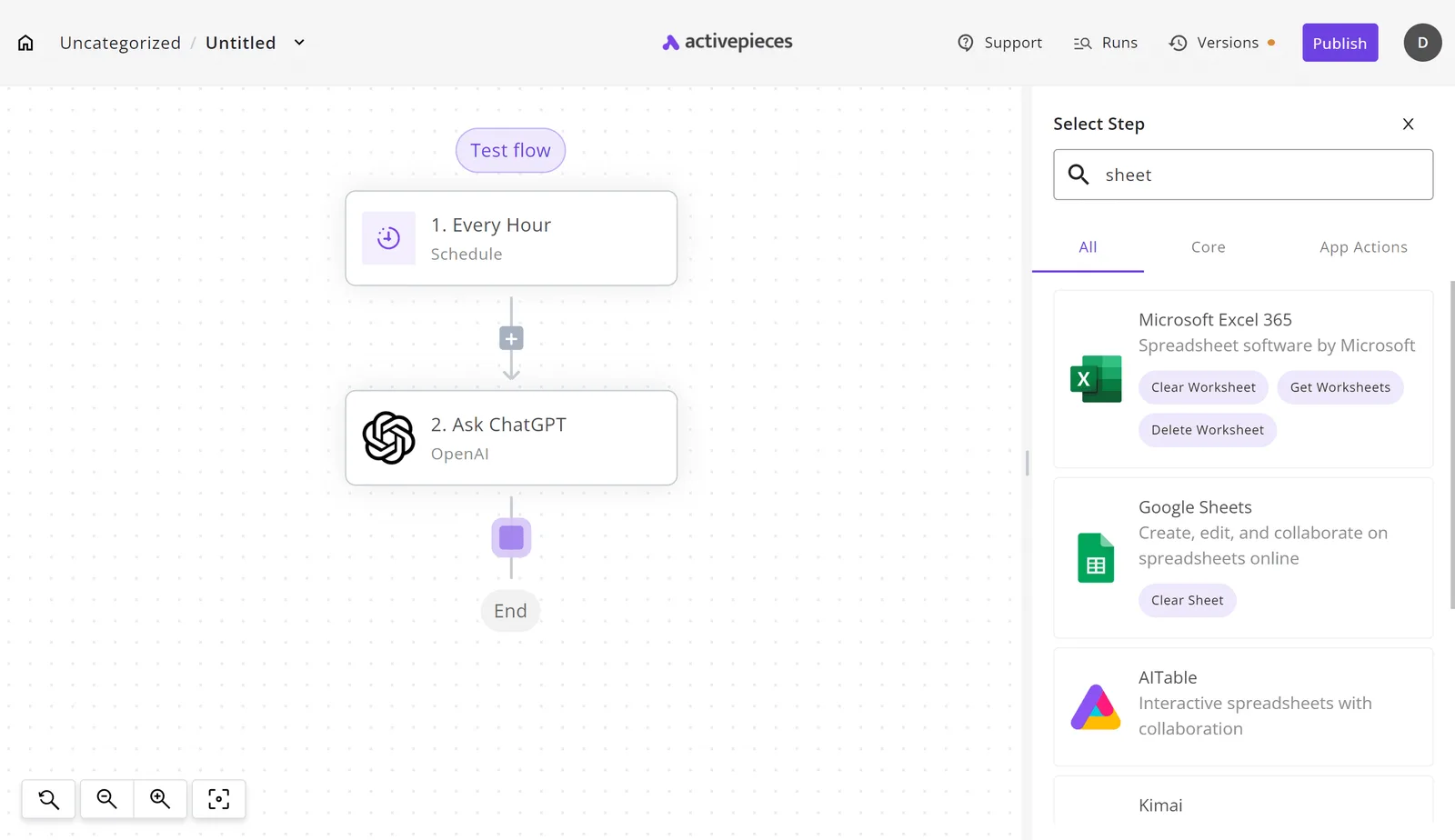

Look at the builder to see how that's put together. The canvas holds a three-step flow: an Every Hour trigger, an Ask ChatGPT action, and an End node.
The open Select Step panel has a search box (here, "sheet") and returns Google Sheets, Microsoft Excel 365, AITable and Kimai.
The point is that adding a model call and adding an app action use the same picker, so you never leave the canvas to give the agent somewhere to act.
In the same canvas you get approval steps. You place a human check before the step that writes, and the flow pauses there. You build it, so the gate sits only where you put it.

It's not a RAG-first canvas. If you left Flowise because you wanted better control over chunking, retrievers and vector stores, Activepieces will feel thin there.
It's built around triggers and actions across those 741 integrations, and retrieval is something you assemble rather than the thing the product is organized around.
It suits teams whose agent's job ends in an action, such as updating a record, sending a message or filing a row, and who want a person to sign off first. If that's you, you can try it free.
It suits you less if retrieval quality is the whole job.
Activepieces is the better fit for teams that need an agent to act in business apps with human approval, and that want governance in a single product rather than assembled from parts.
RBAC, SSO, SCIM, audit logs, log and event streaming, and environments with git sync all ship together, whether you self-host or use the cloud, with no cut-down version either way.
If your deciding criterion is having approvals and governance under one roof, with an MIT-licensed core you can run inside your own network, Activepieces is the better choice. Note that the enterprise directories sit under a separate commercial licence.
Choosing a Flowise alternative: verdict and Monday steps
Which Flowise alternative fits your reason for leaving
Pick by your reason for leaving, and if the reason is only retrieval quality, the pick may be no move at all.
If retrieval chat is all you run, Flowise already does that job, and a migration buys you a new canvas and the same retrieval problems.
If you left because the canvas felt right but the ceiling was too low, Langflow keeps the same node-and-edge model, so the rebuild is mostly relabelling.
If you outgrew a chatbot builder and want prompts, datasets and app publishing in one place, Dify is the fuller LLM platform.
If the agent has to act in business apps, such as updating a CRM record or sending an email after someone approves it, choose n8n. It's built as a workflow tool first, with AI steps inside it.
None of these fixes a bad chunking strategy, and none of them removes the need to check what an agent does before it does it.
Because each step feeds the next, this list runs in order: the reason picks the tool, and the tool decides which flow is worth exporting.
- Write down, in one sentence, why you're leaving Flowise. If you can't, you're not ready to move.
- Match that sentence to a tool using the verdict above, and open a trial account.
- Export one real flow from Flowise, a live one with real inputs rather than a demo.
- Rebuild that flow in the trial, and note every place you had to work around the tool.
- Run both side by side for a week, then compare cost per run and the failures each one produced.
The week of failures is the evidence. Tool pages describe the happy path, and your own logs show which tool breaks on your data.
Frequently asked questions
Can I import a Flowise flow directly? Don't count on it. Flowise exports its own JSON format, so treat the export as a spec to rebuild from, not a file to load.
Should I move everything at once? No. Move one flow, learn where it hurts, then decide about the rest.
What if the trial looks worse than Flowise? Then the reason you wrote down on Monday may have been wrong. Rewrite it and test a different tool.
Related reading
Still comparing
The fastest way to settle it is to build something.
Open source under MIT, so you can self-host the same thing later.
Start free Talk to sales