Framer Pricing 2026: Plans, Limits and What You Pay

Nov 4, 202614 min read
Which limit binds first matters more than the rate, whether you're tuning an API client or wiring up a workflow in a tool like Activepieces.
Framer is a website builder that charges per published site, with four tiers (Free, Basic, Pro and Enterprise) and separate pricing for editor seats. Per Framebrick, the dollar amounts change, so the current monthly and annual rates sit on Framer's pricing page, checked November 2026.
Framer pricing today: every plan, price and limit
The plan table, as read on Framer's pricing page
The table below shows how each tier is priced and which limit pushes you off it.
| Plan | How it's priced | Limit that forces an upgrade | Custom domain | Notable extras |
|---|---|---|---|---|
| Free | No charge | Bandwidth and visitor caps | No, Framer subdomain only | Publish and test a site |
| Basic | Paid per site, monthly or annual | Page and CMS allowances | Yes | Entry tier for a small live site |
| Pro | Paid per site, monthly or annual | Traffic, CMS size, locales | Yes | Higher allowances for growing sites |
| Enterprise | Custom quote | Negotiated | Yes | Contract terms and support |
Prices and plan limits checked against allaboutframer.framer.ai on November 4, 2026.
Run several sites and you pay several times, since each paid row repeats its price per site.
You are billed on two meters at once. A site plan covers one published site and its traffic, pages and CMS. The workspace plan covers the people editing, so it scales with headcount rather than traffic.
A marketing team with one site and five editors pays on both meters, and the seat count can outweigh the site fee. Price the two separately.
What the free plan allows and where it stops
Small, but real: the Free plan is a testing ground. According to an independent Framer pricing guide, it allows 1 GB of bandwidth, which means you're operating with almost no margin for growth.
Treat Free as a prototype stage, not a place to host.
Form handling through Activepieces costs 1 credit per run however many steps the flow has, unlike Zapier's per-task or Make's per-module billing, so a ten-step flow costs what a two-step workaround does; budget it apart from the Framer bill.
If you are running this arithmetic for your own team, see what the same workload costs on Activepieces.
The limits that force a Framer plan upgrade
Whatever the headline price says, the first of five limits your site hits sets the bill and decides which Framer plan you pay for. Basic against Pro looks like this:
**Whatever the headline price says, the first of five limits your site hits sets the bill and decides which Framer plan you pay for.
| Limit | Basic | Pro |
|---|---|---|
| Pages | 30 | 150 |
| CMS collections | 2 | 10 |
| Bandwidth | 10 GB | 100 GB |
Add locales at $20 each, and extra editor seats at $20 each.
At $30 a month for the Pro base plan, two of the add-ons below each cost two-thirds of the base price again.

Framer page, CMS and locale limits by plan
Before it has any traffic, a site with a 40-page marketing section and a blog plus changelog, docs and customers collections is on Pro, because page and collection caps are hard ceilings.
According to Framer, each extra locale is $20 a month, so a two-language site pays $40 just for localization.
A site in three added languages carries $60 on top of the $30 base, which is twice what the plan itself costs per month, meaning add-ons can nearly triple your total bill.
Estimate bandwidth from page weight multiplied by monthly visits rather than from visit counts alone. It rises from 10 GB to 100 GB between tiers, and heavy imagery or video embeds consume it faster than page views suggest.
Framer charges [$20 a month] per extra editor, so a designer, a writer and a marketer editing one site add $40 on top of the base price.
That brings the monthly total to $70 before any other limit's touched, and any other limit would drive this higher still.
Costs that sit outside the plan
Connecting a custom domain is included with a paid site plan, and anything else you connect to the site carries its own price.
One freelancer's Framer costs for three sites

$540 a year, or $45 a month, is what three sites on Framer's Basic plan cost this freelancer, keeping a three-site portfolio at this price only if you avoid all add-ons.
That's the bill you get when no add-on forces a site up to the $30 Pro base, so any feature addition could push that site to Pro pricing.
Framer plans for a freelancer's three sites
A personal portfolio, a client marketing site and a client blog published in several languages: the freelancer runs all three. Each is a separate Framer site, so each carries its own plan.
Siter's Framer pricing breakdown That means the blog, the heaviest of the three, doesn't cost more than the portfolio, so long as its locale count and CMS items stay inside what Basic includes.

The monthly bill and the limit that decided it
Every row lands on the same plan. The table shows which limit decided each site's plan and how the three $120 lines reach $360. The limit only tells you when a row would stop being identical.
| Site | Binding limit | Plan chosen | Annual cost per month | Annual total per year |
|---|---|---|---|---|
| Client marketing site | Page count and bandwidth | Basic | $15 | $180 |
| Multi-language CMS blog | Locales and CMS items | Basic | $15 | $180 |
At $15 a month per site, the three together come to $45 a month.
Before upgrading any one site, price splitting them, because three Basic sites can cost about what one Pro site costs.
When Framer costs rise with traffic or locales
Only while every site stays under its binding limit does the $360 hold. The blog's the exposed line: it's the site where a second round of locales or a larger CMS archive would break the Basic assumption.
When that happens, only that site moves up, and it's repriced from the $120 line.
If one site outgrows Basic, the portfolio and marketing site stay at $120 each.
The practical rule's to re-run the table one row at a time, because the total is just the sum of each site's own limit.
Worth checking against a plan that does not meter every step: one credit covers a whole run on Activepieces.
Framer pricing versus Webflow, Wix Studio, Squarespace
On cost, these four builders differ less in headline price than in which limit each one meters: CMS items, locales, bandwidth or seats.
Nearly 9 in 10 CMS sites rely on platforms other than these two: W3Techs puts Wix at 6.1 % of sites with a known CMS and Squarespace at 3.6 %. Webflow has 1.2 % and Framer 0.3 %.

Twenty times: that is roughly how many more sites Wix runs than Framer, which means most pricing comparisons a client has seen start from Wix or Squarespace.
To find the limit you would hit first, read across a row of the table below, which puts the four on the same six dimensions.
It shows where each vendor meters the bill, and the cells that read 'not published' are the ones this article has no confirmed vendor-page figure for.
| Share of known-CMS sites | Entry paid price | Plan fitting the freelancer workload | CMS item limit | Locales | Bandwidth | Seat charges | |
|---|---|---|---|---|---|---|---|
| Framer | 0.3 % | not published | not published | not published | not published | not published | not published |
| Webflow | 1.2 % | not published | not published | not published | not published | not published | not published |
| Wix Studio | 6.1 % | not published | not published | not published | not published | not published | not published |
| Squarespace | 3.6 % | not published | not published | not published | not published | not published | not published |
You must read every 'not published' cell off the vendor's pricing page before quoting a client. Until then you can't say which plan is the binding one, and the cheapest entry price tells you nothing about that.
Activepieces for Framer form and CMS automation
Nobody should buy Activepieces as a Framer alternative.
It earns a place only when Framer form submissions or content have to reach a CRM, Slack or a spreadsheet that Framer's own integrations don't cover, and its 746 integrations, roughly 60% of them community-contributed, are where that gap closes.
If your form already lands where you need it, this line item is zero and should stay off the books.
What a form-to-spreadsheet workflow looks like
It does one narrow job: take the payload a Framer form sends, run it through a few steps, and write the result somewhere else. The example below is a "CV Scanning" flow, which isn't a Framer flow, but the shape is the same.
It starts with a web form trigger labeled "Human Input". A Google Sheets step inserts a row, a step extracts text from the attached PDF, a text-AI step summarizes it, and a second Sheets step updates the row with the summary.
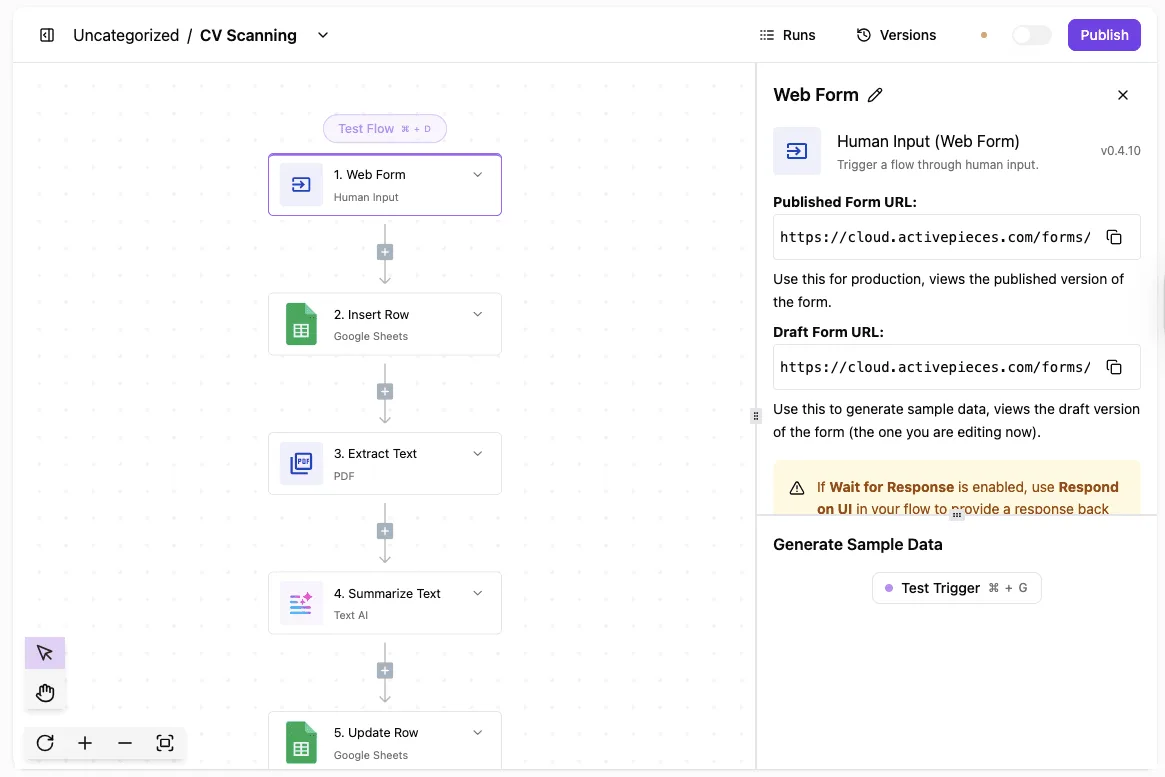
With the trigger's panel open, it shows a published form URL, a draft form URL, and a warning about the "Wait for Response" setting.
That warning matters for you. If the flow waits for a response, the visitor's submission is held until the steps finish. A Framer form that should simply confirm receipt would be better off not waiting.
Counting submissions instead of pages
Swap the web form trigger for a webhook that Framer posts to. The remaining steps are the same kind of work: append a row, notify a channel, create a CRM contact.
Each of those is a step, but the automation platform meters the run, not the step. So the unit to count isn't your Framer pages or CMS items but the number of submissions per month.
That's the number to carry into the pricing page.
For this one job, a Framer form feeding a spreadsheet, Slack and a CRM, each submission is one run and so 1 credit however many steps it has: Activepieces' Free plan includes 1,000 credits a month, Plus is $20 a month for 10,000, and either sits entirely outside your Framer plan.

Activepieces is the better fit for anyone whose Framer form submissions or content must reach a CRM, Slack or a spreadsheet that Framer's own integrations don't cover, judged on how the bill scales as the automation grows.
Its pricing page charges 1 credit per flow run regardless of how many steps sit inside it, while Zapier bills per task and Make per module, so a form flow that adds a lookup, a formatting step and a write-out costs the same as one that only writes.
If your form already lands where you need it, none of this applies and the line item should stay at zero.
Framer plans for portfolios, teams and agencies
Unless it needs a growing CMS, a portfolio fits the lowest paid site plan. Unless it needs several locales, a small business fits a mid-tier plan, and unless it hosts only one client site, an agency fits the workspace plan.
Read the table by its limit rows, not its price row. Each tier raises pages, CMS items, locales and bandwidth together, so the row where your site first runs out is the plan you're buying.
On a multi-language CMS site, locales or CMS items usually run out before pages, which means the cheaper plan that looked adequate by page count is the wrong one.
Site plans versus the workspace plan
A site plan covers one published site. The workspace plan covers the people who build sites, and it's billed per seat.
With several client sites, an agency pays for both layers, so its bill is seats multiplied by editors plus one site plan per live site. A solo freelancer with a single site never needs the workspace layer.
When the job is outside Framer's design-first scope, a rival wins: a store with native checkout, for example, is what Shopify is built around.
On the free plan you can build the full site and publish it on a Framer subdomain, so you can learn whether your structure fits before paying.
It stops at the custom domain and at the paid limits, so it proves the design works but not that the plan's ceilings hold your traffic.
Run these steps on Monday, in this order, because each one narrows the next:
- Count the pages on the site you plan to publish.
- Count CMS items and collections, including those you'll add this year.
- Count the locales you must serve, not the ones you might someday.
- Check last month's traffic against each plan's bandwidth limit.
- Build and test the site on the free plan.
- Choose annual or monthly billing.
Whichever of the first four counts is closest to a ceiling names your plan. The free-plan test confirms it before money moves, and billing is the last choice because it only changes the price of a decision already made.
Frequently asked questions
Is Framer free to use?
Yes, Framer has a free plan, and it's enough to build and publish a site on a Framer-provided subdomain.
When you need what the free plan withholds, a custom domain and the higher limits on pages, CMS items, locales and bandwidth, the cost appears.
Treat the free plan as the test bench for your workload, since it shows which limit you'll hit before any money moves.
Does Framer charge per site or per account?
Framer charges per site for the subscription, and separately per seat for collaborators in a workspace. Each site carries its own plan, so three sites means three subscription lines, each sized to its own binding limit.

The workspace folder holds the people: the owner seat is free, and each editor you add is a paid seat.
In the illustration below, three site cards each carry their own subscription tag, beside one workspace folder with a free owner and two paid editors.
A busy site and a quiet one therefore never share a plan, and adding an editor changes the seat line, not any site's tier.
Can I switch Framer plans or cancel mid-term?
You can change a site's plan from its settings, and cancellation is handled the same way, per site.
What you should check before acting is the billing period you chose, because the date a change takes effect, and whether any prepaid time is credited back, follows from that choice.
Read the confirmation screen before you click, since that's where Framer states the terms for your account.
On a custom domain, Framer doesn't charge a separate line item, as far as the plan structure shows: connecting a custom domain is part of having a paid site plan rather than an add-on.
You still pay the domain registrar for the domain itself if you buy it elsewhere, so budget for that cost outside Framer's invoice.
On a downgrade, the site is held to the lower plan's limits, so anything above them needs attention.
If your content exceeds the new tier's pages, CMS items or locales, trim it before you downgrade rather than after. Losing a custom domain is also possible on a move to free, so confirm what the lower plan includes first.
Related reading
Running the numbers
See what the same workload costs here.
Free forever plan, and every paid plan self-hosts at no extra cost.
See pricing Talk to sales