
Gamma Pricing 2026: Plans, Credits and Limits

Nov 9, 202614 min read
Gamma (gamma.app), the AI presentation app, is priced by AI credits rather than by deck count. Free gets a one-off grant, while Plus, Pro and Ultra get monthly allowances that rise steeply at each step.

Gamma pricing is the tiered subscription structure, Free, Plus, Pro and Ultra, that sets how many AI credits you receive and which export, branding and feature limits apply, so what you pay depends on how many decks you generate rather than on the plan's sticker price.
The table below shows each plan's credit allowance, taken from Gamma's pricing page, with price and terms columns checked on 9 November 2026.
Activepieces meters usage too, but by the run: 1 credit per run however many steps it has, with 1,000 credits a month and unlimited flows on its free plan.
Gamma Pricing Table With Every Plan and Limit
| Plan | AI credits | How they arrive | Monthly price | Annual price | Cost per 1,000 credits | Seats, export, branding |
|---|---|---|---|---|---|---|
| Free | 400 | One-off signup grant | $0 | $0 | Not applicable | Unverified |
| Plus | 1,500 | Monthly allowance | Unverified | Unverified | Unverified | Unverified |
| Pro | 4,000 | Monthly allowance | Unverified | Unverified | Unverified | Unverified |
| Ultra | 20,000 | Monthly allowance | Unverified | Unverified | Unverified | Unverified |
I couldn't load the pricing page on the check date, so each unverified cell is left honest rather than filled with a guess.
Cost per 1,000 credits is the monthly price divided by the allowance, times 1,000, so you can complete the column in a minute once you have the price. Do the same with the annual price divided by twelve to see what annual billing saves.
Once Free's 400 credits are spent, you're choosing a paid plan whether you planned to or not. They don't refill, so treat them as a trial.
Plus's 1,500 credits are 3.75 times the Free grant. Pro's 4,000 is about 2.7 times Plus, and Ultra's 20,000 is five times Pro.
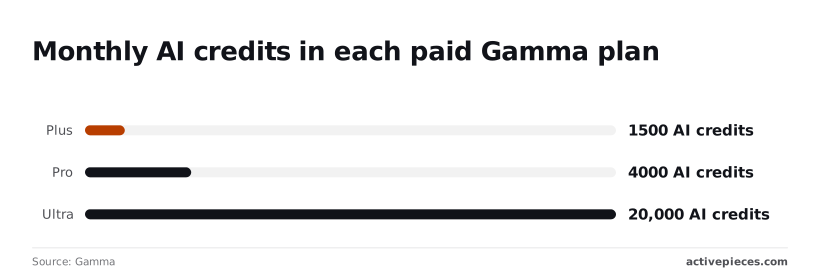
The jumps are uneven, so the plan above yours may be far more than you need.
Run one typical deck, note the credits Gamma shows it consumed, then divide each plan's allowance by that number. The result is your monthly deck ceiling, and the cheapest plan that clears your real count is usually the right one.
Annual billing only saves money if you'll use the plan all twelve months.
If your deck count swings with project cycles, pay monthly for a few cycles first, so you learn your true peak before locking in a tier you may have outgrown or never needed.
If you are running this arithmetic for your own team, see what the same workload costs on Activepieces.
What Gamma Costs at Realistic Monthly Usage
A freelancer needs roughly 150 credits a month, a weekly founder about 200 and a three-person team about 600. These figures rest on an assumed 50 credits per deck, which is my estimate, not a Gamma number.
The table below turns each profile's deck count into credits needed. Compare the last column with the allowance on gamma.app's pricing page, and pick the cheapest plan above it.
| Profile | Decks per month | Assumed credits per deck | Credits needed |
|---|---|---|---|
| Freelancer | 3 | 50 | 150 |
| Founder, weekly decks | 4 | 50 | 200 |
| Three-person branded team | 12 | 50 | 600 |
To put dollars on a profile, find the cheapest plan whose allowance covers its credits and read that plan's monthly price off the page. All three profiles fit inside Plus's 1,500 credits, so a higher price is buying export or branding terms, not volume.
Dollar totals stay unverified until the prices are, and for the team, multiply by the number of paid seats.
Gamma Pricing for Freelancers Making Few Decks
Three decks at 50 credits is 150 credits, so a low-volume plan should suffice.
Image choice moves the number most. Gamma's image model reference lists four models at 2 credits and three at 8, so the same ten-image deck costs 20 or 80 credits in images alone. Default to a 2-credit model unless a client needs the premium look.
If you present weekly, that means four or five decks, so 200 to 250 credits. Gamma's image model reference lists one model at 5 credits and another at 6.
A founder who picks a mid-priced model for every slide pays two to three times the cheapest rate.
Twelve decks is 600 credits. Before credits, check export and branding rules, because a team that must remove Gamma branding may need a higher tier regardless of volume. That makes credits a floor, not the deciding factor.

To choose between two plans, divide the price gap by the cost of the extra credits you would otherwise run short of. If your peak month exceeds the allowance, move up.
If it only occasionally does, stay put and use cheaper image models. Over the 2-to-8-credit spread, that switch often saves more than the upgrade.
Hidden Limits and Costs People Hit in Gamma
The five unverified limits
Five limits cost you money: credit expiry, top-ups, free-plan branding, shared credits and downgrades.
Credit expiry and rollover cap: unverified, no source found.
Top-up pricing: unverified, no source found. Check before sending a deck to a client.
Confirm whether a team draws from one pool. Downgrade behaviour: unverified, no source found. Ask what happens to existing decks and leftover credits.
Image generation drains credits fastest
Nothing drains credits faster than image generation, because the model you pick sets the cost. Per-image costs differ across models, and the takeaway is a fourfold gap between cheapest and dearest.
At 8 credits per image in Gamma's image model reference, Flux 1 Pro turns a 10-image deck into 80 credits of pictures alone. Ideogram 3 Turbo costs 6 and GPT Image 2 Mini costs 5.


Flux 1 Quick and Flux 2 Fast cost 2 each, which makes them the sensible default unless a slide needs the premium look.
Gamma Export Limits, Seats and Plan Downgrades
I confirmed that free exports carry Gamma branding, which the Plus plan removes. Treat a free-plan deck as branded and test one export in the format you need before promising it to anyone.
Credits are per seat on individual plans, so a team of three needs three plans; Business plans share a pool. The same gap applies to downgrades, so export anything important before you drop a tier.
Worth checking against a plan that does not meter every step: one credit covers a whole run on Activepieces.
Gamma Compared With Its Closest Alternatives

Unless you generate decks from a prompt often enough to use its AI allowance, Gamma is the wrong pick. If you already pay for Canva or Microsoft 365, the bundled tool usually covers an occasional deck.
Price and AI allowance side by side
The table shows how the four tools differ on the terms that decide your bill.
Read the last column first. Each vendor's pricing page is the only source for current numbers, and I have not copied any here, so a figure repeated from a review would be a figure that may be stale.
| Tool | Entry paid price | Free tier | AI allowance | Export | Seats | Source page and check date |
|---|---|---|---|---|---|---|
| Gamma | Lowest paid plan on its pricing page | Yes, credit-limited | Metered in credits per generation | PDF and PowerPoint; branding rules vary by plan | Individual plan, then per-seat team plans | gamma.app pricing page; check on the day you buy |
| Canva | Lowest Pro-level plan on its pricing page | Yes, with limited AI use | AI tools capped by plan | Wide range of formats, including PowerPoint | Individual, then team plans | canva.com pricing page; check on the day you buy |
| Microsoft PowerPoint with Copilot | Requires a Microsoft 365 plan that includes Copilot | Basic web editing only, without Copilot | Included with the Copilot-enabled plan | Native PowerPoint files | Per user, tied to the Microsoft 365 licence | microsoft.com pricing page; check on the day you buy |
| Beautiful.ai | Lowest paid plan on its pricing page | Confirm whether it is a trial or a standing plan | Included in paid plans, scope set by plan | PowerPoint and PDF | Individual, then team plans | beautiful.ai pricing page; check on the day you buy |
You can't compare sticker prices directly, because credits are Gamma's meter and the others bundle AI into a licence. Count your monthly decks first, then price each tool against that count.
When Canva or PowerPoint Beats Gamma
If decks are one of many things you design, choose Canva, since the plan you already hold may cover them. If your team lives in Microsoft 365 and needs native files for clients, choose PowerPoint with Copilot; there's no new bill to justify.
Choose Beautiful.ai if you want enforced layout rules more than raw generation speed.
When you build decks from a prompt weekly and the free credits run out mid-month, stay with Gamma. That's the point where its entry paid plan pays for itself, and the next tier up rarely does until you add colleagues or need branding removed.

Automating Gamma Decks With Activepieces
You can build a weekly deck from changing data in Activepieces, the workflow automation tool with an MIT-licensed core, by calling Gamma's generate API on a schedule.
A weekly schedule is four or five runs a month, which is four or five of the 1,000 credits on Activepieces' free plan, so you'll hardly dent your monthly quota. Every automated run spends Gamma credits exactly as a manual deck does.
That's the cost the entry plan has to absorb.
The numbered list below shows the whole chain in order. Take from it that only one step creates a deck, so only that step draws on Gamma credits, while the other steps add nothing to the Activepieces count, which stays at 1 credit per run.
- Add a schedule trigger set to the cadence you need, such as weekly.
- Pull the data that changes, for example last week's figures from a spreadsheet or CRM.
- Format that data into a single prompt, with fixed instructions for structure and tone.
- Call Gamma's generate API with your API key, sent as a request header.
- Store the returned deck link in a sheet or message it to the team.
- Check credit use in Gamma after the first few runs.
Most people skip step six. When a schedule fires more often than you read the decks, it quietly burns credits on files nobody opens.
If Gamma's generate API isn't already among the 747 integrations counted in Activepieces' open-source monorepo, you aren't left waiting on a vendor release: Activepieces lets you generate the missing connector with AI and add it privately to your own instance.
Roughly 60% of that catalogue was written by community contributors, so the list never hinged on one company's roadmap. Check that your Gamma plan includes API access before you build.
Ask for many cards with generated images and a generation costs more than a plain text deck does. Run one scheduled deck, read the balance before and after, and multiply by your monthly run count. That's your real automation cost.
Once a month of test runs shows the schedule is stable, annual billing starts to make sense. If the workflow is still changing, pay monthly and avoid locking in a plan sized for a guess.
With the cost per automated deck known, the monthly deck count from earlier in this article gets one more input: scheduled runs.
Choosing a Gamma Plan This Week
Add scheduled runs to your count of decks and edits from the last 30 days, then buy the lowest Gamma tier that covers the total, whatever the pricing page highlights, which means you're not paying for unused tier capacity.
The highlighted plan is a marketing choice, not a measurement of your usage.
Work through it in this order:
The highlighted plan is a marketing choice, not a measurement of your usage.
- Count every deck you generated and every AI edit you made in the last 30 days, plus any scheduled runs you plan to add, giving you the exact total for choosing your Gamma tier.
- Start on the lowest tier whose credit allowance, export options and branding rules fit that count.
- Check your credit balance after one week to see how fast it is falling.
- If the burn rate holds for two months, switch to annual billing.
- Set a calendar reminder for the renewal date.
- Recheck gamma.app/pricing before you renew, because plans and limits change.
Plan names, monthly and annual prices, and limits all live on gamma.app/pricing, the only authoritative source.
Read three things on the page: the credit allowance, which export formats each tier permits, and whether decks carry Gamma branding. A tier that fits your deck count but forces branding onto client work doesn't fit.
Generate one typical deck, note the balance before and after, and that difference is your cost per deck. Do the same for a single AI edit.
If your team revises heavily, it burns through an allowance faster than its deck count suggests, because edits spend credits too. This is why step three exists: one week of real use tells you more than the plan description does.
Stay on monthly until two months of usage show a steady pattern. Annual billing usually lowers the effective price, but it locks you into a tier you may have guessed wrong. Once the pattern is stable, annual is the cheaper commitment.
Frequently asked questions
If you set a renewal reminder, these are the questions worth settling before it goes off, because each one changes what staying on a plan costs you.
Is Gamma free to use?
Yes, Gamma has a free plan, but it runs on a limited allowance of AI credits and puts Gamma's branding on what you export.
That means it suits trying the product or making the occasional deck, and it stops suiting you once you present to clients under your own name.
Does Gamma charge per seat or per workspace?
Per person: that's how Gamma's paid plans are priced, and the team-oriented tier is built around adding members. So the cost of a small team grows with headcount, not with the number of decks you make.
Count the people who will generate decks, not everyone who needs to view one, and confirm on the pricing page whether viewers need a paid seat.
Can I cancel Gamma and keep my decks?
Cancelling moves you off the paid plan; it's not meant to delete your work. The practical risk is that features tied to the paid tier, such as unbranded export, no longer apply.
Before the billing date, export what you need to a file, and check Gamma's help centre for exactly what happens to your account after the downgrade.
Do Gamma credits expire at the end of the month?
I haven't confirmed from Gamma's own documentation whether unused credits carry over or reset when the billing period turns, so I won't state a rule.
Until you've read it, treat credits as use-it-or-lose-it.
Is there a student or nonprofit discount for Gamma?
I couldn't verify a current student or nonprofit programme from Gamma's pricing page, so I won't claim one exists. If you qualify, ask Gamma support directly and ask for the answer in writing.
Related reading
References
Running the numbers
See what the same workload costs here.
Free forever plan, and every paid plan self-hosts at no extra cost.
See pricing Talk to sales