
Higgsfield AI Pricing 2026: Plans, Credits and Costs

Nov 9, 202614 min read
The headline price won't tell you which pack is the better value. Ultra credit packs run from $129 to $375 a month, and the price per 1,000 credits is the number that separates them, so comparing the monthly rates gets you nowhere.

Higgsfield pricing plans and credit costs
What Higgsfield is and what a credit buys
Every generation on Higgsfield, the AI video generator, draws down credits, not minutes or clips. The conversion is where budgets break.
27 clips a month on default settings, but only 9 worth posting: that is what Printcube found for a Starter allowance. One clip in three survives review, and each usable clip costs three times the sticker math.


Activepieces counts a flow run as 1 credit however many steps it has, so a ten-step chain of generations costs what the two-step version did, and the only figure left to budget on is Higgsfield's 9, not the 27.
The plan table, checked on 9 November 2026
Read the last column first, because it's the cost of a credit, which is what you actually buy. The table below lists the three Ultra credit packs as shown on higgsfield.ai, with the annual price converted to a per-month figure. Prices are those Whizi reports.

| Pack | Credits per month | Monthly price | Annual price, per month | Cost per 1,000 credits (annual) |
|---|---|---|---|---|
| Ultra 3,000 | 3,000 | $129 | $99 | $33.00 |
| Ultra 6,000 | 6,000 | $250 | $194 | $32.33 |
| Ultra 9,000 | 9,000 | $375 | $270 | $30.00 |
Moving from the 3,000 pack to the 9,000 pack cuts the annual per-credit cost by about 9%, so the larger pack only pays if you would really spend the credits.
Higgsfield annual billing discount savings by plan
On the 3,000 pack, annual billing saves $30 a month ($360 a year), so you need to plan on staying the full year. It saves $56 on the 6,000 pack ($672 a year) and $105 on the 9,000 pack ($1,260 a year).
That's roughly 23%, 22% and 28% off, so the biggest pack gets the biggest discount and also the biggest lock-in.
$3,240 is what a year prepaid on 9,000 credits commits you to, for a tool whose usable-clip rate you may not know yet, which means you can't cancel even if the clip rate is worse than expected.
Most AI buyers avoid that commitment. RevenueCat, via SMHN, reports that 59.8% of AI app subscriptions are weekly, 24% monthly and 15% annual, against 26.2%, 41.8% and 30.3% for non-AI apps.

Run one month at monthly pricing, count your usable clips, then decide whether the annual rate is worth it.
If you are running this arithmetic for your own team, see what the same workload costs on Activepieces.
What your Higgsfield credits actually buy
Pick the plan sized to your usable clips at the quality you post, not to the headline allowance on the pricing page, because a credit buys very different amounts depending on the model and resolution.

Credits per clip, image and edit
Start with the spread.
Between 10 and 110 credits: that is what the same five seconds of video costs, depending on choices you make. A single allowance can mean ten clips or one.
Step up from 720p to 1080p and the Seedance clip costs more than two and a half times as much; at 4K it is nearly five times.
Solo creator posting weekly
If you draft at the cheaper 720p setting and render only the keeper at a higher resolution, a smaller plan likely covers you.
Higgsfield pricing for small marketing teams
Here the multiplier is people. When each person drafts independently, the discard rate multiplies, and a shared allowance runs out unevenly.
Have one person approve concepts at low cost before anyone renders at 1080p or 4K. If the team still hits the ceiling mid-month, the next plan up pays for itself, since the alternative is paying top-up rates on the most expensive outputs.
Best Higgsfield plan for occasional users
If you generate in bursts, mostly images and short 720p clips, the smallest plan is likely enough.
Until you've seen a full month of your own usage, avoid the annual rate: a prepaid year only pays off if you actually spend the credits in it.
Hidden costs and limits Higgsfield users hit
Completed generations are charged even if you don't keep them, and surprises like that are mostly habits rather than fees. The rules on expiry, rights and queues decide whether the credits you have are usable.
Retries and credit burn
You spend credits per attempt, not per result. Starter's 270 credits cover 27 clips at default settings, which works out to roughly ten credits a clip.
AI video rarely works first time: hands warp, motion drifts, the prompt gets misread. Count the retries and you get about 9 clips worth posting, so the effective price per usable clip is around three times the sticker arithmetic.
That is why you should size the plan to credits spent per keeper, not clips you hope to make.
Higgsfield credit rollover, top-ups and expiry
I couldn't confirm from the pricing page whether unused credits carry into the next month, so treat that as the first thing to read before you subscribe. If they expire, a light month is money lost, and a heavy month means buying extra.
Treat top-up packs the same way: compare their cost per credit with your plan's own rate. A top-up priced above the plan rate makes a bigger plan the cheaper route for anyone who tops up regularly.
Credits on promotional or discounted plans, users also report, behave differently from standard ones, including different expiry. This is user-reported and unverified.
Higgsfield commercial rights, watermarks and queue limits
Depending on the plan, output may or may not carry a watermark, and may or may not be usable commercially. Confirm both in Higgsfield's terms for the exact tier you are buying, particularly if you make client work.
The other limit is queue behavior. Users report slower waits on lower tiers and caps on how many generations run at once, but I couldn't verify either.
Finally, check the cancellation and refund terms before the first payment. Platforms rarely refund unused credits on cancellation, so cancel before renewal, not after.
Worth checking against a plan that does not meter every step: one credit covers a whole run on Activepieces.
How Higgsfield pricing compares with its closest alternatives
You can't compare the monthly prices of Higgsfield, invideo AI, VEED and Freepik until you convert each to a cost per finished output, because each counts usage in a different unit.
Entry price and allowance side by side
I've left the dollar figures out of the table below on purpose. It shows what each plan's allowance is counted in and which limit to read first.
| Product | What the allowance is counted in | Limit to read first | Where to check |
|---|---|---|---|
| Higgsfield, the AI video generator | Credits, spent per generation | How many credits one clip costs at your chosen model and length | Higgsfield's pricing page |
| invideo AI, the AI video maker | Video minutes and generation limits | Whether the minute cap covers your finished videos or only the first draft | invideo AI's pricing page |
| VEED, the online video editor (veed.io) | Export and editing tiers rather than generations | Export length and resolution on the plan, and what is gated behind higher tiers | VEED's pricing page |
| Freepik, the stock and AI image platform | Credits for AI generation, alongside stock access | Whether credits cover video as well as images | Freepik's pricing page |
Retries use up Higgsfield's credits too, since they are consumed by generations. Your real cost is the plan price divided by the clips you keep, not the clips you make. Divide each plan's price by the usable outputs it delivers, and the ranking can change.
Your real cost is the plan price divided by the clips you keep, not the clips you make.
Record the date you read each page. A comparison with no check date can't be audited next month, and it's the first thing finance would ask for.
When a Higgsfield alternative costs less
When your work is mostly editing or assembly rather than generation, an alternative is cheaper. If you're trimming, captioning and exporting footage you already have, VEED's tiers are built around that job.
If the deliverable is a complete video from a script, invideo AI fits. A minute-based allowance matches that unit better than credits, which are priced per clip.
Freepik fits when you mainly need images and stock, with occasional AI video. Its credits then cover a smaller share of the work.
Higgsfield stays the better choice when short generated clips are the product and you can estimate how many you burn per month. Count a month of real generations, including failed ones. Then compare the cost per kept clip across all four.
Testing before choosing your Higgsfield plan
Run the free tier on your real prompt, log the credits each finished clip costs for a week, and buy the plan whose credit allowance covers that figure. Credits per finished clip, not the monthly price, is what you actually pay.
Measure credits per finished clip
The cost per kept clip from the last comparison only works if the credit side of the formula is your own measurement, not a vendor's example.
Run the free tier on the prompt you'll use in production, not a test prompt. Use the same length, the same reference images, and the same model setting.
Log the credits spent on every finished clip for one working week. Count a clip as finished only when you would publish it. Rejected takes still belong in the log, because their credits are spent, so attach them to the clip they eventually produced.
Divide. Total credits spent that week, divided by finished clips, gives credits per clip. Multiply by the clips you expect to make in a month and you have the monthly allowance you need.
Pick the plan whose monthly credit allowance covers that figure with some room. Read the allowance and the price from Higgsfield's own pricing page, not from a review or a screenshot. If you land just above a plan's allowance, price the top-up against the next plan up before choosing.
Set a calendar reminder to re-check the pricing page. Credit allowances and what each generation costs in credits can change without your usage changing at all, so the plan that fit this month may not fit next quarter.
Four columns in a plain spreadsheet are enough: date, prompt label, credits spent, and whether the clip shipped. That's the whole instrument.
Choosing a plan from the number
The purchase itself follows from the number. If credits per clip is high, the cheapest plan is false economy, since you'll run out mid-month and pay for top-ups.
If it's low, the larger plan is wasted money, and the pricing page is where you confirm which side of that line you are on.
What Activepieces does about this
Activepieces is a workflow automation tool, and what it can do here is the measurement the article keeps asking for. The four-column log (date, prompt label, credits spent, whether the clip shipped) is the only instrument that tells you which Higgsfield pack to buy.
A flow can keep that log for you, so it doesn't depend on someone remembering to type it up at the end of a long render session.
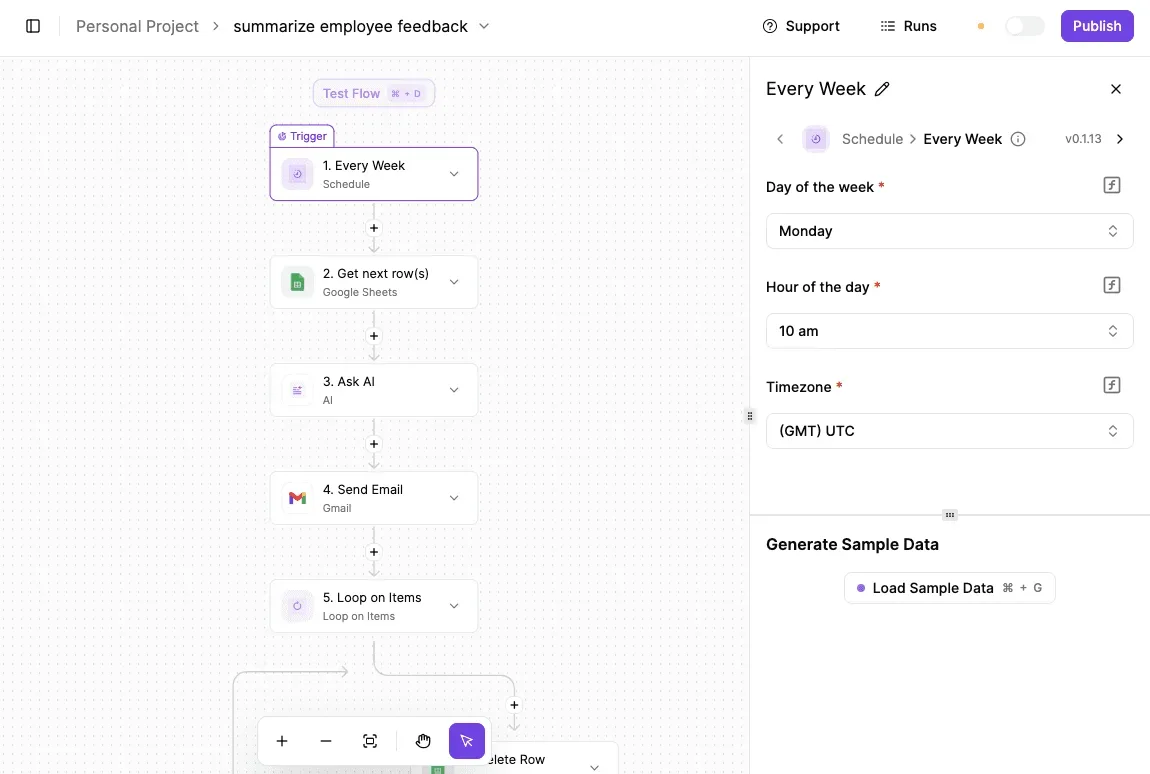
The setup is small. A form or webhook trigger takes each finished or rejected take, and a Google Sheets step appends the row.
A second flow runs on a schedule at month end, sums the credits, divides by shipped clips, and posts credits per keeper to Slack or email.
That is the same division as step three of the test above, and it runs the same way every month. Nothing in it requires Higgsfield to offer an integration, since you enter the credit cost from the app yourself.
I haven't verified a Higgsfield integration, so don't plan around one.
A reminder flow handles the other thing the pricing page can do to you, which is change. Set a scheduled trigger to send you the pricing page link every quarter, with your last credits-per-clip figure and the date you last read the page attached.
Activepieces is open source under the MIT licence, and you can self-host it or use the cloud version, so a log like this doesn't depend on a vendor's roadmap.
Whatever else you automate, the plan decision still comes from Higgsfield's pricing page and your own number, not from us.
Frequently asked questions
Is Higgsfield free to use?
Treat the free entry level as a test drive, not a working plan: it lets you try the generators before paying. Free allowances are sized for a handful of experiments, so a regular video habit will run out of credits quickly.
Read the current free allowance, and any limits on quality or watermarks, on Higgsfield's own pricing page, where they are listed, instead of relying on a review's snapshot.
Do unused Higgsfield credits roll over?
Don't assume they do. Whether leftover credits carry into the next billing period is set by Higgsfield's pricing page and terms, and the safe budgeting rule is to treat each period's allowance as use-it-or-lose-it until you've read otherwise. That changes how you pick a plan.
If credits expire, a bigger allowance you only partly use is money spent on nothing. If they carry over, a lumpy month costs you less. Confirm which rule applies before you commit to the larger tier.
Can I use Higgsfield videos commercially?
The answer can differ between the free level and a paid one, because commercial rights depend on the plan you are on and on the terms of service.
Many AI video tools restrict commercial use or add a watermark on free output, and paid plans are where those limits usually lift, but check this for Higgsfield specifically.
If you make client work or run ads, read the terms before you publish, and keep a record of which plan was active when you generated each clip.
Rights tied to a plan are easier to defend when you can show the plan was in force at the time.
Can I cancel Higgsfield mid-month and keep my credits?
Cancelling normally stops the next renewal, but whether the credits you have left stay usable afterward is a question for the terms and your account page. Don't plan around keeping them.
The practical approach is to spend down your remaining credits on the work you actually need before you cancel, since that's the only outcome you control.
If you're cancelling because you overbought, that's also the signal to go back to your real generation count and pick a smaller plan next time instead of leaving and returning.
Related reading
References
Running the numbers
See what the same workload costs here.
Free forever plan, and every paid plan self-hosts at no extra cost.
See pricing Talk to sales