
Gemini Decisions API Launch: What Google Released

Nov 12, 202611 min read
The Gemini Decisions API is a new Google endpoint for fast, closed-set decisions, the kind of routing or classification step that teams often wire into automations built with tools like Activepieces.
It is powered by a model called Gemini Decision 1 (gemini-decision-1), and it is new as of my check on 2026-11-12.
In Google's own wording, from its developer blog post, it is "a new endpoint for fast, closed-set decisions." A closed set means the answer comes from a fixed list, such as yes/no or a score, not free text.
For an automation team, that is the narrow slice of work where a model replaces a filter or a branch.
Google released it, and the post above is the primary source. I read it on 2026-11-12 and it was current then. The post gives no launch date I can rely on, so I'm not stating one beyond that.
What Google released and when it launched
How to get Gemini Decisions API access
The post is where access gets announced. What I couldn't find there is any breakdown by user type, so the table below shows what Google's page publishes for each case.
| Reader | Access route or rate on Google's page | Monthly cost | Catch forcing a tier up |
|---|---|---|---|
| Solo user | Not published | Not published | Not published |
| Team of 5 | Not published | Not published | Not published |
| Team of 25 needing admin controls | Not published | Not published | Not published |
| Heavy API volume | Not published | Not published | Not published |

Prices and plan limits checked against blog.google and activepieces.com and docs.claude.com and claude.com and openai.com and gemini.google on November 12, 2026.
You can't budget from the announcement alone. Run one real task in a flow, say in Activepieces, or whatever runner you already use, and read the bill that comes back.
Everything below works on Activepieces' free plan. Start without code or a credit card.
Why the launch matters to teams automating work
When the bill comes back, the decision step is the first thing you see. That small yes/no or score check runs on every item that passes through the flow, and Google's launch is aimed at exactly that step.

Google describes the model as built for fast yes/no and score decisions, which is a narrower claim than "a smarter model" and the only one I'm leaning on here.
Where decisions sit in a workflow
Picture a form submission landing in a flow. Before anything gets drafted or filed, something has to answer a question:
- Is this a refund request?
- Does it clear the approval bar?
- Which branch does it take?

For an approval, the answer is yes/no. For routing, it is a score, since you can send high scores one way and low scores another.
Those are the spots where a fast decision model would plug in. Google's post doesn't go further than that, and I won't either.
What teams do today instead
Mostly, what I've built here, and abandoned, is a general chat model prompted to "answer only yes or no." It worked until it rambled, added a caveat, or returned "Yes." with a period that broke my branch condition.
So I added a cleanup step to strip the output, which is one more thing to maintain.
Then there are hard-coded rules, the other common route, which are predictable but miss anything phrased oddly.
What's new in the Gemini Decisions API benchmarks
Gemini Decision 1 reads the oddly phrased input that hard-coded rules miss and returns a yes/no or a score. Its published benchmarks split against Jev 1.14: ahead on one, behind on the other.
Gemini Decisions API capabilities Google states
Google positions Gemini Decision as a fast model for yes/no and score decisions, not open-ended generation. In a workflow, that means it sits in one narrow slot: a decision step after your trigger and AI step.
Take from it that the model's output is a verdict your automation acts on, so a wrong verdict is the thing to test.
Now the numbers. On JevBench, MarkTechPost reports Gemini Decision 1 at 92.2% against 90% for Jev 1.14.
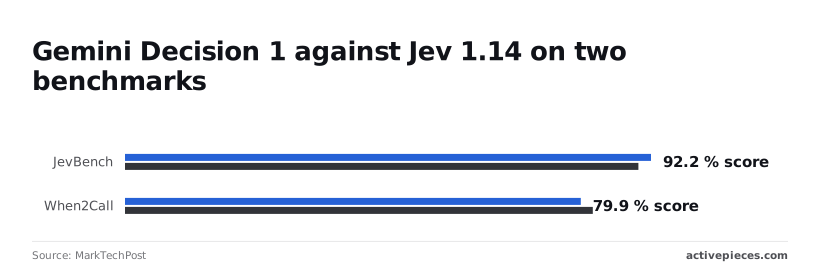
Since the tool-call benchmark is the one it loses, check it on your own tasks before trusting it to pick a path.
Beyond those two benchmarks, I could confirm nothing. Price is among the figures: $0.10 per 1M input tokens and $0 for output, though latency and rate limits are not compared here. Test first.
Which Gemini Decisions API plan fits you
As of 2026-11-12, Google's page lists $0.10 per 1M input tokens and $0 for output tokens for the Decisions API. Testing first costs you nothing but your time.
I found prices in one place only, Google's subscriptions page: Free at $0 a month with a Google Account, and Google AI Plus at $4.99 a month. Those are Gemini app plans, so they say nothing about what a decision call costs.
Plan fit by team size
For a solo builder, start on the free route and run your own tasks. The catch is that I found no stated cap, so you learn your limit by hitting it, ideally on a throwaway workflow.
For a team of 5, no team rate is listed. Don't budget a monthly figure. Have one person run the comparison, then share the results.
For a team of 25 needing SSO or admin controls, the page states nothing about SSO or admin controls for this API. If you need them, ask Google in writing before you move any workflow. Until then, treat that need as unmet.
For heavy API volume, no per-call rate or volume tier is published. High volume is where a missing price hurts most, because you can't forecast a bill. Run a small batch, count the calls, and wait for a published rate before you scale.
Easier to see it running than to read about it: set it up free, no card.
Using Gemini in Activepieces workflows
What the catalogue already covers
The Activepieces catalogue includes a Google Gemini piece.
I found no dedicated Gemini Decisions integration in it, so I'm not claiming support for the endpoint and I'm not giving a release date.
That is the route if you later want the Decisions endpoint as a reusable integration rather than a hand-built step.
Connecting it in a workflow today
Without a dedicated integration, the built-in HTTP step does the job, and you wire it up by hand.
The pricing page lists unlimited flows on every Activepieces plan, including the Free plan at $0 with 1,000 credits a month, so the trial doesn't use up a flow allowance.
Say your trigger is a new row in Google Sheets. That row is what you want a yes/no or a score for.
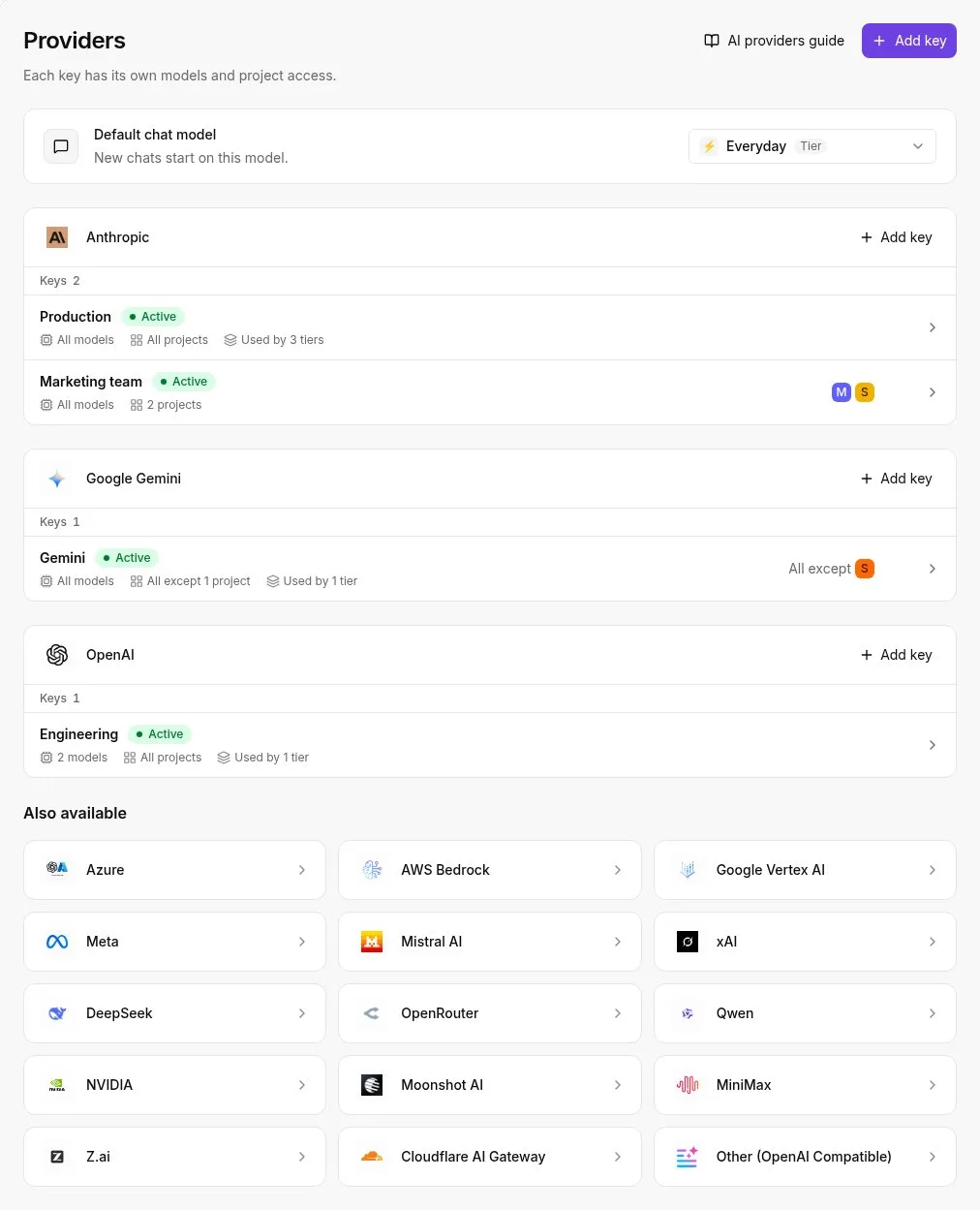
- Get Google access and an API key for the Gemini API from your Google account, and keep the key in Activepieces' connections rather than pasted into the step.
- Add the HTTP step after your trigger and point it at the Decisions endpoint named in Google's own documentation.
- Set the auth header the docs specify, with your key as its value, and build the request body from the trigger's fields.
- Run the step once on a sample row and read the raw response before mapping anything.
- Add a branch step and route on the decision field you saw in that response, with a fallback path for anything unexpected.
That fallback matters because the response shape is yours to verify, and the next section compares it on your own tasks.
Gemini Decisions API cost and speed compared
Google publishes two prices for the Decisions API's model, $0.10 per 1M input tokens and $0 for output, and the output price comes out cheapest. dev.to's small-model price chart lists Gemini Decision 1 at $0 per 1M output tokens, so longer responses cost you nothing.
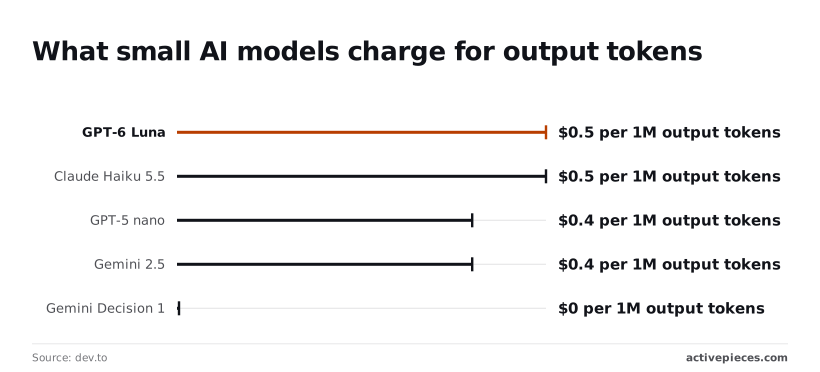
In dev.to's chart, the older Gemini 2.5 Flash-Lite and OpenAI's GPT-5 nano were listed at $0.4, which means output cost is a differentiator. GPT-6 Luna and Claude Haiku 5.5 are at $0.5.
Because a yes/no or score answer is tiny, output pricing was never going to be your main bill, and The chart does not show the input-token price, but Google lists it at $0.10 per 1M input tokens. So $0 is not what a call costs you.
I went looking for latency and setup-effort numbers and came back empty, so those cells say so. The table shows what is published as of 2026-11-12 and where the gaps are.
| Option | Price per use | Stated latency | Setup effort |
|---|---|---|---|
| Gemini Decisions API | $0 per 1M output tokens (dev.to chart, 2026-11-12) | Not published | Not published |
| Calling a Gemini model directly (for example Gemini 3.5 Flash-Lite) | Not published | Not published | Not published |
| Rule-based branching | Not published | Not published | Not published |
In the table, only the price column has any numbers, and the output price there is a difference of fractions of a dollar per million tokens. Latency and setup effort are what you have to measure yourself.
What to monitor in Gemini Decisions API updates
Start Monday by checking three things on Google's pages. Pricing, limits and access are the parts of the Decisions API most likely to shift under a workflow you have already built.
Recheck these on the announcement post and the changelog before you commit anything:
- Pricing: if the rate changes, your cost comparison against a model you already run is out of date.
- Rate limits and quotas: a limit that looks fine in a test can stall a batch job, so note where it bites.
- Access: whether you need an invite, a waitlist or a specific account type decides who on your team can even try it.
Write down the date you checked each one. A stale note is worse than none.
I would keep this small. A big migration is the first thing I'd abandon.
- Read Google's post start to finish and list what it claims and what it leaves out.
- Get access with a normal account, and note any step that blocked you.
- Build one non-critical workflow, such as sorting inbound form submissions into yes or no, triggered by a new row in a spreadsheet. If it fails, nothing important goes down with it.
- Run real tasks through it and record cost and speed for each run, next to what your current model does on the same inputs.
Those notes are the comparison. Decide from them, not from the launch post.
Frequently asked questions
Four questions keep coming up, and the answers below come only from what Google has published, so several read "not published". Each gap is a thing to test yourself, not a thing to assume.
Google lists $0 for output tokens, with input at $0.10 per 1M tokens, and a no-cost tier in Google AI Studio for prototyping. Don't budget around a guess. Check Google's pricing page for the exact rate before you route real volume through it.
Do I need a developer to use the Gemini Decisions API? Google's page doesn't say. It is an API, so expect to send a request and read a response.
If you've wired a webhook into a spreadsheet before, you're likely close. Whether it needs more than that is not published.
Can I call it from a no-code workflow? A native connector for any automation tool is not published. The generic route is an HTTP request step in whatever builder you use.
That's the thing to try first in a single workflow, on a throwaway trigger, before you rely on it.
How is it different from calling a Gemini model directly? Google describes Gemini Decision as a model for fast yes/no and score decisions. A general Gemini model answers in open text, so the practical difference is a narrower job.
Limits, output format and availability are not published.
Those gaps are why the next step is a small comparison on your own tasks.