n8n Self Hosted: How to Set It Up in 2026

Sep 30, 202614 min read
To ensure your automation logic remains independent of third-party execution limits, self-hosting n8n, much like deploying a local instance of Activepieces, requires a dedicated virtual private server (VPS) running Docker.
Self-hosting n8n is the practice of deploying the open-source workflow automation tool on private infrastructure to bypass cloud-based execution caps and maintain full control over data processing.
Baseline requirements for self-hosting n8n
By moving away from managed cloud tiers, you'll gain direct control over the execution environment. This control is necessary for scaling high-frequency tasks without incurring per-execution costs.
Hardware specifications for stable workflows
Production stability depends on providing enough overhead for the Node.js runtime to handle concurrent triggers without crashing the container.
While a basic instance can start on minimal resources, active workflows involving large data transformations or frequent API polling will saturate the CPU and exhaust available memory.
Software dependencies and Docker versions
Docker Compose orchestrates the deployment, managing the n8n application alongside its database and reverse proxy. Using the latest stable Docker Engine ensures compatibility with modern container networking features.
The long-term viability of your self-hosted stack depends on the rights granted by the software license. Activepieces publishes its core under the MIT license, meaning every released commit is yours to run, fork, or embed without a fair-code clause.
In contrast, n8n is source-available rather than MIT, which restricts your ability to redistribute or build commercial offerings on their work.
If a source-available vendor changes their pricing or restricts a feature you rely on, you are forced to migrate on their timeline because the rights to the code stay with them.
Domain name and DNS setup for n8n
External webhooks and secure administrative interfaces require a dedicated domain name and valid SSL certificates. Without a static A record pointing to your server’s IP address, external services can't reliably push data to your triggers.
If a source-available vendor changes their pricing or restricts a feature you rely on, you are forced to migrate on their timeline because the rights to the code stay with them.
Implementing an automated certificate authority ensures all traffic is encrypted via HTTPS. This is a requirement for most modern API integrations that refuse to send sensitive payloads to unencrypted endpoints.
This takes minutes, not a project: automate it in Activepieces free.
Compare n8n cloud and self-hosted costs
Self-hosting n8n on a Virtual Private Server (VPS) reduces monthly overhead by up to 60% compared to official cloud plans. It removes execution caps that otherwise throttle scaling, which means your automation capacity is limited only by your hardware.
Why 4GB RAM is the sweet spot for self-hosting
4GB of RAM provides enough overhead to prevent the Node.js process from crashing during large JSON transformations or concurrent API calls. When you run n8n on less than 4GB, the service often terminates during spikes in workflow complexity, leading to lost data in production.
This memory tier allows for the integration of modern LLMs (such as Gemini 3.8 Flash for high-throughput reasoning) without the host system swapping to disk and killing performance.
Analyzing the price gap between cloud providers and n8n Cloud
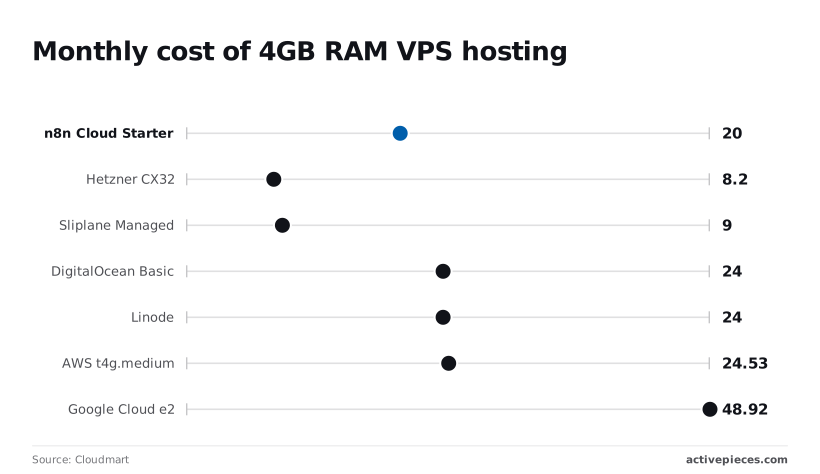
The following comparison illustrates that n8n Cloud is priced for convenience, whereas raw infrastructure providers offer significantly more compute per dollar.
| Provider | Monthly Cost (USD) |
|---|---|
| n8n Cloud Starter | $20.00 |
| DigitalOcean Basic | $24.00 |
| Linode | $24.00 |
| AWS t4g.medium | $24.53 |
| Sliplane Managed | $9.00 |
| Hetzner CX32 | $8.20 |
$20 is the cost of n8n Cloud Starter, yet it limits you to 5,000 executions, meaning a single polling trigger running every minute will exhaust your monthly budget in under four days.
A Hetzner CX32 at $8.20 or a Sliplane Managed instance at $9.00 offers the same 4GB of RAM with zero execution limits, allowing you to scale your workflows without worrying about hidden per-execution costs.

Even premium providers like DigitalOcean and Linode at $24.00, or AWS at $24.53, remain more economical than n8n’s higher-tier cloud plans once you surpass basic usage, so opting for infrastructure-as-a-service significantly lowers your long-term operational overhead.
n8n cloud vs self-hosted pricing breakdown
Choosing the lowest price point requires accounting for the time spent maintaining the underlying operating system. n8n Cloud includes automatic updates and database maintenance.
For $9.00, a PaaS like Sliplane manages the Docker deployment, providing the savings of a VPS without the complexity of manual SSL renewals, which means you can focus on building automations rather than maintaining server security.

Step 1: Deploying n8n with Docker Compose
Stability begins with a predictable deployment pipeline that isolates the application from the host operating system’s dependencies.
Using Docker Compose ensures that every environment variable and volume mount is codified. A single configuration file can recreate your entire automation stack on a fresh VPS in minutes.
The following deployment sequence establishes the core service:
- SSH into VPS.
- Install Docker/Docker-Compose.
- Create n8n directory and docker-compose.yml.
- Run 'docker-compose up -d'.
Creating the project directory and environment file
By keeping the database credentials and persistent storage paths in one audited location, a dedicated project folder prevents configuration drift.
Inside this directory, an .env file is the single source of truth for sensitive data, such as the encryption key n8n uses to scramble your stored credentials.
Configuring the docker-compose.yaml file
The docker-compose.yaml file is the blueprint for the container, mapping host ports to the application and ensuring the service restarts automatically if the server reboots.
You must define a persistent volume for the /home/node/.n8n directory so that your workflows and local triggers survive a container update.
version: '3.8'
services:
n8n:
image: n8nio/n8n:latest
restart: always
ports:
- "5678:5678"
environment:
- N8N_HOST=${DOMAIN_NAME}
- N8N_PORT=5678
- N8N_PROTOCOL=https
- NODE_ENV=production
- WEBHOOK_URL=https://${DOMAIN_NAME}/
- GENERIC_TIMEZONE=${GENERIC_TIMEZONE}
volumes:
- n8n_data:/home/node/.n8n
volumes:
n8n_data:
external: trueLaunching the container and verifying logs
Executing the deployment command in detached mode starts the service in the background, freeing the terminal while the application initializes.
Monitoring the output with docker logs -f n8n is the only way to confirm the internal migrations have finished and the server is listening for requests.
Setting up a reverse proxy for n8n
Configuring Nginx Proxy Manager or Caddy for n8n
A reverse proxy is the single entry point for all external traffic, shielding your n8n container from direct exposure to the public internet.
By configuring a tool like Nginx Proxy Manager or Caddy, you route incoming requests from a specific domain name to the internal IP address and port where n8n resides.
The following diagram illustrates the secure path a request takes from the user to the database:
[Network flow diagram: User Browser -> HTTPS (443) -> Reverse Proxy Container -> HTTP (5678) -> n8n Container -> PostgreSQL Container]
Automating SSL certificates with Let's Encrypt
Encryption via Let's Encrypt is mandatory because n8n handles sensitive API keys for services like Gemini 3.8 Flash or GPT-6 Sol.
Automating this through a proxy container ensures certificates renew before they expire. This prevents sudden workflow failures caused by browser security blocks.
Hardening the n8n environment variables for security
Securing the application requires explicitly defining how it perceives its own network location and administrative access.
- N8N_ENCRYPTION_KEY encrypts stored credentials so a database breach doesn't lead to a full system compromise.
- WEBHOOK_URL sets the public address for incoming triggers so that external services like GitHub or Stripe send data to the correct endpoint.
- N8N_BASIC_AUTH_ACTIVE forces a login layer at the application level to prevent unauthorized access to the workflow editor.
You can follow the rest of this with the builder open. Start free, no card.
Migrating n8n from SQLite to PostgreSQL
Switching to PostgreSQL ensures that n8n can handle multiple simultaneous read and write operations without triggering the database locks that freeze workflows.
SQLite database locking issues in n8n
Because SQLite operates as a single file on the disk, any write operation locks the entire database and prevents other processes from updating records until the first task completes.
In a production environment where a webhook from a payment processor might arrive at the same moment an automation is updating a status in a CRM, this file-level lock creates a bottleneck.
PostgreSQL resolves this by allowing concurrent connections. This prevents a heavy data-processing task in one workflow from blocking a lightweight status update in another.
Updating the Compose file for PostgreSQL integration
Transitioning to a dedicated database requires adding a new service to your Docker Compose file and mapping the n8n container to the new credentials.
version: '3.8'
services:
 postgres:
 image: postgres:16
 restart: always
 environment:
 - POSTGRES_USER=${DB_POSTGRESDB_USER}
 - POSTGRES_PASSWORD=${DB_POSTGRESDB_PASSWORD}
 - POSTGRES_DB=${DB_POSTGRESDB_DATABASE}
 volumes:
 - postgres_data:/var/lib/postgresql/data

 n8n:
 image: n8nio/n8n:latest
 restart: always
 ports:
 - "5678:5678"
 environment:
 - N8N_HOST=${DOMAIN_NAME}
 - N8N_PORT=5678
 - N8N_PROTOCOL=https
 - NODE_ENV=production
 - WEBHOOK_URL=https://${DOMAIN_NAME}/
 - DB_TYPE=postgresdb
 - DB_POSTGRESDB_HOST=postgres
 - DB_POSTGRESDB_PORT=5432
 - DB_POSTGRESDB_DATABASE=${DB_POSTGRESDB_DATABASE}
 - DB_POSTGRESDB_USER=${DB_POSTGRESDB_USER}
 - DB_POSTGRESDB_PASSWORD=${DB_POSTGRESDB_PASSWORD}
 volumes:
 - n8n_data:/home/node/.n8n
 depends_on:
 - postgres

volumes:
 n8n_data:
 postgres_data:
These variables tell the n8n instance to ignore the local file system and instead route all state and execution history to the PostgreSQL container.
Migrating existing workflow data safely
Moving data from SQLite to PostgreSQL is a destructive process if not handled with a strict backup-and-import sequence.
Because the two databases use different SQL dialects, you must export your workflows and credentials as JSON files through the n8n CLI or the interface before switching the environment variables.
Solving common n8n self-hosted errors and performance bottlenecks
Maintaining a production-grade n8n instance requires proactive monitoring of system resources to prevent silent execution failures.
Fixing the 'EADDRINUSE' and port conflict errors
When the n8n service attempts to bind to a network port already claimed by another process, a port conflict occurs.
To fix this, you must identify the PID of the blocking process using the lsof utility or change the N8N_PORT environment variable to an open high-numbered port.
Managing the n8n_data volume and disk space bloat
The n8ndata volume stores execution history and binary files, which can expand rapidly and trigger an "out of disk space" error that crashes the database.
You must configure the execution data prune environment variables to delete successful execution records automatically after a set period.
Fixing n8n JavaScript heap out of memory errors
Resource exhaustion typically manifests as a "JavaScript heap out of memory" error.
This happens when large datasets, such as high-resolution images processed by Gemini 3.8 Flash or massive JSON arrays from GPT-6 Astra, overwhelm the allocated Node.js memory.
The following table identifies common performance symptoms and their direct administrative fixes:
| Symptom | Likely Cause | Resolution |
|---|---|---|
| Workflow Timeout | EXECUTIONS_TIMEOUT reached |
Increase the timeout environment variable |
| Out of Memory | Node.js heap limit reached | Set NODE_OPTIONS to --max-old-space-size |
| Slow UI Response | Massive execution_entity table |
Enable EXECUTIONS_DATA_PRUNE to clear history |
Correctly balancing these limits ensures that high-throughput workflows don't starve the rest of your infrastructure of vital CPU cycles.
Monday morning maintenance for n8n admins
Stable n8n administration requires a proactive cadence to prevent the silent failure of high-volume automation pipelines.
Executing safe version upgrades via Docker pull
Upgrading n8n ensures access to the latest nodes for models like Gemini 3.8 Flash.
Before pulling a new image, stop the container to prevent database locks during the migration. Always check the n8n release notes for "Breaking Changes" to ensure that your custom JavaScript nodes or specific API integrations remain compatible.

Automating database and workflow backups
For self-hosted n8n instances, backing up the PostgreSQL database and the n8n encryption key is the only way to recover from a catastrophic virtual private server failure.
Use a cron job to export your workflows as JSON files and dump the database to an off-site S3 bucket. This separation of data ensures that a localized file system error doesn't result in total business logic loss.
Monitoring server resources for n8n uptime
Observing resource trends allows you to scale your infrastructure before Claude Opus 5.5 agentic tasks trigger an Out-Of-Memory kill event, which means your applications remain online during peak processing demands.
- Check disk space (df -h) to ensure execution logs haven't filled the volume.
- Prune Docker logs to reclaim space taken by verbose debugging output.
- Verify backup completion to confirm your recovery point objectives are met.
- Check for n8n image updates to stay current with security patches.
What Activepieces does about this
Activepieces provides a production-ready alternative that eliminates the licensing and stability hurdles inherent in the n8n ecosystem. While n8n relies on a source-available model that can restrict your commercial freedom, Activepieces is published under the MIT license.
This ensures that your self-hosted infrastructure remains truly yours, allowing you to embed, redistribute, or scale your automation engine without the legal uncertainty of fair-code clauses. For organizations like Rakuten, this open-source foundation provides the long-term architectural security required for enterprise-scale deployments.
To address the performance bottlenecks of SQLite and the complexity of manual PostgreSQL migrations, Activepieces is designed to run on a decoupled architecture from day one. The software utilizes a distributed task queue system that separates the web interface from the execution workers.
This means that even during high-concurrency events (such as processing thousands of webhooks simultaneously) the administrative UI remains responsive, and tasks are queued reliably rather than causing the entire container to crash due to database locks.
The resource bloat often seen in Node.js-based automation tools is mitigated by the Activepieces execution model, which optimizes memory usage for high-frequency tasks.
By providing a streamlined Docker Compose configuration that includes managed persistence and automated environment hardening, the platform reduces the "Monday morning maintenance" burden.
You gain the cost advantages of a $9.00 VPS while maintaining the stability of a managed cloud service, ensuring that your workflows for models like Gemini 3.8 Flash run without constant manual intervention, so your team can focus on development rather than infrastructure maintenance.
Frequently asked questions about n8n self-hosting
Can I run n8n on a Raspberry Pi in 2026?
You can host n8n on a Raspberry Pi provided you use a model with at least eight gigabytes of RAM. This prevents the Linux kernel from killing the process during heavy node executions.
While the software runs on ARM architecture, a single-board computer lacks the redundant power supplies found in data centers.
How do I store large binary files outside the database?
The most sustainable way to handle large files is to use the S3 Binary Storage mode. This offloads heavy assets like PDF reports or images to an external object store.
- Amazon S3 is the standard for enterprise cloud storage.
- MinIO can be deployed as a self-hosted, S3-compatible alternative on your own hardware.
- Google Cloud Storage is an option if your workflows primarily interact with the Google ecosystem.
Is multi-tenancy available in the self-hosted community version?
Native multi-tenancy is restricted to the Enterprise edition, so you can't natively isolate different departments or clients within a single instance of the community version. If you need to keep credentials and workflows separate for different users, you must deploy multiple independent Docker containers.
This approach requires a reverse proxy like Traefik or Nginx to route traffic to the correct container based on the subdomain.
Related reading
References
Build it
Set this up in minutes.
No code required. Connect your accounts, and Activepieces runs it from there.
Start free Talk to sales