
Gladia Pricing 2026: Plans, Per-Hour Rates & Add-Ons

Nov 2, 202614 min read
Pick by how many audio hours you push through each month and which add-ons you switch on.
Gladia's a speech-to-text API, and the per-hour rate on its pricing page is only the starting line, whether you're wiring transcripts into a workflow tool like Activepieces or calling it straight from your own code. Everything below reflects the pricing page as checked on 2026-11-02.
If you run heavy volume, one figure changes what you actually pay: the top-up bonus, which AI Listing Jungle lists in three tiers:
- A €1,000 top-up earns 10% bonus credit, so you hold €1,100 of usage.
- A €2,500 top-up earns 15%, or €2,875, so you pocket an extra €375.
- A €5,000 top-up earns 20%, or €6,000.

At the top tier, the €1,000 of extra credit works out to roughly 17% off every hour you transcribe.
Which Gladia plan fits you
Below, four situations each name a plan, a monthly cost and the catch that pushes that reader up a tier. They cover a solo tester, a team of 5, a team of 25 that needs SSO, and a team with heavy API volume.
If you are running this arithmetic for your own team, see what the same workload costs on Activepieces.
All Gladia plans, pricing and limits
The table below shows what each plan bills by and where it caps you, as checked on 2 November 2026; the hourly rate's only one column of several.
| Plan | Price basis | Free allowance | Concurrency | Rate limits | Included features | Check date |
|---|---|---|---|---|---|---|
| Self-serve pay-as-you-go | Per audio hour used | Not the point of this tier | Capped, higher than free | Capped, higher than free | Core transcription, with extras billed when switched on | 2026-11-02 |
| Growth | Volume-based hourly rate | Not the point of this tier | Higher than self-serve | Higher than self-serve | Core transcription and extras, priced for volume | 2026-11-02 |
| Enterprise | Negotiated contract | Set by contract | Set by contract | Set by contract | Terms agreed per customer | 2026-11-02 |
Prices and plan limits checked against gladia.io on November 2, 2026.
Use the free tier to test accuracy, because its allowance runs out quietly. A pipeline that passes in testing can stall in production once the allowance's spent.
On pay-as-you-go you pay only for hours used. Concurrency and rate limits still apply, so a backlog queues rather than finishing at once.
On Enterprise, published limits give way to negotiated ones. Get concurrency, rate limits and feature inclusions in writing, because "custom" only helps if the contract names the numbers.
You are billed for audio hours processed, not for hours you meant to process. Retries, re-runs and add-ons all count, so the sections that follow price each in turn.
**You are billed for audio hours processed, not for hours you meant to process.
What Gladia costs at realistic monthly usage
At published async rates, 10 hours costs about €1.60, 100 hours about €16, and 1,000 hours between €120 and €270, depending on which rate applies, so you'll need to verify your exact tier before committing to 1,000-hour volume.
The chart prices each plan at all three volumes: the plans are indistinguishable at the low end and more than €100 apart at the top.
A solo developer at 10 hours
At 0.16€ an hour, 10 hours is €1.60, or €2.70 on Solaria-1 at 0.27€. Either way the rate's irrelevant, because the €50 free credit covers 312 async hours on Solaria-3 and 185 on Solaria-1.


Real-time's the exception: the credit covers only 73 hours, and at the 0.68€ self-serve real-time rate 10 hours is €6.80, so the promotional credit is quickly exhausted by regular real-time usage.
A support team at 100 hours
At 100 hours the base rate gives €16 and Solaria-1 gives €27, an €11 gap that nobody will notice on an invoice. The free credit still covers the whole month on either async model, but only once.
Real-time at 100 hours is €68, which already exceeds the 73 hours the credit covers. So a team that adds live transcription pays from the first month, while an async-only team doesn't.
Gladia pricing for call-heavy products at 1,000 hours
Here the choice matters. The base rate gives €160 and the lowest volume band (0.12€) gives €120 if it applies to your whole volume, so reaching that lowest rate requires keeping all your traffic within a single tier. Solaria-1 gives €270.
The spread's €150 a month, or €1,800 a year, for the same audio.
The headline 0.16€ is the cheapest figure on the table, not the typical one.
Hidden costs and limits Gladia users hit
Beyond the floor that the per-hour rate sets, three other things decide the rest of your bill: which features carry their own charge, how many jobs you can run at once and which controls sit on a higher tier.
Add-on features priced separately
Budget nothing extra for diarization, which labels who spoke, and don't pick a plan to get it. Other options, such as translation or summarization, aren't covered by that statement.
Read the pricing page line by line for any option that adds its own per-hour charge. A surcharge applies to every hour you transcribe, so a feature you switch on for every call costs more than one you use on a few.

Gladia concurrency, file size and rate limits
Send too many jobs at once, or one file that's too long, and the paid plan stops you, because it caps how many pre-recorded and live transcriptions can run at the same moment and the length of a single file.
If you backfill an archive with a script that sends everything at once, the API will reject or queue the jobs over the cap, depending on how your code handles the response.
When a recording runs long, as full-day hearings or webinars do, you have to split it before upload and stitch the transcripts back together afterward.
That split, upload and stitch routine is a chain of small steps, and Activepieces bills it as 1 credit per run, whether the flow has two steps or ten.
Zapier's per-task billing charges for every step, so breaking a long hearing into smaller, more reliable integrations costs more there for doing the job properly.
With Activepieces the run is the meter, which leaves Gladia's audio hours as the only line that grows with the archive.
Rate limits rarely matter in testing and show up the first night of a bulk run. Compare the figures in Gladia's docs with your busiest hour, not your average one.
Retention control, meaning how long Gladia keeps your audio and transcripts, and single sign-on for your team may depend on the plan you hold. If your compliance team needs scheduled deletion, find out which tier gives you that control before signing.
Worth checking against a plan that does not meter every step: one credit covers a whole run on Activepieces.
Gladia pricing against the closest alternatives
What separates Gladia from Deepgram, AssemblyAI or OpenAI isn't the per-hour rate; it's what you can switch on before the enterprise gate. The price spread between AI options is wide, and the gap to human transcription's enormous.
Start with the spread. According to the Taskcents, Rev and GoTranscript help centres, Groq's hosted Whisper costs $0.04 per audio hour, so 1,000 hours a month is $40.
Whisper Large v3 is $0.111, nearly three times that, so the same 1,000 hours costs $111.
At $0.36 an hour, AWS Transcribe and OpenAI Whisper make the same volume $360, which means neither has a cost advantage.
Rev's human transcription is $119.40 per audio hour, so those 1,000 hours would cost $119,400, about 330 times the OpenAI figure.
Below, the table lists the four vendors we compare. We checked in November 2026, and cells read "Not confirmed" where the sources above gave no figure, so don't read a blank as free.
| Vendor | Price per audio hour (async) | Free credit | Included features | Enterprise gating | Source |
|---|---|---|---|---|---|
| Gladia | Not confirmed | Not confirmed | Not confirmed | Not confirmed | None confirmed |
| Deepgram | Not confirmed | Not confirmed | Not confirmed | Not confirmed | None confirmed |
| AssemblyAI | Not confirmed | Not confirmed | Not confirmed | Not confirmed | None confirmed |
| OpenAI transcription API | $0.36 (OpenAI Whisper) | Not confirmed | Not confirmed | Not confirmed | Rev pricing |
For the other three vendors, any comparison starts from their own pricing pages, since only the OpenAI row carries a confirmed rate. Take their per-hour rates, then check each add-on and each limit line by line, because that's where the bill moves.

Sending Gladia transcripts into your workflows
Wire a transcript into your CRM, ticket queue or summary and what Gladia bills for the audio doesn't change.
Where a workflow tool helps
When one transcript has to trigger several things in sequence, a workflow tool earns its place. It can call Gladia's API through a plain HTTP step, so no custom integration's needed.
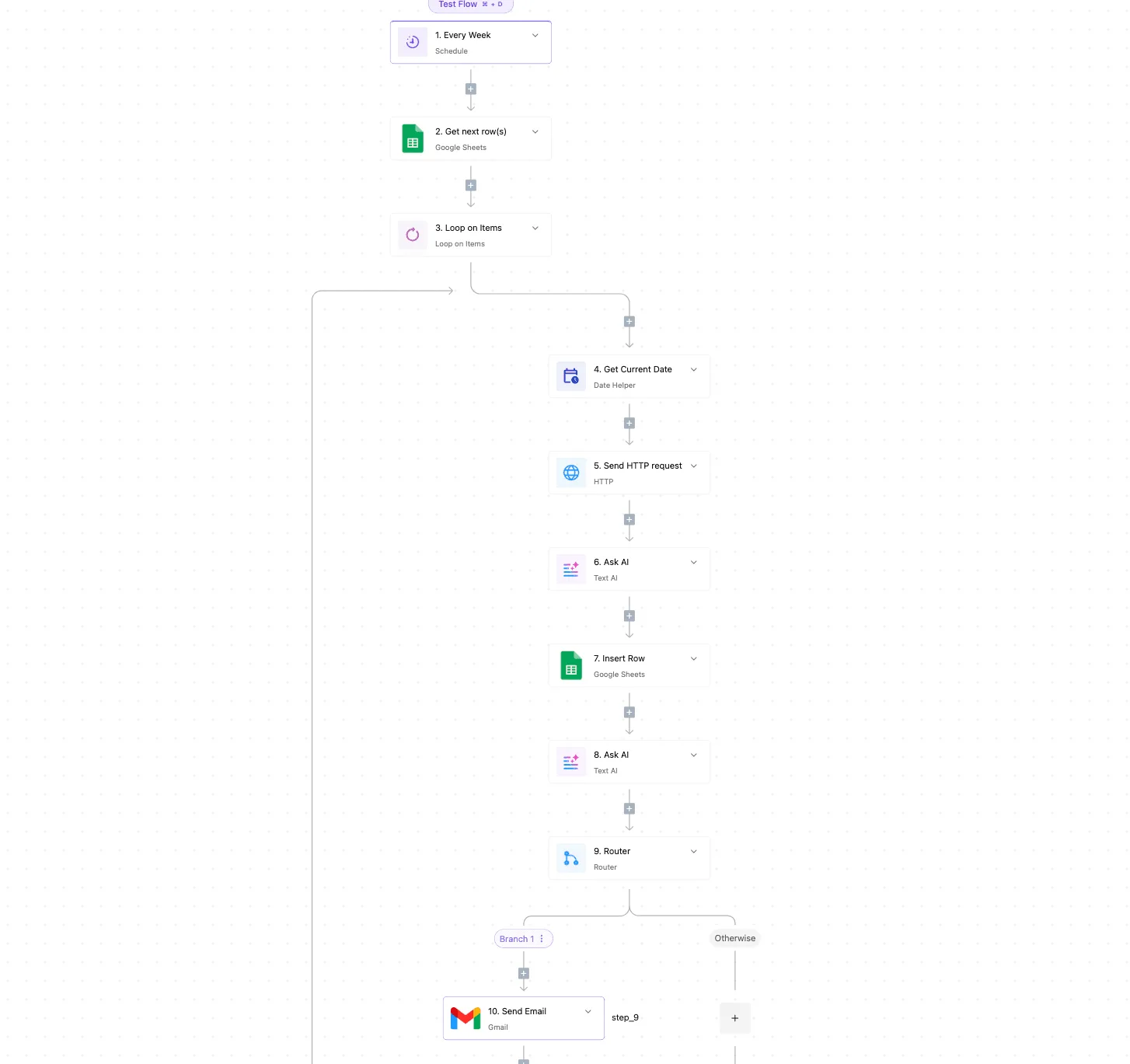
On a weekly schedule, the flow below pulls rows from a spreadsheet, loops over each one, sends the audio to Gladia, passes the result to a text-AI step for a summary, and writes it back to a row.
A router then decides whether an email goes out.
Every extra loop pass is another audio file sent, so a loop over a large sheet is still billed as the volume it is. The audio hours stay the only meter that grows.

Where you don't need one
If your app already receives Gladia's output and needs to store it in one place, a direct API call from your own code is shorter and easier to debug.
The same goes for a single destination, such as pushing every transcript into one ticket field. A router and a loop add failure points you then have to monitor.
Skip the tool when there's one source and one destination.
Reach for it when a human would otherwise copy the transcript between three systems by hand, and test the first run on a few files, not the whole backlog, so a bad loop doesn't spend your quota for you.
What to do before choosing a Gladia plan
Measure your own usage, list the features you need, test on the free credit, and set a spending alert and an upgrade trigger before you pay for anything.
Here's the order for Monday morning, so that a stray loop or a surprise feature charge doesn't pick your plan for you.
- Measure last month's audio hours. Pull the total from your call recorder, meeting tool or upload folder, and note the busiest week as well as the average. The busiest week shows whether you would hit a plan's limit, and the average shows what you actually pay for.
- List the features you need. Write down whether you need speaker labels, translation, summaries, live transcription or a language mix. Every one you switch on can change the bill, so a plan priced on bare transcription tells you little about your cost.
- Run a test batch on the free credit. Use a few representative files, including your worst audio, not a clean demo clip. Then compare the credit spent with the hours processed, because that ratio shows what your real mix of features costs.
- Set a usage alert. Use the account's own alert if it offers one. If it doesn't, put a recurring calendar check on the usage page. Either way, you hear about a runaway job before the invoice does.
- Decide the upgrade trigger now. Write a single line, such as "move up when the busiest week passes this many hours or when we need this feature." Then the decision's already made when the pressure arrives.
What Activepieces does about this
Activepieces can't lower Gladia's bill, and we won't pretend it can. Audio hours, switched-on features and plan limits are set by Gladia. What we do is keep the work around those hours from adding a second meter.
A run costs 1 credit whether the flow has two steps or ten, so the split, upload and stitch routine for a long hearing doesn't get dearer as you break it into safer integrations.
The limits that push people up a tier are also the ones a flow can respect.
A loop can process files one at a time or in small batches, with a delay step between calls, so a backfill queues in your own flow instead of hitting Gladia's concurrency cap on the first night.
A router can send anything over the file-length limit down a splitting branch before it reaches the API. That helps you stay on the plan you picked by volume, rather than being nudged up by a script that sent everything at once.
You can also build the checks from the Monday-morning list into a flow. Run a weekly schedule that sums last week's audio hours from your sheet, compares the total with the trigger you wrote down, and emails you when it's passed.
Activepieces is open source under the MIT licence, so you can self-host it if you'd rather not run transcript data through a third party. MoneyGram, Moneypenny, Alan and FundingSocieties run it in production.
Frequently asked questions
Does Gladia have a free plan?
Gladia's pricing page lists the free credit as a one-time 50€, so check it for any change.
If one exists, treat it as a way to test accuracy and your integration, not as production capacity. A free allowance that runs out mid-project's the usual way a pilot stalls on a Friday afternoon.
How does Gladia bill, per hour or per minute?
Quoted per audio hour, the headline rate doesn't necessarily show the unit that's metered. Read the billing terms for how usage is measured and rounded.
If each file is rounded up, a pile of short clips costs more than the same total duration in a few long recordings.
Can I switch Gladia plans mid-month?
Don't assume a mid-month switch is prorated or takes effect immediately. Ask support before you switch and get the answer in writing, including what happens to usage already logged under the old plan.
If you're close to a limit, find out whether the new limit applies at once or only from the next cycle.
Does Gladia charge for failed or silent audio?
Don't assume either way. Billing usually follows the audio you submit, and a silent file's still audio with a duration.
Test it: upload a short silent file and a deliberately corrupted one, then compare your usage dashboard before and after. Also ask support whether failed jobs are credited automatically or only on request.
Is Gladia cheaper than Deepgram?
It depends on your volume and the features you switch on, not on the two headline rates. Price the same workload on both, with the same features enabled, such as speaker labels or translation.
Then compare the monthly totals and the limits each plan imposes. A lower sticker rate loses quickly if a feature you need's billed separately.
Related reading
Running the numbers
See what the same workload costs here.
Free forever plan, and every paid plan self-hosts at no extra cost.
See pricing Talk to sales