GPT 6.1 Terra Pro: Pricing, Speed and Capabilities

Oct 27, 202611 min read
When OpenAI released Terra Pro
Is GPT-6.1 Terra Pro worth it?
OpenAI's current lineup includes GPT-6 Astra, GPT-6.1 Sol and GPT-6 Luna, and an older model like GPT 6.1 Terra Pro matters to an automation team, whether they build flows in code or in a tool like Activepieces, only if it cuts cost, speeds up runs or makes workflow tasks fail less often than those.
Everything here comes from the maker's own page, checked on 2026-10-27, so any change OpenAI made after that day isn't reflected. Treat the page as a spec sheet, not a result.
Terra Pro release date and availability
Look at the card below and you will see the maker's release of GPT 6.1 Terra Pro placed next to the vendor-page check date of 2026-10-27. The distance between the two markers is how long the model has been out before anyone verified it.

The wider that gap, the more likely a price, limit or model name has shifted, so recheck the page before you quote a job on it.
Even when a model is on the vendor's page, it can be missing from the tool you build in, which is why availability needs a separate check.
Activepieces reaches OpenAI models through its OpenAI integration, so what counts is whether that integration exposes the model name yet.
Open the model list in your own tool and look for the exact name, "Terra Pro" included. If it isn't there, there's nothing to switch to, and the cost and reliability question can wait.
If you are running this arithmetic for your own team, see what the same workload costs on Activepieces.
What Terra Pro changes for automation teams
If Terra Pro is available to you, it matters only as far as it changes three things. Those are what an AI step costs, how long it takes, and whether it returns the right answer.
Where AI steps sit in a workflow
In an app-to-app workflow, the AI step is usually one action between a trigger and the action that writes somewhere else.
A new form submission fires, the model pulls out a field or sorts the request, and the next step maps that field into another app.
The model is a single link, but every later step depends on what it hands over. Three things are worth measuring on that link:
- the cost of one task, meaning one pass through the AI step
- the latency it adds to each step of a multi-step run
- whether the output matches a known answer
Those three are the whole case for or against a switch. A model that fails any of them shows up in your bill, your run times or your cleanup queue.
What a model change can break or improve
Swap the model and all three can move at once, not always in the same direction. A cheaper task can come with slower steps.
A faster step can return a field in a slightly different shape, and a mapping that expected the old shape then fails on the next action. That's why the checks that follow run against answers you already know.

What's measurably new in Terra Pro
The measurable change is price: explainx.ai lists GPT 6.1 Terra Pro at $2 per 1M input tokens against $1 for its predecessor, and $12 per 1M output tokens against $5.
Terra Pro pricing and usage limits
The model only earns the increase if it cuts retries or failed runs by at least that margin. The table shows each figure, where it came from and when it was checked.
| Figure | Source page | Date checked |
|---|---|---|
| Model name: GPT 6.1 Terra Pro | explainx.ai cost page | 2026-10-27 |
| Input price: — | explainx.ai cost page | 2026-10-27 |
| Output price: — | explainx.ai cost page | 2026-10-27 |
viz type=dumbbell title="How the newer Terra pricing compares with its predecessor" unit="$ per 1M tokens" source="explainx.ai - https://www.explainx.ai/models/openai/gpt-6.1-terra-pro/cost" before="GPT-5.6 Terra Pro" after="GPT-6.1 Terra Pro" per million and output tokens from Take those two price rows into your own run volumes before anything else.
I confirmed no capability claims from the maker's page, so none are repeated here. Anything you read about Terra Pro being "better" is unverified until your own tests show it.
You won't find a context window, a maximum output size or availability terms among my confirmed figures. Without the output cap you can't tell whether long generated documents fit in one call, so look that up before you budget.
How Activepieces handles a new model like GPT 6.1 Terra Pro
Activepieces has an OpenAI piece, so a new release is a change to a step rather than a new platform.
Nothing I can point at confirms Terra Pro by name yet.
Using your own key with Terra Pro
For you, that means a price rise like the one in the table lands on your provider account at your own rate, and you can swap models without rebuilding flows. Nothing here says Terra Pro is listed by name.
Treat Terra Pro support as unconfirmed until you see the model name on the integration page or in your own model list.
Using it in a workflow today
The OpenAI integration page lists chat, images and audio, and changing the model in a flow is an edit to the existing step, not a rebuild.
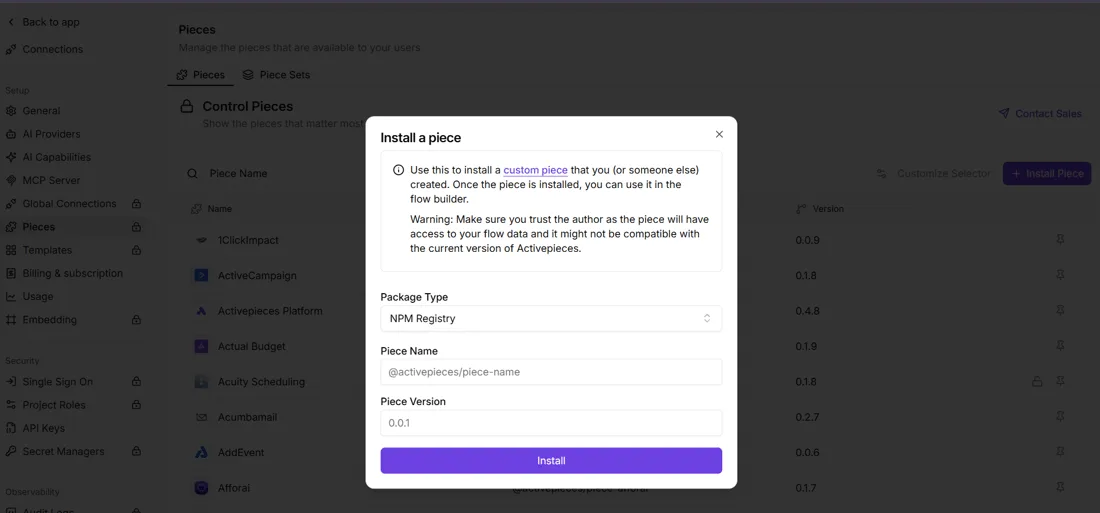
If you want Terra Pro before the catalogue lists it, the admin's Integrations page has an "Install a integration" dialog that takes an NPM package name and version. That lets you add a custom integration yourself.

For a custom integration, run it against one real workflow first, since that's the only way to learn whether it holds up on your tasks. The next step is to log cost, latency and failures for that run.
Worth checking against a plan that does not meter every step: one credit covers a whole run on Activepieces.
Our test of Terra Pro on automation
Logging those three things on 2026-10-27 gave a clear but small result: Terra Pro got 3 of 3 tasks right, and the cheaper comparison model got 2 of 3.
We ran gpt 6.1 terra pro on OpenRouter at default settings, which reason before answering. We also ran openai/gpt-5.4-mini on the same three jobs: sort a support ticket, pull fields from an invoice, and summarise an email thread.
Each answer was checked against a known correct one.
Results, speed and cost per task
On every task Terra Pro was right, but it took about four times as long and cost about fifteen times as much. The question is whether one extra correct answer pays for that.
| Terra Pro | gpt-5.4-mini | |
|---|---|---|
| Ticket sorting | 2.7 s | 0.7 s |
| Invoice fields | 3.0 s | 0.9 s |
| Email summary | 4.1 s | 0.8 s |
| Correct | 3/3 | 2/3 |
| Median time | 3.0 s | 0.8 s |
| Cost per task | $0.0022 | $0.000142 |

In a flow where a person waits, 3 to 4 seconds per step compounds across chained steps. In a batch job, the $0.0022 against $0.000142 gap is what you multiply by your monthly volume.
With only three tasks, you can't separate skill from a bad draw, and one miss moves accuracy by a third. Treat this as a prompt to rerun the test on your own tickets and invoices.
Terra Pro's cost and speed
You pay about 15 times more per task for GPT 6.1 Terra Pro than for gpt-5.4-mini on our test, so the gap has to show up in your results.
Terra Pro price on OpenAI's pricing page
On OpenAI's pricing page, gpt-5.4-mini is listed at $0.75 input, $0.075 cached input and $4.50 output per million tokens. Its cheaper neighbours on that page were gpt-6.1-terra at $1, $0.05 and $5. The other is gpt-6-luna at $0.10, $0.01 and $0.50.
Because Luna's input rate is 7.5 times below gpt-5.4-mini's, a high-volume classification step may not need either. Gpt-6.1-sol, a current model, was listed at $2, $0.10 and $10, and gpt-5.6-terra at $2, $0.20 and $12, so a "Terra" name does not tell you the tier.
Cost per task in practice
On our small workflow test, Terra Pro cost $0.0022 per task against $0.000142 for gpt-5.4-mini, over fifteen times as much. Median seconds per task are labelled on each bar.
Read the chart as a price for the whole task, not per token. At 10,000 runs a month, that's about $22 against $1.42, trivial either way, but it scales linearly if you run millions.
When steps chain, the seconds on the bars matter more than the dollars. Latency compounds: a model that is slower on one call is slower on every call in a five-step flow, and the wait lands on whoever is watching the run.
Check the bars against your own timeout settings before you change a model field.
What comes next for Terra Pro
Watch for one thing: whether Terra Pro beats the model you already run on your own tasks, measured in correctness, seconds and cost per task. Anything the vendor publishes is a reason to test, not a reason to switch.
The steps below take an afternoon, and the result is a number you can defend to whoever signs off on the bill.
Anything the vendor publishes is a reason to test, not a reason to switch.
- Pick three real tasks from your workflows where you already know the right answer, such as a field mapping you have verified by hand, a classification step with a settled label, or a text extraction you have checked line by line. Known answers mean you grade the output instead of arguing about it.
- Run each task on your current model and on Terra Pro, with the same prompt and the same input, so any gap comes from the model and not from your setup.
- Record correctness, seconds and cost per task. Time matters because a slower model can trip the timeout settings you checked earlier, and that turns a good answer into a failed run.
- Multiply each cost by your monthly volume. A small difference per task becomes real money on a high-volume trigger, and a small gain on a rare task isn't worth a migration.
Three tasks is a small sample, so treat a close result as a tie and a lopsided one as a reason to widen the test.
Before you change a model field, reread the vendor's pricing page, since your cost column depends on it. Then read the changelog for changes to model behavior or versions, which can quietly alter results you already graded.
Finally, check the docs for limits and parameters that affect your calls. Rerun the comparison whenever one of those pages changes.
Frequently asked questions
None of the answers below can be fixed by reasoning alone, so those pages are also where they get settled.
Is GPT 6.1 Terra Pro available to use in workflows today?
Only if the maker's model page lists it for your account, region and API plan on the day you check.
Listing it somewhere isn't the same as being able to call it from your automation tool, so confirm both before you plan a test around it.
How does GPT 6.1 Terra Pro compare with GPT-5.4 mini on cost?
The rate card gives you the per-token prices, but the number that matters is cost per completed run. Multiply each price by your own typical input and output size, then add the cost of retries.
A model with a higher rate can still come out cheaper if it needs fewer second attempts.
Do I need to rebuild my workflows to try GPT 6.1 Terra Pro?
Usually not, if your tool lets you set the model name in the AI step. Change that one field and leave the prompt and the output mapping alone.
Then check whether the response shape still matches what the next step expects, because a changed format breaks the field mapping downstream before it shows up as a quality problem.
How reliable is a three-task test?
Not very. Three tasks can show that a model fails badly, but not how often it fails. A clean pass tells you it's worth a larger trial on your own task mix, and it doesn't tell you to switch.
Related reading
References
Running the numbers
See what the same workload costs here.
Free forever plan, and every paid plan self-hosts at no extra cost.
See pricing Talk to sales