Is LiteLLM Enterprise Pricing Worth the Monthly Bill?

Oct 28, 202614 min read
LiteLLM enterprise pricing in 2026, plan by plan
Is LiteLLM enterprise pricing worth it?
You pay nothing to license LiteLLM's open-source proxy, whether you wire it into a script or into a workflow tool like Activepieces. The paid enterprise tiers buy governance: single sign-on, audit logs and spend controls.

If you don't need those yet, your real cost is the server and the person who looks after it.
LiteLLM is an open-source LLM gateway that puts one API in front of many model providers, so your apps don't have to change when you swap models.
Every current plan in one table
| Plan | Price | Inclusions | Limits |
|---|---|---|---|
| Open Source | Free, plus your own hosting | The gateway and proxy, routing across providers | SSO capped at a small user count; community support; no SLA |
| Enterprise Basic | Not published | Governance features such as SSO and audit logs | Support terms not published; SLA not published |
| Enterprise Premium | Not published | Everything in Basic, with a higher support level | Exact support terms not published; SLA not published |
What 'contact sales' pricing does and does not tell you
Budget for a conversation, not a checkout, because a missing price tells you the number moves with your size. It doesn't tell you the product is unaffordable.
Ask for the support hours, the SLA and the user limits in writing, because those are the unpublished cells that decide what you're buying.
It also pays to price the free path honestly. Self-hosting means patching, monitoring and being on call, much like running any other open-source tool, whether that's a gateway or Activepieces, whose MIT-licensed core you can self-host with unlimited flows.

That labor is the number to compare against a quote.
If you are running this arithmetic for your own team, see what the same workload costs on Activepieces.
Monthly LiteLLM bills for two realistic teams
Put the two teams side by side and the line to read is gateway fee, not hosting: the five-person team pays a $12-24 VM and no licence fee, while the 50-person company pays that same hosting plus an Enterprise Basic fee that dwarfs it, which means your cost per employee rises as you grow.
| 5-person team, open source | 50-person company, Enterprise Basic | |
|---|---|---|
| Gateway fee | $0 | Set by quote |
| Hosting | $12-24 VM | $12-24 VM |
| Model-provider spend | Your own usage, billed by the provider | Your own usage, billed by the provider |
| Total | Hosting plus provider spend | Quote plus hosting plus provider spend |
viz type=stackrank title="What it costs to host LiteLLM yourself each month" unit="$ per month" source="Google RAD Modules - https://docs.radmodules.dev/docs/modules/LiteLLM_GKE" target="250" 8 a month for two Fargate tasks to If you run one assistant behind one proxy, a single small VM is enough. Your monthly bill is the VM and the tokens, and the maintenance labor from the previous section is the real cost you carry.
If what you want is many keys, teams and SSO, that is what Enterprise Basic sells. The VM doesn't get more expensive, so you're buying governance, not capacity.
What self-hosting costs by setup
Google RAD Modules prices four setups. Google RAD Modules' data shows Fargate with 2 tasks runs $18 a month, which is barely above the VM range.
The VM doesn't get more expensive, so you're buying governance, not capacity.
According to Google RAD Modules, Cloud Run is $77, so serverless convenience costs about four times as much. Google RAD Modules' analysis puts GKE Autopilot at $129, and Fargate with a load balancer at $146.
That's the price of high availability, so load balancing is a $17/month premium.
Token spend scales with usage and lands in both columns, so the gateway fee is the only line you can decide to avoid.
Hidden costs and limits teams hit on LiteLLM
Skipping the gateway fee doesn't make the proxy free. Five costs arrive on their own triggers, and on the open-source tier you pay most of them in hosting, time and risk.
- Extra proxy servers, once traffic outgrows a single instance.
- Postgres and Redis, once you turn on spend tracking.
- Engineering hours, with every upgrade you test and roll out.
- SSO, once more than 5 people need to sign in.
- No SLA, from the first outage on the open-source tier.
One proxy instance is cheap. Past that, you run several behind a load balancer. Spend tracking also needs Postgres and Redis, so you now have two more stateful services to back up and patch.
Features in the enterprise licence
Start with SSO, the first gate most teams hit.
According to SSO Pricing, SSO adds $7.25 to $12.50 per user per month on Slack, $4 to $21 on GitHub, $8 to $20 on Miro and $10 to $20 on Notion, revealing that SSO is never included in base pricing.
viz type=groupedbars title="What SSO adds to the per-seat price of common SaaS tools" unit="$ per user per month" source="SSO Pricing - https://ssopricing.com/" cols="Base tier,SSO tier"6 to $55 per user for SSO, and GitHub from $4 to $21; Slack's step is $7.25 to Zoho runs $14 to $52 and Figma $16 to $55, so even switching to different specialized tools keeps you in this pricing band.

At the top of those ranges, per-seat gating costs more than the tool itself, and it's still normal.
Read it as a yardstick: if a proxy's enterprise quote lands near these figures per seat, the price is ordinary, and what matters is whether you need SSO yet.
Before each release goes out, it needs testing against your routing, keys and budgets. Even a few hours per upgrade can outweigh a licence fee for a small team, because that time comes out of product work.
When the gateway goes down at 2 a.m., the fix is yours, because open source has no SLA. That costs nothing until the gateway sits in front of revenue-critical traffic, and from then on it's the cost most worth pricing.
LiteLLM pricing beside Portkey, OpenRouter and Helicone
Beside its three rivals, LiteLLM's gateway is free, and your hosting bill is the real price. The table shows who charges for the gateway and who charges on spend. Figures were checked against vendor pages on 2026-10-28.
| LiteLLM | Portkey | OpenRouter | Helicone | |
|---|---|---|---|---|
| Free tier | Open-source proxy | Yes | Pay as you go | Yes |
| Entry paid price | None for the proxy | Paid plan on vendor page | No subscription | Paid plan on vendor page |
| Enterprise path | Sales-quoted tier | Enterprise plan | Enterprise arrangement | Enterprise plan |
| Hosting model | Self-hosted | Hosted, enterprise options | Hosted only | Hosted or self-hosted |
| Fee on model usage | None | Plan-based | 5.5% | Plan-based |
| SSO | Enterprise tier | Plan-dependent | Plan-dependent | Plan-dependent |
| Audit logs | Enterprise tier | Plan-dependent | Plan-dependent | Plan-dependent |
| Budgets | Available in the proxy | Plan-dependent | Plan-dependent | Plan-dependent |
Only one column grows with your traffic: OpenRouter's percentage fee. The rest are flat plan decisions, so the choice is who runs the server and which governance features you need.
Where Portkey, OpenRouter or Helicone cost less
When nobody on your team wants to own a gateway, a hosted rival is cheaper. With Portkey or Helicone, upgrades, uptime and log storage are someone else's job, and for a small team that saves more than any license line.

For simplicity, OpenRouter wins, since one account reaches many models with no subscription. Its fee is a cost only once spend is large enough that a percentage outweighs an engineer's hours.

Where LiteLLM is cheaper
When volume is high and you already run containers, LiteLLM wins. No share of spend goes to the gateway, so your bill stays the providers' charges plus a small server. You also keep budgets without paying for them.
When auditors ask for SSO and audit logs, the advantage ends, because those sit in the enterprise tier. That's the point where the free proxy stops being the cheapest option.
Worth checking against a plan that does not meter every step: one credit covers a whole run on Activepieces.
When the free open-source LiteLLM proxy is enough
Until one of five triggers appears (SSO, audit retention, team budgets, a support SLA, or a compliance review), the free proxy on your own hosting is the better buy.
Routing calls across model providers, issuing a key per project, and giving a few engineers one place to watch usage all work on the free proxy.
A small team with no outside auditor has no governance gap yet, so the licence would be for features nobody uses.
Any of these can turn a nice-to-have into a requirement: a customer questionnaire demanding SSO, an auditor asking how long logs are kept, or finance wanting hard budgets per team.
A contract requiring a guaranteed support response or a compliance review does the same. One trigger is a reason to get a quote. None is a reason to buy ahead of need.
How the SSO premium looks across SaaS
At Salesforce the markup is 75%, at Notion 100%, at Miro 150%, at Sentry 208% and at Figma 244%. Even the cheapest of those is a large markup, so a governance paywall in LiteLLM's enterprise tier is normal practice, not an outlier.

You can bolt SSO, log retention and budget alerts onto the free proxy yourself, but you then maintain them through every upgrade. If that upkeep costs more engineering hours than the quote, pay. If it costs less, keep building.
Activepieces workflows that call models through LiteLLM
Route AI steps to your gateway
If you already run LiteLLM as your gateway, point Activepieces' AI steps at that same OpenAI-compatible endpoint. Workflow spend then lands under the same keys and budgets as everything else. It's a wiring choice, not a new product, and it doesn't replace the gateway.
Activepieces runs its model steps on whichever provider key you give it, with 746 integrations around them in an MIT-licensed core, and those steps speak the OpenAI API format, which means you're not locked into a vendor's roadmap and can self-host without paying for licensing.
LiteLLM exposes that same format in front of whichever providers you route to. So the base URL and a LiteLLM-issued key are the only things that change.
LiteLLM virtual keys and budgets for workflows
Give the workflow its own virtual key, and its usage shows up as a separate line in your spend tracking rather than disappearing into a shared provider account.
If a runaway loop starts firing hourly calls, the budget on that key is what stops it, not an invoice surprise at month end.
What the test workflow shows
On the builder canvas, the screenshot shows a deliberately small test flow: a schedule trigger set to run every hour, one "Ask ChatGPT" step, and an end node. The step picker is open and filtered to spreadsheet integrations.
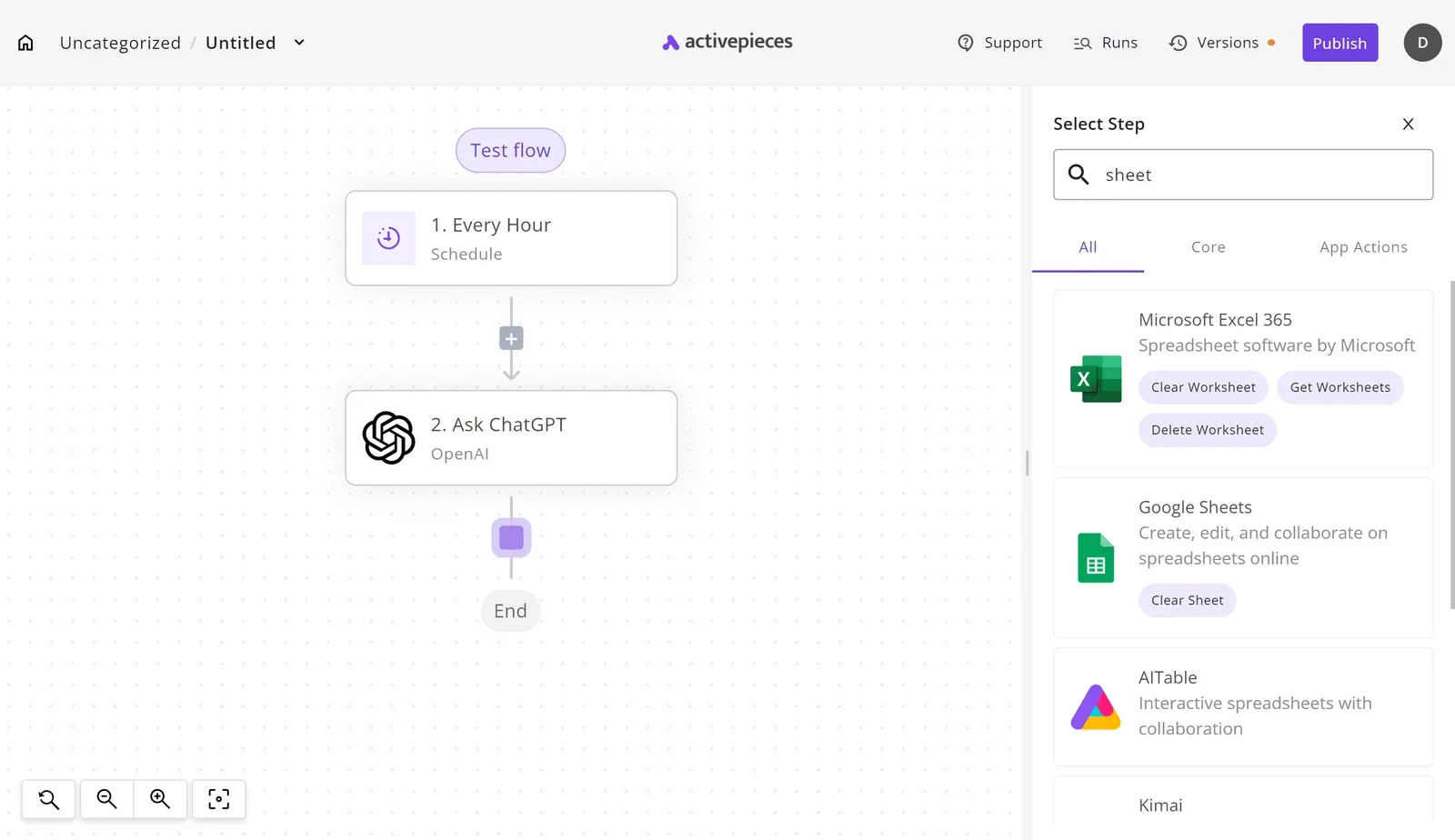
Take two things from it. The AI step is one block among many, so swapping its endpoint touches one configuration, not the whole flow.
And a trigger that fires on a clock is exactly the kind of job that spends money unattended, which is why it deserves its own key and cap.
Where the limit sits
Be honest about the limit: LiteLLM still enforces the budgets and rate limits on that key, and the paid governance features stay in its enterprise tier. What Activepieces adds is the part a gateway never sees.
A gateway meters calls, and an SDK hands an agent code to run, but neither gives the agent a role or a trail; Activepieces treats the agent as a user, so the RBAC, SSO and SCIM already applied to your staff also set which apps it may connect to.
Open the run detail view and each tool call the agent made sits as its own entry, with its own input and output, instead of one opaque result. That is how the workflow stops being a blind spot beside the gateway.
The Monday steps for choosing a LiteLLM plan
Stay on the free open-source proxy until a named person owns a governance requirement, such as SSO, audit logs or spend controls, that you can't meet any other way.
Seven steps, done in order, will show whether you have reached that point, and most teams don't, so the free tier is likely your permanent solution.
- Pull last month's model spend for each team.
- List your governance needs, each with an owner.
- Re-read the pricing page and request a quote.
- Price your own hosting.
- Compare one rival's quote.
- Set a review date.
- Write a one-page decision note.
Do them in this order, because step 1 tells you whether any of this is worth the effort.
Two columns are all the comparison you actually need: the free proxy plus your hosting, and the enterprise tier. I'm not reproducing the vendor's table here, because plans change and the page you re-read in step 3 is the authority.
Build your own with one row per governance need from step 2.
For each row, record who asked for it and whether you can meet it today without paying. Rows with no owner get deleted.
If most rows survive, the enterprise tier deserves a serious look. If only one or two do, check whether a cheaper workaround covers them first.
Ask for a quote and you learn the real number, and what the vendor thinks your spend and headcount are worth. It doesn't tell you whether you need the product.
Take the quote to step 4 and put it beside your hosting estimate, then beside the rival's quote from step 5. Treat the gap between those three as the price of the decision, not the quote alone.
Frequently asked questions
Is LiteLLM free for commercial use?
You can use LiteLLM's open-source proxy commercially for free, and you pay only for the servers you host it on and the model providers you call.
The enterprise features, such as SSO and audit logs, sit under a separate paid license. Check the license terms in the project's repository before you ship.
Does LiteLLM mark up model tokens?
Self-hosted, LiteLLM adds no markup on model tokens: your requests go to OpenAI, Anthropic or another provider under your own account, and they bill you at their rates.
LiteLLM's fee is for the enterprise license, not a cut of token spend. Confirm this against the current pricing page if you plan to use any hosted offering.
Can you trial the enterprise features, and what is the contract term?
Ask sales for a trial of the enterprise features before you buy. LiteLLM has trial licenses on request. Test the specific feature you'd be paying for, such as SSO against your identity provider, before you sign anything.
I can't give you a confirmed contract term, and a guess would be worse than nothing.
Enterprise software is often sold on annual agreements, but LiteLLM's terms are set in the quote. Ask about term length, renewal pricing and cancellation rights in writing, because those matter more than the first-year number.
How reliable are these figures?
Treat any figure you read, including ours, as a snapshot, because LiteLLM's plans and limits can shift, as on any fast-moving infrastructure product.
Before you budget, check the vendor's pricing page and your quote on the day you decide. Anything you're told on a call should also appear in the contract.
Related reading
References
Running the numbers
See what the same workload costs here.
Free forever plan, and every paid plan self-hosts at no extra cost.
See pricing Talk to sales