
LiteLLM Alternatives Pricing and Hosting Costs in 2026

Oct 25, 202617 min read
LiteLLM alternatives are other LLM gateways: services that put one API in front of many model providers, much as workflow tools like Activepieces put one interface in front of many apps.
Choosing among them is mostly a question of who runs the proxy, what it bills beyond the list price, and what happens when it fails.
The total cost of a LiteLLM alternative is the full price of routing model requests through a gateway, which includes the per-token or platform fee, the cost of hosting and maintaining the proxy, any markup or add-on charges, and the cost of an outage when it fails.
A cheaper or hosted swap only helps if you also add a fallback route and a spend cap. Vendor pages last checked: 24 October 2026.
LiteLLM alternatives, defined by one 02:10 gateway outage
What a gateway does and where teams use one
A gateway accepts requests in one format, forwards them to whichever provider you configure, and returns the answer in the same shape. Teams use one to keep provider keys in one place, switch models without touching application code, and log usage per team.
Every caller depends on it, and that is the constraint that matters. Chat features, nightly batch jobs, and internal automations (for example, workflows built in Activepieces, whose core is MIT-licensed and can run on your own servers) all point at the same endpoint.
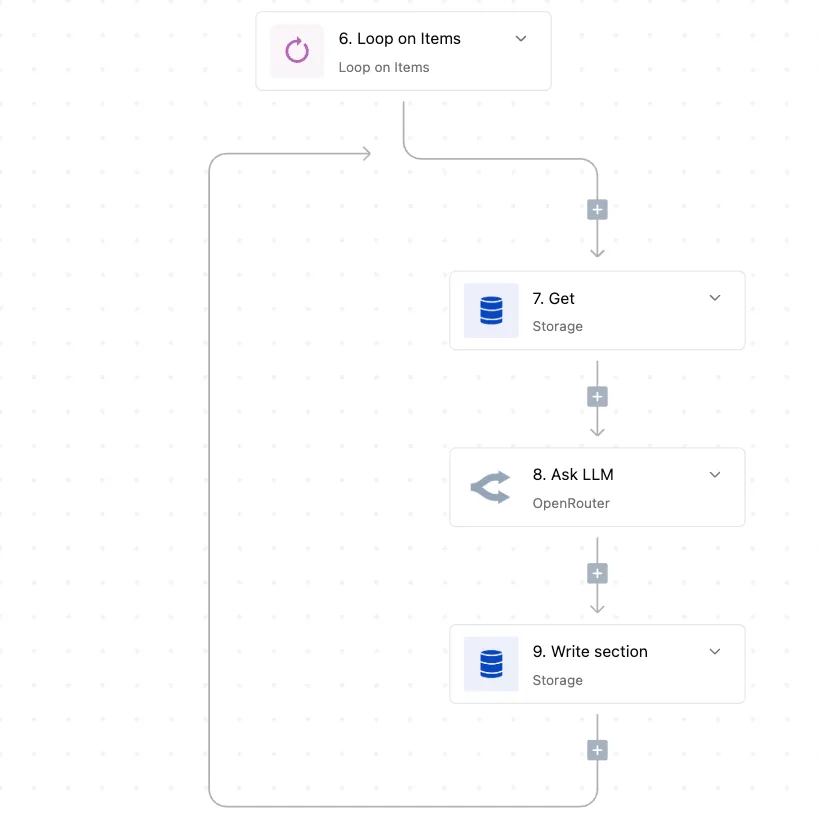
A gateway is therefore a single dependency, however many providers sit behind it.
Timeline of the LiteLLM gateway outage
Read the team below as an illustrative composite, not a named company. It runs a self-hosted proxy on one machine, with no second route and no on-call alert tied to the proxy itself.
The timeline shows how long a single stopped process can stay invisible, and the gaps between steps are the part to take from it.
- At 02:10 the proxy stops. Nothing on the provider side has failed, yet every feature that calls a model now has nowhere to send its request.
- At 02:14 the first requests fail. Applications talk only to the proxy, so users see errors even though every provider is healthy.
- At 02:40 the first page or ticket arrives. Monitoring watched the providers rather than the proxy, so nobody knew for about half an hour.
- At 03:30 someone tries a restart. The first fix came more than an hour after the stop, because the person who owned the proxy had to be found and given access.
- At 04:15 service is restored. The costed window was 90 minutes, all of it avoidable with a standby route.
You can make each gap in that list a decision in advance: who watches the proxy, who can restart it, and where traffic goes meanwhile. The sections that follow compare alternatives against those decisions.
If you are running this arithmetic for your own team, see what the same workload costs on Activepieces.
What the outage cost in time and dollars
In this illustrative case, a roughly two-hour gateway outage costs about $1,400, and nearly all of it's engineer time, not lost requests, which means the burden is operational overhead rather than lost customer value.

The inputs below are assumptions to replace with your own; none are measured.
| Line | Assumed input | Rate | Resulting cost (illustrative) |
|---|---|---|---|
| Minutes down | 90 min | 116 requests/min (5M ÷ 43,200) | 10,440 requests hit |
| Failed requests | 10,440 | $0.002 each | $21 |
| Tickets | 12 | $15 each | $180 |
| Engineer hours | 10 h | $80/h | $800 |
| Spend overrun | retry storm, no cap | assumed | $400 |
| Total | $1,401 |
At 5 million requests a month, the gateway carries about 116 requests a minute, which means any minute of downtime silently affects thousands of in-flight requests. Ninety minutes down therefore fails roughly 10,000 calls.
At an assumed $0.002 each that's only $21, so the requests are cheap to lose. A fallback route matters because those calls were user-facing, not because of their price.
Twelve tickets at $15 add $180. Ten engineer hours at $80 add $800, the largest line, so engineer availability is the limiting factor in incident response.
Without a spend cap, clients retrying against a recovering proxy can overrun the budget; $400 is an assumed figure, so unmanaged retry behavior turns recovery itself into a cost amplifier. A cap limits that line, and a fallback shortens the other lines.
The monthly gateway bill at this workload
Against that $1,401 incident, the list prices are small. TrueFoundry reports LiteLLM's MIT edition at $0 a month, so you pay in your own operating hours, which is what the outage above consumed.
According to TrueFoundry, it lists Enterprise Basic at $250 a month and Portkey Production at $490, by which measure a single incident equals months of enterprise service. Enterprise Premium is $2,500, which is more than the whole example incident.

A subscription of a few hundred dollars is cheaper than one bad night, but only if it comes with a fallback and a cap.
Why the self-hosted proxy with no fallback failed
When a single failed upgrade stopped every request, nothing capped the cost of the retries. The outage came from running one unmanaged LiteLLM instance with no second route and no spend limit.
Because every model call passed through one process, the rest of the gaps mattered. The sequence below shows how a routine upgrade became an outage, and each step is a gap the team can close independently.
- One proxy instance served all traffic.
- The image had no pinned version, so a restart pulled a newer one.
- The database migration step failed on startup.
- No health check noticed, so traffic kept going to a proxy that couldn't serve it.
- No second route existed to send requests around it.
- No budget cap stopped spend while clients retried.

Removing any one of steps 1, 2, 4, 5 or 6 would've shortened or prevented the incident.
Missing fallbacks and budget limits
None of fallbacks, health checks and budgets is on by default; LiteLLM's documentation describes them as features you configure.
Look at how enterprise spend divides and the second route makes sense. Menlo Ventures puts Anthropic at 40% of enterprise LLM API spend, OpenAI at 27% and Google at 21%.

That means a typical company already pays three vendors, so a fallback to another one costs a config entry rather than a new contract.
Without a cap, a retry loop against a broken route bills at full price while producing nothing; a budget cap's the other half.
Unpinned upgrades and key sprawl
Under the timeline sit three mistakes:
- Treating an open-source project as a managed service, when upgrades, migrations and monitoring are the operator's job.
- Leaving the version unpinned, so a restart became an upgrade nobody scheduled or tested.
- Holding every provider key in one place, so one failed proxy took down access to all three vendors at once.
Read the LiteLLM changelog before each upgrade, and pin the version, because that is what gives you time to read it. Test the migration on a copy of the database, with no outbound dependency on the production proxy, before it touches live traffic.
Next comes the question of which alternatives remove these gaps, and what each charges for doing so.
Worth checking against a plan that does not meter every step: one credit covers a whole run on Activepieces.
LiteLLM alternatives compared on price, hosting and limits
None of the alternatives removes all of the gaps above, though each removes at least one. The charges that sit beside the list price differ more than the list prices do.
The table below sets the seven options side by side on the six properties that decide the swap.
Read the "extra charges" and "fallback" columns first: they show where a cheaper option quietly moves cost or risk onto the team.
Where a vendor hasn't published a figure or a feature, the cell says "not published" rather than a guess. This table quotes only the prices that could be confirmed against a vendor page.
| Option | Hosting | List price | Extra charges | Licence | Fallback | Budgets |
|---|---|---|---|---|---|---|
| LiteLLM | Self-hosted, or vendor-hosted enterprise | Enterprise quoted by sales | Not published | Open source core, commercial enterprise tier | Yes | Yes |
| OpenRouter | Hosted only | Not published | Not published | Proprietary service | Yes | Not published |
| Portkey | Hosted, with self-hosted options | Not published | Not published | Open source gateway, proprietary platform | Yes | Yes |
| Helicone | Hosted, or self-hosted | Not published | Not published | Open source | Not published | Not published |
| Cloudflare AI Gateway | Hosted only | Not published | Not published | Proprietary service | Yes | Not published |
| Kong AI Gateway | Self-hosted, or vendor-hosted | Not published | Not published | Open source core, commercial tier | Yes | Not published |
| SDK retries | In the application | None | None | Depends on the SDK | Retry only, no provider switch | None |
In practice the choice depends on who must keep the proxy alive. The sections below take each group in turn.
Managed gateways
If the gateway is hosted only, as with OpenRouter and Cloudflare AI Gateway, the team no longer patches or restarts anything, which removes the failure that caused this outage.
The cost's a new dependency outside the team's control, so an outage there can't be fixed from inside the network. Any team that can't send traffic to a third party should rule these out first.
Inside the team's own boundary, LiteLLM, Portkey's gateway, Helicone and Kong AI Gateway can all run. That keeps data local and keeps the audit trail in-house.
It also keeps the operating burden: the team owns upgrades, capacity and the on-call rota. Self-hosting changes who's paged, not whether anyone is.
When all you want is a floor, SDK retries need no extra service and can be tested with the network cable pulled out. They retry the same provider; they don't switch providers and they cap nothing. They're a floor, not a replacement.
Self-hosting changes who's paged, not whether anyone is.
In order, the decision went like this:
- State the constraint: whether traffic may leave the network.
- If it may not, keep a self-hosted gateway and add a second provider as fallback.
- If it may, a hosted gateway is acceptable, provided a fallback path to a second provider exists.
- In either case, set a spend cap before go-live, because a swap without one reproduces the original risk.
Where Activepieces fits beside an LLM gateway
Don't expect Activepieces to replace LiteLLM: it is workflow automation, not a proxy for application traffic.
It fits where an LLM call is one step inside a business workflow, such as a summary or a routing decision, so that one workflow can switch model providers or alert on failure.
On Plus and above, with your own AI keys, every AI step costs 1 credit and the model cost lands on your own provider bill.
When the LLM call is a workflow step
When a webhook, a schedule or a form triggers the job and a model call is one of several steps, the workflow tool owns retries and alerts, and a gateway adds little.
Activepieces cloud's self-serve plans start with Free at $0 per month, Plus at $20 and Team at $200 a month, with Ultimate and Embed priced through sales, meaning anyone can test the platform without budget approval. The full list is on its pricing page.

Trying the pattern costs nothing, and the jump from Plus to Team is tenfold, so check which limits you actually hit before paying for it.
If your answer to the first decision above was that traffic may not leave the network, the workflow half can follow it.
Activepieces has a self-hosted, air-gapped build, and its docs list SSO, SCIM, custom RBAC, audit logs, release management and secret managers for that build.
The managed cloud pinned to the EU region in Frankfurt carries the same six items, though only the self-hosted build keeps the workflow inside your network.
MoneyGram, Moneypenny, Alan and FundingSocieties run Activepieces in production, on an MIT-licensed core with 771 integrations in the open repository, which means organizations can deploy it knowing it's battle-tested in production.
A fallback and alert pattern for that step
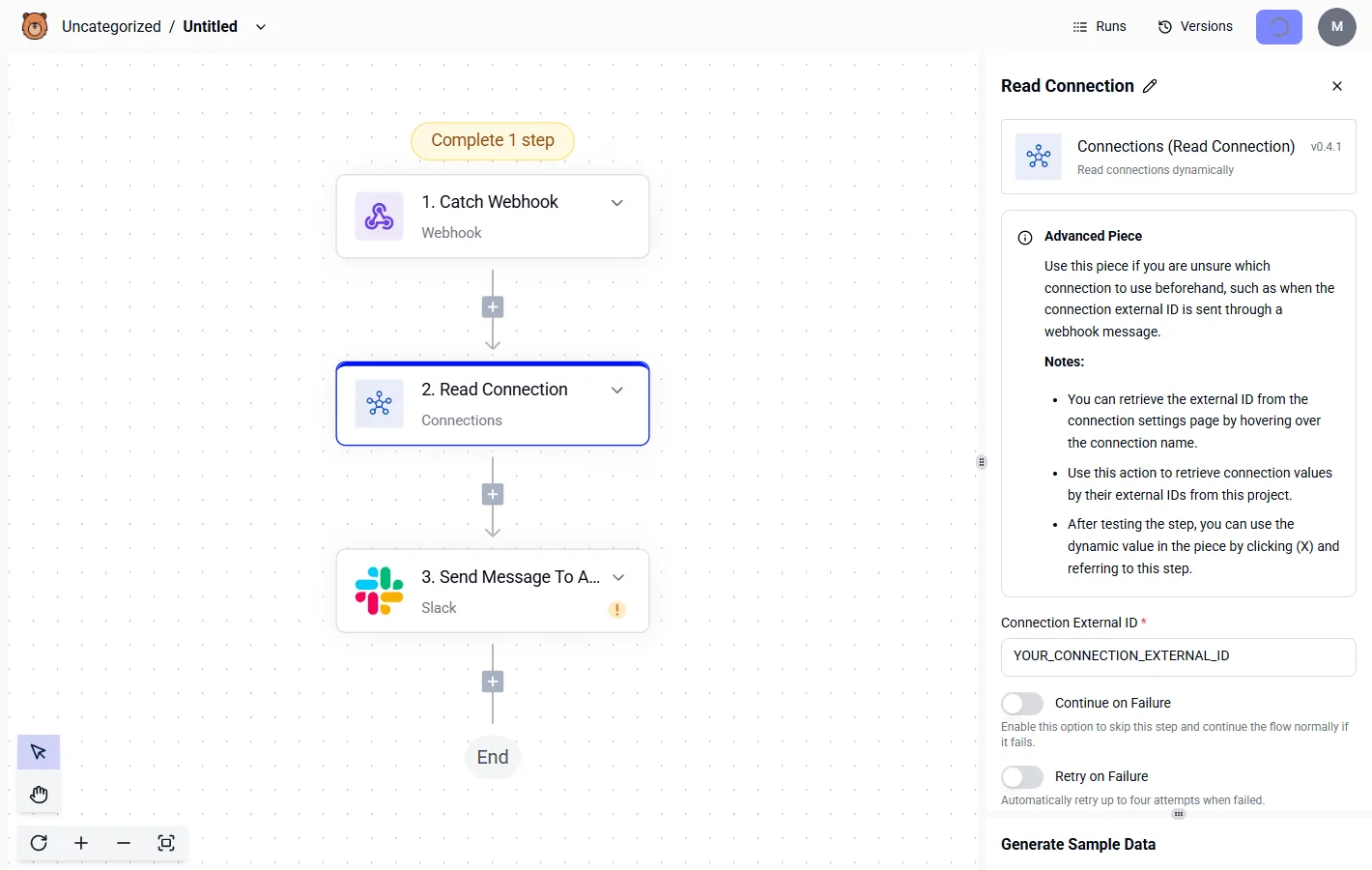
In the configuration panel of the Read Connection step below, each step shows "Continue on Failure" and "Retry on Failure" toggles.
That step is a Connections integration (v0.4.1) that reads a connection by its external ID, sitting between a Catch Webhook trigger and a Slack message.
It shows that credentials live in a named connection rather than in the step, so swapping a provider means changing one ID.
The pattern, in order:
- Call the primary provider with "Retry on Failure" on.
- Turn on "Continue on Failure" so an exhausted retry doesn't end the run.
- Branch on whether step 1 returned an error.
- On error, call the second provider using its own connection.
- If that also fails, send a Slack message so a person sees it.
Silence is no longer possible: each run ends in a result or an alert. This protects one workflow only. Other services calling the same provider are unaffected.
When you need a gateway instead
Use a gateway when many applications share model access and you need one place to cap spend, route by model and rotate keys.
Activepieces sees only the calls its workflows make, and the 1,000 credits a month on its Free plan meter those runs alone, so it can't cap spend that other services incur.

Teams with both kinds of traffic can run the two together: the gateway for application calls, Activepieces for scheduled and event-driven work, which its self-hosted Community Edition runs under the MIT licence.
The Free plan's $0 price makes the workflow half cheap to test, but it doesn't replace a spend cap on the gateway side.
Gateway rules for LiteLLM alternatives after the outage
On Monday the team wrote down five rules, and a spend cap is the first. Each one closes a gap the outage exposed that no list price would've shown.
Fallback, pinning and budget caps
When the gateway failed, every workflow that called it failed too, because it sat in the path of every model call and nothing sat behind it.
A cheaper or hosted replacement would only move that single point of failure somewhere else, so the rules apply whichever proxy the team runs.
Written into the change request, the five rules were:
- Every route has a second route on failure, through a different provider or a direct connection, so one gateway fault doesn't stop the workflow.
- The gateway version is pinned and tested in staging before it reaches production, so an upgrade never arrives unannounced.
- Every key has a hard monthly budget that stops requests when reached, rather than an alert someone may read late.
- A health check pages a named person, not a shared channel, so someone owns the first response.
- Pricing is reviewed quarterly, because per-token rates and fees beyond the list price change without notice.
You can check each rule without trusting a vendor's claim. Disconnect the primary route in staging and watch the fallback take over. Set a tiny budget on a test key and confirm requests are refused. If either fails, the rule isn't in place yet.
This is the order the team worked in. It fits in one day because none of it needs procurement or a new contract.
- List every key the gateway issues and record which workflow uses each one.
- Set a hard monthly budget on each key, starting conservatively and raising it only after a review.
- Configure a second route for each workflow and test it by blocking the first route in staging.
- Pin the current gateway version and write down the exact version string in the runbook.
- Add a health check that pages one named person, then trigger it deliberately to confirm the page arrives.
- Put the quarterly pricing review in the calendar, with an owner and a list of fees to re-check.
Frequently asked questions
Is LiteLLM free to use? The open-source proxy is free to download and run, but you pay for the machine, the database and the person who keeps it patched.
LiteLLM's documentation also separates a paid enterprise tier, which holds features such as single sign-on and finer-grained access controls. Check which of those your audit requires before you call the deployment free.
Can I self-host an alternative to LiteLLM?
Yes. With no outbound path to a hosted vendor, several open-source gateways run on your own infrastructure, and self-hosting keeps working only if you run redundant instances.
If the single instance goes down, every caller goes down with it, because you then own the failure mode. Run at least two instances behind a load balancer and test a failover with the network cable pulled before you trust it.
Is OpenRouter cheaper than running LiteLLM myself?
Not automatically. OpenRouter is a hosted service that passes through model prices and charges its own fee when you buy credits, so the per-token list price isn't the whole bill.
Run it yourself and there is no per-token markup, but hosting and staff time come with it. Compare the two using your real monthly volume, and set a spend cap on whichever you choose. A hosted swap without a cap only moves the risk.
Do I need an LLM gateway at all? Not if you call one provider from one service and can tolerate that provider's outages.
A gateway earns its place when several teams share keys, when you need one place to log and cap spend, or when you want to fail over between providers. If none of those applies, a direct SDK call has one less component to break.
How do I move from LiteLLM without changing my code? Because most gateways expose an OpenAI-compatible endpoint, the change is mostly configuration. Do it in this order:
- Inventory every model name your code sends, because aliases defined in LiteLLM won't exist elsewhere.
- Stand up the replacement and map each alias to a real model on it.
- Change the base URL and API key in configuration, not in code.
- Replay a sample of recorded requests against the new endpoint and compare the responses.
- Switch traffic over, and keep the old endpoint available as the fallback until the new one has survived a deliberate failure.
Related reading
References
Running the numbers
See what the same workload costs here.
Free forever plan, and every paid plan self-hosts at no extra cost.
See pricing Talk to sales