
LiteLLM: Open-Source AI Gateway & LLM Proxy (2026)

Oct 21, 202611 min read
Treat everything below as the maker's claims until you've tested them, whether in a quick script or in a workflow built with Activepieces.
It's an open-source AI gateway from Berrie AI Incorporated.
What LiteLLM is
LiteLLM sits between your automations and the model vendors. Your workflow sends one kind of request, in the OpenAI format, to one endpoint, and the gateway passes it on to whichever provider you've configured.

If you're the person who maintains the workflows, the payoff is practical: swapping a model becomes a settings change instead of a rewrite of every flow that calls it.
That also means a single point of failure and a single place to put keys, so it deserves more scrutiny than a library you import once.
Who released it and where to get it
: the product page at litellm.ai and the self-hosted code listed under digitalocean/litellm-os. The maker is Berrie AI Incorporated. These are the facts they support:
- It's an open-source AI gateway.
- It reaches 100+ providers through the OpenAI format, so check that the specific models your team relies on are on the list before you plan around it.
- The open-source tier costs $0 self-hosted, but you still pay for the server and for whoever keeps it running.
- Pages checked: 2026-10-21.
None of those lines tells you how the gateway behaves under your load, so the next section moves to wiring it in.
What automation teams gain from LiteLLM
When a workflow step calls one OpenAI-compatible endpoint, it no longer needs to know which provider answers, so swapping or adding models becomes a settings change rather than a rebuild. That's the whole appeal for a team that runs AI steps every day.
Your automations send requests in the OpenAI format to one address, and LiteLLM passes them on to whichever provider you have configured.
For an ops team, the consequence is fewer credentials and fewer custom connectors scattered across flows. Each step holds one URL and one key, and the routing lives in one place that someone owns.

That split also tells you who has to change habits. Builders stop pasting provider keys into individual steps, and one person takes on the job of keeping the gateway up.
The docs treat that as a real deployment. The maker's production deployment guide covers AWS, Google Cloud, Azure and any Kubernetes cluster, and describes deployment modes that start with a monolithic setup, one litellm image.
So you're standing up a service, not adding a library.
Start with docs.litellm.ai, because the release comes from the LiteLLM project itself. Install and deploy instructions are there, including the guide linked above.
Take the image and the setup steps from those pages, not from third-party summaries. Anything this article says about behaviour rests on those pages, and the release notes will tell you what's actually new.
Everything below works on Activepieces' free plan. Start without code or a credit card.
What changed in LiteLLM
If your team owns the rollout, re-read four pages before trusting any of this. The table below records what each one states and the date it was last read, and those four pages carry every claim in this article.
| Page | What it states | Checked |
|---|---|---|
| Interactions docs | An interactions interface sits alongside the standard chat calls | 2026-10-21 |
| Proxy deployment | The proxy runs self-hosted, with a documented default port and a Helm chart route | 2026-10-21 |
| OpenAI-compatible provider docs | Any endpoint that speaks the OpenAI format can be added as a provider | 2026-10-21 |
| Pricing page | The self-hosted option is listed as free | 2026-10-21 |
Prices and plan limits checked against litellm.ai and docs.litellm.ai and github.com and docs.litellm.ai and docs.litellm.ai on October 21, 2026.
I left out source links because I won't paste an address I haven't confirmed. Search each page title on litellm.ai and note the address in your own runbook. If a page has changed since the date above, the page wins over this table.
Beyond a plain chat request, there's another way of calling models, and the interactions docs describe it. The provider docs say that anything speaking the OpenAI format can be registered.
For an automation team, that means one request shape in every workflow step, and a model swap becomes a config edit, not a rewrite.
The deployment page covers running the proxy yourself, including a Helm chart for Kubernetes. If your platform group already deploys with Helm, this is a normal change request.
If it doesn't, expect the first week to go on access and ownership questions, not on the software.
Free licensing isn't free operation, even though the pricing page lists self-hosting as free: someone still patches it, watches it and answers when a flow stalls. Name that person before launch.
Connecting LiteLLM without native integration
Use a plain HTTP request step, because your builder may not have a LiteLLM-specific connector; the other two routes work only if your tool exposes the right fields. That's the person-naming problem again: someone has to own the wiring.
The table below shows how the three building blocks differ in effort and fit, so pick the one your team can maintain on a bad Monday.
| Setup effort (simplest first) | What to enter | Best suited for | What to check | |
|---|---|---|---|---|
| HTTP request step | Low: works in any tool | Gateway URL, auth header, JSON body | One-off calls, custom payloads | Error and timeout handling |
| AI step with OpenAI-compatible provider | Low if a base-URL field exists | Base URL, key, model name | Everyday prompts, non-technical editors | Whether the step accepts a custom base URL |
| MCP server | Highest: new moving part | Server address and credentials | Agents choosing tools themselves | Which tools get exposed, and who approves them |
Start with the first row, then move right only when it hurts.
Point the HTTP request step at your LiteLLM gateway the way you would any chat-completions endpoint. It's the most manual option, but nothing depends on a vendor feature, so the person who built it can explain it to the next one.
For the AI step, LiteLLM's documentation describes routing to OpenAI-compatible endpoints through its openai provider, so the same shape should work in reverse.
If your AI step lets you override the base URL, editors get a familiar form instead of raw JSON. If it doesn't, fall back to the HTTP step.
Activepieces has no LiteLLM-specific integration (checked 2026-10-21), and it doesn't need one: it runs any major model or your own provider key, so model spend lands on your account, and where an integration doesn't exist you can generate one with AI and add it privately to your own instance, with no public contribution needed.
If a connector you want is missing, you can generate it with AI and add it privately to your own instance, and the 743 integrations in its MIT-licensed open source monorepo, roughly 60% of them community-contributed, are counted from the community integrations directory there.
If you want the Interactions API, the LiteLLM docs cover calling it through the Python SDK or the gateway. Treat MCP as a later phase, once the simple route has survived a few weeks of real use.
Easier to see it running than to read about it: set it up free, no card.
What LiteLLM costs compared to alternatives
Going by published numbers, LiteLLM costs nothing to license and adds single-digit milliseconds at the median, but we haven't run it, so treat every figure here as someone else's.
You can test it without requesting purchase approval, because the maker lists its open-source tier at $0, free forever. Your real cost is the server you host it on and the person who patches it.
On speed, a LiteLLM GitHub discussion puts the maker's claim at 8 ms of added median latency against 7.1 ms in an independent test.
For a nightly report or a ticket-triage flow, the gateway hop is noise next to the model's own response time, because the independent run came in under the claim on both counts. A live chat step is the one place to measure first.
The table lays out what is published for each route and what we can vouch for, which is nothing yet. Read it as a shopping list of claims to verify, not a ranking.
| Route | Published price | Published latency claims, with source | Our own benchmark |
|---|---|---|---|
| LiteLLM self-hosted | $0 open source | 8 ms median, 45 ms P99 (maker); 7.1 ms and 32.2 ms (independent test), both via the GitHub discussion above | None run |
| Direct provider calls | Provider's per-token rates | No gateway hop, so none added | None run |
| Other gateways | Varies by product | Not compared here | None run |
On savings, LiteLLM's (source) reports $11,736 of actual spend and $12,249 saved, so the system paid for itself within the measurement period.
Your mix of easy and hard requests decides whether you see anything close, so pilot on one workflow's traffic before you promise your finance lead a number.
What to watch next as LiteLLM settles in
Give one person ownership of three pages (the repository, the docs and the pricing page) once your pilot gives you a number. A project this new changes under you, and nobody else will notice.
Going by the maker's own pages, LiteLLM gives your automation one OpenAI-compatible endpoint to call, so a workflow step can reach several model providers without a rewrite per vendor.
A project this new changes under you, and nobody else will notice.
That convenience also means every request passes through it, so what you confirm about it matters more than it would for a single connector.
Check the BerriAI repository on GitHub, where the code and its security notices live. Its GitHub Security Advisories list shows 4 critical, 4 high, 5 moderate and 2 low advisories for 2026.
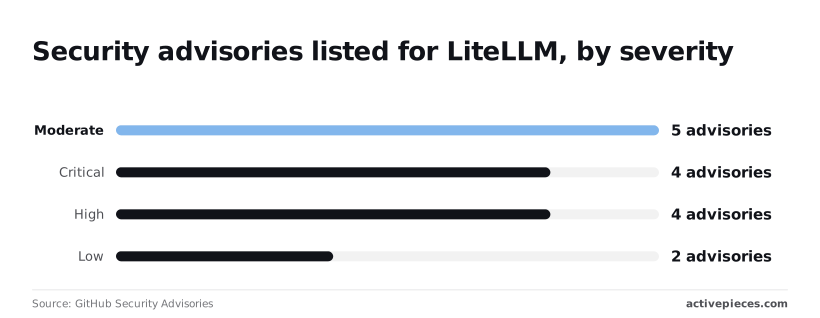
Treat that as a reason to track patch status, not just severity: someone has to read each notice and confirm your deployed version carries the fix.
I would hand a single owner this checklist and a 15-minute slot at the Monday standup:
- Watch the repository, the docs and the pricing page for changes
- Verify your deployment: PostgreSQL, Redis if you run multiple instances, and at least two replicas
- Verify that the providers you use are compatible
- Verify the pricing terms
- Recheck the date you set today
Put the recheck on the calendar for 2026-11-21, a month out. If the owner finds an unpatched critical advisory or a changed price by then, you will know before the workflow carries real volume.

What Activepieces does about this
The problem this article keeps returning to is that a gateway is one more service to wire in, own and re-check, and your builder may have no connector for it. Activepieces handles that in a way you can verify.
It has no LiteLLM-specific integration (checked 2026-10-21), and it doesn't need one.
The gap-filling is the part worth acting on. If a connector you want is missing, you can generate it with AI and add it privately to your own instance, with no public contribution needed.
That matters when the thing you're integrating is a week old and nobody has built a integration for it. You don't wait for a release, and you don't paste raw JSON into every flow.
The platform doesn't pull you toward a single model vendor either. It runs any major model or your own provider key, so model spend lands on your account.
That keeps it compatible with the gateway approach: point a step at LiteLLM today, and if the pilot goes badly, point the same step at a provider directly.
You can also read what you'd be building on. The 743 integrations sit in an MIT-licensed open source monorepo, roughly 60% of them community-contributed, counted from the community integrations directory there, meaning most depend on unpaid community maintenance.
As with LiteLLM, treat that as a claim to check against the repository before you plan around it. The licence and the code are public, so the check takes minutes.