
Gmail API: Scopes, Quotas and Error Codes (2026 Guide)

Nov 19, 202616 min read
The Gmail API is a free Google REST API for reading, sending and managing mail, labels, threads and drafts in a mailbox, whether you call it from your own code or through a workflow tool like Activepieces.

You enable it in a Google Cloud project and authorise each call with an OAuth 2.0 token. It's not a bulk-sending service.
The descriptions here follow Google's Gmail API documentation, checked on 19 Nov 2026 against developers.google.com/gmail/api.
The app obtains an OAuth token through the client and then makes REST calls against the mailbox, so the project and the token decide what the app may touch.
Before anything else, settle who owns that project and that client, because every later scope and quota decision is attached to them.
Gmail API is a REST interface to mailboxes
Everything after the diagram assumes that split: the project is the identity, the token is the permission, the mailbox is the data.
What the Gmail API lets you do
Through REST calls you can list and fetch messages, send new mail, and create or edit drafts. You can also read whole threads and create, apply and remove labels. Each call acts on one mailbox, the one the OAuth token was granted for.
When you plan a build, name the scope first. The permission you request at consent time (the OAuth scope) sets how much of that mailbox the call can see or change.

What it does not do
It's not a bulk mailing service, and it doesn't send on behalf of a mailbox the user hasn't authorised. A call without a valid token for that mailbox is refused.
It also gives you no access beyond the scopes granted, so a token approved for reading can't send, and one approved for sending can't read.
Contacts and calendar entries are outside the mailbox. They belong to other Google APIs with their own scopes.
The API itself carries no charge, and access is tied to a Google Cloud project rather than to a paid Gmail plan. The mailbox owner must grant consent through OAuth.
For a Google Workspace mailbox, the organisation's administrator may also restrict which apps can request access, so ask who administers the account before you build against it.
This takes minutes, not a project: automate it in Activepieces free.
Enable the Gmail API and create credentials
Access takes five steps in Google Cloud. The project you create owns the credentials, the quota and the consent screen, so create it under an account that will outlast your involvement.
The numbered list below gives the order; the three subsections after it explain the decisions inside each step.
- Create a Cloud project.
- Enable the Gmail API in that project.
- Configure the OAuth consent screen.
- Create an OAuth client ID.
- Download the client secret and record the redirect URI.
Steps one and two are mechanical. Steps three to five are where scope and ownership decisions get fixed.
Step 1: project and API enablement
A Cloud project is the container that holds your credentials and your quota. Name it for the system it serves, and add a second owner so access doesn't depend on one person.
Then open the API library inside that project and enable the Gmail API. Enabling it in the wrong project is a common cause of permission errors later.
Configure the OAuth consent screen and client ID
When the mailbox owner approves your app, the consent screen is what they see. Declare only the scopes you decided on earlier. An API key can't reach private mail, because mail requires a token issued with the user's consent.
Create an OAuth client ID of the type that matches your app, such as web application or desktop. Download the client secret, store it in a secrets manager, and record the redirect URI exactly as registered, since a mismatch fails the sign-in.
Gmail API service accounts and domain-wide delegation
A service account is a non-human identity. For a Workspace domain, an administrator can grant it domain-wide delegation, allowing it to act as named users within the scopes approved in the admin console.
Personal Gmail accounts have no administrator to grant this, so they use the consent flow above.
Check quotas on Google's Gmail API usage-limits page, as read on 19 November 2026.
Choose Gmail OAuth scopes before writing code
The narrowest scope that does your job decides how fast you launch, because Google reviews sensitive and restricted scopes differently, and the review is the slowest step in the project.
Quota limits tell you how fast you can call. Scopes tell you whether Google lets you call at all, and who must sign off on that first.
Scope comparison table
Read the table below as a ladder. It sets the six Gmail scopes against what each permits, how Google classifies it, and what that classification costs you at verification.
Each step up in access moves the review burden with it, so pick the lowest row that covers your feature.
| Scope | What it permits | Classification | Verification consequence |
|---|---|---|---|
| gmail.metadata | Reads message headers and labels, not bodies | Restricted | Full restricted-scope review |
| gmail.readonly | Reads messages, threads, labels and settings | Restricted | Full restricted-scope review |
| gmail.send | Sends mail only, no reading | Sensitive | Sensitive-scope verification |
| gmail.compose | Creates, reads, updates and deletes drafts, and sends mail | Restricted | Full restricted-scope review |
| gmail.modify | Reads, writes and labels messages, no permanent delete | Restricted | Full restricted-scope review |
| mail.google.com | Full access, including permanent deletion | Restricted | Full restricted-scope review |
Confirm each row against Google's scope documentation before you commit, since Google reclassifies scopes from time to time. Whoever owns the Google Cloud project owns this decision, so name that person now.
A sensitive scope needs your app verified by Google. A restricted scope needs that, plus a security assessment of how you store and handle the data.
If your feature only sends mail, gmail.send keeps you out of the heavier process. If you need to read bodies, accept the assessment and plan the calendar around it.
If your OAuth consent screen is still in testing mode, an integration that works on Monday can fail without warning later, because refresh tokens expire after a short period there. Treat every testing-mode token as disposable.
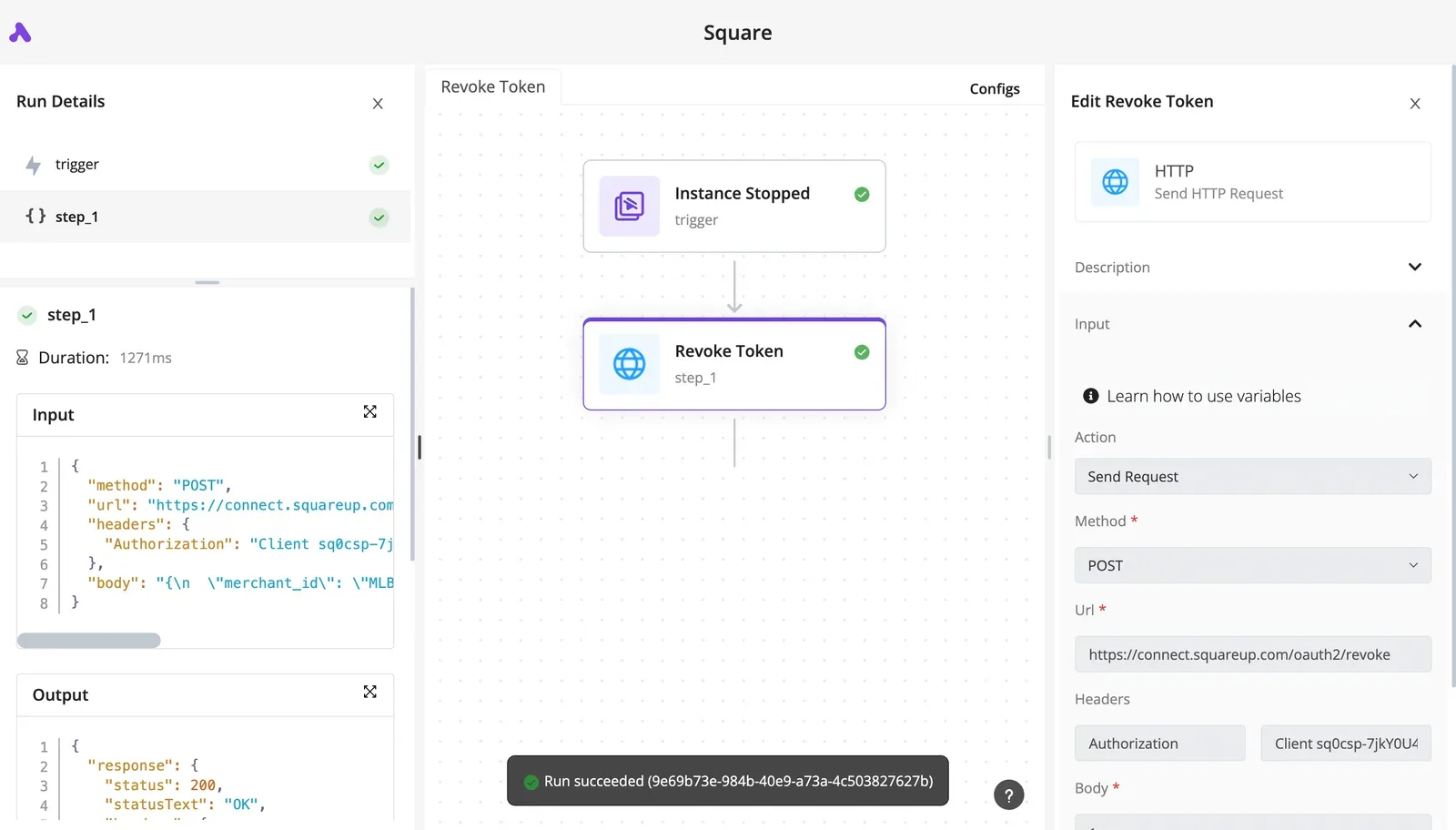
Build the re-authorisation path before you build the feature, and don't hand a testing-mode connection to anyone as production.
A minimal Gmail API request that works
To make a working first call, send a bearer token carrying a scope you chose on purpose to users.messages.list.
First exchange the authorisation code by POSTing code, client_id, client_secret, redirect_uri and grant_type=authorization_code to https://oauth2.googleapis.com/token. The response holds the access token, and a refresh token if you requested offline access.
List Gmail messages with curl
Before you run this, check whose mailbox me refers to. It resolves to the account that granted consent, not to your developer account. The read call needs gmail.readonly at minimum.
curl -H "Authorization: Bearer $ACCESS_TOKEN" \
 "https://gmail.googleapis.com/gmail/v1/users/me/messages"
The reply lists message IDs and thread IDs only. Fetch bodies separately with users.messages.get, so a list call alone tells you nothing about content.
Send a message
Sending needs the gmail.send scope, which is narrower than full mailbox access. Build an RFC 2822 message with To, Subject and body, encode the whole thing as base64url, and put it in the raw field of a JSON body.
curl -X POST -H "Authorization: Bearer $ACCESS_TOKEN" \
 -H "Content-Type: application/json" \
 -d '{"raw": "<base64url-encoded message>"}' \
 "https://gmail.googleapis.com/gmail/v1/users/me/messages/send"
Ordinary base64 will be rejected, so use the URL-safe alphabet.
A form that looks complete in a no-code builder, with the connection chosen and the recipient filled, still fails the run if the token lacks the send scope. Fix that failure at the grant, not in the request.
If you would rather not write the base64url encoding and the token exchange yourself, Activepieces sends the same message through its Gmail integration, and if a Gmail action you need isn't there, you can have AI generate the missing integration and add it privately to your own instance, with no vendor release to wait on.
That is how the catalogue got to 750 integrations, counted directly from the open source monorepo, with roughly 60% contributed by the community. The consent and the gmail.send scope still have to be granted underneath.
The Gmail API reference organises everything under users:
messages, for listing, reading, sending and deleting individual mailthreads, for whole conversationslabels, for creating and applying labelsdrafts, for unsent messageshistory, for changes since a known pointwatch, which pushes mailbox change notifications through Pub/Sub
Each group maps to a scope, so choose the group first and the scope follows.
You can follow the rest of this with the builder open. Start free, no card.
Understand Gmail API rate limits and quota units
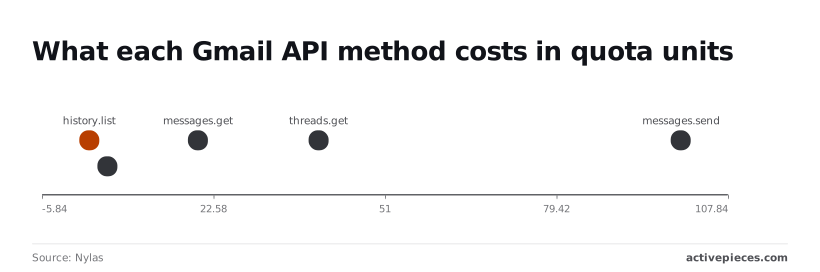
Two numbers decide how you design a sync. Nylas lists 2 units for history.list and 100 for messages.send, because every Gmail API call is charged in quota units and the charge depends on the method.
Quota units per method
Reading the mailbox is cheap in units only when you use the cheap calls. history.list costs 2 units and messages.list costs 5, so finding what changed is inexpensive.
Fetching every message you find costs four times the listing call, because messages.get costs 20 units. threads.get costs 40 units, double a single message fetch, so pull whole threads only when you need them. messages.send costs 100 units, the most expensive of the five.
The table converts those costs into a ceiling, using a budget of 6,000 units per user per minute.
| Method | Units per call | Max calls per minute at 6,000 units per user |
|---|---|---|
| history.list | 2 | 3,000 |
| messages.list | 5 | 1,200 |
| messages.get | 20 | 300 |
| messages.send | 100 | 60 |

Poll with history.list and fetch only the messages it names, and you stay far below the ceiling. List and then get everything, and you hit it at 300 fetches a minute.
Gmail API per-project and per-user quota limits
Each mailbox you connect draws on its own allowance, so one busy account doesn't starve another. That is what the 6,000-unit per-user figure means. The project has a separate ceiling, shown in the quota page of your Google Cloud console.
Batching doesn't reduce the cost, because each call inside a batch still counts its own units. Decide your retry and back-off behaviour against the per-user number first.
The 100 units per send is an API charge. Whether a message is allowed out at all is a separate rule that belongs to the sending account, and it varies with the account type.
Ask who owns the connection before you plan volume, because the owner's account absorbs the sends.
Fix Gmail API errors by response type
Every Gmail API error calls for one of three responses: repair the token, correct the scope or the pace, or wait and retry. Only rate limits and server errors are worth retrying.
The table shows which response fits each code, so build your handler from it rather than treating all failures alike.
| Code | Documented cause | Fix | Retry? |
|---|---|---|---|
| 400 | Malformed request or invalid parameter | Correct the request | No |
| 401 | Invalid or expired access token | Refresh the token, resend | Once, after refresh |
| invalid_grant on refresh | Refresh token revoked or expired | Owner re-consents | No |
| 403 rateLimitExceeded | Rate limit reached | Slow down | Yes, with backoff |
| 403 insufficient scope | Token lacks the needed scope | Request the scope, re-consent | No |
| 404 | Resource not found for this mailbox | Check the ID and the owner | No |
| 429 | Too many requests | Slow down | Yes, with backoff |
| 5xx | Server-side failure | Wait | Yes, with backoff |
The sections below cover the groups that need judgement.
When you get a 401, the access token's stale, so refresh it and resend once. If the refresh itself returns invalid_grant, the refresh token's dead, usually because the mailbox owner revoked access. Retrying can't fix that, so send the owner back through consent.
Insufficient scope means the token was issued without the scope that method requires. Widening scopes forces every owner to consent again, which is why you decide them first. A rateLimitExceeded or 429 response means slow down, then retry with backoff.
When 5xx errors arrive, wait, retry, and lengthen the wait after each failure, with a random jitter so parallel workers don't retry in step. Cap the attempts and log the final failure.
Batch requests within the documented batch limit, and use watch with history.list instead of polling. A retried send can deliver twice, so record each send before you retry it.
Call the Gmail API without code in Activepieces
Wherever a workflow sends, reads or labels mail on a trigger, Activepieces fits, because its Gmail integration handles the request plumbing for you. It doesn't remove the Google OAuth consent or the quota limits underneath.
A retried send can deliver twice, so record each send before you retry it.
A send that fails once can still be retried and delivered twice, so the duplicate-send record from the previous section belongs in the workflow too.
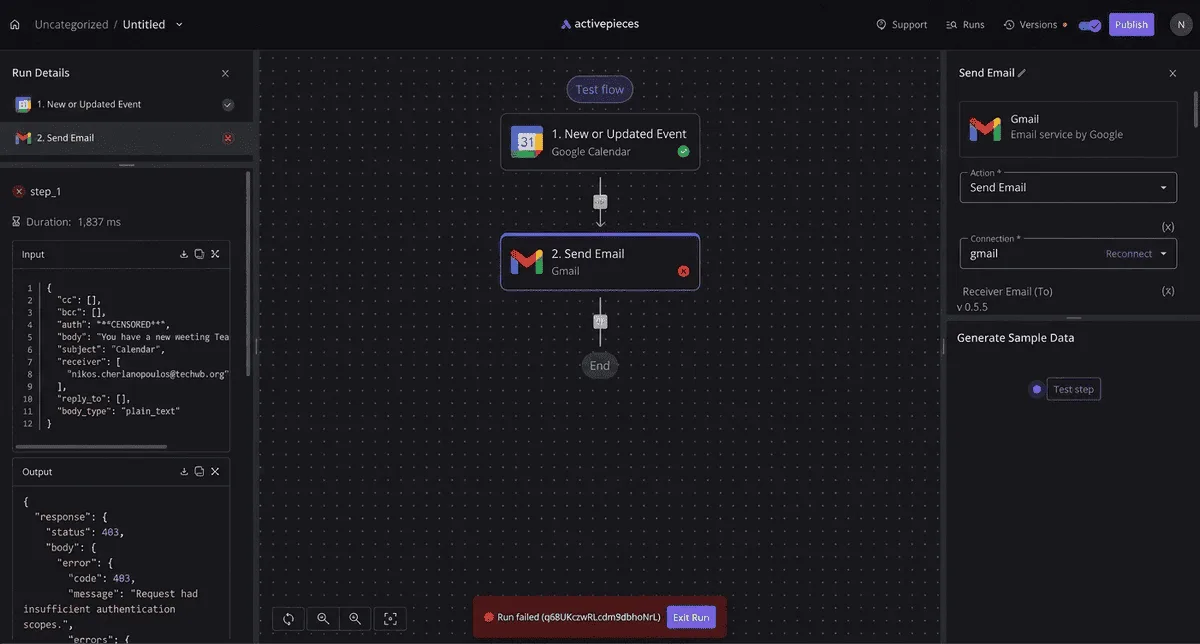
The screenshot shows a failed run in the Activepieces builder. A Google Calendar event trigger feeds a Gmail Send Email action, and the run stops with a 403 for insufficient authentication scopes.

The right panel shows the Gmail connection chosen for that step, and the left panel holds the error output.
The lesson: the connection was authorised without the scope that sending needs, and the builder can't fix that for you. Someone has to reconnect with the right permission.
What the Gmail integration covers
The integration has a new-email trigger, a send-email action and a custom API call action. Those cover the common jobs: start a flow when mail arrives, send a message from a flow, and label or read mail through the third action.

Each step uses a connection, and that connection holds the Google token. So ask first who owns it. If it belongs to one person's account, the workflow stops working when that person leaves or revokes access.
Call any Gmail API endpoint with custom HTTP
When no ready-made action exists, the custom API call lets you send a request to a Gmail endpoint using the same connection. You supply the method, the path and the body, as you would in code.

Step outside the scopes granted at connection time and you get the same 403 as in the screenshot, because those scopes still decide what Google will accept. Choose scopes before building the flow, not after the first failed run.
If you need your own retry and backoff behaviour, per-user quota handling across many mailboxes, or a send record checked before every retry, stay with code.
A visual flow gives you less control over those. For a single mailbox with modest volume, the workflow is enough.
Frequently asked questions
Is the Gmail API free to use?
Yes: Google doesn't charge per call to the Gmail API. What you do pay is the work of staying inside its quotas, and the cost of a Workspace subscription if the mailbox you connect belongs to one.
Someone still has to own the Google Cloud project that holds the quota, so name that person before you build.
Can I use the Gmail API with an API key only?
No. An API key identifies your project, but it can't authorise access to a mailbox. Every call that reads, sends or modifies mail needs an OAuth 2.0 access token carrying the scope you requested. The key alone returns an authorisation error.
Does the Gmail API work with a personal @gmail.com account?
Yes. The account holder signs in through the OAuth consent screen and grants your app the scopes it asks for. The connection belongs to that person, so if they revoke access or leave, your integration stops.
If your app requests sensitive or restricted scopes and serves users outside your own organisation, Google's verification review applies too.
How do I stop my refresh token expiring after seven days?
Move your OAuth consent screen from testing status to production. Refresh tokens issued to apps in testing expire on a short fixed schedule; in production they last until something revokes them.
Revocation can come from the user, from a password change on certain scopes, or from the token going unused for a long time. Store the token securely and handle an invalid-grant error by sending the user back through consent.
Can I send bulk marketing email through the Gmail API?
It's the wrong tool for that job. The API sends as an individual mailbox and is bound by that account's sending limits and Google's usage policies.
Bulk campaigns risk suspension of the mailbox you connected. Use a dedicated email-sending service for marketing, and keep the Gmail API for one-to-one messages sent on a user's behalf.
Related reading
References
Build it
Set this up in minutes.
No code required. Connect your accounts, and Activepieces runs it from there.
Start free Talk to sales