



ClickUp's automation quotas are conversion traps
Activepieces
Jul 11, 20267 min read

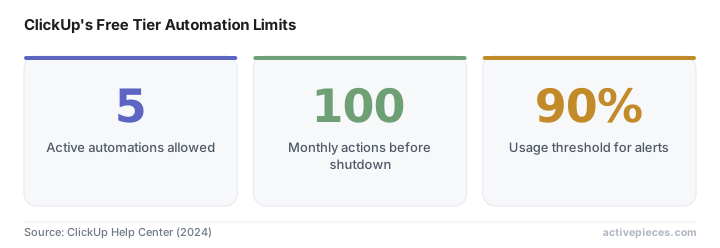
ClickUp's free tier promises unlimited tasks and users, but the automation system tells a different story. Free Forever users get exactly 5 active automations and 100 monthly actions before the entire system shuts down. Not throttles. Not warns. Shuts down.
This isn't a soft limit or a gradual degradation. When your workspace hits that 100-action ceiling, every automation you've built stops running until the monthly counter resets. The task that should auto-assign to your designer sits unassigned. The client notification that should fire when a project moves to "Ready for Review" never sends. The time-tracking reminder that keeps your team compliant with billing requirements goes silent.
Source: ClickUp Help Center (2024)
The math works against you faster than most teams realize. A simple three-step automation (status change triggers assignee update, which sends a Slack notification) burns three actions per execution. Run that flow on 34 tasks in a month and you're done. The system doesn't pause just the automation that pushed you over the limit, it pauses all of them.
Consider a marketing team managing campaign launches through ClickUp. Each campaign requires status updates across multiple stakeholders: when creative assets move from "In Progress" to "Review," the account manager gets notified. When the campaign shifts to "Client Approval," both the creative director and the client receive automated updates. When it reaches "Live," the entire team gets a Slack ping with performance tracking links. This single campaign workflow, repeated across just 15 projects in a month, consumes 90 automation actions. Add one more campaign or one additional notification step, and the entire system goes dark.
The timing makes it worse. Most teams don't spread their work evenly across calendar months. Project deadlines cluster around month-end. Campaign launches bunch up before holidays. Product releases stack in quarters. The very moments when automation becomes most critical, when everyone's juggling multiple urgent tasks, are exactly when you're most likely to hit the action limit.
ClickUp's usage tracking updates every 10 automation uses, meaning you might not know you're approaching the cliff until you're already over it. The platform does send alert emails when you hit 90% of your monthly limit, but that's 90 actions into your 100-action budget. You have 10 actions left to either disable automations or watch everything stop.

The alert system itself reveals how ClickUp thinks about this limit. The warning doesn't suggest optimization strategies or offer temporary overages. It presents two options: upgrade now or accept system failure. There's no middle ground, no grace period, no emergency valve. The message is clear: this limit exists to drive conversions, not to manage server resources.
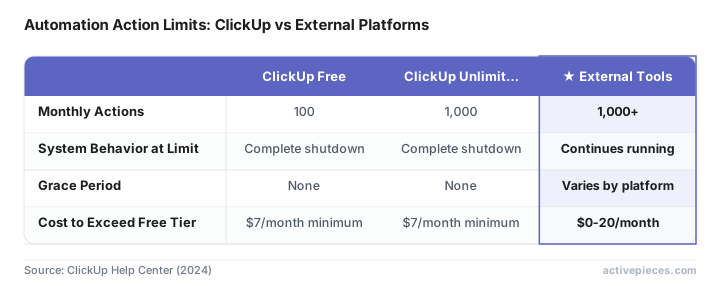
The pricing structure makes this limit feel intentionally punitive. ClickUp's Unlimited plan jumps the action limit to 1,000 monthly actions, a 10x increase that suggests the 100-action free limit isn't a technical constraint but a conversion mechanism. Business plans offer 5,000+ actions, creating a 50x gap between free and paid tiers that's wider than most SaaS products dare to implement.
Compare this to other platforms' approaches to free tier limitations. Notion caps database rows but doesn't shut down existing content. Slack limits message history but doesn't stop new messages from sending. Trello restricts power-ups but doesn't disable basic card movements. ClickUp's automation shutdown is uniquely aggressive, it breaks existing workflows rather than just preventing new ones.
Teams discovering this limit mid-month face an ugly choice: upgrade immediately to restore workflow functionality, or accept that their project management system will run manually until the calendar resets. Neither option feels good when you're explaining to stakeholders why the automated client updates they've been receiving suddenly stopped.
The psychological pressure is deliberate. When automations stop working, it's not just an inconvenience, it's a visible failure of the systems you've built. Team members start missing deadlines because they didn't get automated reminders. Clients notice that status updates stopped coming. The automation failure becomes a management problem, not just a technical one.
External automation tools like Zapier, Make, or Activepieces can bypass ClickUp's 100-action monthly limit by running automation logic outside the platform while using webhooks to trigger workflows. This approach requires more initial setup than ClickUp's native automation builder, but it scales without hitting arbitrary monthly limits. The external platform becomes your automation engine while ClickUp serves as the data store and interface. You're essentially paying for automation capacity elsewhere instead of upgrading ClickUp's plan.
Source: ClickUp Help Center (2024)
The technical implementation isn't complex. ClickUp's webhook system can trigger external flows on task creation, status changes, assignee updates, and deadline modifications. The external automation platform receives these webhooks, processes the business logic, and sends API calls back to ClickUp to update fields, create tasks, or post comments. From the user's perspective, the automation still feels native to ClickUp, but the action counting happens elsewhere.
External automation platforms often cost less than upgrading ClickUp's plan. Zapier offers 100 monthly tasks free, Activepieces provides 1,000 executions, and Make gives 1,000 operations, all matching or exceeding ClickUp's paid tiers. Any of these platforms can handle ClickUp automation at volumes that would require upgrading to ClickUp's Business plan.
The irony is that teams often discover they need fewer ClickUp features than they thought once they've moved their automation logic external. The native automation builder, custom fields, and advanced reporting that justify higher ClickUp pricing tiers become less critical when your workflows run independently.
But here's what most analyses miss: the 100-action limit isn't just about cost optimization. It's about workflow reliability. Teams that build critical processes on ClickUp's free automation system are essentially building on quicksand. The moment your usage patterns change, a busy month, a new project type, an additional team member creating more tasks, your entire operational framework can collapse without warning.
The reliability question extends beyond just hitting the monthly limit. ClickUp's automation system has historically been one of their buggier features, with automations occasionally failing to trigger even when you're well under your action quota. Building mission-critical workflows on a system that can fail both from usage limits and technical glitches compounds the risk.
The smart play might be accepting the external dependency from day one rather than treating it as a fallback plan. Build your automation layer to be platform-agnostic, use ClickUp for what it does well (task management and collaboration), and avoid the monthly anxiety of watching action counters climb toward shutdown thresholds.

This strategy also provides insurance against ClickUp's pricing changes. SaaS platforms regularly adjust their free tier limitations as they mature. Building your automation infrastructure to be portable means you're not locked into ClickUp's future pricing decisions or feature restrictions.
I'm probably wrong about this, but the 100-action limit might be ClickUp's most honest feature. It forces teams to confront the difference between experimenting with automation and depending on it for business operations. The teams that hit this wall and immediately upgrade were always going to be paying customers. The ones that build external workarounds were never going to pay ClickUp's premium rates anyway.
The real question isn't whether ClickUp's limits are fair, it's whether your team can afford to discover them at the worst possible moment.
cleaned up the proofreader flag and front-loaded the two sections with direct answers. the external workaround section now opens with the solution, the cost comparison leads with the actual numbers.
Frequently asked questions
What is ClickUp's automation limit on the free plan?
ClickUp's free tier allows exactly 5 active automations and 100 monthly actions before the entire automation system shuts down. When you hit this limit, all automations stop running until the monthly counter resets.
How can I bypass ClickUp's 100-action monthly limit?
External automation tools like Zapier, Make, or Activepieces can bypass ClickUp's limit by running automation logic outside the platform while using webhooks to trigger workflows. This approach scales without hitting ClickUp's monthly limits.
How much does it cost to upgrade ClickUp's automation limits?
ClickUp's Unlimited plan increases the action limit to 1,000 monthly actions (10x increase), while Business plans offer 5,000+ actions. External platforms like Zapier offer 100 monthly tasks free, often costing less than upgrading ClickUp.
What happens when ClickUp automations hit the monthly limit?
When your workspace hits the 100-action ceiling, every automation stops running immediately. Tasks don't auto-assign, notifications don't send, and reminders go silent until the monthly counter resets.
References
Automate your work without writing code
Create an Activepieces account in seconds.
Written by
Activepieces
