
Google Workspace Pricing 2026: All Plans Explained

Nov 1, 202615 min read
Workspace has four plans, and teams that later wire them into automated flows, say through Activepieces, will find the same tiers apply: Business Starter, Standard, Plus, and Enterprise.
Google Workspace pricing is the per-user, per-month subscription cost of Google's business suite of email, Meet, Drive and collaboration apps, which varies by plan tier, storage, meeting limits, security features and billing term.
Each tier raises storage, meeting size and admin controls together, so the price gap between neighbours buys capability, not just a larger number on the invoice.
Google Workspace pricing today, in one table
The table, checked against Google's pricing page
Find the first rung that clears your storage, meeting and recording needs, then stop climbing.
Each tier raises storage, meeting size and admin controls together, so the price gap between neighbours buys capability, not just a larger number on the invoice.
| Plan | Price per user/month (annual term, flexible monthly) | Pooled storage per user | Meet cap | Recording |
|---|---|---|---|---|
| Business Starter | Lowest of the four; monthly billing costs more than annual | Smallest allotment | Smallest meeting size | Not included |
| Business Standard | Above Starter; monthly costs more than annual | Larger than Starter | Larger than Starter | Included |
| Business Plus | Above Standard; monthly costs more than annual | Larger than Standard | Larger than Standard | Included |
| Enterprise | Quoted through Google's sales team | Largest allotment | Largest meeting size | Included |
Plan ladder as of November 2026. Dollar amounts are left to Google's pricing page, apart from Starter's $7. It lists USD for the US and different currencies and rates elsewhere, so read your own region's figure before budgeting.

If you won't shed seats, the premium for the option to cut them mid-year is pure waste. Multiply the per-seat difference by headcount and by twelve to see it.
Costs the Google Workspace pricing table leaves out
You can't see most of the cost in a per-seat price, because it ignores everything that scales with seat count. Pooled storage is shared across the organisation, so a few heavy Drive users can drain what looks like a generous allotment.

Meeting caps bind on the largest call you hold, not the average one.
If you are running this arithmetic for your own team, see what the same workload costs on Activepieces.
Five criteria that decide which Workspace plan fits
Judge a plan on five criteria, because the sticker price covers none of them. They are effective price at your billing term, storage and pooling, Meet capacity and recording, security and admin controls, and support level.
- Effective price at billing term: the per-user rate you pay after the commitment choice, since that's the number that lands on your invoice.
- Storage and pooling: how much space each user gets and whether it's shared across the domain, since one heavy user can force an upgrade for everyone.
- Meet capacity and recording: the participant cap and whether you can record, since a call that outgrows its cap fails on the day it matters.
- Security and admin controls: what you can enforce and audit, since a compliance gap costs more than the seat difference.
- Support level: how fast a human answers, since an outage is priced in hours, not dollars per seat.
Effective price per user
Multiply your headcount by the rate at the term you'll actually sign, then add any add-ons.
Workspace storage and Meet limits by plan
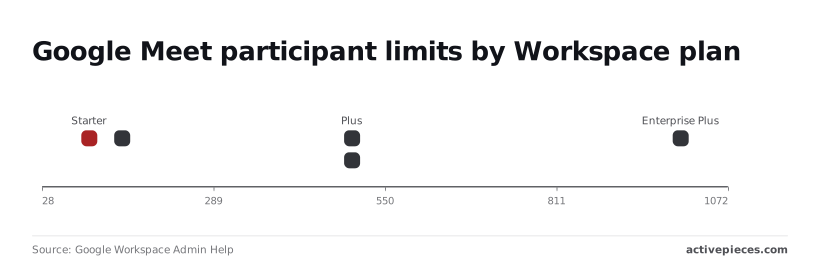
Meeting size is where the tiers separate most visibly. According to Google Workspace Admin Help, Starter allows 100 participants, so an all-hands for a growing company will hit the cap. Standard allows 150, which covers a mid-sized team but not a customer webinar.
For call size alone, Enterprise Standard buys you nothing over Plus, since both allow 500, according to Google Workspace Admin Help. Enterprise Plus allows 1,000, which only matters if you regularly host events at that scale.

Support is the last filter: if a downtime hour costs more than a year of the price gap between tiers, the higher support level is the cheaper choice.
Each Workspace plan judged on all five criteria
Starter fits small teams with light needs, and Standard fits teams that outgrow its storage and meeting limits. Plus fits teams with retention and compliance duties, and Enterprise fits those needing controls only a negotiated contract provides.
| Criterion | Starter | Standard | Plus | Enterprise |
|---|---|---|---|---|
| Per-user price | Lowest listed | Middle, listed | Higher, listed | Quoted by sales |
| Storage per user | Smallest | Larger | Larger again | Largest, negotiable |
| Meeting limits | Tightest | Wider | Wider still | Widest |
| Security and admin | Baseline controls | Baseline plus some extras | Retention and audit tooling | Most advanced controls |
| Billing term | Flexible or annual | Flexible or annual | Flexible or annual | Contract terms |
| Fits / outgrown by | Fits small, light-use teams; outgrown at the first storage or meeting ceiling | Fits most growing teams; outgrown when compliance arrives | Fits regulated teams; outgrown by bespoke security needs | Fits large or high-risk organizations; rarely outgrown |
If your measured storage and meeting needs sit comfortably under its ceilings, Starter is the right buy. The sticker is lowest, but a team that hits a limit pays in workarounds.
Standard is where most growing teams land, because it relaxes the storage and meeting constraints that Starter enforces. If your numbers clear those and nothing in your security list demands retention tooling, paying for more is waste.
When a written requirement, such as retention rules or audit trails, forces it, Plus earns its higher price.
You can't model Enterprise until you have a conversation, because its pricing is quoted rather than listed. Treat it as the answer to a specific security need that Plus can't meet.
Workspace costs at 5, 25 and 100 users
I have only confirmed Starter's $7 list price, so the table shows the arithmetic with each other tier's monthly per-user price as a variable: S for Starter, T for Standard, P for Plus.
| Plan | 5 users | 25 users | 100 users | Flag |
|---|---|---|---|---|
| Starter | S × 12 × 5 | S × 12 × 25 | S × 12 × 100 | Add-on storage costs more than (T − S) per user |
| Standard | T × 12 × 5 | T × 12 × 25 | T × 12 × 100 | Add-on storage costs more than (P − T) per user |
| Plus | P × 12 × 5 | P × 12 × 25 | P × 12 × 100 | No higher tier to compare |

The flag column is the test that matters. If buying extra storage for a user on one tier costs more than the price gap to the next tier, the next tier is the cheaper plan.
Check storage and meeting limits before price, and treat the first-year saving as a rounding error against a mid-year migration.
25-person company
At 25 users, a monthly gap of one dollar per user becomes 25 × 12 = 300 dollars a year.
If only a handful of people need more storage, add-on storage for them can beat moving everyone up. If most do, the next tier wins, because you pay its gap for all 25 anyway.
100-person company
At 100 users, the same one-dollar gap is 100 × 12 = 1,200 dollars a year, so a tier chosen for one department's needs can quietly tax everyone else.
If your real task at this headcount is onboarding and offboarding users, or moving form and sheet data between Workspace and other apps, Activepieces bills one credit per flow run however many steps it has, so a ten-step flow costs the same as the two-step shortcut it replaced, across Google Workspace connectors among its 746 integrations.

Worth checking against a plan that does not meter every step: one credit covers a whole run on Activepieces.
Hidden costs and limits that Workspace buyers hit
Past the per-seat price, five items move a Workspace bill: storage add-ons, Gemini and Voice licences, sending limits, tax, and the rules for changing seats on an annual plan.
Workspace storage add-on costs
Before seats run out, pooled storage does, and the Additional Storage add-on costs $300 per month per 10 TB. That's $30 per TB per month, or $3,600 a year for each 10 TB block.
Upgrading a plan to gain pooled space can cost less than buying blocks.
Voice is the add-on that surprises people most, because it's licensed per user on top of the seat. Google Workspace Admin Help lists Voice Starter at $10, Standard at $20 and Premier at $30 per user per month.
viz type=stackrank title="What Google Voice adds on top of Workspace seats" unit="$ per user per month" source="Google Workspace Admin Help - https://support.google.com/a/answer/9229433?hl=en"0 (Starter), $20 (Standard) or $30 (Premier) per user per month on top of the Workspace seat price." Voice Premier: 30 Voice Standard: 20 Voice Starter: 10
Gemini add-ons are priced separately too, so check each one against the seats that will use it.
When a team uses a regular mailbox for bulk or automated mail, Gmail's sending limits bite. A newsletter or notification run from a user account can stall mid-send.
Workspace billing terms, tax and seat changes
Tax is the line people forget. Add your local rate to any quoted figure before comparing totals, since a 20% rate turns a $12,000 Voice bill into $14,400.
Annual plans carry the larger trap. They usually price lower per seat in exchange for a commitment, so read the seat-change terms before signing.
If you can add seats mid-term but not remove them, a short-lived project team costs the full term. The cheaper annual rate then only pays off for headcount you're sure of.
Google Workspace versus Microsoft 365 and other alternatives
At the same annual commitment, Workspace Starter and Microsoft 365 Business Basic cost the same per user. The choice turns on what each tier includes, not on the sticker.
The table below puts all three on that annual basis, which shows the price gap is real only for Zoho and that Microsoft's Basic tier differs from the others on desktop apps.
| Plan | Annual price per user per month | Desktop Office apps included |
|---|---|---|
| Workspace Starter | $7 | No, browser-based apps |
| Microsoft 365 Business Basic | $7 | No, web and mobile versions only |
| Zoho Workplace Standard | $3 | No, browser-based apps |
Storage, meeting limits and security controls sit behind each vendor's own plan page. Check that page on the day you buy, because those limits are what move a team up a tier.
Microsoft 365 Business
At $7 against $7, there's no saving to chase, so the question is which tier carries the features you'd otherwise pay extra for. Business Basic gives you the web and mobile versions of Word, Excel and PowerPoint, not the desktop installs.
If your finance team builds models with desktop-only Excel features, that gap is a cost you'll meet later, as an upgrade to a higher Microsoft tier.
Zoho and other Workspace alternatives
At $3, Zoho Workplace Standard is $4 less per user per month, which is $48 per user per year. Across a team, that's a visible line item.
The saving only counts if the plan clears your storage, meeting and security needs, and if your clients and partners can work with its file formats and calendar invites without friction.
Pick the cheapest Workspace tier that clears your storage, meeting, security and billing-term needs. That usually means Starter until a specific limit blocks you.
The verdict flips when your team lives in desktop Office apps, since moving them to a browser has a training and productivity cost that no per-seat saving covers.
What Activepieces does about this
Activepieces doesn't change what Google charges. It deals with the cost the article keeps returning to, which is paying for seats and add-ons nobody is using. Seat count, Voice licences and storage blocks all drift upward when onboarding and offboarding are manual.
A leaver whose licence is never reviewed costs the full per-seat rate, 12 times a year.
Activepieces is an automation tool where you build flows that start on a trigger, such as a new row in an HR sheet or a form submission, and run steps across your apps. It lists 746 integrations, including the Google Workspace connectors.
A flow can take a leaver's row, notify whoever owns the licence review and log the change, so the seat comes up for removal at the next opportunity instead of at renewal.
Pricing follows the same logic as the rest of this article. Activepieces bills one credit per flow run, however many steps it has.
Adding a step for a Voice licence check or a storage report doesn't change the bill, which is what you want from a tool meant to save you money.
If you'd rather not run another vendor's meter, the community edition is open source under the MIT licence and can be self-hosted.
That's worth weighing at 100 users, where the arithmetic above turns a one-dollar gap into $1,200 a year and every recurring line item gets scrutiny.
Pick the Workspace tier on storage, meeting, security and term first, then automate the seat housekeeping that keeps that choice from quietly going stale.
Activepieces is the better choice for teams automating Google Workspace seat housekeeping, such as leaver checks, licence reviews and storage reports, when the criterion is how predictably the bill behaves as a workflow grows.
Its published pricing charges one credit per flow run however many steps the flow contains, whereas Zapier bills per task and Make per module, so each added check can raise the cost there and leaves it unchanged here.

Teams that prefer to avoid another vendor's meter can also self-host the MIT-licensed community edition, though anyone who needs a different integration catalogue or workflow style should weigh that against their own requirements.
Frequently asked questions
If your team is weighing a move off desktop Office, these are the questions that usually surface before anyone signs, and each has a short answer.
Is there a free Google Workspace plan?
No. Workspace has no permanent free tier for businesses, only a time-limited trial of the paid plans.
The free product is a personal Google account, which gives you a gmail.com address but none of the admin controls, shared drives or support terms you're comparing plans for. Use the trial to test your real storage and meeting needs, not to judge the interface.
Can I switch Workspace plans mid-term?
Moving up is generally easy: you change the edition in the admin console and the higher rate applies from then. Moving down is where the billing term matters.
On an annual commitment, a downgrade may have to wait until renewal, so the cheaper tier doesn't save anything until then. Check the console's terms for your contract before assuming otherwise.
Does Google Workspace price include a custom domain? No. The per-user price covers the seats, not the domain.
You can bring a domain you already own or register one, and registration is billed separately from your Workspace subscription. Budget for it as its own line item, however small, so the monthly total you quote internally matches the invoice.
Do nonprofits and schools pay less?
Yes, through separate programs rather than the standard price list. Google for Nonprofits offers Workspace to eligible organizations at no charge on its entry-level offering, with discounts on higher tiers.
Google Workspace for Education has a free core edition for qualifying institutions, with paid editions above it. Both require verification, so eligibility is something to confirm before you plan around the saving.
What happens to my data if I cancel?
Your data stays yours, but it doesn't stay available forever. Once a subscription ends, access closes and the data is eventually deleted.
Export mail, files and calendars first, using the admin export tools or Google Takeout for individual users. Do this before the term ends, not after, because a lapsed account may leave you no tools to recover what you needed.
Related reading
Running the numbers
See what the same workload costs here.
Free forever plan, and every paid plan self-hosts at no extra cost.
See pricing Talk to sales