GPT-6.2 Sol Pro API Pricing and Limits for Developers

Nov 20, 202613 min read
It's billed by use against a platform account and called with a key, a model string and an endpoint.
Each of those integrations, whether you wire it up in code or through a workflow tool like Activepieces, is a claim you should confirm in OpenAI's own documentation, not in a blog post, this one included.
I couldn't confirm whether "Pro" is a separate model string, a mode or a pricing tier, so it carries a tag below. OpenAI lists GPT-6.2 Sol as its balance of intelligence and cost for everyday work.
A stamp means "true on that day, and no later", and an unverified tag is work you still owe before anyone writes code.
GPT 6.2 Sol Pro API and key access
- OpenAI platform account: checked 2026-11-20. The API account is separate from a consumer chat subscription.
- Billing and credits: checked 2026-11-20 that billing is required for paid use. Unverified whether new accounts start with any free allowance.
- API key: checked 2026-11-20 that keys are created in the platform dashboard. Unverified whether keys can be scoped to a single model.
- Model string: GPT-6.2 Sol checked 2026-11-20. The exact "Pro" string is unverified.
- Endpoint: unverified. Copy the base URL from the docs page, not from a tutorial.
Stage 1: create an account and billing
Create the platform account first and attach billing before you do anything else. A key on an account without billing may authenticate and still be refused at the first paid call.
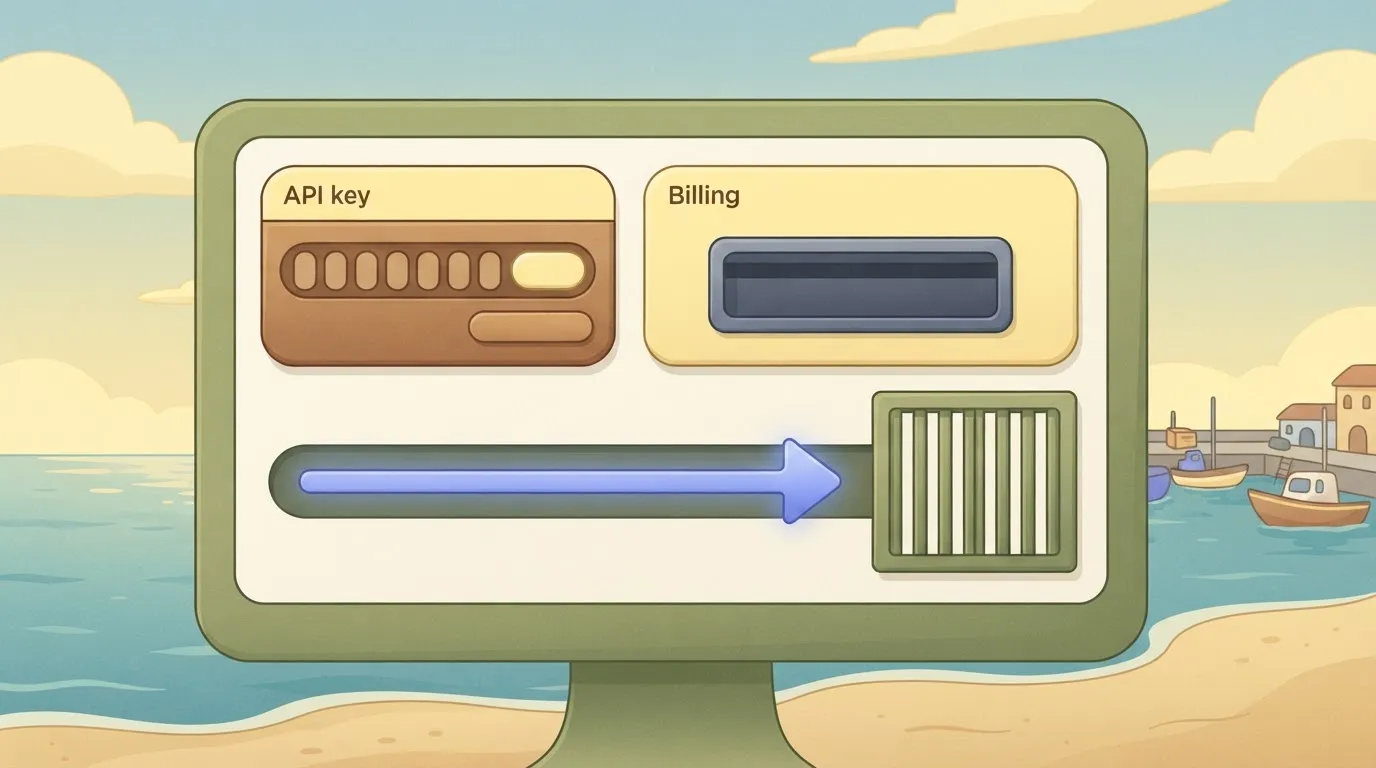
Read the billing page for how credits are drawn down and what happens at zero, because that behaviour decides whether a spent balance produces a clean error or an outage.
Next, generate the key in the dashboard (Stage 2) and put it in a secrets manager or environment variable straight away. The dashboard shows a key in full only at creation, so a key pasted into a chat thread is a key you must revoke.
If you hand it to Activepieces, the same storage rule applies, and its MIT-licensed core can run on your own infrastructure, so the key never has to leave it.
GPT 6.2 Sol Pro model ID and endpoints
Take the model string and the base URL from the vendor's model page, and record the date you copied them. A string that was correct on 2026-11-20 may be renamed or retired later, and the failure arrives as an error response, not a warning.
If you are running this arithmetic for your own team, see what the same workload costs on Activepieces.
Sol Pro pricing and limits by tier

That's exactly a quarter of Astra at each type, which is why Astra costs four times as much.
Per-token prices
If you want to check the figures, they come from OpenAI's GPT-6.2 Sol model page. According to Claude, cached input's $0.10 per million tokens against $0.40 for Astra, so a long system prompt resent on every call costs a twentieth of what fresh input costs.
On both models, output is the most expensive token type, so a chatty answer costs more than a long question.
The chart that follows shows the quarter ratio holding at every type, so switching Astra traffic to Sol cuts the bill by about three quarters if quality holds.
Rate limits by tier
Before you size a queue, check the cells marked "unverified" against your own account's limits page. I couldn't confirm them from the vendor's pages, so they carry no guess.
The table below shows what each tier asks you to prepay and where its monthly spend cap sits.
| Tier | Credit purchases needed | Monthly spend cap | Requests per minute | Tokens per minute | Daily cap |
|---|---|---|---|---|---|
| Build | — | — | — | — | — |
| Launch | — | — | — | — | — |
| Grow | — | — | — | — | — |
What one typical request costs
Take a request with 10,000 input tokens, 8,000 of them cached, and 1,000 output tokens.
That's roughly 1,100 a day, so a feature that serves a few thousand users will hit the ceiling mid-month, and the failures will arrive as errors rather than as an invoice.
Your cost cap should fire before the vendor's does.
Minimal GPT 6.2 Sol Pro request
Until you have one call that returns generated text and a usage count, your cost cap has nothing to count.
**Your cost cap should fire before the vendor's does.
Stage 4: send the first request with curl
Open the reference page for GPT 6.2 Sol Pro and copy four things exactly: the endpoint, the authentication header, the model string, and the smallest body the page shows. Write down the date you copied them.
I'm not reproducing them here, because a string typed from memory or from a blog post is how people end up calling a retired alias and reading a 404 as a networking problem.
Keep the prompt short and the output limit low. Send it from curl first, with the key read from an environment variable rather than pasted into the command. Then the shell history and the support ticket you may file later contain no secret.
Save the raw response to a file. When something fails later, you'll compare against a response you know was good.
Stage 5: read the usage fields and log cost
Find two things in the response: the generated text and the usage object. Look for the input and output token counts in the docs' own field names, and read those names off the page rather than guessing them.
Cost depends on both counts, so a logger that records only one will under-report every long answer.
Write one log line per call: timestamp, model string, input count, output count, and the price table date you checked. With that line you can multiply counts by the published rates and compare against the invoice.
If the two disagree, you have a dated record to bring to the vendor.
Below, a screenshot shows the same habit in a low-code workflow builder. A two-word chat message, "hi", runs through an agent step backed by an OpenAI chat model. The execution panel reports success with a latency and token counts.
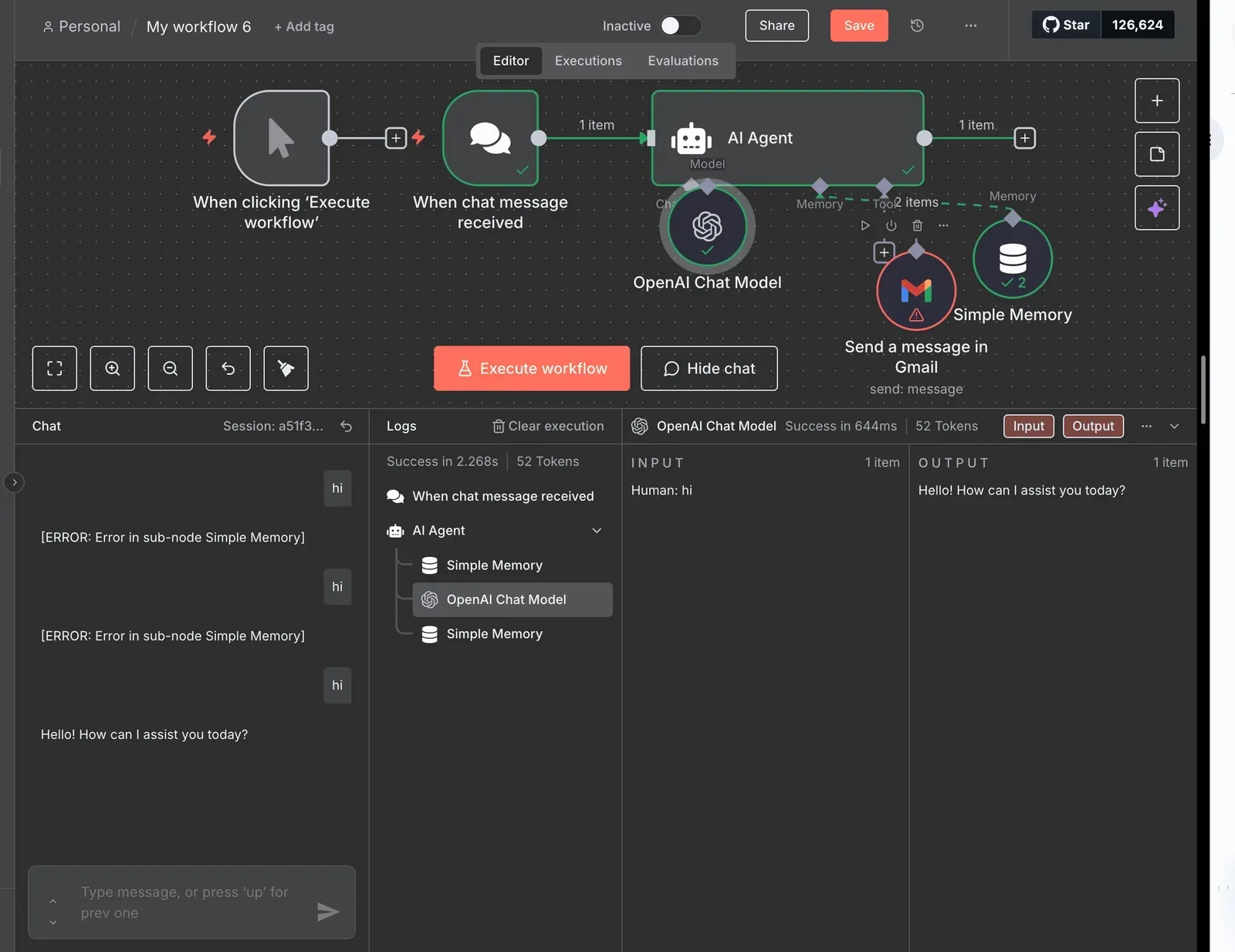
Even a hello-world surfaces usage, though one trivial call's latency tells you nothing about your real prompts.
Sol Pro API call in Python or JavaScript
Use whichever language your service runs in, and send the same endpoint, header, model string and body that worked in curl. Don't reach for a wrapper library first.
If the docs publish an official SDK, use it only after the raw call works, so you can tell an SDK default from the API's behaviour.
Set an explicit timeout and an explicit output limit in code, since defaults are the vendor's choice, not yours. Then reuse the Stage 5 log line unchanged, so every later retry is counted in the same format.
Worth checking against a plan that does not meter every step: one credit covers a whole run on Activepieces.
Common Sol Pro errors and limits
When Sol Pro fails, only 429s, timeouts and 5xx responses are normally worth retrying, and the retry rule for each should come from the vendor's docs, not from this article. Sol Pro failures fall into four groups: authentication, rate limits, timeouts and context, and spend.
If you get a 401 or 403, the key, project or permission is wrong, so retrying only repeats the failure and burns your attempt budget.
Fail fast, alert, and check the error body against the docs, since quota exhaustion can arrive under a different status than a per-minute limit.
429s: backoff, queues and tier upgrades
0.1% of requests hit a 429 for xAI, 0.27% for OpenAI and 0.39% for Anthropic, per Requesty's August 2026 data.
It also gives 0.88% for Fireworks, a third-party model host, and 1.12% for Azure, Microsoft's cloud host, meaning Azure now ranks highest for rate-limiting incidents among all services tested. None of these is Sol Pro's own rate.
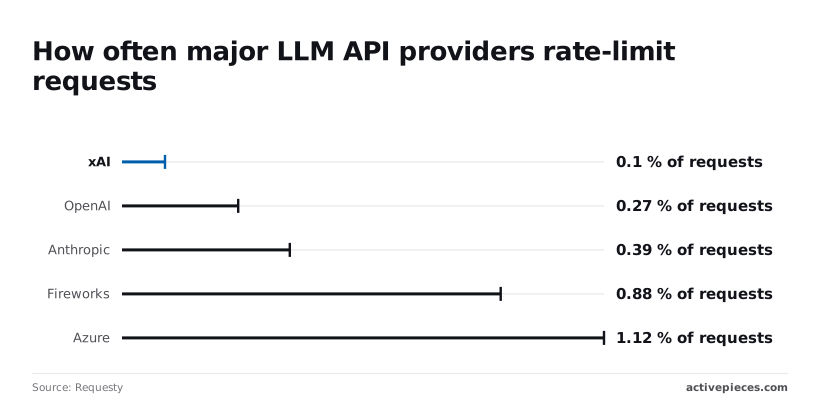
Even the lowest means one call in a thousand fails, which is 100 failures a day at 100,000 calls. At Azure's rate it's roughly 1,120.
- Read the rate-limit headers on the 429 response.
- Wait until the documented reset time. If the headers give none, back off.
- Retry with exponential delay and random jitter, so parallel workers do not retry in lockstep.
- Cap attempts, for example at five.
- Queue the request, and alert when the queue ages past your threshold.
If the queue keeps filling, you have a capacity problem, and the fix is a higher tier, not a longer wait.
Timeouts, long outputs, context limits and spend caps
Set your client timeout above the longest legitimate generation, or you'll cancel work you still pay for. Context-length errors aren't transient: trim the input or split the job, never retry unchanged. A refusal is a valid response, so log it and don't retry it.

Without a cost ceiling, a retry loop turns an outage into a bill. Set a hard daily cap in code, and a vendor-side cap if the console offers one.
Record the deprecation date of the model you pin, so a retirement notice is a calendar entry and not a production error.
Using GPT 6.2 Sol Pro in Activepieces Workflows
Treat Sol Pro in Activepieces as something to verify, not assume: Activepieces works with any major model or your own provider key, so Sol Pro is usable once your provider's model list exposes it.
Swap models and use custom keys
Activepieces runs any major model or your own provider key, and a model can be swapped without rebuilding the flow.
Separately, the key that lets a flow call those models doesn't have to live with us: the self-hosted edition and the enterprise cloud tier can route API keys, OAuth tokens and connection secrets to your own secret manager, so the database never holds them.
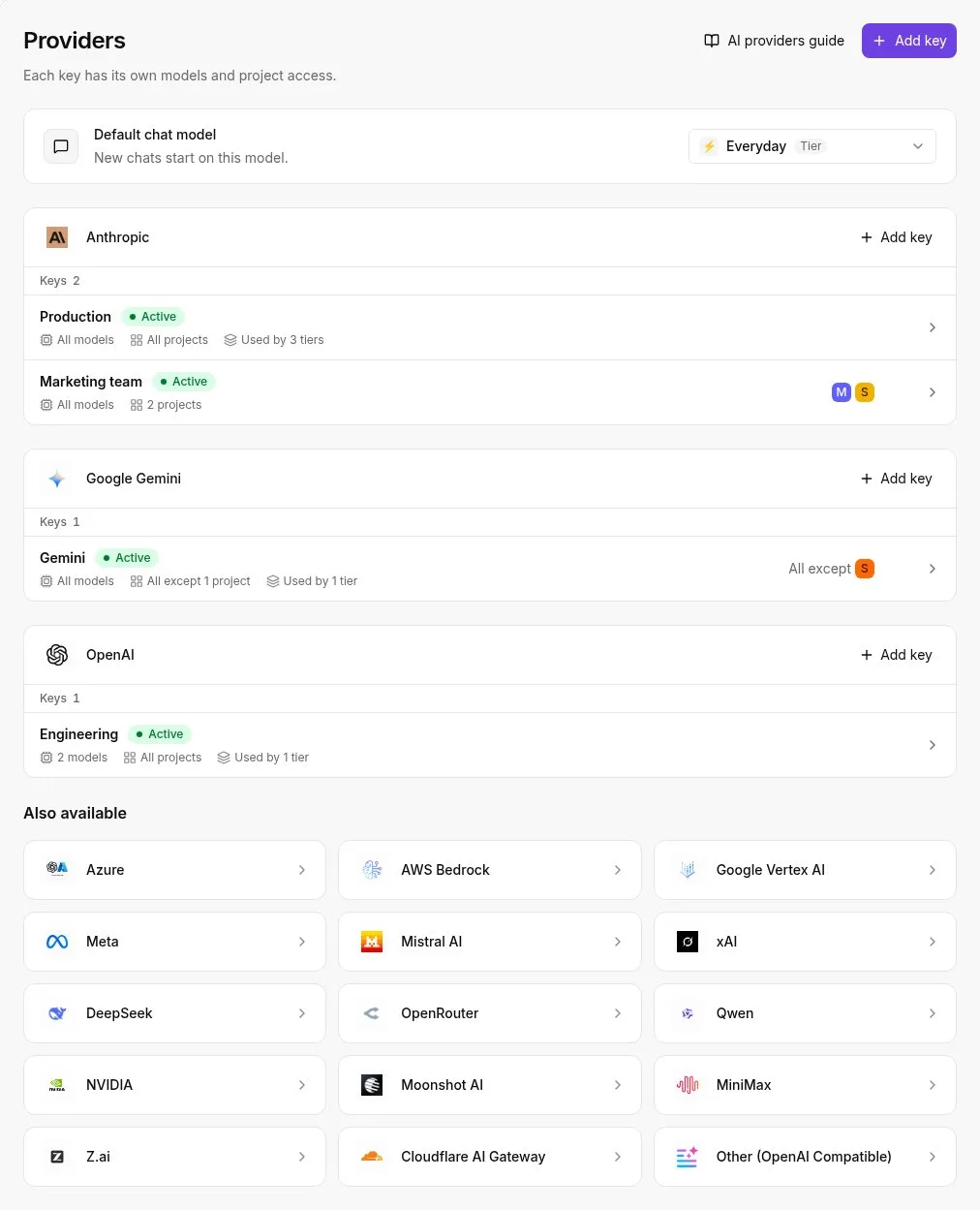
Your credentials are never ours to hold.
Error shapes and limits can differ between models, so a retry rule written against the old one may not match what your workflow now receives.
We found no Sol Pro-specific confirmation, so check your provider's model list, and that your flow reaches the model you pinned, before you trust it.
Our three-task test against gpt-5.4-mini
Three tasks, each checked against a known answer: that was the test, run on gpt-6.2-sol-pro and gpt-5.4-mini through OpenRouter, so both models could be objectively compared on these tasks. Both models got 3 of 3 right. It's a small, indicative test, not a benchmark.

The chart shows time and cost per task, and the point to take is that Sol Pro bought no extra correctness here, only delay and expense.
On every task, Sol Pro took longer, by our own timings:
- Ticket sorting: 3.5 seconds against 1.7, so a step that feels instant becomes a visible pause.
- Invoice fields: 4.2 seconds against 1.3, the widest gap, which matters if a person waits on the result.
- Email summary: 3.8 seconds against 1.4, the median across our three tasks, though the gap may not hold on harder inputs.
About thirteen times more per task: $0.0019 for Sol Pro against $0.000142 for the mini. At 10,000 runs that is $19 against $1.42, so the premium only pays if your tasks fail on the cheaper model.
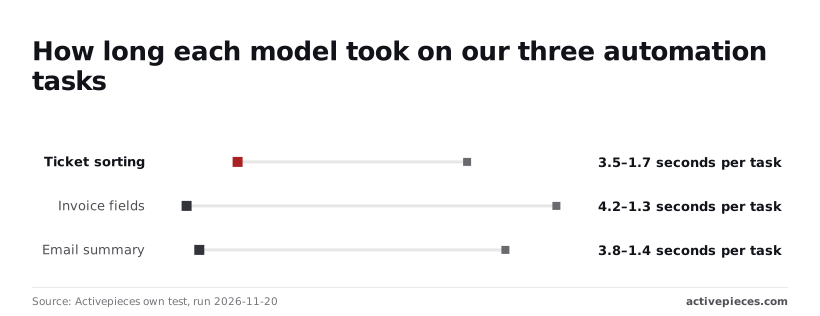
Because our tasks were easy enough for the cheap model, run your hardest real inputs before you pay the difference.
Monday checklist before going live
Before going live, set a spend cap on the API key in the vendor's billing settings, so a looping flow stops at a number you chose.
Add a retry step with a limited attempt count and a growing delay, and fail the run visibly once attempts are spent.
Log input and output token counts for every run, so the cost per task you measured can be compared with what production actually charges.
Frequently asked questions
Ask first about the price gap you are about to pay for; the answers below are the ones our test couldn't settle.
Each rests on what we could confirm in the vendor's own documentation on 2026-11-20, and where we couldn't confirm a figure, we say so rather than fill it in.
Is there a free tier for the GPT 6.2 Sol Pro API?
We didn't confirm a free tier in the vendor's documentation as of 2026-11-20, so don't plan a prototype around one. Check the billing and pricing pages for your account type, and screenshot what they say with the date.
If a free allowance exists, it's likely to carry tighter limits than paid use, and you'll find that out at a failed request rather than in a warning.
How does GPT 6.2 Sol Pro compare with GPT-6 Luna on price?
We are publishing a ratio, because OpenAI's own pages state both models' current prices. A comparison built on remembered numbers is the exact mistake this article warns about.
Pull both input and output prices from the page yourself, multiply by your real token volumes, and compare the totals. Then run your hardest inputs on both, since the cheaper model only wins if it passes them.
Can I use GPT 6.2 Sol Pro without writing code?
Possibly. We didn't verify which no-code surfaces expose it as of 2026-11-20. Availability in a vendor's chat product, a playground or a third-party automation tool is a separate question from API access, and each can lag the others.
Check the model's own page for where it's offered. A no-code route usually hides the retry and cost-cap settings this article tells you to design, so confirm what you can still control.
How do I raise my GPT 6.2 Sol Pro rate limit?
Start with the limits page in your account settings, which shows what your tier allows today. The vendor's documentation describes how accounts move between tiers, and a support request is the fallback when that route doesn't fit.
We didn't verify the exact criteria on the check date, so read them directly. Meanwhile, build your retries to back off on rate-limit errors, because a raised limit doesn't remove them.
Where are the official GPT 6.2 Sol Pro benchmarks?
Look first on the vendor's model page and in any technical report linked from it. Treat those as the vendor's own measurements, taken on the vendor's chosen tasks.
We didn't verify a specific published set on 2026-11-20, and our small test is no substitute for one. Check the date on any figure you copy. Use official numbers to shortlist, then trust your own inputs to decide.
Related reading
References
Running the numbers
See what the same workload costs here.
Free forever plan, and every paid plan self-hosts at no extra cost.
See pricing Talk to sales