GPT 6.1 Terra Automation: Setup and Pricing in 2026

Nov 10, 202616 min read
GPT 6.1 Terra automation means calling OpenAI's Terra model from code on a schedule, whether through a cron job or a workflow runner like Activepieces, with no person in the loop.
GPT 6.1 Terra automation setup and pricing
Checked against vendor pages on 10 Nov 2026, a first working call takes about 30 minutes, meaning each integration test requires a time block of that size.
What GPT 6.1 Terra automation means
Get a key, make a first call, force structured output, then run unattended: those are the four stages of the job. Teams usually stall at the last one, because a prompt that works in a chat window has no guardrails once nobody watches it.

Treat the stages as an adoption curve and make each one pass before starting the next.
Before anything else, confirm the model name on OpenAI's page. It lists GPT-6.1 Terra as the fast, efficient model for visual reasoning, computer use and writing, and the API identifier used below is gpt-6-1-terra.
What you need before you start
You need an API key, a billing method, and one saved prompt template. Make the template the first thing you build.
A fixed template is the one lever you can measure: you can count how many outputs fail validation per hundred runs and watch that number fall.
Activepieces schedules a flow as readily as a plain cron job schedules a script, with unlimited flows on every plan including free, but the scheduler matters far less than the template.
GPT 6.1 Terra API pricing and access tiers
$1 per 1M input tokens and $5 per 1M output tokens is what Terra costs on OpenAI's pricing page, read on 10 Nov 2026, so high-output applications require close cost management.
Its predecessor, GPT-5.6 Terra, lists $2 input and $12 output, making the newer model considerably more cost-effective, so any remaining Terra users would be overpaying for equivalent capability.
Move over and input cost is halved, while output cost falls by more than half. A job producing 1M output tokens a day saves $7 a day by moving over.
Because the output price sets the bill for most automation, the table compares it across the models you would realistically weigh.
| Model | Output $ per 1M tokens |
|---|---|
| gpt-6-1-terra | 5 |
| gpt-6-1-sol | 10 |
| gpt-6-astra | 50 |
Step up to Sol and the output rate is twice Terra's; step up to Astra and it is ten times. Start on Terra and move up only if your own validation numbers show it failing.
At $0.5 per 1M output tokens, a tenth of Terra, GPT-6 Luna sits below the table and is the candidate for high-volume steps that need no judgment, so teams can run these steps without worrying about cost.
Read the input price, context window and output cap for each model from the same page before you size a job.
On the free plan, the ChatGPT plans page lists unlimited GPT-6 text chats, subject to abuse guardrails. That prices a seat, not tokens, so it doesn't govern an unattended job.
Use only the benchmark figures printed on OpenAI's own model page, and record the date beside each one. The vendor chooses which tests to show, so treat them as a shortlist filter.
Then run your saved template on fifty real inputs and use your failure count as the deciding number.
If you are running this arithmetic for your own team, see what the same workload costs on Activepieces.
Building GPT 6.1 Terra workflows in stages
Once your failure count clears the bar, build the workflow in four stages, each leaving something working before the next begins, so a break always points to one stage.
- Create a scoped API key with a spend limit.
- Send a first request to
gpt-6-1-terra. - Request structured output against a JSON schema.
- Schedule the unattended run with retries and logging.
Capture each screenshot as you finish its stage and date it; the three below show the API keys page, the first response and the run log. The vendor's pages change, and a dated capture tells you whether a later failure is yours or theirs.
Stage 1: create an API key and set a spend limit
Create the key from the vendor's API keys page and give it a name that identifies the workflow, not the person. Scope it to the permissions this job needs and nothing broader.
Set a spend limit before the key leaves the page. Rollouts tend to break first at the team that ran a loop with no cap, and a cap turns that mistake into a small invoice.

Store the key in your secrets manager or an environment variable, never in the script. Read the current limits and prices from the vendor's own pages and note the date beside them.
Stage 2: send the first request to the model
Send one request with the model identifier gpt-6-1-terra and a short prompt from your saved template. Read the endpoint and field names from the vendor's current API reference rather than from a tutorial, because tutorials age faster than the reference.
You are done with this stage when you have one readable response and a recorded request ID.
That gives you a baseline, so when a later stage fails you can rerun this call and see whether the key, the model or your payload is at fault.
Stage 3: return structured output you can store
Add a JSON schema to the request so the response arrives as fields your database or spreadsheet can accept. Keep the schema small at first, with only the fields downstream steps read.

Then validate every response against the schema in your own code before storing it. Treat a response that fails validation as a counted failure, the same measure you used when choosing the template, so you can track whether schema changes help or hurt.
Stage 4: run it on a trigger without you
Attach the working call to a schedule or an event, and wrap it in retries with a growing wait between attempts and a hard stop after a set count. Write one log line per run: input ID, request ID, validation result and outcome.
When a steering committee, or you on a Monday morning, wants to see what ran while nobody watched, the run log is the answer, and it is the third screenshot.
Limits and errors when automating GPT 6.1 Terra
When an unattended Terra run fails, it is mostly one of four things: a rejected key, a throttled burst, an exhausted quota, or a prompt too large for the context window. Each has a different fix, and only some are worth retrying.
Rate and context limits by tier
As your account moves up a tier, everything here changes: rate limits, context size, output-token caps and batch queue limits. Copy them from the OpenAI model page and your account's limits page, with the date you read them.
Pass the pilot at the lowest tier and you can still hit throttling the week it scales to a second team. Record the tier next to the figures in your run template.
GPT 6.1 Terra error messages, causes, and fixes
Of everything an automated run can hit, six failures are the ones most likely to be logged, and the table below covers them.
The retry column is the practical rule: retry only what can change on its own. A 401 or a missing model will fail identically every time, so retrying it only burns your schedule.
| Status code or message | Usual cause | Fix | Docs' retry guidance |
|---|---|---|---|
| 401 | Missing, revoked or mistyped key; wrong project | Reissue the key, check the environment variable the job reads | Don't retry; fix the credential first |
| 429 | Requests or tokens per minute exceeded | Slow the job, spread the batch | Retry with exponential backoff and jitter |
| Quota exhausted | Spend or credit limit reached | Add credit or raise the cap | Don't retry until the balance changes |
| Context exceeded | Prompt plus requested output is larger than the window | Trim or split the input, lower the output cap | Don't retry unchanged |
| Model not found | Misspelled model name, or no access on this project | Copy the name exactly from the model page | Don't retry; correct the name |
| Timeout | Long generation or a network stall | Shorten the request, raise the client timeout | Retry a limited number of times |

Log the status code and request ID on every failure. That's what lets whoever reviews the run on Monday tell a throttle from a bad key.
Controlling cost on unattended runs
Put a job on Batch or Flex and every Terra token rate halves, per the same model page. Input falls from $1 to $0.50 per million tokens, so a 10-million-token overnight job drops from $10 to $5.
Cached input falls from $0.05 to $0.025, which makes a long shared prefix nearly free to repeat.
Output falls from $5 to $2.50, and because output is the dearest token, long generated reports gain the most. Anything that doesn't need an answer in seconds belongs on Batch or Flex, and the template should make that the default.
Worth checking against a plan that does not meter every step: one credit covers a whole run on Activepieces.
Running GPT 6.1 Terra in Activepieces workflows
With a schedule trigger, an HTTP request step and a Google Sheets step, you can run Terra unattended without writing code. A scheduled flow is the natural home for the Batch and Flex work above.
Activepieces flows start from a trigger and run steps in order, and each of its 747 integrations, counted from the open source monorepo, is also a tool an agent can call, giving agents coverage across most standard business systems, by which point entire workflows rarely need custom connectors.
The Google Sheets and Gmail steps in the flow below are registered once, and that same integration action runs as a flow step and as a tool on the project's MCP server, which Claude, ChatGPT, Cursor or an agent of your own can call.

Nothing is exported or wired up a second time. The Integrations Framework and MCP Server documentation describe it, and packages/pieces in the MIT-licensed repo holds the code.
As of 2026-11-10, I couldn't confirm that Activepieces lists GPT 6.1 Terra by name in its OpenAI model picker. Check the integration's current dropdown before you build on it.
Because the HTTP request step calls the vendor's endpoint directly, it doesn't depend on that list. You choose the model, the service tier and the request body yourself, and a new model works the day the vendor publishes it.
What the test workflow shows
Titled Test Flow in the builder, the flow below runs from a schedule trigger through a sheet read, a loop over rows, a date helper, an HTTP call, two AI steps, a sheet write, and a router with a Branch 1 and an Otherwise path, demonstrating the range of operations Activepieces can chain together, which means a non-technical person could assemble an end-to-end workflow touching data, APIs, and AI without writing code.
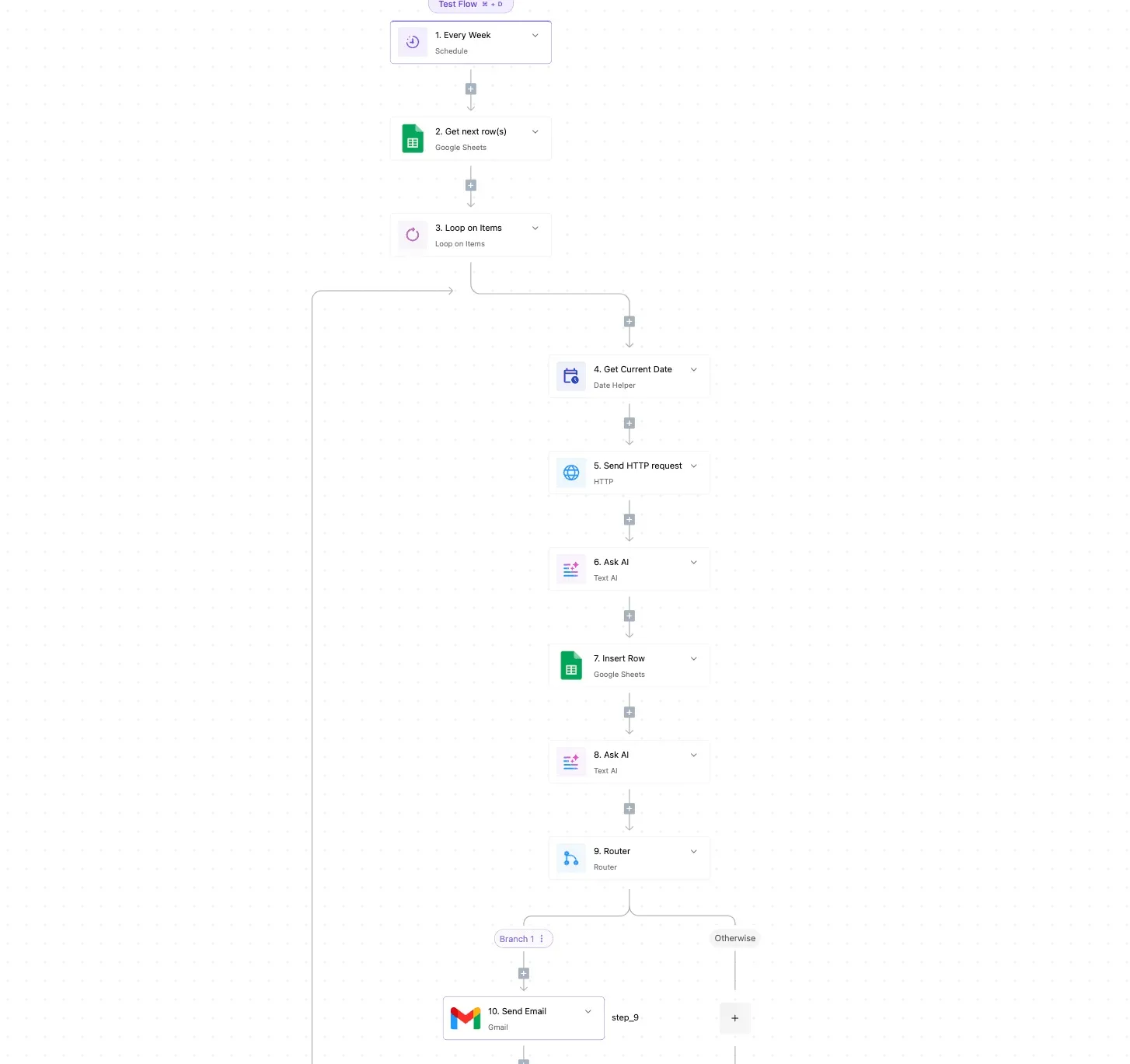
The last step is a Gmail send.
Take two things from it. Each stage of the job is one visible step, so a reviewer can see where the key is used. And the router turns "what happens when the call fails" into a drawn path instead of an afterthought.
To make this a rollout lever rather than a demo, several things matter:
- Store the API key once as a connection, so it never appears in a step body or a screenshot pasted into chat.
- Put the model name and tier in the first step after the trigger, so changing either is a single edit.
- Write every response, and every failure, to a sheet row with the date, so the limits and prices you read from the vendor's pages can be checked against what actually ran.
- Route failures to an email, so a quiet run doesn't get mistaken for a successful one.
Save the flow as a template, and count how many teams copy it unchanged versus edit the model step. That ratio tells you whether the default is holding.
If you would rather not use Activepieces, cron is the alternative: a scheduled job on a server or a serverless function calls the API from a short script.
You get finer control over retries and batch polling, and you take on code to maintain, secrets to store and logs to build yourself. Activepieces earns its place where non-engineers need to see and change the flow.
Monday checklist for a GPT 6.1 Terra automation
Whichever tool runs the flow, the first week comes down to five actions, and the order matters because each one protects the next. Teams that skip the early ones tend to learn about pricing and limits from an invoice.
Read the list below as the whole week: the first two actions fix your facts and your ceiling, and the last three give you evidence and a schedule.
- Re-read the vendor's pricing and limits pages and write down the date you read them.
- Set a budget alert before the first scheduled run.
- Log tokens per run, so cost is measured rather than guessed.
- Pick one low-risk task, such as drafting or summarising, where a bad output costs a retry.
- Set a recheck date for model changes and deprecations.
It means a script or workflow calls GPT 6.1 Terra, OpenAI's fast, efficient model for visual reasoning, computer use and writing, on a schedule or trigger with no one watching.
That unattended part is what separates it from chatting with the model, and it's why logging and alerts come first.
You need an API key kept in a secret store, a place to record each run's token counts, and one named owner for the budget alert. Add a shared template for the run log so every automation reports the same fields.
When every flow logs identically, adoption across teams becomes something you can compare, and that is why a template is the cheapest lever here.
Read the pricing page itself, not a summary of it, and write down the date. Prices, tiers and rate limits change, so a figure copied into a deck last quarter is a guess today.
Record what each tier allows and what it charges per token, then check your expected run volume against it. That gives you your budget alert threshold.
GPT 6.1 Terra vendor-published benchmarks
Treat vendor benchmarks as the vendor's claims, run on the vendor's chosen tasks. Note the publication date and which tasks were tested, then compare them with your pilot task.
Score strongly on a different kind of work and it says little about yours, so your own logged runs become the benchmark that counts. Put the recheck date for deprecations in the same calendar entry.
Frequently asked questions
Since the same recheck entry should also answer the questions teams ask most often, the answers below point back to the vendor's pages rather than to figures that will age.
Is GPT 6.1 Terra available on the free tier?
Check your own account's limits page, because access is set per model and per account, and the vendor changes it. A first call that returns an access or quota error is the signal that your key's tier doesn't include Terra.
Test this at stage two, before you build anything on top of it. A team that discovers it at stage four has already built the unattended run against a model it can't call.
Can I use GPT 6.1 Terra without writing code?
Yes, any workflow builder with an HTTP or API-request step can call it, so a non-developer team can reach stage four. The key still goes in the builder's credential store, never pasted into a step.
You still need the exact model identifier, copied from the vendor's model page, and you still need to validate structured output before anything downstream trusts it.
Once one team has a working flow, save it as a template. Every later team then starts at the structured-output stage instead of re-solving the key and first-call stages, and you can measure how many teams reach an unattended run from that template.
How do I know when the model name or price changes?
Assume you won't be told in time, and schedule the check yourself. On the recheck date, read four things on the vendor's own pages.
Those are the model page for the exact identifier, the pricing page for the Batch versus Flex rates and the cached-input discount, and the deprecation notices.
Keep the identifier in one configuration value, not scattered across steps. When a name changes, you then edit one line and not every workflow. Record the date of each reading beside what you recorded, so the next person knows how stale it is.
Is GPT 6.1 Terra better than the previous model for automation?
Not on the vendor's description alone. Terra is described as fast and efficient, with strengths in visual reasoning, computer use and writing, and that fits high-volume automation. It doesn't tell you whether your prompts do better on it.
Run the same set of your own real inputs through both models and compare failure rate, output validity and cost. If the vendor publishes benchmarks, read them on the vendor's page and date them, but let your own test set decide.
Related reading
Running the numbers
See what the same workload costs here.
Free forever plan, and every paid plan self-hosts at no extra cost.
See pricing Talk to sales