Harvest Pricing: Plans, Per-Seat Cost & Fees (2026)

Nov 23, 202614 min read
Harvest sells three plans, Free, Teams and Enterprise, and the per-seat price on each is only where your bill starts. Seat counts and plan limits decide where it ends.
Harvest pricing is the per-seat fee structure Harvest, a time-tracking and invoicing tool, uses to charge teams across its Free, Teams and Enterprise plans, where the total cost depends on how many people use it and which plan limits they reach.
Harvest is software for tracking hours and sending invoices, and teams use it to see what time cost and what to bill. It's also often the first system other tools plug into, including automation tools like Activepieces. This page was checked on 23 November 2026.
Use the table below to see where each plan's limits sit, because the limit you hit first is the one that raises your bill. It sets out all three plans as listed on getharvest.com/pricing.
The figures here come from Harvest's pricing page, so check the live page for current numbers.
Harvest Pricing Today: Every Plan, Price and Limit
| Plan | Monthly price per seat | Annual price per seat | Seats | Projects | Key inclusions | Stated gaps |
|---|---|---|---|---|---|---|
| Free | No charge | No charge | Capped | Capped | Time tracking and invoicing for one person getting started | Team controls and wider limits sit on paid plans |
| Teams | Charged per seat | Charged per seat, lower than monthly | Grows with your headcount | Wider than Free | Shared tracking, reporting and invoicing across a team | Add-on needs aren't priced on the plan line |
| Enterprise | $17.50 per seat/month | $14 per seat/month, billed annually | Arranged with Harvest | Arranged with Harvest | Larger-scale needs handled by agreement | Public per-seat price to budget against |
How billing works: per seat, monthly versus annual
You pay for each person who needs a login, so the bill moves with headcount, not with how much work gets done.
Annual comes with a catch, even though its per-seat rate is lower: you're committing to that seat count for the year, where paying monthly carries a higher rate.
Add a second teammate or one project too many, and you're on Teams. The free plan is built for one person trying the tool, and its seat and project caps are the point. Treat Free as a trial, not a place to run a team.
If you are running this arithmetic for your own team, see what the same workload costs on Activepieces.
The First Invoice: What a 12-Person Team Pays
Monthly and annual cost at 12 seats
$1,584 a year billed monthly on Teams, or $1,296 billed annually. That is what a 12-person agency (nine billable staff, two managers and one part-time contractor) pays. The $288 gap is what paying month to month costs you.
That's the floor. On annual billing, the range runs from $1,296 to $2,016 a year per Getharvest, so the plan you pick moves the bill by $720.
Monthly billing spans $1,584 to $2,520 according to Getharvest, which is the same decision with a bigger penalty attached.
Add Forecast, Harvest's scheduling tool, and annual billing lands between $2,016 and $2,736 per Clauseaudit. Monthly with Forecast runs $2,484 to $3,420. If you need scheduling and you don't budget for it, the top of that range is your real number.

Cost at 5 and 30 seats
Pay monthly and it costs more, because the table prices Teams at $11 per seat monthly and $9 per seat annually ($108 a year).
Read across a row to see what billing choice does to your total, and down the last column to see where Free stops being an option. The savings grow in step with headcount, so the bigger the team, the more a monthly habit costs.
| Team size | Teams monthly ($11/seat) | Teams annual ($9/seat) | Free plan fit |
|---|---|---|---|
| 5 people | $660 a year | $540 a year | Trial only |
| 12 people | $1,584 a year | $1,296 a year | Doesn't fit |
| 30 people | $3,960 a year | $3,240 a year | Doesn't fit |

At 30 seats, paying monthly costs $720 more than paying annually.
Who counts as a paid seat
In this hypothetical, all 12 people are priced as paid seats, including the part-time contractor. A contractor who logs only a few hours a week still shows up as a full line on the invoice.

If you count only your nine billable staff, you'll undershoot the bill by three seats, which is $324 a year on the annual Teams rate. Count everyone who'll log time or approve it, then price the plan.
Month Three: The Hidden Costs and Limits Teams Hit
By month three, the bill usually sits above the quote, because people join, outsiders need access, and plan limits start to bite. The headcount you priced on day one is a snapshot, and work doesn't stay still.
Rarely does a 12-person agency stay at twelve. Five things tend to catch it out:
- A seat added mid-cycle is paid for before the new person has logged an hour.
- A contractor on a six-week job still needs a seat, and it may sit idle afterward unless someone removes it.
- A client who wants to view or approve hours has to be counted like anyone else.
- A usage limit can push you onto a higher plan.
- Late timesheets cost your own people's hours to chase.

I have no verified dollar figure for any of these, so price each one against your own roster before you sign.
You find the cap in the middle of a project, upgrade under deadline, and negotiate from the weakest position you'll ever have. That is what doing nothing about limits costs.
Read the limits for your plan now, and check them against the busiest month you expect, not the average one.
Costs outside the invoice
You pay twice for every hour an office manager spends nagging: once in salary, and again in the revenue you can't invoice until the time comes in. It is the cost that never appears on a bill.
You pay twice for every hour an office manager spends nagging: once in salary, and again in the revenue you can't invoice until the time comes in.
At renewal, the invoice itself can jump. These figures are anecdotal: reviewer reports compiled by StudioWorks, a competitor, and not audited bills:
- A UK firm with 15 staff reported going from $130 to $2,110 a month, which is more than sixteen times as much.
- An agency on Reddit reported $80 rising to $1,900, so a small bill became a payroll-sized one.
- A small business reported $24 rising to $124.30, the mildest case, and still about five times the starting price.

Those jumps are why you should ask for the renewal price in writing before you commit.
Worth checking against a plan that does not meter every step: one credit covers a whole run on Activepieces.
The Same Team Priced on Harvest's Closest Alternatives
Swap tools and the cost moves around instead of going away. Toggl Track and Clockify can undercut Harvest on seats, then charge for the features you assumed were included, and an invoicing-first tool bills you somewhere else entirely.
For a twelve-person team, the table shows how each tool handles invoicing, expenses and approvals. Those are the features that usually push a bill past the seat price.
| Tool | Invoicing and expenses | Approvals | Where the extra cost tends to land |
|---|---|---|---|
| Harvest Teams | Built in | Built in | Seats as the team grows |
| Toggl Track Starter | Invoicing handled in separate accounting software | Sits above the Starter plan | The second tool, or the upgrade |
| Clockify Standard | Built in | Check which plan unlocks them | Moving up a plan once you need approvals |
| Invoicing-first tool (FreshBooks, accounting software that also tracks time) | Its main job | Lighter on timesheet review | Per-client or per-user fees that grow with billing volume |
Price your own headcount against these rows before you trust any monthly figure.
Harvest vs Toggl Track
For pure time tracking, Toggl Track is the better tool, and it is the weaker one for billing. If your team only needs hours recorded and you already send invoices from accounting software, it can cost less.
If you want hours to flow into an invoice, you end up paying for a second tool, and you pay again in the time spent moving data between them.
For a like-for-like swap, Clockify is the closest, and it's where seat-count math matters most. Its entry plans cover a lot, but approvals can sit a plan higher.
Price the plan that includes every feature you'll use, not the one on the front of the pricing page.
Skip Harvest if you only need hours logged, or if your invoicing already lives in accounting software and you never bill from tracked time. Choose it when invoices come straight from timesheets and a manager signs off on hours.
Fix Harvest Seat and Timesheet Gaps with Activepieces
Activepieces is an MIT-licensed automation platform with 750+ integrations, and it runs the checks nobody remembers to run. It's not a Harvest alternative, and it doesn't change what Harvest charges you.
Doing nothing has a price of its own: a seat nobody uses renews every month at $11 on Teams monthly billing, and a missing timesheet holds up an invoice. Activepieces connects to Harvest and handles three jobs:
- A timesheet reminder that nudges people with missing hours before the week closes.
- A monthly inactive-seat check that lists anyone with no logged time, so you can remove them before the next bill.
- A handoff that passes approved hours to your invoicing step, so nobody retypes them.
A per-seat licence turns every new hire into a line item, which is why access ends up with a chosen few while everyone else waits.
Activepieces meters by consumption instead: credits follow usage, and unlimited flows come on every plan, including Free with its 1,000 credits a month, so adding a person costs nothing until they run an automation.

Alan and Funding Societies both run production automation on Activepieces. Its pricing page lists the credit allowances and the $0 Free plan, so you can work out what your own checks would use before building anything.
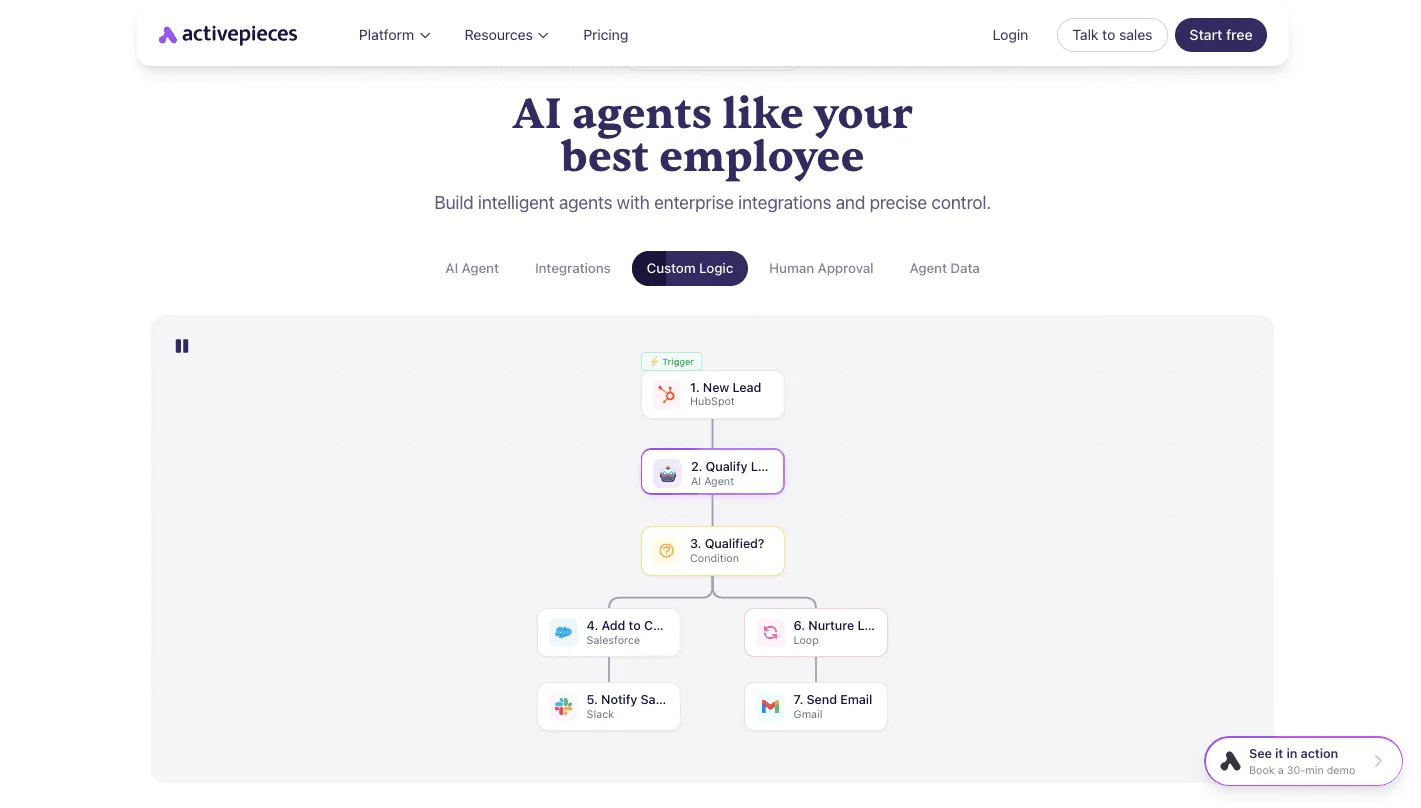
Top to bottom, the steps run in order, each connected to the next by a vertical line.
Your seat check has the same shape: a monthly trigger, a condition that asks whether someone logged hours, and a message to whoever approves seats. Nothing in it needs engineering vocabulary, just a sequence you can read from top to bottom.
What the tool itself costs is flat. Activepieces lists a Free plan at $0 a month, so you can build the inactive-seat check and see whether it catches anything before you spend a dollar.
$20 a month gets you Plus, a small fixed line you can weigh against one unused Harvest seat, so the economic case hinges on whether your Harvest account has idle capacity.
$200 a month buys Team, which only makes sense once several people rely on these workflows.
Add people to the plan and the cost doesn't rise, which is the opposite of how Harvest bills.
Start on Free and let one month's check show what it finds.
The Monday Checklist Before You Pick a Harvest Plan
Once that month of Free is up, you have real evidence, so run these five checks in order before anyone enters a card number:
- Count true paid seats. Count the people who actually log time, not everyone on the payroll. Pay for empty chairs and the bill grows with no work behind it.
- Choose monthly or annual. Annual usually trades flexibility for a lower rate, which is a bad deal if your headcount might shrink before the year ends.
- Set a quarterly seat review. Put it on the calendar, because a departed contractor whose seat nobody removed keeps billing you.
- Reconfirm the price on Harvest's page. Pricing changes, so the page on the day you buy outranks anything written earlier, this article included.
- Trial for 30 days with real timesheets. Demo entries won't hit the limits your team will hit, so a trial run on invented data tells you nothing.
Build the comparison yourself from Harvest's pricing page, with one row per plan and three columns: price per seat, what the plan caps, and what it locks behind a higher tier.
The cap column matters most, because that's where a cheap plan turns expensive once your team outgrows it.
Because billing is per seat, the total is the seat price multiplied by your count, and every extra seat repeats the cost. Monthly lets you drop seats the moment they go quiet.
Annual asks you to be right about your headcount twelve months ahead, and if you're wrong, you pay for the mistake.
The day your team crosses either limit, you're paying whether you planned to or not, so find that day now rather than discovering it on an invoice.
Frequently asked questions
Is there a free Harvest plan? Harvest has offered a free tier, but it's capped tightly on people and projects.
Once your team outgrows either cap, you move to paid seats. Read the current pricing page for the exact limits, because the cap is where free stops.
Does Harvest charge for clients or contractors?
You aren't charged for clients. A client is a record you send invoices to, not someone who logs in and works, so they don't take up a seat.
Contractors are different. Anyone who tracks time inside your account generally counts as a seat, so a contractor who logs hours is a cost you should count in your headcount.
If you can have them send you hours instead, you may avoid the seat, but confirm how your plan treats that before relying on it.
Can you get a refund or downgrade mid-term?
I can't confirm Harvest's refund terms, so don't assume you can undo a purchase. Treat every seat you add as one you'll carry until the term ends.
Ask support in writing before you pay, and ask specifically what happens to seats you remove partway through. That is the cheap fix. Not asking leaves you paying for people who have already left the project.
Does Harvest offer nonprofit or annual discounts?
Whether Harvest offers one, I can't confirm, though discounts of this kind are common in software. Ask the sales or support team directly and get the answer in writing.
Compare plans after the discount, not before, because a discount that applies only to a particular plan or billing period can change which plan is cheapest for your team.
How often does Harvest change its prices? I have no confirmed history of Harvest's price changes, and no vendor promises prices will hold.
The practical move is to ask whether your rate is fixed for the term and what notice you get before a change. Then check your invoice each renewal, because a rate you never look at is one you can't catch changing.
Related reading
References
Running the numbers
See what the same workload costs here.
Free forever plan, and every paid plan self-hosts at no extra cost.
See pricing Talk to sales