
GitHub API Rate Limit Exceeded? Fix 403 and 429 Errors

Nov 20, 202614 min read
The GitHub API's a REST and GraphQL interface to repositories, issues, pull requests and org data, and calling it costs nothing beyond a token. What you pay in is rate limit budget, which's where the nightly sync eventually broke.

GitHub API rate limiting is the set of caps on how many requests, how much query cost, and how much concurrent or secondary activity a token may use in a given window, with errors returned once any one of them is exceeded, not only the headline hourly limit.
GitHub API access and sync build
What the GitHub API is: REST, GraphQL and webhooks
REST exposes one resource per URL, and GraphQL lets you ask for several resources in one query. Webhooks push events to your server so you don't poll.
Because the job was simple (list repositories, then read each one), the sync used REST.
The team could have built it in Activepieces, which has a GitHub integration among its 750 integrations, but a plain script made every request visible, which mattered once the limits started to bite, so they could identify which requests were excessive.

The official docs cover all three.
Choosing a token: fine-grained PAT, GitHub App or OAuth app
For a single-team job, a fine-grained personal access token's the smallest option that works: it can be limited to one organization's repositories and given read-only permissions.
A GitHub App suits software that acts for many installations, and an OAuth app suits acting on behalf of individual users.
Each authenticates differently, so each is metered differently.
The minimal working request with the required headers
- Create a fine-grained personal access token.
- Scope it to the organization's repositories with read-only permissions, so a leaked token can't write anything.
- Send it in the
Authorizationheader with every request. - Call
GET /user/reposwithper_page=100, which keeps the number of pages, and therefore requests, as low as that endpoint allows. - Read the
X-RateLimitheaders on the response.
Skip step five, which teams often do, and you lose the only place the API tells you how much budget remains. A sync that never reads those headers finds out about its limit from a failure.
There's no per-call price. Limits differ by authentication method and by plan, and GitHub adjusts them, so read the current values from the rate limit documentation instead of from an article.
Everything below works on Activepieces' free plan. Start without code or a credit card.
Nightly sync failure with 403 and 429
At 02:14 the nightly sync stopped, because GitHub, the service holding the repositories this job reads, answered with 403 and 429 responses. The job treated both as fatal instead of waiting.
The incident below's a composite, built for illustration from the way these failures typically look.
What the nightly GitHub sync was doing
The job was a scheduled sync that walks every repository in an organization. For each one it lists open pull requests, then fetches reviews and check results for each pull request, and writes the results to a reporting database.
With no pause between calls and no concurrency cap, the job ran unattended and in a loop. Its error handling was a single catch block that logged the failure and exited.

Here, each repository fanned out into many follow-up requests, so the job moved from a trickle of calls to a sustained burst.
What drew the rejection was the burst, not the total volume over the hour.
GitHub 403 and 429 response headers
The log showed the loop reading repositories normally, then a rejected request, then a second rejection on the next attempt, then the process exiting. The first rejection was a 403, the second a 429.
The body carried a message saying a secondary rate limit had been exceeded, which is the wording GitHub's documentation describes for its short-window limits.
The headers were dropped, and that's the real mistake, though status and message made it into the log. Three headers decide what to do next.
retry-after, when present, says how long to wait before the next request, so the retry delay should come from it and not from a guess.
If x-ratelimit-remaining still shows budget left, the hourly limit wasn't the cause. It shows whether the hourly budget was actually spent. x-ratelimit-reset says when the hourly window renews, which matters only if remaining has reached zero.

Because the job discarded them, the on-call engineer had to guess which limit fired. Logging those headers on every failed call's the first fix.
Partial data after the GitHub API failure
Partial data from a failed GitHub sync
The cost was a partial dataset nobody knew was partial.
Partway through its repository list the sync stopped, exited without retrying, and left the morning's reports looking complete when they weren't. Nothing had told them that it stopped.
Suppose a job returns a rate-limit response, treats it as the end of the work, and exits cleanly. There's no alert, because from the scheduler's side the run finished.
The damage here shows up later, in other people's dashboards.
Cost of the GitHub rate limit failure
The figures are illustrative, not measured. Here is what the composite case cost in the four units the team felt.
Everything after the point where the run stopped was left unsynced. That data was simply absent, not marked as missing, so downstream consumers read silence as "no activity."
Hours passed between the failed run and the first person asking why a number looked low. Detection came from a human reading a report, not from the pipeline.
To re-run by hand, an engineer had to work out which repositories were missing, re-trigger the sync for them, and wait out the limit window. The wait was the longest part, since re-running immediately would only hit the same limit again.
Last came the stale downstream reports. Every report built on that data carried yesterday's numbers into the morning.
GitHub primary, secondary, and tier limits
A job that must resume cleanly has to know which limit stopped it. The nightly sync hit one the hourly number never showed: the quota set by its identity, or a secondary limit that triggers well below it.
Primary limits by token type and plan
The table below, checked 20 Nov 2026 against GitHub Docs, shows that the identity you call with sets your ceiling more than anything else does. A sync running unauthenticated gets 60 requests an hour, so it stalls within minutes.
| Identity | Hourly quota | Scaling |
|---|---|---|
| Unauthenticated | 60 | Per IP address |
| PAT / OAuth | 5,000 | Per user |
| GitHub App | 5,000 minimum | Grows with repositories and users |
| GITHUB_TOKEN in Actions | 1,000 | Per repository |
| Enterprise Cloud | 15,000 | Per app on an Enterprise Cloud organization |
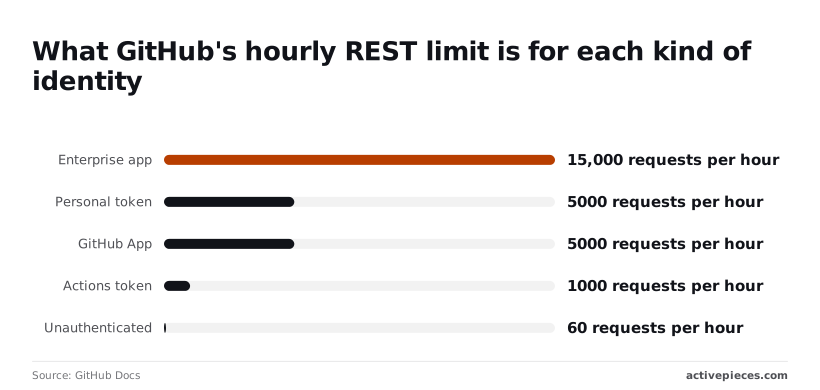
A personal token and a GitHub App both start at 5,000, but only the App grows, so a multi-repo sync belongs on an App.
The Actions token's 1,000 is the one that surprises people: a workflow doing the same work as a local script has a fifth of the budget.
Secondary limits the hourly number hides
Burst behavior, not volume, is what secondary limits fire on. GitHub's docs cap concurrent requests at 100, REST points at 900 per minute per endpoint, and content creation (issues, comments) at 80 per minute and 500 per hour.
Burst behavior, not volume, is what secondary limits fire on.
Fan out in parallel and the sync can get blocked with most of its hourly quota unspent. Honor the retry-after header, and serialize writes.
REST counts requests; GraphQL charges points by query cost, with its own 5,000-point hourly budget.
One query nesting repositories, issues and comments can cost far more than one point, so request count tells you little. Ask for the rateLimit { cost remaining } field and measure before you batch.

Other common errors: 401, 403 scopes, 404 on private repos, 422, 5xx
A 401 means the token is bad or expired; refresh it, don't retry. A 403 can be a missing scope or a rate limit, so check x-ratelimit-remaining before assuming either.
A 404 on a private repo usually means the token can't see it, not that it's gone. A 422 means the payload failed validation, and retrying never fixes it. A 5xx is safe to retry with backoff.
Easier to see it running than to read about it: set it up free, no card.
Rules Added to the Sync After the Incident
Each rule below follows from the cost you just measured. Apply them in this order, cheapest change first:
- Read the
X-RateLimit-*headers on every response. - Honour
Retry-Afterwhen a request is refused. - Serialise requests instead of firing them concurrently.
- Send ETags so unchanged data costs nothing.
- Paginate at
per_page=100, which cuts the round trips for a long list. - Switch from a personal token to a GitHub App, so the sync has its own budget.
- Prefer webhooks to polling.
- Alert before the budget reaches zero.
Back off using Retry-After and X-RateLimit-Reset
The incident worsened when the retry loop hammered a refused endpoint. When GitHub sends Retry-After, wait exactly that long. When it sends none, read X-RateLimit-Reset, an epoch timestamp, and sleep until then.
Serialising requests matters for the same reason: parallel workers trip the secondary limits, which punish bursts even when the hourly budget's untouched.
Cut request volume: ETags, webhooks, GraphQL
Store the ETag from each response and send it back as If-None-Match. An unchanged resource returns a 304, and for authenticated requests a 304 doesn't count against the primary limit. A nightly sync that mostly re-reads unchanged data stops paying for it.
Better still, stop asking. Webhooks push events to you, so the sync only fetches what changed.
Where you must pull, GraphQL lets one query replace a chain of REST calls, and its rateLimit { cost remaining } field tells you the price before you scale up.
Moving to a GitHub App, an installation with its own token and its own allowance, also stops the sync from competing with a person's day-to-day usage on the same account.
Alert before the GitHub rate limit runs out
An alert at zero fires after the damage. Log the remaining count from every response and page someone when the sync has spent most of its budget with work still queued. That leaves time to pause or shift to webhooks before the nightly run fails.
Run the Same GitHub Calls with Activepieces
Setting up the connection
Activepieces lets you run the nightly sync's GitHub calls as a visual flow instead of a script you host. It changes none of GitHub's limits, so the rules from the runbook still apply to every step you build.

Setup's where it earns its place.
Activepieces ships a GitHub integration (its name for a connector) with triggers and actions, one of the 750 integrations counted in its open source monorepo, whose core is under the MIT licence, so the GitHub triggers and actions are source you can read, not a vendor's description.
If no template covers your case, you can describe it in plain language to the built-in AI chat, and it builds and publishes a runnable flow instead of returning a template search result: ask it for a flow that opens a ticket and pings a channel when a sync step hits a 403 or 429, and the flow comes back published, not as a search hit.
MoneyGram, Moneypenny, Alan and FundingSocieties run Activepieces in production, and every plan, the free one included, allows unlimited flows.
Once you add a connection in Activepieces and authenticate it with GitHub, every step in the flow reuses that credential.
That means no token handling in your own code and no rotation script to maintain, and when a token is revoked you fix one connection instead of hunting through cron jobs.
What a workflow looks like in the builder
The screenshot below shows the shape of a flow in the builder canvas. A trigger sits at the top, two OpenAI steps feed a WordPress step at the bottom, and that last step's selected, which means WordPress will receive processed data from two AI sources.
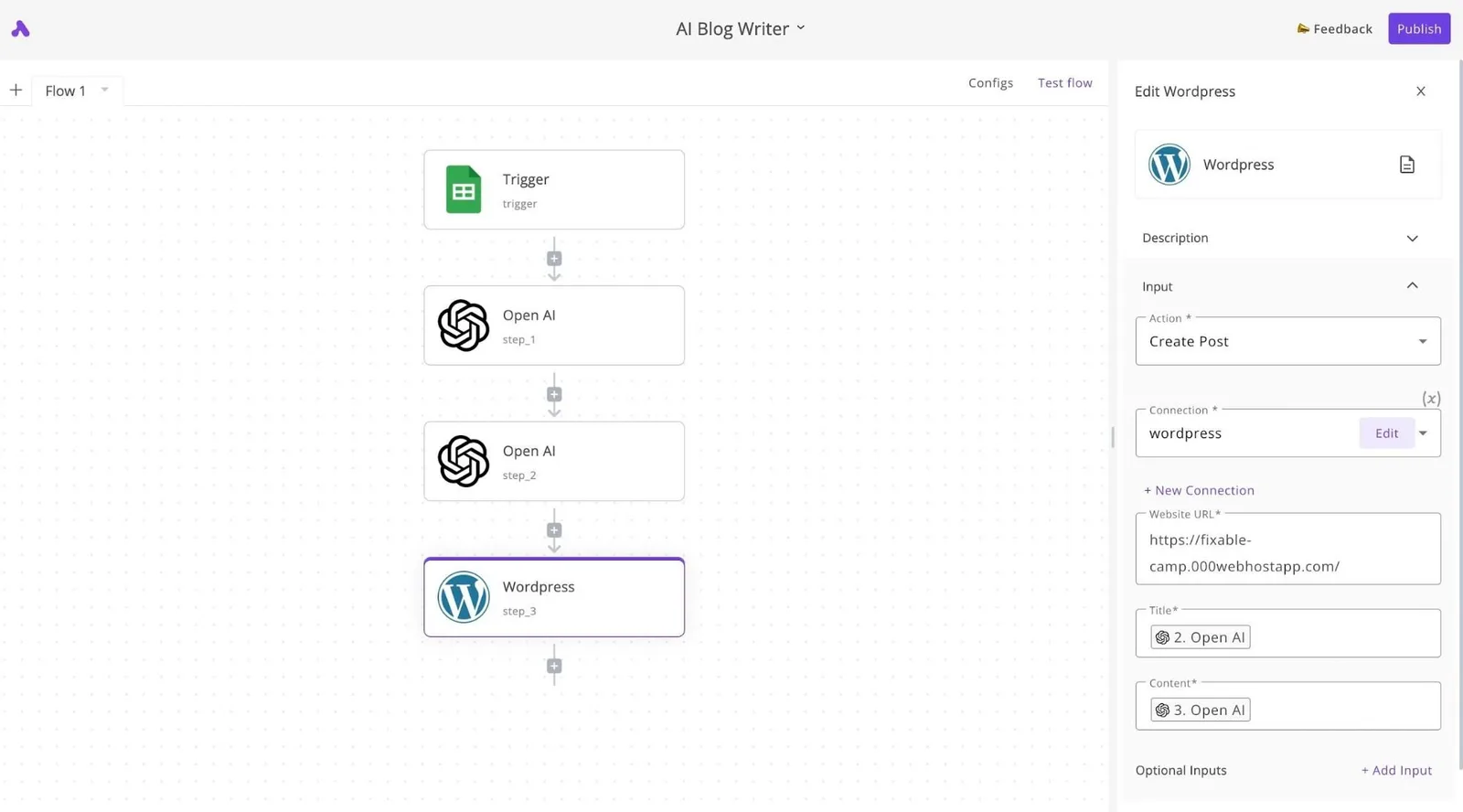
Its panel shows an action and a connection, with fields filled by references to earlier steps.
Your GitHub flow looks the same: a connection picked from a dropdown, and inputs wired to the output of the step before. The takeaway's that each step's one call, so you can count the calls a run makes by counting the steps.
Limits and retries still apply
That counting matters because the failure mode's unchanged. A flow that loops over every repository and calls GitHub for each one spends your quota exactly as a script would, and a 403 or 429 from GitHub surfaces as a failed step.
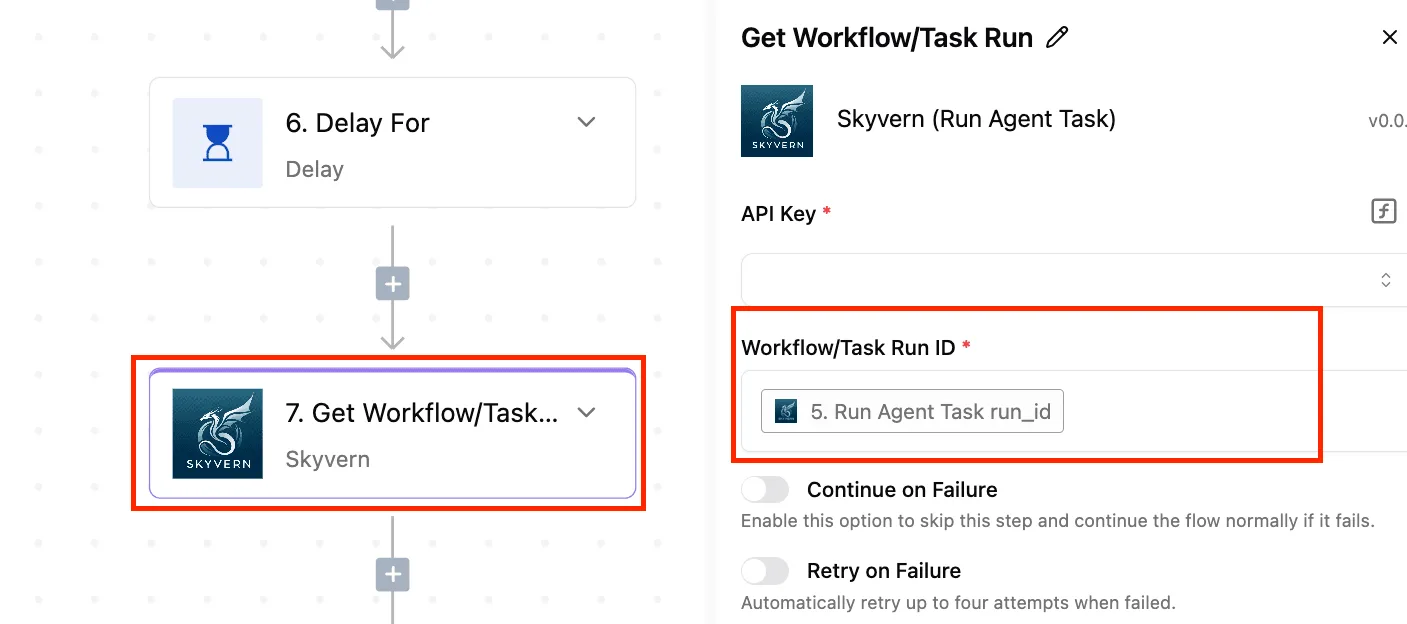
Activepieces can retry a failed step, but a retry's another request against the same limit. Retrying immediately into an exhausted quota makes the outage longer.
Check the response headers GitHub documents for when the limit resets, and build the wait into the flow rather than relying on blind retries.
When to keep the work in code
Know where this approach stops. For large bulk reads, such as walking every issue across a big organization, raw API code's the better tool. You control pagination and how fast you consume the budget, and a visual loop gives you less of that control.
Use Activepieces for event-driven triggers and modest per-run actions, and keep the heavy reads in code.
Frequently asked questions
The runbook leaves a handful of questions that come up in review, and each has a short answer here, with the GitHub docs page that holds the exact current terms.
Is the GitHub API free to use? Yes: calling the API carries no per-request charge, but every call counts against a rate limit, and that limit's what you're really budgeting.
The limits depend on how you authenticate and are set out in the REST API rate limits page. Check your plan's terms before assuming a higher ceiling.
Does GitHub charge extra for calls above the limit?
No. Above the limit, requests fail instead of being billed, so the cost's an outage in your sync, not a line on an invoice.
A rejected call returns a rate-limit error with headers saying when you can retry, and your client should read them and back off. The rate limits page covers the headers.
To see where you stand before a run, call GET /rate_limit, which is documented under rate limit. That call doesn't count against your primary limit.
Can I use the GitHub API without a token?
For some public endpoints, yes, but the unauthenticated allowance's far smaller than the authenticated one, so a scheduled job will exhaust it quickly. Use a token.
Inside GitHub Actions, the built-in GITHUB_TOKEN works, but it has its own limits and it's scoped to one repository, so a cross-organization sync will need a different credential. See authenticating to the REST API.
What is the difference between the REST and GraphQL APIs? REST meters you by request, while GraphQL meters you by the cost of each query, so one large query can use more of your budget than it appears to.
Nested connections are what make a query expensive. Read GraphQL rate limits and node limits before you replace many REST calls with one query.
How do I pin the GitHub API version? Send the X-GitHub-Api-Version header with every REST request.
Without it, GitHub uses a default version, and a later change to that default can alter responses under a job nobody has touched. The API versions page lists the supported values.