Sprout Social Pricing 2026: Plans and Cost Per Seat

Nov 5, 202614 min read
You are looking at a social media management platform that charges per seat and sells four plans: Standard, Professional, Advanced and Enterprise, with Enterprise quoted only through sales, so you cannot price-compare the full range. The first three are published on sproutsocial.com.
Dollar amounts change, so this section shows how the plans stack up as of 5 November 2026 and leaves the live numbers to the pricing page.
Sprout Social plans and pricing
The plan table, checked against sproutsocial.com
Each step up costs more for every person on your team, not once for the account. That is what to take from the table, which lists the per-seat list price of each plan from cheapest to most expensive.
| Plan | Monthly-billed price per seat | Annual-billed price per seat | Profiles included | Notable caps |
|---|---|---|---|---|
| Standard | $199 | Below $199; exact rate on the pricing page | Smallest bundle | Core publishing and inbox, lightest reporting |
| Professional | $299 | Below $299; exact rate on the pricing page | Larger bundle than Standard | Adds deeper reporting and team tools |
| Advanced | $399 | Below $399; exact rate on the pricing page | Same profile bundle as the tier below, or larger | Adds workflow automation and more control |
| Enterprise | Ask sales | Ask sales | Negotiated | Set in your contract |
Those are list prices per seat, and $299 and $399 are tier prices, not rates that climb with headcount: ten Professional seats each cost $299. The next two parts cover the extras and the billing choice that move the bill.
Sprout Social plan limits and paid add-ons
Each plan limits how many social profiles you connect and which reporting and workflow features you get. Some tools sit outside every tier as paid add-ons, such as listening and advanced analytics.
So the plan you pick is only the base of the bill. If a feature is locked, you either upgrade every seat or pay for a separate tool, such as Activepieces, to patch the gap.

If you commit to a year, every published tier is cheaper per seat. The saving is real, but it ties you to the seat count you sign for.
If your team is likely to change size, a smaller yearly saving may cost less than paying for empty seats.
If you are running this arithmetic for your own team, see what the same workload costs on Activepieces.
The real monthly bill for three named buyers
On Sprout's published list prices, one Standard seat costs $199 a month, five Professional seats cost $1,495, and fifteen Advanced seats cost $5,985, so the bill grows with both headcount and tier.

It shows the monthly total for a solo creator, a 5-person team and a 15-seat company at monthly list price.
Below it is the working for each buyer, so you can redo it with your own headcount.
One Standard seat is 1 × $199 = $199 a month, which is $2,388 over twelve months at that rate. That's the floor, and it's what you pay before a single add-on.
Five Professional seats at the $299 tier price is 5 × $299 = $1,495 a month, or about $17,940 a year. The higher per-seat figure comes from the tier, not from the extra people.
A sixth person on Professional adds another $299, no more. Moving up to Advanced is what lifts every seat to $399.
20-seat company with approvals
Fifteen Advanced seats at $399 each is $5,985 a month, the last confirmed figure. At the same tier price, twenty seats would be 20 × $399 = $7,980 a month.
That's my arithmetic, not a quoted price, so check it against the pricing page before you plan around it.
At roughly $95,000 a year, a company this size has reached the point where a cheaper tool for most of your team deserves a real look, meaning the switching cost is now justified.
Hidden costs and limits Sprout Social buyers hit
Although the seat price is the number on the page, the add-ons, profile limits and contract terms are what push a Sprout Social bill past what you budgeted, and some of them aren't published at all.
Add-ons priced separately
If you want social listening, which tracks mentions of your brand and topics across the web even when nobody tags you, it's sold as an add-on at around $999 a month.
That's roughly $12,000 a year on top of seats, so a team that wants it for one campaign is paying for twelve months of it.
Per user, per month: $35, which means each new hire increases your monthly bill. That is what Support indicates Trellis Plus, a separately sold upgrade, adds.
Multiply that by every person who needs it and it becomes a second seat bill.
Seat and profile ceilings
On the entry plan you're capped at 5 connected social profiles. A profile is one account on one network, so a single brand on Instagram, Facebook, LinkedIn, X and TikTok already uses all five.

A second brand or regional account forces an upgrade, and you pay for the jump in tier rather than for the one profile you needed.
Beyond the seats your plan includes, extra ones are billed per person. Sprout doesn't publish what they cost at every tier, so treat that figure as ask sales.
Nothing on Sprout's pricing page spells out the renewal mechanics or the cancellation terms, and I haven't guessed at them. Before you sign, get these answers in writing:
- Whether the plan renews automatically, and how much notice you must give to stop it.
- Whether you can cancel mid-term, and what you owe if you do.
- Whether the price you are quoted is locked at renewal.
Without those answers, a plan you outgrow or stop using could keep billing you.
Sprout Social against Hootsuite, Buffer and Agorapulse
Of the four, Sprout Social costs the most, and the premium pays off only if you need its shared inbox, approval steps and deeper reporting. Otherwise you're paying for features nobody on a small team opens.
Entry price and 5-person team cost
How each tool charges matters more than the headline price, and the table shows it. Read the five-person column first: it shows who pays more as the team grows.
| Entry price | Cost for 5 people | Included profiles | Approval workflow | Inbox and listening | Reporting depth | |
|---|---|---|---|---|---|---|
| Sprout | Highest of the four | Rises with every seat added | Limited by plan tier | Built in on higher tiers | Strongest inbox; listening is a paid add-on | Deepest |
| Hootsuite | Mid to high | Depends on the plan's seat limit | Limited by plan tier | Higher tiers | Inbox included; listening costs extra | Solid |
| Buffer | Lowest | Priced by channel, not by person | Charged per channel | Basic | Light | Basic |
| Agorapulse | Mid | Rises per user | Limited by plan tier | Included | Inbox included; listening is limited | Good |
Check each vendor's pricing page before buying, because these tiers change. What follows from the table is that Buffer's channel pricing keeps a five-person bill flat, while Sprout's per-seat pricing makes it climb.
If several people answer customers, or a manager must sign off every post, Sprout's inbox and approval steps save real hours. Reporting is where it pulls furthest ahead, which matters if someone must show results to a boss or client each month.
If your team mostly schedules posts and glances at basic numbers, you are paying for depth it will never use. Buffer or Agorapulse does that job at a lower bill.
Start there, and move to Sprout only when a missing feature costs you more than the price gap.
Worth checking against a plan that does not meter every step: one credit covers a whole run on Activepieces.
The right Sprout Social plan for your team
Buy the lowest Sprout Social tier that contains the one feature you can't work without, and move up only when a named limit stops you from doing your job.
The table below sets that rule out by team size, channel count and approval need, so you can see which limit should send you upward.
| Team and situation | Recommended plan | Limit that triggers moving up |
|---|---|---|
| 1 person, few channels, no approval | Lowest tier that has your must-have feature | The tier can't connect another profile you need |
| 2-5 people, several channels, light sign-off | Standard or Professional, whichever holds your must-have | Posts need a formal approval step the tier lacks |
| 6-20 people, many channels, formal approval | Professional or Advanced | A seat, role or reporting restriction blocks someone's work |
Read the rows as starting points, not verdicts. The right column is the part to act on, because a limit you have actually hit is worth paying for and a limit you merely might hit is not.
Signs your Sprout Social plan is too big
If a paid feature has gone unused for a full quarter, you're paying for it as insurance. Seats that nobody logs into cost the same as seats in daily use, and an add-on bought for one campaign keeps billing after the campaign ends.
Check who actually logs in and which reports anyone opens, then drop what has sat idle.
Signs you have outgrown your plan
Watch for the workaround that eats staff time: exporting data by hand, forwarding drafts over email for sign-off, or sharing one login because seats ran out. Each workaround has a cost in hours and in mistakes.
When that cost beats the price gap to the next tier, move up, and buy only the tier that removes the blocking limit.
Connect Sprout Social to your other tools with Activepieces
It won't lower your Sprout Social bill, but Activepieces, an automation tool that moves information between apps for you, can take over the copying, forwarding and chasing that people otherwise pay a seat to do.
A run costs 1 credit however many steps it has, whereas Zapier bills per task and Make per module, so the Monday report below costs the same whether you build it as two steps or ten.
Most pricing in this space charges more as you break work into smaller, safer integrations, which taxes the very habit that keeps an automation reliable; here the run is the meter, and what happens inside it is not.

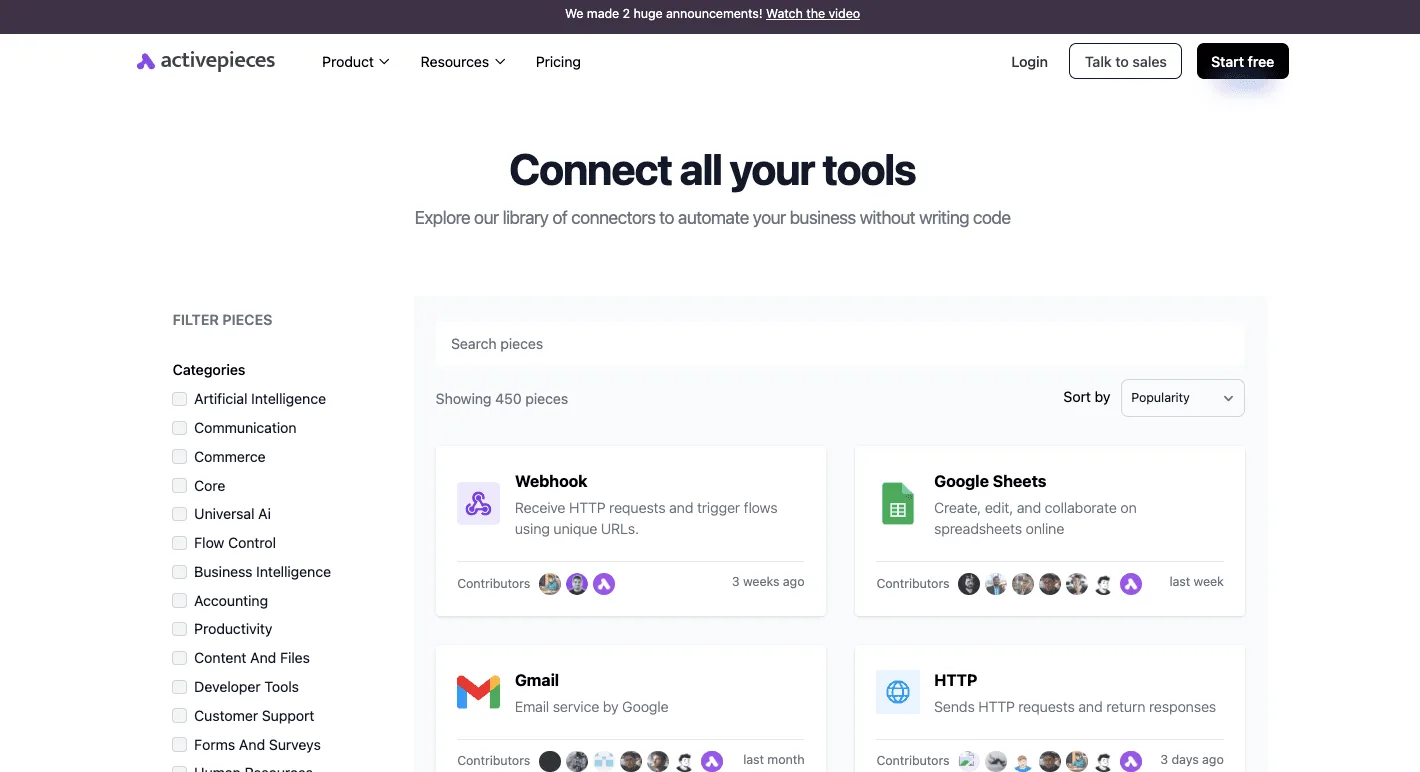
The connectors library below shows how wide the catalog is: Webhook, HTTP, Google Sheets and Gmail sit at the top by popularity, so you can see whether your other tools are covered before you commit.
What a workflow can and cannot do for Sprout Social
Send an alert to Slack, drop numbers into a sheet, email a draft to an approver: a workflow can do all of that. It can't unlock anything your Sprout plan withholds.
If Sprout doesn't expose the data on your tier, no automation will pull it out.
I couldn't confirm a dedicated Sprout Social integration in the catalog. If there isn't one, the HTTP piece can call Sprout's API, or the Webhook piece can receive a message Sprout sends.
Either way, check Sprout's integration and API documentation first to see whether your plan includes API access. If it only comes with a higher tier, that's a line item to add to your estimate before you build anything.
To stop someone exporting a report by hand every Monday, the example workflow runs these steps in order:
- Set a schedule trigger for Monday morning.
- Fetch the report figures from Sprout through the HTTP integration, using your API credentials.
- Add a row to a Google Sheets file, so you build a history Sprout's own reporting may not keep for you.
- Post a short summary to a Slack channel so the team sees it without logging in.
Done once, this saves a recurring chore, and a cheaper tier with fewer seats can serve the team because they read the report in Slack instead of in Sprout.
Your Sprout Social purchase checklist
Before you sign or auto-renew, do six jobs on a Monday morning; they will tell you what you're really paying for and whether you need to pay it.
Skip them and the contract decides for you: seats nobody logs into and add-ons nobody switched on keep billing quietly.
The list below runs in an order that works, because each step feeds the next.
- Count the seats and social profiles in use. Count people who log in, not people who were once given a login, because every idle seat is a charge you carry for nothing.
- Write down the must-have features. Mark the ones your team used last month, so you don't pay a higher tier for something that only looked useful in the demo.
- Re-check the pricing page on the day you buy. Plans and limits change, and the page is the only version you can hold the vendor to if your quote disagrees.
- Ask for an itemised written quote. It should list the plan, each seat and every add-on on its own line, so you can see which line you would cut.
- Trial one cheaper alternative alongside. Run a real week of your posting through it. If it does the job, you have a number to negotiate with, or a reason to leave.
- Set a renewal reminder ahead of the notice date. Put it in the calendar well before the date your contract names, because missing it can lock in another term.
Frequently asked questions
Once you have the numbers, these are the questions that come up, and each answer points to the Sprout page that settles it.
Trial and billing
There is a free trial but no permanent free plan. The trial is how you test the product, so use it on your real workflow. Check the sign-up flow on Sprout's pricing page for what the trial includes and how long it runs.
Paying annually is cheaper: Sprout's pricing page lists a lower rate for annual billing than for month-to-month. The catch is the commitment: you're paying for a year of seats whether or not you use them. Compare the two rates there before you pick one.
Seats and add-ons
You can add extra users, because Sprout sells additional seats on top of each plan's included users, priced per person.
That's where a small team's bill quietly grows, so count every contractor and part-timer who needs a login. The pricing page shows the per-seat rate for each tier.
Whether AI features cost extra depends on the feature and your tier. Some AI tools are bundled into plans, while other capabilities, such as listening and premium analytics, are sold as separate add-ons.
Read Sprout's plan comparison line by line and ask sales to confirm in writing what your quote includes.
Cancelling
Don't count on cancelling mid-contract. Sprout contracts are generally set up so that you commit for the term and renew automatically unless you give notice.
Read the renewal and cancellation language in your order form and in Sprout's terms of service, and put the notice date in your calendar the day you sign.
Related reading
References
Running the numbers
See what the same workload costs here.
Free forever plan, and every paid plan self-hosts at no extra cost.
See pricing Talk to sales