
How to Get a Docusign API Key and Handle Limits

Nov 20, 202616 min read
The Docusign API is a set of REST interfaces for sending, tracking and managing agreements, and for administering the account that holds them. Docusign documents several distinct APIs, each with its own scope.
Whoever owns the integration key, whether that is a developer wiring it directly or a team connecting it through a tool like Activepieces, owns the 2am page when one fails.
Docusign API access and capabilities
The API families Docusign documents
There is no single endpoint. Docusign publishes separate API families, and the table lists each one with what it does and where its docs live, as checked on 20 November 2026.
Before you start debugging, know which API you called, because "The Docusign API" is a loose phrase: a failure in envelope sending and a failure in user provisioning belong to different APIs.
| Family | What it does | Docs page |
|---|---|---|
| eSignature REST | Creates, sends and tracks envelopes, recipients, templates and documents | eSignature REST API |
| Admin | Manages organizations, users and account-level settings | Admin API |
| Click | Handles clickwrap agreements, where a user accepts terms with a click | Click API |
| Rooms | Manages real estate transaction rooms and their documents | Rooms API |
| Monitor | Exposes security and activity events for audit | Monitor API |
| Connect | Pushes event notifications to your endpoint as webhooks | Connect |
If you start with eSignature REST, as most teams do, you will probably add Connect so you stop polling for status. Each additional family is another set of permissions someone has to approve and own.
Docusign developer account and demo environment setup
To build and test without touching production agreements, you get a developer account from Docusign with a separate demo environment. The demo environment is where you create the integration key and try the consent flow.
Treat it as a rehearsal: a key that works there still has to go through promotion for production, and that handover needs a named owner, not a shared inbox.
Which plan includes API access
You need a paid plan for production calls; the demo environment does not require one. Docusign sells API access separately from its standard eSignature plans, and the docs and pricing page, not a blog summary, are the authority on which tier covers your use.
Confirm the plan with Docusign before you commit to a design.
This takes minutes, not a project: automate it in Activepieces free.
Authentication with an integration key and OAuth
Before the first authenticated request, five steps have to succeed, each one before the next, so if one breaks anywhere, the whole authentication halts.
The steps are: create an integration key, add a redirect URI and RSA keypair, grant consent once, request a token, and call userinfo.
Whoever owns the key is the person paged when the token stops working.
Here's the order the example team follows, so the first call isn't the first failure:
- Create the integration key in your developer account.
- Add the redirect URI and generate an RSA keypair on that key.
- Grant one-time consent for the key.
- Request an access token.
- Call userinfo to get the account ID and base URI.
The Docusign Python SDK authentication guide covers each step below.
On day one, record a named owner against the integration key, because every token request traces back to it. It is the client ID for your app.
Then add the redirect URI and the RSA keypair; the private half goes in a secrets store, not a repository.
Choosing Authorization Code or JWT grant for Docusign
Use Authorization Code when a person signs in, and JWT when a service acts without one. The lifetimes differ, and that difference is where the failure happens.
Per Docusign, an Authorization Code token lasts 8 hours, so a token fetched at 9am is dead by 5pm. According to Docusign, the Implicit Grant also lasts 8 hours.
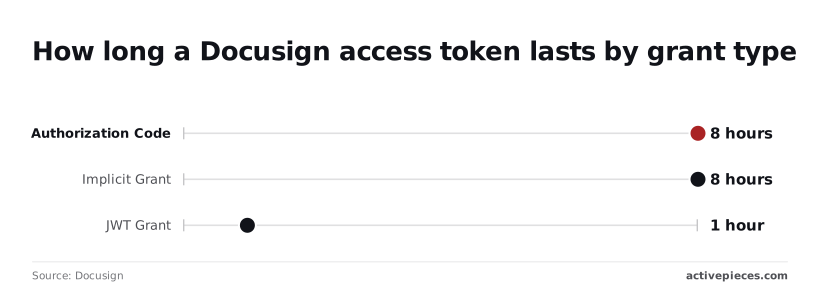
Docusign states that a JWT token lasts 1 hour, so any unattended job that runs longer must request a fresh token or it'll start returning 401 errors partway through.
It compares the three lifetimes side by side.
Skip consent and the token call fails with a consent-required error, which is the usual cause of a JWT setup that works for the developer and fails for everyone else.
Consent is a one-time approval of the scopes your key requests; JWT needs it before the first token request will succeed.
Call userinfo with the access token. It returns your account ID and the base URI, and every later API call is built on that base URI. Hardcoding the sandbox host is what breaks the move to production, so read it from the response.
A minimal working request to send an envelope
When all you need is a minimal send, it is one POST to your account's envelopes endpoint, carrying the bearer token, one document, one signer and one signature tab, with status set to sent.

The token and base URI you already hold decide where it lands.
Docusign create envelope API request format
Post to {baseUri}/restapi/v2.1/accounts/{accountId}/envelopes with an Authorization: Bearer header. In the developer sandbox the host is the demo one; in production, use the base URI returned for the account, never a hard-coded host.
{
 "emailSubject": "Please sign",
 "documents": [{
 "documentBase64": "<base64 of the file>",
 "name": "Agreement.pdf",
 "fileExtension": "pdf",
 "documentId": "1"
 }],
 "recipients": {
 "signers": [{
 "email": "[email protected]",
 "name": "A. Signer",
 "recipientId": "1",
 "tabs": {
 "signHereTabs": [{ "anchorString": "/sn1/" }]
 }
 }]
 },
 "status": "sent"
}
Set status to created and you get a draft that emails nobody, which is a quiet way to think the automation worked when it didn't.
Reading the Docusign create envelope response
When the call succeeds, you get envelopeId, status and a uri back. Store the envelopeId against your own record at once: it's the only handle for finding that envelope later.
Losing it leaves a signature request in the world that no one on your side can trace.
Do not read sent as signed. It means Docusign accepted the envelope and notified the signer, and it says nothing about whether anyone signed.
Checking Docusign envelope status through the API
To check progress, GET the same path with /{envelopeId} appended and read status. It moves through values such as sent, delivered, completed, declined and voided.
Polling this for every open envelope is where hand-built integrations spend their per-account allowance, so the loop needs an owner who knows its cost.
Ask the same of the connection that holds your credentials: who changed it, and when. An audit log answers it.
The one below lists a flow creation, a connection update and that connection's deletion, each with the user who did it and the project it belonged to.
Docusign API pricing and rate limits by plan
$600 a year for Starter, $3,600 for Intermediate, $5,760 for Advanced: those are the costs, set by the plan's envelope allowance, which means you pay more for a bigger allowance.
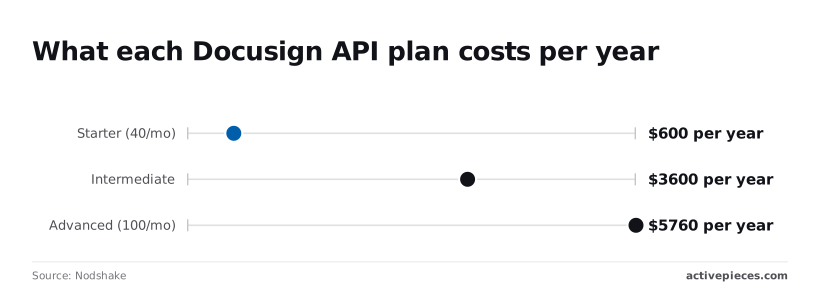
The rate limits that push back at 2am are a separate matter, and one the figures below don't settle.
Docusign API per-envelope pricing and plan allowances
At $600 a year, Starter allows 40 envelopes a month, according to Nodshake. That works out to about $1.25 per envelope.
The allowance is the number to watch: a retry loop that resends on every error can use up the month before anyone is awake to see it.
The chart shows annual cost for the two plans with a stated monthly allowance, meaning you can calculate the cost-per-transaction for each tier.
For $3,600 a year, Intermediate allows 100 envelopes a month, per Nodshake. That's $3 per envelope, so 2.5 times the allowance costs six times the price.
Advanced costs more and buys no more envelopes: it is also listed at 100 envelopes a month, at $5,760 a year. Nothing in that figure buys more envelopes, so the extra $2,160 over Intermediate pays for features, not volume.
Whoever owns the budget should know which feature justified it.
Documented rate limits and burst limits
I have no confirmed per-plan rate or burst figure to quote, so none appears here. Docusign's developer documentation is where to check current limits, and you should treat anything you read elsewhere as unverified.
When one team runs a batch job, another team's signing flow can slow down, because limits apply per account and every integration sharing it draws on the same budget.
When you exceed a limit, expect the API to refuse calls with an error until the window passes. Back off and retry later instead of retrying immediately.
Docusign API polling versus Connect webhooks
Every status poll on a timer counts against the account's call budget, because polling asks Docusign for an envelope's status each time. With many open envelopes, polling spends that budget on "no change" answers.

Connect is Docusign's webhook feature: it pushes a notification when status changes, so you spend calls only on events.
The cost is an endpoint that must stay reachable and someone who owns it. If that endpoint is down, you miss notifications unless you reconcile with an occasional status check.
Activepieces flows start from triggers, and the catalogue is large enough that its integration list is the place to look for Docusign triggers and actions before you settle for a timer loop.
Describe the process in the built-in chat, such as "when an envelope is completed, update our record", and the flow it publishes shows up in your account as an ordinary flow you can open step by step, with a run trace for each execution showing where a call succeeded or failed, under the same RBAC and audit logs as a flow someone built by hand.
MoneyGram, Moneypenny, Alan and FundingSocieties run Activepieces in production, and the core is MIT-licensed, so the code behind each integration sits in the open source monorepo alongside 750 integrations.
You can follow the rest of this with the builder open. Start free, no card.
Common Docusign API errors in production and fixes
Almost never is it Docusign being down that pages you after launch; it is your integration failing to hold consent, a token or a quota.
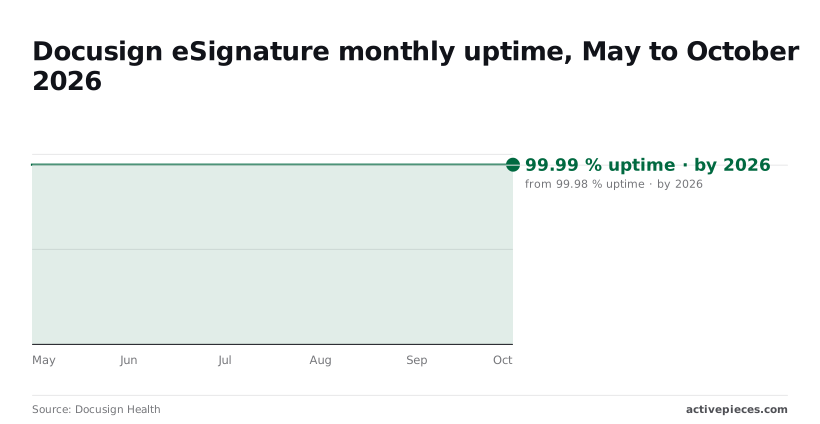
Docusign being down is rare: Docusign Health shows 99.98% for May and June 2026, which is under nine minutes of downtime a month, so if Docusign fails for you, the platform isn't down.
Almost never is it Docusign being down that pages you after launch; it is your integration failing to hold consent, a token or a quota.
July dipped to 99.96%, about 18 minutes, and August through October held at 99.99%, roughly four minutes. So a 2am failure is usually yours.
| Error | HTTP status | Cause | Fix |
|---|---|---|---|
| consent_required | 400 | The user or admin never granted the integration key consent | Send them the consent URL once, then retry |
| 401 expired token | 401 | The access token has lapsed | Request a new token and retry |
| HOURLY_APIINVOCATION_LIMIT_EXCEEDED | 429 | The account passed its hourly call limit | Back off and retry after the window resets |
| USER_LACKS_PERMISSIONS | 400 | The impersonated user cannot perform the action | Grant the permission or use a different user |
| Wrong envelope state | 400 | The action does not fit the envelope's current status | Read the status first; act only when it allows it |
| Invalid recipient or tab | 400 | The payload has a bad recipient or tab definition | Correct the payload and resend |
Each row has a named owner in practice: whoever holds the key owns consent, and whoever runs the job owns retries.
Alert on consent failures rather than retrying them, since consent fails once per user and is permanent until fixed. An expired token is routine; refresh it inside the client, never in a human's runbook.
When one loop runs away, it starves every other integration sharing the account, because the 429 applies per account. Back off, cap retries, and prefer the status check from the previous section over tight polling.
Retrying a voided envelope or a malformed tab never succeeds, because envelope state and payload errors are your bugs, not Docusign's. Log the response body and stop.
Before promotion from demo to production, confirm consent exists for the production account, tokens refresh unattended, retries are capped, and one named person receives the alerts.
Calling Docusign without code through Activepieces
When the work is "send this envelope" or "react when its status changes," Activepieces fits: its flows start from triggers and run their steps without code, and every run leaves a trace you can open to see which step a limit or error hit.

It suits simple send-and-status workflows, not the custom auth work above, so one named person owns a flow instead of a codebase.
That ownership question comes first: when a send fails at 2am, someone has to open a run history, not a repository.
In the screenshot below, the flow builder has a test flow open. A Schedule trigger labelled "Every Hour" is selected, and the settings panel beside it carries a "Run on weekends" toggle and a "Generate Sample Data" section with a successful test result.
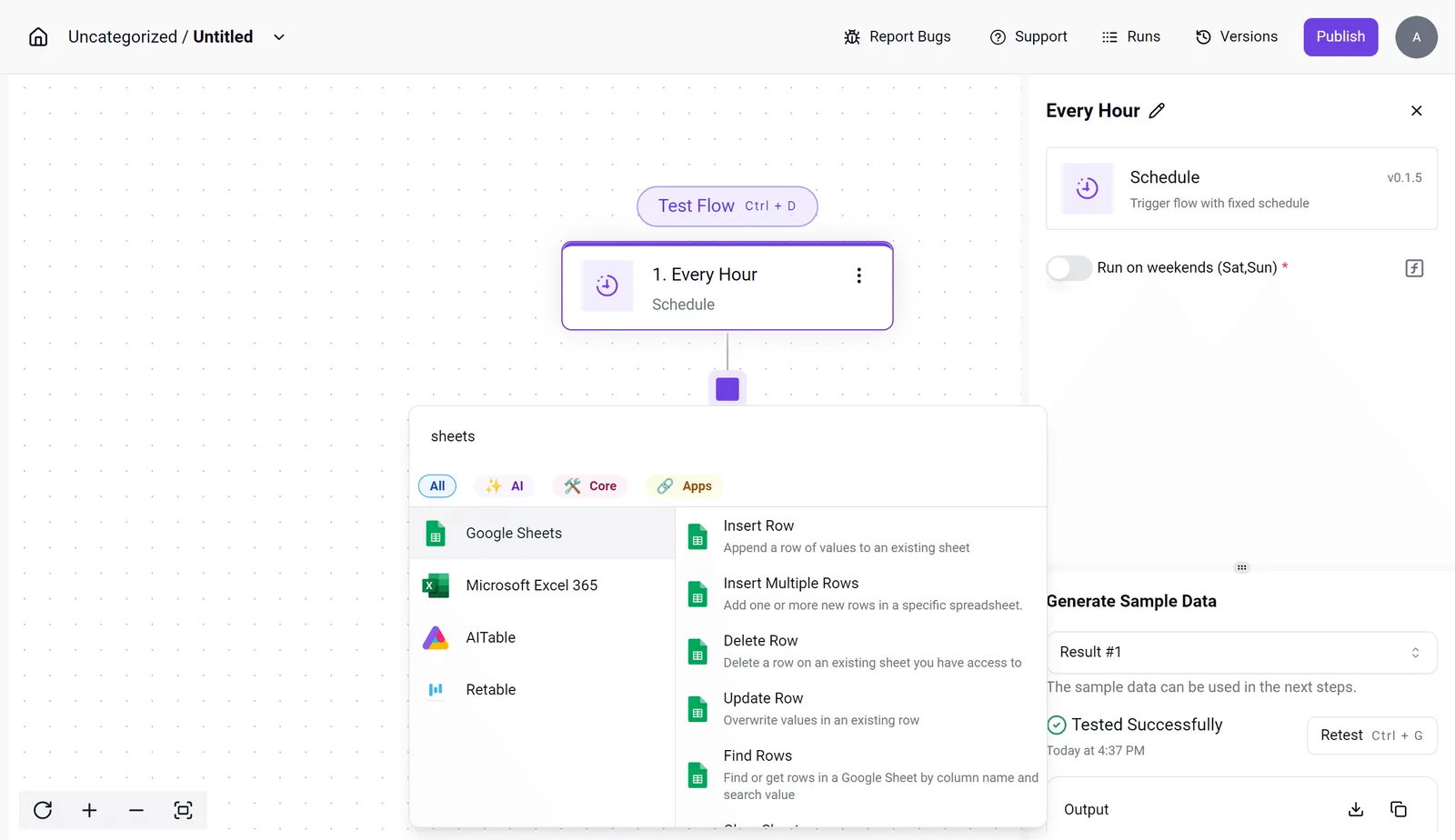
Over the canvas, the integration selector is listing spreadsheet integrations and their actions: Insert Row, Update Row, Find Rows and others.
Every step is a named, inspectable unit with its own test output. That's what lets you see which step a limit or error hit, which a hand-built script rarely shows without extra logging.
What the Docusign connector covers
The integration lets you pick Docusign as a step in the same way the modal lets you pick a spreadsheet. You then choose from the triggers and actions its integration lists, if one fits the send or status check you need.
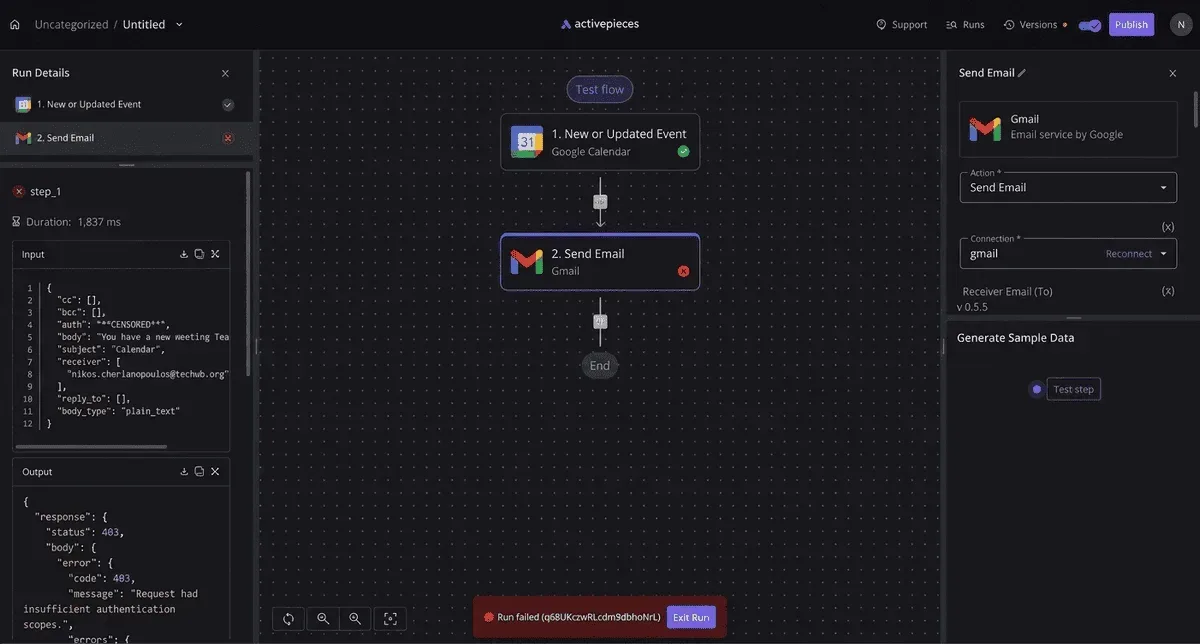
You authorise once, and the platform stores and refreshes the credential, which replaces the manual consent and token work.
Check the integration's own action list in your Activepieces instance before designing around it, since the available actions are defined by the integration, not by Docusign's full API.
Per-account limits still apply. Activepieces doesn't raise Docusign's ceilings; it only makes a hit visible in the run trace of the step that failed.
When to stay with the raw API
Stay with the raw API when the integration doesn't expose the endpoint you need. Do the same when you need control over request shape, pagination or retry behaviour that a step doesn't offer.

Anything outside the integration's action list is a raw call, and an HTTP step inside the flow can cover some of those cases while you keep the same connection and run history.
Bulk or unusual operations deserve the same scrutiny you would give code: who owns it, and what caps the retries.
- Name the person who receives failure alerts for each Docusign flow.
- Confirm the connection is authorised against the production account, not only the sandbox.
- Run a test of the send or status-change step and read the output before promoting it.
- List any endpoint you need that the integration does not expose, and decide whether an HTTP step or a raw integration owns it.
- Cap retries on every step that calls Docusign.
Frequently asked questions
These are the questions that land on whoever inherits the integration after launch, so each answer says who has to act as well as what is true. Check anything plan-specific against Docusign's current developer documentation before you commit to it.
Building and testing is free, but production use isn't. A developer account gives you a sandbox at no cost, while live envelopes run against a paid Docusign plan that includes API access.
Budget for that plan before you promise a launch date, and confirm with Docusign which tier your volume needs.
Does Docusign offer a sandbox for testing?
Yes, Docusign provides a separate demo environment for development. It has its own accounts, its own integration keys and its own data, so nothing you create there reaches production. Envelopes sent from it are for testing and aren't legally binding.
Keep your keys and consent grants for the two environments labelled separately, because passing in the demo environment doesn't mean production is configured.
Can I use the Docusign API without a developer account?
Technically you only need a Docusign account that can create an integration key, but a developer account is the sensible route. It gives you the sandbox and a safe place to make mistakes.
Someone at your organisation must still own the production account, because that is where the integration key is promoted and where consent is granted for real users.
Does Docusign support webhooks instead of polling?
Yes. Docusign Connect and envelope-level event notifications push status changes to an endpoint you control, which is the better default than repeatedly asking for status. Polling still counts against your account's rate limits, so a tight loop is a risk you create yourself.
Decide in advance who is alerted when your receiving endpoint stops answering and what happens to events missed during the outage, because webhooks move the failure there.
Docusign doesn't commit to a timeline I can cite, so treat go-live approval as a dependency outside your control.
Go-live is a review of your integration key after it has made successful calls in the demo environment. Start it early, name the person who submits it, and keep a record of the test calls it depends on.
Related reading
References
Build it
Set this up in minutes.
No code required. Connect your accounts, and Activepieces runs it from there.
Start free Talk to sales