How to Set Up a Dreamina Integration in 2026, Step by Step

Nov 16, 202616 min read
Dreamina has no one-click integration; the route that works today is ByteDance's official API, so settle that access path before you build anything.
Dreamina Integration Options and the Fastest Working Path
What Dreamina is and what integration means here
Dreamina is ByteDance's AI image and video generation tool, used mostly through its web app, and people who try to wire it into other software, whether by hand or through an automation platform like Activepieces, tend to hit the same wall.
"Integration" is where people go wrong.
They search an automation tool for a Dreamina action such as "Generate video", find nothing, or find a listing from a third party, and assume the gap is a setup problem. It's not.
Look at what Dreamina's own pages describe: the web app and the vendor's API, with no connector for workflow tools. Integration here means one thing: your code or workflow sends a generation request to an API you may actually call.

Routes compared on access, models, cost and approval time
Four routes get tried, and the table shows whether Dreamina's own pages acknowledge each one. Only the official API is both documented by the vendor and callable from code, so read the first column before the others.
| Route | Exists per Dreamina's pages | Setup time | What you get | Best for |
|---|---|---|---|---|
| Dreamina web app | Yes | Sign-up only | Manual generation in a browser, no programmatic calls | Trying prompts and judging output quality |
| Official ByteDance/BytePlus API | Yes | Account, approval and key issuance | Programmatic calls under the vendor's terms and quotas | Anything you intend to automate |
| Third-party API resellers | No | Sign-up with the reseller | Someone else's wrapper, with their pricing and uptime | Short experiments where you accept that risk |
| Native Dreamina connector in a workflow tool | No connector listed | Nothing to set up | A search result you cannot rely on | Nothing, until the vendor publishes one |
Expect the official API to be gated, because that wait decides when your first automated call can happen. Approval time is the unknown that matters. A reseller skips the wait, but you now depend on a party Dreamina doesn't vouch for.
Which route to choose
Start in the web app to confirm that the output is what you want. Then apply for official API access and make one generation call by hand, before any workflow tool is involved.
If the same prompt works in a single request, you have proof the route is real. Wiring it into Activepieces, which allows unlimited flows on every plan including free, or any other automation layer then becomes a plumbing task rather than a gamble.
Use a reseller only if the approval wait blocks a deadline, and treat its output as provisional.
This takes minutes, not a project: automate it in Activepieces free.
Stage 1: Account, Access and API Key
Start the official route first, because its approval wait is the part you can't compress. Stage 1 is finished only when one authenticated request, sent by hand, returns a real response.
The list below runs in the order that avoids rework: eligibility can block you after you have already done the other steps.
- Create the account on the vendor's official developer or cloud console, not a consumer app login.
- Confirm your region and whether the API needs approval, and note what the console says about your status.
- Issue an API key from the console.
- Copy the base URL and the model ID from the vendor's API reference.
- Send one test call with the key in the auth header the docs specify.
If any step stalls, you learn it here rather than inside a half-built automation.
Create the account and confirm eligibility
You can sign in successfully and still not have an API account. Check whether the console you land on has an API or developer section at all. If it doesn't, you're on the wrong product page, and that's the first thing to find out.
Then look for a region restriction or an approval queue. I couldn't confirm from the docs how the vendor grants approval or how long it takes, so treat any timeline you read elsewhere as unverified.
Record the status you see on screen, since that's what you'll quote to the vendor if it stalls.
Generate and store your Dreamina API key
Issue the key from the console and copy it immediately, since many consoles show a secret only once. I haven't verified that behaviour for this vendor, so check before you close the tab.
Put the key in an environment variable or a secrets manager, never in a script or a shared document. A key pasted into a workflow tool's plain-text field is readable by everyone with access to that workflow.

If it leaks, revoke it and issue a new one.
Run one test request and read the response
Take the base URL, model ID and auth header scheme verbatim from the vendor's API reference. I'm not stating them here because I couldn't confirm them, and a guessed header produces an authentication error that looks like a bad key.
Send one generation request with the simplest prompt you have. Read the whole response, not just the status code. For video or image work, expect a job identifier rather than finished media, and save it.
If you get an error, copy the body of the message exactly. It tells you whether the problem is the key, the region, or the model ID.
When a response comes back with a valid job identifier, or a clear error you can explain, access works. Next comes polling that job to completion.
Generate images and video through the API
Submit a request, receive a task ID, poll that ID until the job finishes, then download the file before its link lapses: every generation call follows that shape. The connector pages skip the last two steps, and they are where scripts break.
Submit a text-to-image request
Start with an image, because it's the cheapest call to get wrong. Send one request containing a model identifier, a prompt, and the size or aspect-ratio field the vendor's reference lists.
Use the exact field names from that reference, not the ones a connector's form shows you.
Read the response body before you write any code. If it contains the finished image, the endpoint is synchronous and you are done. If it contains only a task ID and a status, treat it like video and poll.
Save that raw response. When a later automation step fails, you'll want to compare it against a call you know worked.
Submit a video task and poll for the result
Submit video the same way, with extra parameters such as duration and an optional reference image. The response won't contain a video. It will contain a task ID, and the clip doesn't exist yet.
In the flow below, the script submits, the API returns an ID, the script polls through queued, running and succeeded, and a download step follows. A clock at the end marks when the result link expires.
Take from it that the clock starts when the job succeeds, not when you get around to looking.
Poll on a fixed interval with a ceiling on total attempts, and stop on any status that isn't queued, running or succeeded. A failed task still returns a response. A loop that waits only for "succeeded" will spin forever on it.
Log the full body of every failure, because the error message there is the only diagnostic you get.
After the loop exits on success, the next step is the download.
Download the output before the link expires
By the time a scheduled run reaches it, a link that worked in your manual test can be dead. Result links are temporary, and each vendor sets its own lifetime.
Look up the figure for the model you call and write it into your script as a comment.
Download inside the same run that observed success. Write the file to storage you control and record its path next to the task ID. Don't store the vendor's URL as the durable reference, because that's the one thing guaranteed to stop working.
Once a file survives this round trip by hand, you have something worth automating.
You can follow the rest of this with the builder open. Start free, no card.
Dreamina Limits, Credits and Errors With Fixes
Before you automate the call, budget for three limits, monthly credits, per-resolution cost and short-lived result links, and handle the failures that follow: mostly content refusals, then expired URLs.
Dreamina documented limits, quotas and credit pricing
A bigger plan buys volume, not cheaper generations, because credits cost roughly a cent each at every tier.
By the second, the pricing is steeper. According to Yir, Seedance 2.0, the video model behind Dreamina, costs 0.07 $ per second at 480p. At 720p it's 0.152, at 1080p 0.374 and at 4K 0.778.
Run a ten-second clip at 480p and it costs about $0.70; at 4K it costs $7.78, which means 4K is economically feasible only for high-value content. A test loop left at 4K therefore costs eleven times what the same loop costs at 480p.
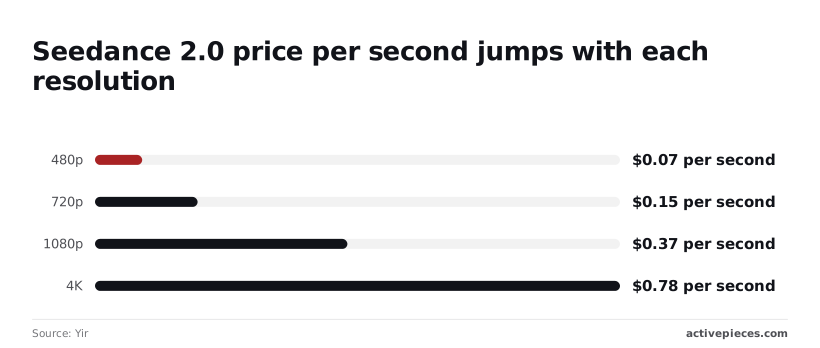
Prototype low, render high once. These are API prices, separate from the plan credits above.
Next, what goes wrong when a job runs. I won't invent code numbers; match on the symptom your client actually logs.
| Symptom | Likely cause | Fix |
|---|---|---|
| Job ends as refused | Prompt or reference image tripped moderation | Rewrite the prompt, swap the reference, do not retry unchanged |
| Request rejected, no job created | Credits or quota exhausted | Check balance before submitting; queue instead of looping |
| Job stays pending | Asynchronous work not finished | Poll with backoff; never treat "pending" as failure |
| Download returns an error | Result link expired | Fetch on completion and store your own copy |
Dreamina moderation rejections and expired result links
When a job fails, it is most often a refusal, not an outage. In a Seedance AI sample, 9,942 jobs were delivered, content moderation refused 1,056 and only 170 failed for other reasons, so moderation policy is the main constraint on job completion.
When a job fails, it is most often a refusal, not an outage.
So content filtering is the primary obstacle to job completion, not technical reliability.
That puts refusals near 9.5% of jobs and about six times the rate of every other failure combined, so optimizing for content compliance is more valuable than technical hardening.

Give a refusal its own branch in your error handling; it is a normal outcome, not an exception to retry.
Expect links to die quickly too. AI Movie Toolkit lists result URLs lasting 1 hour for Sora, 24 hours for Seedance, 48 hours for Veo and 720 hours for Kling. That means you must build service-specific retrieval infrastructure rather than generic download logic.

If your workflow waits for a human to approve a clip overnight, a Seedance link is already dead by the next afternoon. Download the file when the job completes.
Automating the Dreamina Workflow With Activepieces
Activepieces has no Dreamina connector, so it handles this job through a generic HTTP Request step, and it can do that among 750 integrations counted directly from the packages/integrations/community folder of its open source monorepo on GitHub, whose core is MIT-licensed and which holds 25,549 stars.
Roughly 60% of those integrations were contributed by the community, meaning development isn't bottlenecked by the core team's capacity. Where no official Dreamina connector exists, build the same loop from that HTTP Request step: trigger, submit, delay, poll, failure branch, then save or notify.
Trust a connector that claims to "generate video" only if it exposes the job ID and status, because the job is asynchronous and you need both. Zapier, Make or a short script can run the same loop, so nothing here ties you to one tool.
Trigger and submit step
Pick a trigger that carries the prompt: a new row in a sheet, a form submission, a webhook. The second step is an HTTP Request that POSTs to the vendor's generation endpoint with your credential in an Authorization header and the prompt in the body.
Use the values you proved by hand in curl, unchanged. If the hand call worked and the step fails, the difference is in how the step builds the header or body, which narrows the search.
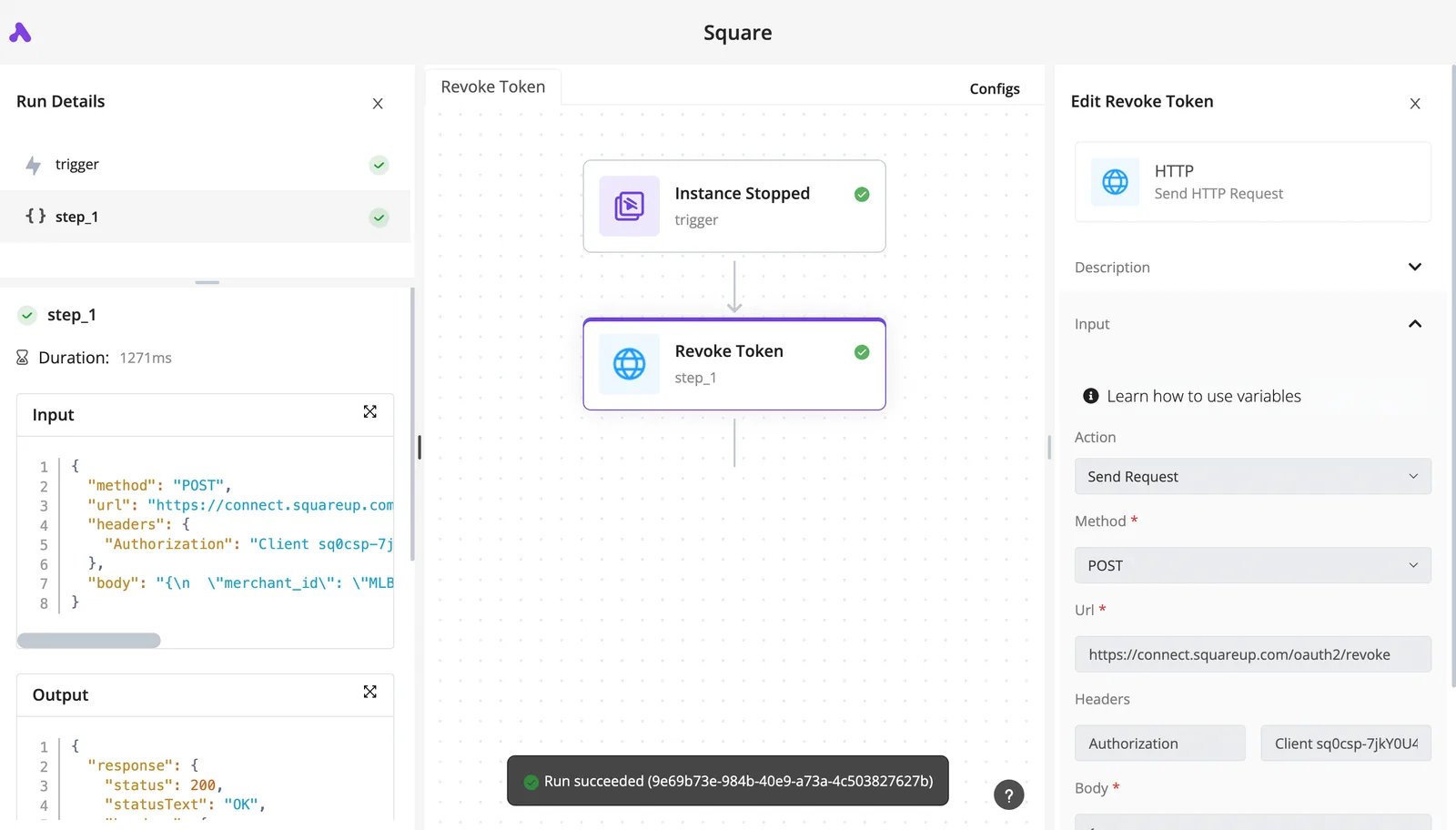
Here is the shape of this pairing, though not Dreamina itself, in the screenshot below. It's a two-step flow in which an "Instance Stopped" trigger feeds a "Revoke Token" step, an HTTP request to a Square OAuth revoke URL.

With the step open, its POST method, Authorization header and body are visible, and the run panel shows both steps green with "Run succeeded".
Take from the screenshot where to look: the run details keep each step's input and output JSON, so the job ID your submit step returns is readable there, not guessed at.
Next comes the part the screenshot can't show: waiting for the result.
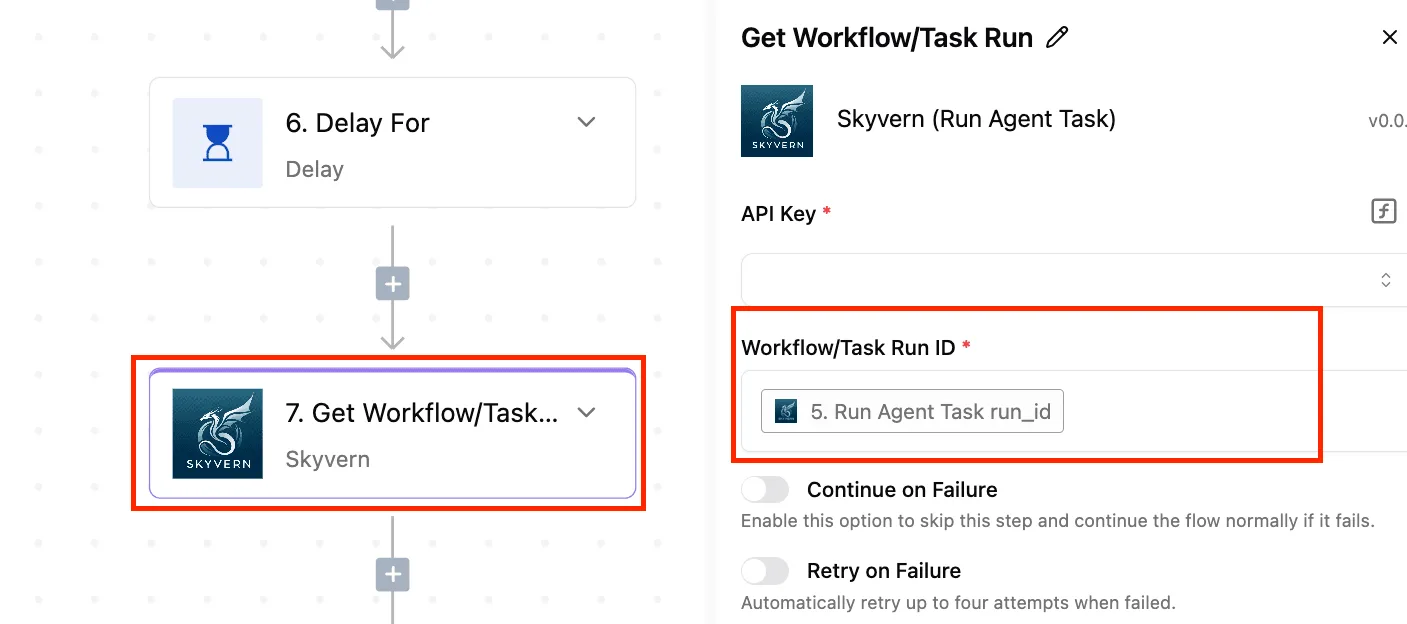
Building the Dreamina polling loop and failure branch
Because the submit call returns a job reference, not a video, the wait has to be built in this order:
- Store the job ID from the submit step's output.
- Add a delay step, so you aren't polling the instant the job exists.
- Send an HTTP GET to the status endpoint with that ID.
- Branch on the status field: finished goes forward, still running loops back to the delay, failed goes to the failure branch.
Cap the loop. Without a limit, a job that never leaves "running" keeps polling forever and spends your quota doing it.
The failure branch should capture the vendor's error body verbatim and send it somewhere a person will see it. A bare "step failed" tells nobody whether the cause was a quota, a rejected prompt or an expired credential.
Saving Dreamina output and sending notifications
On success, one more HTTP step downloads the file from the returned URL, and a storage step writes it somewhere you control. Save it promptly, since a result link may not stay valid, and I wouldn't assume it does.
Then post the stored location to chat or email, so the person who submitted the prompt gets the file and not a job ID.
Frequently asked questions
Once the file lands in the requester's inbox, the questions left are about the platform around the call. Each answer below is checked against what the vendor documents rather than what a connector listing implies.
Does Dreamina have a native Zapier or Make integration?
Searching either tool's app directory for a Dreamina connector is a dead end, since the vendor documents no native one. What both tools do offer is a generic HTTP step, and that's enough.
Send the authenticated request to the official API from that step, store the returned job ID, and poll for the result in a second step.
Plain code does the same thing with fewer moving parts. The catch is that the HTTP step has to carry your credentials, so keep them in the tool's secret storage rather than pasted into the request body.
Can I use Dreamina's API for commercial projects?
Whether the call succeeds tells you nothing about commercial rights. Those come from the terms attached to your access path and the specific model. A consumer-app licence doesn't automatically carry over to API output, and the reverse is also not guaranteed.
Read the service terms for the route you chose, and keep a copy of what applied on the day you generated the file. If a client will publish the output, that copy is your evidence.
Is the Dreamina API free to try?
You may get trial credit, but that depends on the access path and your region, and I can't promise a free tier on yours. Check the billing or credits page of the console before writing any automation.
Then make one generation call by hand. If that call is refused for quota or billing reasons, you have learned it before building a workflow around it.
Why does my video task stay pending for a long time?
When a video task sits at pending, it is usually queued or still rendering rather than stuck, because video generation is asynchronous. Keep polling the status endpoint with a growing delay.
Don't resubmit the same prompt, because every duplicate is a new job that can consume quota and leave you with two files. Treat only an explicit failed status, with its error message, as a reason to retry.

Do I need separate access for Seedance and Seedream models?
Plan on needing separate access for each. Seedance generates video and Seedream generates images, and providers commonly enable models individually per account.
A key that works for one can be refused for the other with a permission error. Look at the model list your account actually returns, and test each model with a single manual call before you wire either into a workflow.
Related reading
References
Build it
Set this up in minutes.
No code required. Connect your accounts, and Activepieces runs it from there.
Start free Talk to sales