VEED Pricing 2026: Plans, Limits and Free Tier

Nov 9, 202614 min read
VEED prices its online video editor as tiered plans on veed.io, each billed monthly or annually.
The tiers differ less in what you can do than in how much you can do before something stops, a pattern familiar from usage-capped tools generally, whether a video editor or an automation platform like Activepieces.

VEED Pricing Today: Every Plan in One Table
What VEED is and who pays for it
There is no install and no file sitting on your machine, because VEED, the online video editor at veed.io, runs in the browser. That's why storage and export limits are part of the price.
Mostly it is people who finish videos on a schedule who pay. Examples are a solo creator cutting weekly uploads, a marketer turning one recording into several clips, and a small team sharing a workspace.
Each hits a different ceiling first. The creator hits export resolution or a watermark. The team hits seats. Someone leaning on the AI tools hits credits.
The plan table: monthly price, annual price, limits
This table lists what to read off each plan on the live page.
| Limit to read | What happens when you reach it |
|---|---|
| Monthly price against annual price | The annual rate looks lower, but you can't leave mid-year without losing what you prepaid |
| Export resolution | A client asks for a higher resolution than your plan renders, and the finished file is unusable |
| Watermark | The export carries the vendor's mark, so it cannot go to a client as delivered |
| Storage | Uploads stop or older projects must be deleted before new work begins |
| AI credits | The AI tool you planned the month around runs out partway through |
| Seats | Each added colleague forces a plan change rather than a small top-up |
Activepieces does not replace any VEED plan, and it neither edits nor prices anything, but the chore after an export needs no hire: describe it in the built-in chat (file to cloud storage, a row in a tracker, a Slack notice) and what comes out is a live flow in your account, the same thing a builder would have wired by hand.
It runs under the same RBAC and audit logs as the flows MoneyGram, Moneypenny, Alan and FundingSocieties run, human-built or not, and each run leaves a trace anyone on the team can open and read with no certification needed.
On 2026-11-09, VEED's pricing page at veed.io was the reference.
Prices and limits change without notice, and a limit that has moved since this was written is the one that breaks a delivery.
If you are running this arithmetic for your own team, see what the same workload costs on Activepieces.
What VEED Plans Cost at Realistic Usage
On annual billing, videomake.ai puts one seat of VEED, the online video editor, at $147 a year for Creator, $265 for Pro and $465 for Studio.

viz type=dumbbell title="VEED monthly price by billing cycle" unit="$ per user per month" source="ToolColumn - https://www.toolcolumn.com/tools/veed" before="Monthly billing" after="Annual billing"2 and Studio from $79 to $39." Creator: 25 -> 12 Pro: 45 -> 22 Studio: 79 -> 39
It is the job that decides the bill, not the headline price. The table below prices three jobs from those figures. Read the last column first: it's the gap you must justify before moving up.
| Job | Needed resolution | Subtitle minutes | Seats | Cheapest sufficient plan | 12-month total | Next plan pays for itself when |
|---|---|---|---|---|---|---|
| Solo creator | 1080p, vertical | Captions on one video a week | 1 | Creator | $147 | A limit costs you more than the $118 gap to Pro |
| Two-person marketing team | 1080p, no watermark | Captions on every client cut | 2 | Pro | $530 | Extra limits save more than the $400 gap to Studio |
| Tutorial recorder | 1080p screen capture | Captions on long recordings | 1 | Pro | $265 | Long files cost more than the $200 gap to Studio |
For the solo creator posting weekly, Creator is $147 a year, which is $118 less than Pro. Move up only when a limit stops a post, since that's the day the gap pays for itself.
For the two-person marketing team, seats multiply everything. Two Pro seats are $530 a year, and two Studio seats are $930. The $400 difference is real money for a team that hasn't yet hit a Pro limit.

For tutorial and training recordings, subtitle minutes and storage strain first. Pro at $265 covers one recorder. Studio adds $200, justified only if Pro runs out mid-course.
Listed separately on the price page, these limits and extras can each end a delivery:
- Export resolution
- Watermark
- Subtitle minutes
- AI credits
- Storage
- Seat count
- Auto-renewal
Here are the rates ToolColumn lists:
| Plan | Monthly | Annual |
|---|---|---|
| Creator | $25 | $12 |
| Pro | $45 | $22 |
| Studio | $79 | $39 |
Pay annually and the rate is about half the monthly one. Monthly Creator costs $300 a year and monthly Pro $540.
The yearly seat figures run slightly above twelve times the annual rate, so budget from the yearly number. Annual billing saves money only if the plan fits, because you then pay for a wrong plan for twelve months.

VEED Compared With Its Closest Alternatives
Once you see what the same money buys elsewhere, a wrong plan locked in for twelve months is easier to spot. On entry price alone VEED is not the cheapest of the four.
Comparison table: price, free tier, watermark, seats
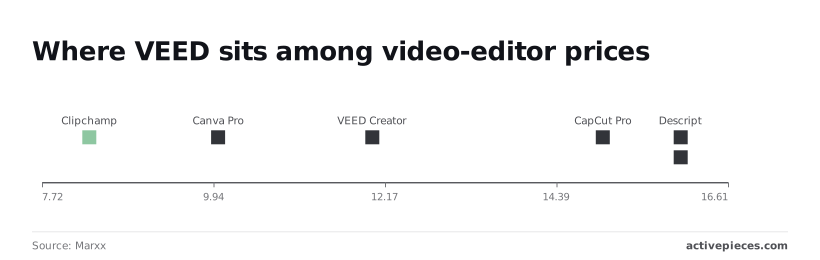
For each editor, the table lists the entry paid monthly price, using figures from Marxx.
| Editor | Entry paid plan | Price per month |
|---|---|---|
| VEED | Creator | $12 |
| CapCut | Pro | $14.99 |
| Descript | Entry paid plan | $16 |
| Canva video | Canva Pro | $10 |

Nothing on Marxx's page covers free export limits, watermark rules, AI features or seat counts. Those are the terms that decide whether the price holds, and each vendor's own pricing page states them. Read them there, with the date, before paying for a year.
When CapCut or Canva Costs Less Than VEED
If you already live in Canva's design tool, video there costs less than adding VEED: Canva Pro, at $10 a month, is $2 below VEED Creator's $12. That's $24 a year, and it also saves you a second login and a second file library.
At $8.33 a month, Clipchamp, Microsoft's browser editor, is the cheapest figure in this comparison, so a person who only trims and captions short clips has little reason to pay VEED's extra $3.67 a month.
At $14.99, CapCut Pro, ByteDance's video editor, is $2.99 above VEED. It's only the cheaper pick if its free tier covers your exports and you never need the paid plan. The same logic applies to Kapwing Pro, another online editor, at $16.
When VEED is worth the premium
Against CapCut Pro's $14.99 and Descript's $16, VEED's $12 is the cheaper paid entry point. Against Canva Pro and Clipchamp it carries a premium of $2 and $3.67 a month.
That pays off only if you use what VEED is built around: browser-based editing, subtitles and AI tools in one place.
Pay $4 a month more than VEED and you get Descript, at $16, which is $48 over a year. Pay it only if editing video by editing its transcript is how you actually work.
Worth checking against a plan that does not meter every step: one credit covers a whole run on Activepieces.
Automating What Happens After a VEED Export With Activepieces
Nothing about what VEED charges you changes with Activepieces, an open-source tool with an MIT-licensed core and 747 integrations that chains apps together without code. It handles the chore that follows an export, so a team shipping many videos stops posting links by hand.
Check VEED's own integrations list first, because if the connection you need is already there, you don't need a second tool.
In the plan below, exports land in a shared Google Drive folder, which is where the flow starts. The steps run in this order:
- Trigger: Google Drive, "New File", pointed at the export folder.
- Action: Google Sheets, "Insert Row", with filename, link and date.
- Action: Slack, "Send Message to Channel".
- Test run.
- Publish.
In five moves, the numbered list shows the whole flow. The order is the point: the test comes before publishing, so nothing posts to a live channel until you've seen it work once. The paragraphs below cover the fields.
Choose the Google Drive integration, select "New File", and name the specific folder your VEED exports go to. Leave the folder blank and the trigger watches more than you intended, so every unrelated upload fires the flow.
Keep the export folder separate from anything else people drop files into, and the automation stays quiet when it should.
Actions: log, notify, hand off
First comes Google Sheets "Insert Row". Map three columns: filename, the file's share link, and the date. That sheet becomes the record of what was exported and when, which is useful the day someone asks which version went out.
Second comes Slack "Send Message to Channel". Pick the channel, then write a message that carries the filename and link from the trigger. The team sees the export without anyone typing a message.
"Hand off" means the sheet row and the Slack message are where a human takes over: an editor reviews, a manager approves. The flow doesn't judge the video; it only makes sure someone knows it exists.
Run the test with a real file in the folder, then check that the row appears and the message posts.
A run is 1 credit however many steps it has, so these three steps cost no more than one would against the 1,000 credits a month on the $0 Free plan. Publish only after both do.
If you export a handful of videos and tell your team in the usual way, the setup costs more attention than it saves. The same applies if VEED's native integrations already post where you need.
Build this when the manual step is being skipped or forgotten, not before.
Choosing and Trialling a VEED Plan This Week
Choose a VEED plan the way you would any subscription: buy the limit you have actually hit, not the one you fear. That means writing down your jobs, testing on the free plan, and settling billing last.
Choose a VEED plan the way you would any subscription: buy the limit you have actually hit, not the one you fear.
- Write down three jobs you actually do in the editor.
- Pick the lowest plan whose limits clear all three.
- Run one real project on the free plan.
- Check the watermark and the export resolution on the finished file.
- Set a renewal reminder before you pay.
- Decide between monthly and annual billing.
Day one: list jobs and limits
Write each job as a sentence: what you upload, how long it runs, where it's published, who else touches it. Then open VEED's own pricing page at veed.io and set each job against the listed limits for export resolution, watermark, storage, AI credits and seats.
When a job needs a clean export for a client, any plan that stamps a watermark is ruled out, whatever else it includes.
Pick the cheapest plan that clears every job. If one job alone forces you up a tier, say so in your notes, because that job is what you'd be paying the difference for.
Testing a VEED Plan on a Real Project
Use a real project, not a demo clip. Real footage has real length, real audio and the AI features you intend to lean on.
Export it, then open the file and look for the watermark. Check the resolution in the file's properties, not in the export screen's label. Screenshot both with the date visible.
If a credit meter or storage warning appears partway through, that's your answer about the plan, and you have a timestamp to show for it.
Before you pay annually
When the work changes, monthly billing lets you leave. Annual billing is a commitment that reads as a discount, so take it only after the test project has cleared every limit you wrote down.
If you do commit, set a calendar reminder ahead of the renewal date, because auto-renewal doesn't wait for you to remember.
Record where in your account to cancel, too. If any job on your list came close to a limit during the test, stay monthly until it stops.
Frequently asked questions
To learn the answers below cheaply, stay monthly. Most of them are about what happens at renewal, at cancellation and at a limit you didn't know was there.
Taken together, the quick answers on the free plan, watermark, auto-renewal, cancellation, refunds, seats and Pro pricing show that VEED's surprises sit in the terms around the price, not in the price itself. Read those terms before you enter a card.
Is VEED free to use, and what does the free plan limit?
Yes, VEED has a free plan, and it's built for trying the editor, not for delivering work. Exports from it carry a VEED watermark and sit at a lower resolution than paid tiers, so a client-facing video made on free will look unfinished.
Expect caps on storage and AI features as well. Run your real job through it once to see which cap you hit first.
Does VEED charge extra for AI credits or avatars?
When you generate with avatars or other generative tools, you draw on AI credits, which come as an allowance with your plan, not as an unlimited feature. A month heavy on generation can use that allowance up before the month ends.
Check your tier's credit allowance on VEED's pricing page at veed.io, and count the generated clips your jobs need before you decide the plan is enough.
Can I cancel VEED and get a refund?
You can cancel from your account settings, and you should do it before the renewal date, not after. Plans renew automatically unless you cancel.
Read VEED's published refund policy before paying, since it governs refunds, and don't assume an annual plan can be unwound mid-term. This is the strongest reason to test monthly first: a monthly mistake costs one billing cycle.
Does VEED offer discounts for students or nonprofits?
Don't count on one until you've seen it offered. Discounts, where they exist, appear on VEED's pricing page or come through its support team, and they change over time.
If you're a student or work for a nonprofit, ask support before paying, and get the answer in writing. A discount you assumed and didn't confirm is just a higher bill.
Is VEED cheaper than CapCut?
On the surface, CapCut, ByteDance's video editor, often looks cheaper, but the sticker comparison tells you little. Compare the two on your three jobs: the export resolution you need, whether the watermark disappears, and how many seats and AI credits you'll use.
Whichever does those jobs without pushing you to the next tier is the cheaper tool.
Related reading
References
Running the numbers
See what the same workload costs here.
Free forever plan, and every paid plan self-hosts at no extra cost.
See pricing Talk to sales