
Is n8n Automation Free? What Self-Hosting Costs

Nov 24, 202614 min read
You run n8n either on your own server or on n8n Cloud, and it is a workflow platform that connects apps on a visual canvas.
What n8n automation is and how it works
According to n8nhosts, as of 24 November 2026, the free self-hosted option gives you the workflow engine itself, but not the hosting, backups or upgrades, and some team-management features sit in paid tiers.
Activepieces, whose core is MIT-licensed under the LICENSE file in its GitHub repository, faces the same constraint: free software still needs someone to run it.
How n8n triggers, nodes and workflows work
Every workflow starts with a trigger: a webhook, a schedule, or an event in another app. Each later step is a node that calls a service, reshapes data or branches.
The Code node runs your own script when no ready-made node fits, and your team then owns that script.
What counts as an n8n execution
What you pay for is the execution: one complete run of a workflow from trigger to last node, however many nodes it passes through.
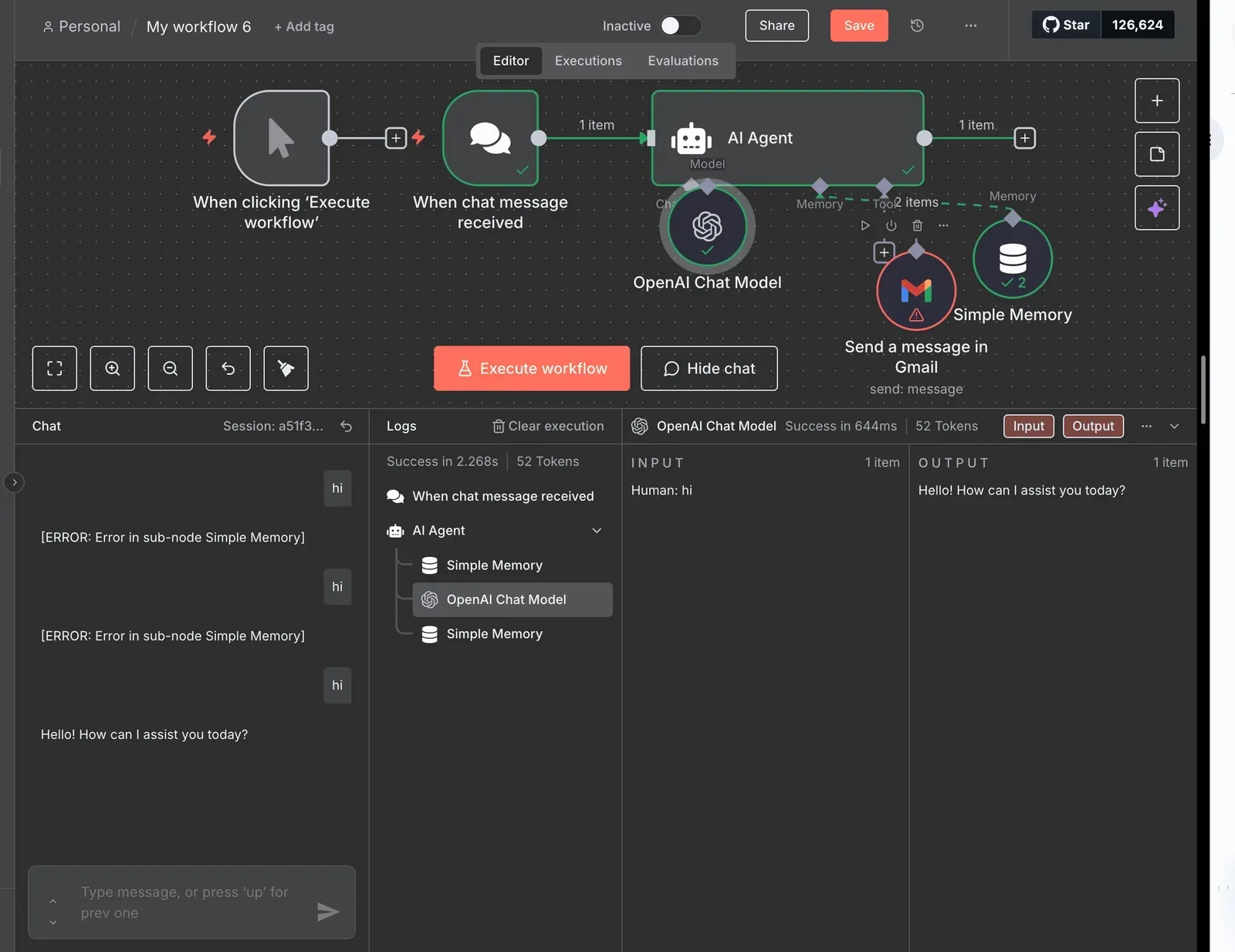
Below, the canvas shows a four-node chain, a webhook feeding an HTTP request, a Code node and a Slack message. The bracket over it marks the whole chain as a single execution, so adding nodes doesn't raise the count. Adding runs does.
Cloud, self-hosting and the licence
When you choose n8n Cloud, n8n runs the servers and you pay by execution volume. Self-hosted, you supply the machine, the database, the TLS certificate, the backups and the upgrade schedule. Your cost moves from the invoice to staff time.


Strictly speaking, n8n is fair-code, not open source. You may read the source, modify it and run it for your organisation's internal use.
Selling n8n itself as a hosted service, or building a competing product on it, falls outside the licence.
Everything below works on Activepieces' free plan. Start without code or a credit card.
What you can automate with n8n in practice
When the task is a chain of API calls with some branching logic, n8n suits it. It suits tasks less as the work moves toward heavy computation, strict real-time response or anything a non-technical team must own alone.
Read the last column first: two rows carry caveats, and that is where the maintenance cost sits.
| Task | Example workflow | Nodes needed | Suits n8n |
|---|---|---|---|
| Lead routing | Form submission is scored, then assigned to a rep by region | Webhook, IF or Switch, CRM, Slack | Yes |
| Reporting | Weekly figures pulled from a database and mailed as a summary | Schedule Trigger, database, Code, email | Yes |
| Data syncing | Customer records mirrored between a CRM and a billing system | Trigger, HTTP Request, Merge, database | With caveats |
| Approvals | Purchase request waits for a manager's reply before proceeding | Webhook, Wait, email or chat, IF | With caveats |
| AI agent workflows | Support message classified and answered by a model with tool access | Trigger, AI Agent, model, memory, HTTP Request | With caveats |
Nothing fits better than lead routing. A webhook receives the form, a Switch node branches on region or company size, and the CRM and chat nodes complete the hand-off.
Data syncing and approvals in n8n automation
Syncing two systems is where caveats begin. You must decide which system is the source of truth, how to match duplicates, and what happens when one API is down. n8n gives you the nodes but not those decisions.
Approvals work through the Wait node, which pauses a run until a reply arrives.
AI agent and LLM workflows
n8n can chain a model, memory and tool calls inside one workflow, which makes prototypes quick.
The caveat is that model output varies, so each agent needs logged inputs, a fallback path and a person who reads the failures.
Avoid n8n for high-volume stream processing, transactions that must complete in milliseconds, and heavy data transformation across very large files. Avoid it, too, where nobody on the team can read a workflow when it breaks.
What n8n self-hosted and Cloud plans cost
If you self-host the Community edition, the licence costs nothing, while Cloud starts at €20 a month billed annually ($24 monthly) for 2,500 executions. The table shows where each tier stops, so match it to your volume before you match it to your budget.
| Plan | Price | Executions | Active workflow cap | Gated features |
|---|---|---|---|---|
| Community (self-hosted) | Free licence | No metered limit | None | Enterprise controls such as single sign-on |
| Cloud Starter | €20 annual, $24 monthly | 2,500 | 5 | Higher-tier collaboration features |
| Cloud Pro | $50 | 10,000 | 15 | Fewer than Business |
| Self-hosted Business | $800 | 40,000 | Higher | Full governance features |

Community has no execution meter. It stops at governance and support: your server, backups and patching are your team's job.
Starter's 2,500 executions therefore buy 2,500 triggers, and a polling workflow that runs every minute would spend that allowance in under two days.
Cloud versus self-hosted at the same volume
$20 for 2,500 runs on Starter, $50 for 10,000 on Pro and $800 for 40,000 on Business: those are the steps, according to Jonathan Montoya.
Going from Pro to Business quadruples volume but multiplies cost sixteen-fold, so a team near 40,000 runs should price self-hosting first.
n8n Cloud is billed by execution count, and its own pricing page carries the current figures for each tier.
Activepieces meters the run in the same way n8n does: its published pricing page lists 1 credit per flow run, however many steps the flow holds, and its Free plan carries 1,000 credits a month with unlimited flows.
What self-hosting n8n requires from your team
You need a server, a database, backups and a named person who answers when it stops; the licence costs nothing, but the upkeep lands on your team.
Minimum setup for self-hosting n8n
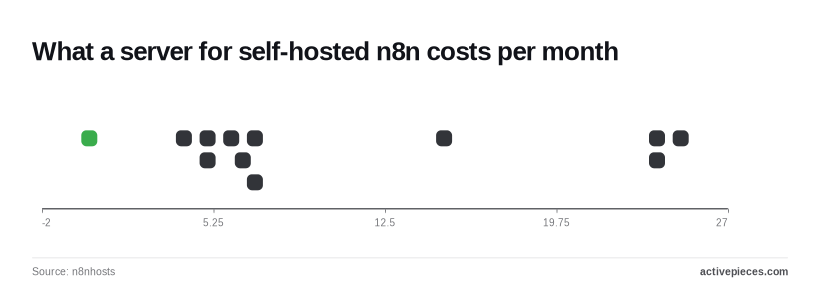
The entry price is small. According to n8nhosts, Render Hobby costs $0 a month, so a free host exists, though you should check its limits before putting production runs on it.
DigitalOcean 512 MB is $4, Lightsail 0.5 GB and Railway Hobby are $5 each, DigitalOcean 1 GB is $6, and Hetzner CX23 is $6.49. Many plans sit under $10, which means the invoice isn't where the cost accumulates; staff time is.

The duties the chart doesn't show are these:
- server hosting
- SQLite or Postgres as the database
- queue mode with Redis and workers
- backups
- upgrades
- the encryption key
- a named owner for failures
Start with SQLite, the default database: it needs no setup, but it suits a single small instance.
Queue mode needs Postgres and Redis, plus worker processes that pick up executions. That's three more components to patch, monitor and restart.
- Back up the database on a schedule, and restore it once on a spare machine; an untested backup is an assumption.
- Store the encryption key separately. It protects saved credentials, so a restored database without it leaves every connection unusable.
- Upgrade in a test copy first, then production.
- Write down who gets the page when a workflow fails at night.
None of these steps is hard. Together they are the maintenance the free version hands to you.
Easier to see it running than to read about it: set it up free, no card.
Mistakes that break n8n automations
When an n8n automation fails, it usually traces to four neglected defaults: no alert when a run fails, execution history left to grow, oversized workflows holding fragile credentials, and unchecked licence or version assumptions.
Silent failures and missing error workflows
Unless you build the alert, a failed run alerts nobody.
The Executions tab below shows one run marked Error and opened on the canvas: the HTTP Request node is outlined red, and the output panel carries a 429 rate-limit message with the start time and duration.
**Unless you build the alert, a failed run alerts nobody.
- Create a separate workflow that begins with the Error Trigger node and sends a message to a channel your team reads.
- In each production workflow's settings, select that workflow as its error workflow.
- On rate-limited calls, enable the node's retry-on-fail setting with a wait between attempts, so a 429 is retried instead of ending the run.
On a self-hosted instance, every run stores its input and output data in your database, and left alone it grows until disk or query speed becomes your problem.
Turn on execution pruning, set a retention window that matches your audit needs, and stop saving successful-run data for workflows you don't need to replay.
When one workflow does everything, it is hard to read, hard to test and expensive to re-run after a late failure. Split it into sub-workflows with clear inputs.
Keep secrets in n8n's credential store, never typed into node parameters or Code nodes.
Licence and version surprises
Two surprises recur. First, the source is available under n8n's Sustainable Use License, which isn't an open-source licence.
Second, an unpinned container image upgrades whenever it's pulled. Pin an explicit version, read the release notes, and test the upgrade on a copy first.
Test and production webhook URLs also differ, so update the caller when you activate a workflow.
Where Activepieces fits next to n8n
When the people maintaining webhook details like those aren't developers, Activepieces gives them a step-by-step, no-code flow builder to work in, with an MIT-licensed core and about 750 integrations. It's MIT-licensed, whereas n8n gives you more room for code.
As of November 2026, the table sets the two side by side.
| n8n | Activepieces | |
|---|---|---|
| Licence | Source-available, fair-code | MIT (community edition) |
| Builder style | Node canvas, with code and HTTP nodes | Step-by-step, no-code flow |
| Integrations | Built-in nodes plus HTTP and code for the gaps | About 750 |
| Cloud entry price | Paid plans, billed by execution count | Free, Plus $20, Team $200 |
| Best for | Technical teams that want control | Non-developer teams that want simplicity |
For procurement, the licence row matters most. The MIT licence covers the core in the LICENSE file of the Activepieces GitHub repository, while the enterprise directories under packages/ee/ carry a separate commercial licence.
For the core, that means you can self-host, modify and redistribute without a licence review, which shortens an approval cycle.
The roughly 750 integrations are the integrations counted in the repository's packages/pieces/community directory, about 60% of them contributed by the community, so most common tools are covered, but check your own list before committing.
When a non-developer team should skip n8n
State the constraint first: if operations or marketing staff will build and fix flows with no engineer on call, a linear no-code builder lowers the maintenance you take on.
The MIT licence also removes a legal question if your policy forbids source-available terms. Self-hosting still carries the hosting burden described earlier, so the licence doesn't make it free to run.
When n8n remains the better fit
Choose n8n when flows need branching logic, custom code or calls to internal APIs, because its canvas and code nodes handle that directly.
Verify any integration claim yourself before relying on it: install the community edition, run one real workflow with the network restricted to what production allows, and confirm it completes.
If a workflow needs a connector neither tool ships, n8n's HTTP and code nodes are the shorter route to a working flow.
The Monday-morning checklist for starting with n8n
Start with one task you already do by hand, because a narrow first workflow is the A way to learn what n8n costs your team. The six steps below run in order, and each one produces something you can write down before you build anything.
- Pick one repetitive task with a clear start and a clear end.
- Count its monthly runs, including retries and test runs.
- Check those runs against the plan limits on n8n's pricing page.
- Decide who owns hosting: n8n's cloud or your own server.
- Attach an error workflow so failures reach a person.
- Set a cost review date and put it in a calendar.
Pick and size the first workflow
Choose a task whose inputs you can list on paper. Count how often it fires in a month, then add the runs you'll spend on testing.
Execution counting is where the bill comes from, so an estimate that ignores retries will come in low.
Decide who owns your self-hosted n8n
If you self-host the free version, the license fee goes but the work stays. Someone has to patch it, back it up, and restore it when the server fails.
If nobody in your team can be named for that, the cloud plan is the honest choice.
Put the review in the calendar before the first run. On that date, compare real executions with your count from step two. If they differ, the estimate was wrong, and that's the number to fix before adding a second workflow.
Frequently asked questions
Answers reflect the n8n documentation and pricing pages as read on 24 November 2026. Check them again before you sign anything.
Cost and licence
Is n8n really free? The self-hosted Community Edition costs nothing to download and run, but you pay for the server, backups, upgrades and whoever is on call. Cloud is a paid, execution-based plan. Treat "free" as the licence price only.
Is n8n open source? Not in the strict sense. n8n publishes its source under a fair-code licence, the Sustainable Use License. It lets you read, modify and self-host it for internal use but restricts selling it as a service.
If your policy says "OSI-approved licences only", this fails the check, so have legal read the licence text first.
Replacing other tools
Can n8n replace Zapier or Make? For most workflows, yes, provided someone on your team will own it.
The constraint is operational, not functional: n8n gives you more control over branching, data handling and hosting, and in exchange you take on maintenance that a fully managed tool does for you.
Migrate one low-risk workflow first and compare the real effort.
Skills and integrations
Do I need to code to use n8n? No, but you'll be more effective if you can read code. The visual editor covers common work, and the Code node, which accepts JavaScript and Python, handles what it doesn't.
Expect to meet expressions and JSON early, and plan for at least one person who is comfortable debugging them.
How many integrations does n8n have? It ships a large library of built-in nodes for common services, and the HTTP Request node reaches any service that exposes an API.
The library's size matters less than whether your specific systems are covered, so check the node list for each tool you depend on and test authentication before committing.