
Activepieces On Premise: Pricing & Self-Hosting Guide

Oct 23, 202614 min read
On premise means running Activepieces on your own servers. The Community Edition that does this costs $0; paid plans only start when you need SSO, support or a vendor-backed licence, so you're managing infrastructure and support yourself if you choose the free version.
Prices below were checked on 23 October 2026.
1. Define on-premise Activepieces and what it costs
What on premise means for Activepieces
You deploy the platform inside your own network, so flow definitions, credentials and run data stay on infrastructure you control. That matters when FedRAMP, FISMA or PIPEDA residency rules make "just use the cloud API" a non-starter.
The trade is that patching, upgrades, backups and uptime become your job, and that labour is the real cost of the free edition.
What each plan includes for a self-hosted rollout
The cloud tiers are the main published price ladder:
- Free is $0 a month with 1,000 credits, per Activepieces, enough to evaluate and not much more.
- Plus is $20 a month with 10,000 credits, which suits one person's automations but has no SSO.
- Team is $200 a month with 50,000 credits, 25 users and SSO, so it's the first tier where identity integration appears.
- Credits beyond the allowance cost $0.007 each, meaning 10,000 extra credits add $70.

The cloud plans, which run from $0 to $200 a month, are hosted by Activepieces, so read them as a price reference for features, not as on-premise options.
| Plan | Price per month | Included credits or users | SSO | How bought |
|---|---|---|---|---|
| Community Edition (self-hosted) | $0 | Your own hardware sets the limit | No | Self-serve download |
| Cloud Free | $0 | 1,000 credits | No | Self-serve |
| Plus | $20 | 10,000 credits | No | Self-serve |
| Team | $200 | 50,000 credits, 25 users | Yes | Self-serve |
| Enterprise / Ultimate / Embed | Quoted by sales; Embed from $36,000 a year | Set in the quote | Yes | Sales |
Nobody publishes a monthly price for self-hosted enterprise, Ultimate or Embed. The quote moves with user count, credit volume, deployment model and the support level you ask for, so expect to bring those four numbers to the call.

When the free Community Edition is enough, and when it is not
When a small platform team can run it, nobody needs SSO, and internal support is acceptable, the Community Edition is enough.
It stops being enough when your identity provider must govern access, an auditor wants a vendor support contract, or you're embedding Activepieces in your own product. Activepieces doesn't claim SOC 2 certification; that programme is in progress, so don't rely on it in a questionnaire.
If you are running this arithmetic for your own team, see what the same workload costs on Activepieces.
2. Stand up a working instance on your own server
You need one Linux host for a working instance you control end to end. Docker, Compose, a compose file, a few generated secrets and an admin account are all it takes, provided the free Community Edition covers you for now.
Prerequisites and sizing from the docs
Install Docker Engine and the Compose plugin, and confirm both answer docker --version and docker compose version. Postgres and Redis come up as containers from the same compose file, so you need no separate installs.
2 vCPU, 4 GB of RAM and 30 GB of disk is the documented minimum (App only). The recommended production layout, with Worker, App, Postgres and Redis split, is 4.5 vCPU, 7 GB of RAM and the same 30 GB for the App.
The minimum runs everything on one box, enough to evaluate but with no headroom. The recommended profile separates the services so a busy worker can't starve the database.
The 30 GB covers the App only. Postgres and Redis volumes sit on top of it, so size those for how much run history you plan to keep.
Copy the compose file and generate secrets
Create a working directory and copy the project's published compose file and its example environment file into it. Rename the example to .env. Before the first start, replace every placeholder credential.
That covers the Postgres password, the Redis password if the file sets one, and the encryption and signing secrets. Generate each with openssl rand -hex 32.
Store the encryption secret outside the host as well, in your password manager or vault. Stored connection credentials are encrypted with it, so losing it makes them unrecoverable.
Set the public URL variable to the address users will actually type, because webhooks and callbacks are built from it. Lock the file down with chmod 600 .env.
Start the containers and create the admin account
From the directory holding the compose file, run docker compose up -d, then docker compose ps. Every service should report as running, and Postgres and Redis should be healthy before the app is.
If the app restarts in a loop, read docker compose logs for it. A wrong database password in .env is the usual cause.
Open the URL in a browser. The first sign-up screen creates the admin account, so do it immediately and use a real mailbox you control. Anyone who reaches the page before you can claim that role.
3. Build and run your first workflow
Prove the instance end to end before you harden it. Create a flow, add a trigger, add one action, run Test step, Publish, then confirm the run in the Runs list.
Create the workflow and add a trigger
Create a new flow, name it, and choose a trigger. A web form or webhook trigger is the best first choice because it exercises the same inbound path your real integrations will use.
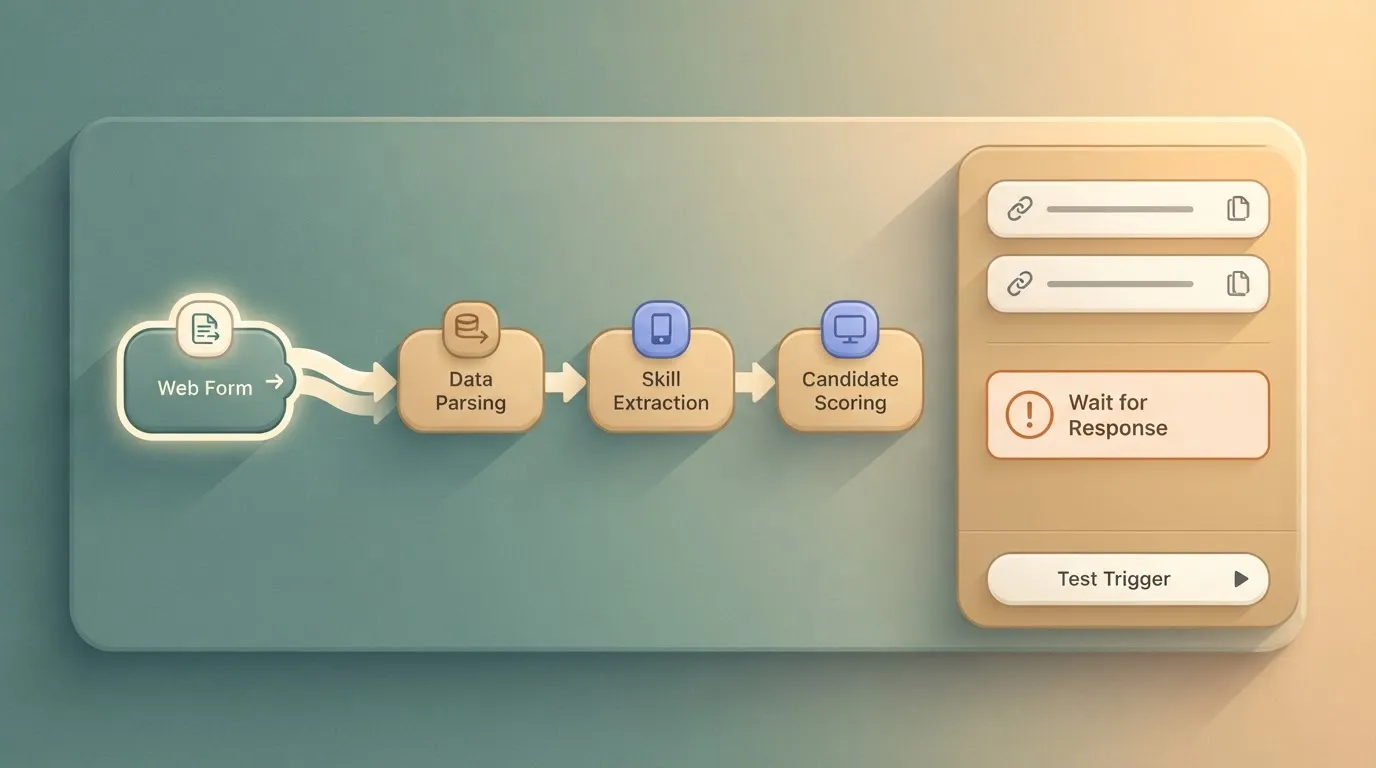
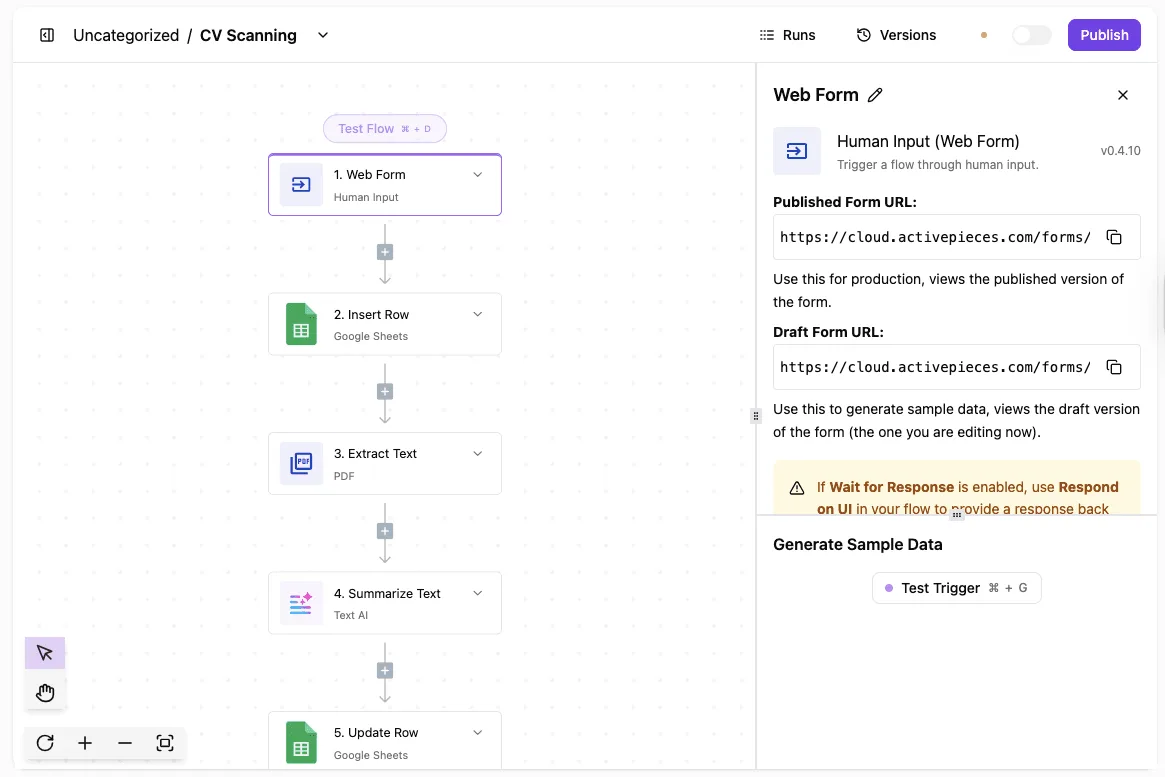
Take the example below, a "CV Scanning" flow whose Web Form trigger, labelled "Human Input", is selected. Its panel shows:
- The published and draft form URLs
- A warning about "Wait for Response"
- A Test Trigger button
Read the two URLs closely. The instance builds them from the public URL you configured at install time, so if one shows a localhost or internal hostname, an outside caller or a browser on another network can't reach it.

Fix that setting before building anything further.
The panel also shows the integration version, v0.4.10, which lets you match your instance against the documentation when behaviour differs.
Add one action and test it
Add a single action after the trigger. Pick something with a visible result, such as writing a row to a spreadsheet or sending a message to a chat channel you control.
Each service needs a connection, and creating it checks that the instance can make outbound calls, which matters if your egress is filtered through a proxy or an allow-list.
Use Test step on the action. A green result with real output means the worker executed it and the credentials held. If it fails, the error text usually points to outbound access or authentication rather than to the flow.
Publish the flow, then trigger it from outside the server, from a laptop on a different network segment if you can. A call from the host itself can succeed while external callers fail.

Open Runs and look for the new entry. Check three things:
- The run appears at all, which proves the trigger was received.
- Every step is marked successful.
- The output of each step matches what you sent.
Worth checking against a plan that does not meter every step: one credit covers a whole run on Activepieces.
4. Harden the setup: HTTPS, backups, updates and SSO
Four things make up hardening: TLS in front, Postgres backups you've restored at least once, pinned versions, and a licence only when SSO or audit evidence is required.
HTTPS and the public URL
Put a reverse proxy such as Caddy or nginx in front of the app and terminate TLS there. Set the public URL to the HTTPS address, because webhook callbacks and OAuth redirects are built from it, and a plain-HTTP value breaks both.
Close every port except 443 at the firewall, so the application and database ports are reachable only from the proxy host.
Backups and restores
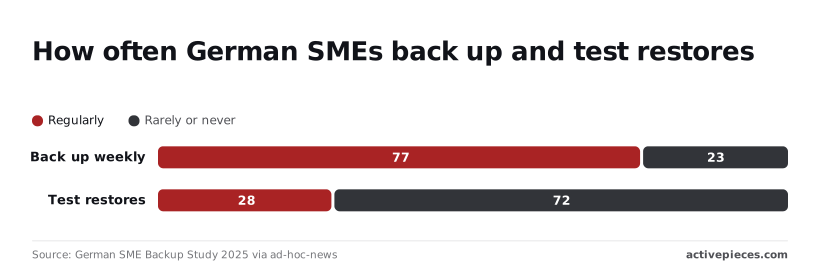
According to the German SME Backup Study 2025, 77% of German SMEs back up weekly, so 23% don't. Only 28% test restores, which means 72% hold backups they've never proven they can use.
Schedule a nightly pg_dump, copy it off the host, and once a quarter restore it into a scratch instance and open a flow. Auditors working to ISO 27001 or PIPEDA safeguards ask for restore evidence, not backup logs.
Pin the image to an exact version tag, never latest. Read the release notes, snapshot the database, upgrade in staging, then production. If a migration fails, the pinned tag and the snapshot let you roll back in minutes.
SSO and where the licence starts to matter
If your team manages its own accounts and no auditor is asking for identity evidence, the free Community Edition is enough. When your identity provider must be the single point of access, or when you must show who changed what, the licence starts to matter.
Team adds SSO. The other rows depend on your contract, so confirm them with sales before you commit.
| Community Edition | Team | Self-hosted enterprise | |
|---|---|---|---|
| SSO | Not included | Included | Quoted through sales |
| SCIM | Not included | Confirm with sales | Quoted through sales |
| Custom roles | Not included | Confirm with sales | Quoted through sales |
| Audit | Not included | Confirm with sales | Quoted through sales |
| Support | Community only | Confirm with sales | Agreed with the licence |
Many vendors keep the self-hosted build thinner than their cloud, so the buyers who need the most control get the least product.
Activepieces doesn't do that: secret managers, release management, audit logs, custom RBAC, SCIM and SSO all run in the air-gapped enterprise build as they do in the managed cloud, and regulated and public-sector organisations run that edition in production today, alongside MoneyGram, Moneypenny, Alan and FundingSocieties, who all run Activepieces.
If your requirement is only SSO, price Team first. If you need SCIM or audit trails, start the sales conversation early, because quotes depend on users, credits, deployment and support level.
5. Mistakes teams make running Activepieces on premise
Whether you buy a licence or stay on the free edition, the costly mistakes are operational rather than technical, and the same six recur. Each one is cheap to avoid before launch and expensive to discover afterwards.
- A wrong public URL, so webhooks and OAuth callbacks point at an address the outside world can't reach
- A lost encryption key, which leaves stored connection credentials unreadable
- Unpinned image tags, so a routine restart pulls an upgrade nobody tested
- Backups that haven't been restored
- Assuming the Community Edition includes enterprise features such as SSO
- Underestimating staff time against a $20 or $200 cloud plan
Configuration errors that break a fresh install
Set the public URL to the address users and external services actually resolve, not the internal hostname behind your reverse proxy. If it's wrong, triggers appear to work in the editor and then fail in production, because callbacks never arrive.
Generate the encryption key once, store it in your secrets manager, and keep it apart from the database backup. Without it, a restored database is full of connections you must re-authorise by hand.
Operational gaps that surface months later
Pin image tags and upgrade deliberately, with a rollback path. A floating tag meeting a host reboot is an unreviewed change, which is a problem if your change-control regime, whether FISMA-aligned or internal, requires approvals.
Choosing self-hosting for the wrong reason
Saving money isn't a reason to self-host. The reasons that hold up are data residency under PIPEDA, an air-gapped network, or a policy that forbids third-party processing. A Hetzner server runs about $78 to $85 a year.
Saving money isn't a reason to self-host.
Against that, the same pricing page lists Plus at $240 a year and Team at $2,400, and c17.io and MentorCruise put a mid-level DevOps engineer near $130,000, so the Team tier costs less than a month of engineering labor.
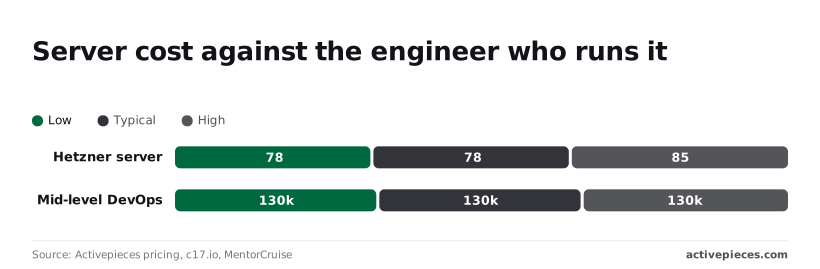
One week of that salary is roughly $2,500, which already exceeds a year of Team.
If patching, backups and incident response take even a few days a year, the cloud plan is the cheaper option, and it includes the SSO that the Community Edition lacks.
6. Next steps and frequently asked questions
Settle your SSO, residency and support requirements first, then test the free edition before you talk to anyone, because those answers decide whether you ever need a licence.
- Write down whether your identity provider must front every login (SSO). If it must, the Community Edition is out and the choice is a paid plan.
- Write down where data and execution may live. Residency rules such as PIPEDA or sector-specific controls can rule out the cloud plan whatever it costs.
- Decide who answers at 2 a.m. If the answer is "us, and we accept that", you're budgeting for operations, not for software.
- Stand up the Community Edition in an afternoon and run one real flow end to end.
- For self-serve plans, read the pricing page. For self-hosted enterprise, SSO beyond the Team plan, Ultimate or Embed, use the sales form.
Why the order matters
That order matters because the first three cost nothing and can end the evaluation early.
Is Activepieces on premise free?
If you ask whether Activepieces on premise is free, the Community Edition is, under an MIT-licensed core, and it runs on your own hardware.
For a team without SSO or contractual support requirements it can be enough. What you pay for is the operating work: patching, backups and incident response.
Can it run without internet access?
When you ask whether Activepieces can run without internet access, the answer depends on what your flows call. Self-hosting the MIT-licensed core keeps the platform and its execution inside your network, but a flow is only as isolated as the services it calls.
Any step that reaches an external SaaS API needs outbound access.
For a network with none, the air-gapped enterprise deployment on your own servers carries the same six capabilities as the managed cloud (SSO, SCIM, custom RBAC, audit logs, release management and secret managers), at a price quoted through sales, so put your air-gap requirement in the sales form and get the answer in writing.
Does self-hosting include SSO?
You won't get SSO from the self-hosted Community Edition. SSO is available on the cloud Team plan, and anything beyond that, including self-hosted SSO, goes through sales.
What does a self-hosted enterprise licence cost?
Don't expect a public price for a self-hosted enterprise licence; sales quotes it. The quote depends on user count, credit volume, deployment model and the level of support you need, so arrive with those four answers.
Is Activepieces SOC 2 certified?
Activepieces isn't SOC 2 certified. The SOC 2 programme is in progress, and it's not a certification you can cite today. If an auditor requires one, treat that as an open item and ask sales for the current status.
Related reading
Running the numbers
See what the same workload costs here.
Free forever plan, and every paid plan self-hosts at no extra cost.
See pricing Talk to sales