
LogRocket Pricing 2026: Plans, Costs per Session

Nov 8, 202614 min read
LogRocket is a session replay and product analytics tool that records what users do in your app so you can watch bugs and drop-offs happen, and once you've spotted a problem, you can route it into whatever workflow your team already uses, whether that's a ticket queue or an automation built in Activepieces.
Its pricing runs on four plans (Free, Core, Pro and Enterprise), and the unit that sets your bill is recorded sessions per month, not seats or the plan name.
Read the live figures on logrocket.com/pricing, because the quota and retention on each plan are what you size against.
LogRocket pricing today, plan by plan
Every current plan in one table
I read the page on 2026-11-08 and I'm not copying its figures here, since they change and a stale number in an article is worse than none.
| Plan | Unit that drives the bill | What to read on the pricing page |
|---|---|---|
| Free | Sessions per month | Session cap and retention window, to see how quickly a small production app exhausts it |
| Core | Sessions per month | Included sessions and overage rate, which decide the cost of a busy month |
| Pro | Sessions per month | Included sessions, retention and which analytics features are unlocked |
| Enterprise | Negotiated volume | Whether the quota and retention are set in a contract rather than listed |
Prices and plan limits checked against logrocket.com on November 8, 2026.
What each plan includes
Whatever the tier, the meter is the same. A plan is really a bundle of three limits: how many sessions are included, how long recordings are kept, and how many people can log in to watch them.

You get a 14-day free trial of all of LogRocket's features. Use it to measure your real sessions per month rather than guessing.
Three features are worth checking plan by plan. Heatmaps show where users click; funnels show where they leave a multi-step flow; and Galileo AI is LogRocket's AI feature for surfacing problem sessions.
If your reason for buying is one of these, the plan that unlocks it sets your price floor, whatever the session quota says.
Getting LogRocket alerts into Slack or a ticket queue is the one job Activepieces takes on here, and it needs no hire: you describe the relay in its built-in chat, and it builds and publishes the flow in your account, the same artifact a builder would have assembled by hand.
That flow runs under the same RBAC and audit logs as every other flow on the platform, the way it does for MoneyGram, Moneypenny, Alan and FundingSocieties, who all run Activepieces in production, and each alert it routes leaves a run trace that anyone on the team can open and read without special training.
The next section turns the session meter into a bill, with overages priced against the jump to the next plan.
If you are running this arithmetic for your own team, see what the same workload costs on Activepieces.
What LogRocket costs at realistic usage
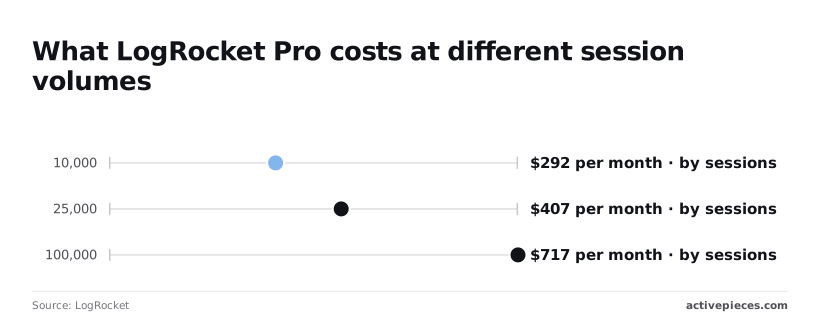
$0 is what a small production app pays on Free at 1,000 sessions a month; at 10,000 sessions, Pro runs about $292 a month. The meter is the recorded session, so traffic, not plan name, sets the bill.
Three sample apps and their monthly bills
Treat these sizes as our estimates, not LogRocket figures:
- a side project near 1,000 sessions
- a growing product near 10,000
- a busy app near 50,000
The meter is the recorded session, so traffic, not plan name, sets the bill.
The side project fits Free at $0. According to Tutorsbot, the growing product has two options at 10,000 sessions: Core at $83 or Pro at $292, so you're choosing between them.
At 25,000 sessions Pro reaches $407; the 15,000 extra sessions add $115. The 50,000-session app lands between that and the $717 Pro charges at 100,000. Pro's per-session cost keeps falling along the way.
Per session, Pro works out to roughly 2.9 cents at 10,000. That falls to 1.6 cents at 25,000 and 0.7 cents at 100,000. A high-volume app gets the cheapest sessions, but only by committing to the larger bill.

The overage point where the next plan is cheaper
The premium for Pro over Core is $209 at 10,000 sessions and $231 at 25,000, so it widens as you scale. That's the price of moving up, and it's the number to hold your overage estimate against.
Take the sessions you expect above your plan's quota, multiply by the overage rate on the pricing page, and add the plan price. If that total passes the next tier's price, move up.
One busy month on overage rates can cost more than a year of the higher tier's extra fee, so size for your peak month, not your average.
Hidden limits: retention, sampling and gated features
Sessions aren't the only cap. Four other limits shape what a plan is worth.
When a bug is reported three weeks late and the window is short, there is no session to replay. That window is retention: how long recordings stay searchable.
Sampling decides whether you record every session or a share. It lowers the bill but removes the one session you needed.
Once support and QA join engineering, seats start to matter: they cap how many teammates can watch replays.
Add-ons are features sold outside the base plan, which push the real bill above the figures here.
A cheaper tier with short retention can cost more once you're debugging blind.
LogRocket against its closest alternatives on price
Watch the retention column, because it is what turns a cheap row into an expensive one.
Price table: LogRocket and three alternatives
The table below sets all four vendors against the same five columns, using each vendor's own pricing page as checked in November 2026.
Hotjar's $69/mo buys a tier sized at 10k sessions, which tells you its price moves in volume steps and you pay for the whole step.
Under 5,000 web recordings, a small app may pay nothing on PostHog, because that is what its free tier includes.
| Entry paid price | Free tier | Included sessions | Overage model | Retention | |
|---|---|---|---|---|---|
| LogRocket | Monthly plan sized by session quota | Yes | Fixed quota per plan | Per-session rate above the quota | Set per plan |
| Hotjar | $69/mo | Yes | 10k sessions at that price | Move up to the next volume tier | Set per plan |
| FullStory | Plan-based | Yes | Bundled per plan | Set by plan terms | Set per plan |
| PostHog | Usage-based | Yes | 5,000 web recordings free | Metered per recording beyond the free amount | Set per plan |
The overage column is where the bills diverge. LogRocket and PostHog charge for each session past the allowance, so a traffic spike raises the bill by exactly the extra sessions.
Hotjar's tiers make the same spike a jump to the next step, which can be cheaper or dearer depending on where you land inside the step.
When a cheaper tool is the wrong comparison
These four aren't the same product, so a lower row can be a different purchase. Hotjar is built around heatmaps and surveys for marketing and UX teams, with recordings as one part.
PostHog is a product analytics suite that bundles session replay alongside feature flags and event analytics, so its recording price sits inside a larger bill. FullStory sells digital experience analytics.
What an engineer needs to reproduce a bug is the console errors and network requests, and LogRocket ties each replay to both.
If your goal is fixing production errors, a tool that records the screen but keeps little technical context makes the cheaper price a false saving. Price the sessions you must keep and search, then compare vendors on that number.
Worth checking against a plan that does not meter every step: one credit covers a whole run on Activepieces.
Routing LogRocket alerts with Activepieces
Activepieces is an MIT-licensed core, open source AI automation platform with 747 integrations, and it runs automated workflows between those apps on unlimited flows, even on the free plan, which means you likely have connectors for the tools you use.

It doesn't lower your LogRocket session count or replace session replay.
It handles the work around an error, such as telling people and filing tickets, so nobody has to open a replay just to find out something broke.
That scope matters for the bill. Sessions recorded, the overage rate and retention are metered inside LogRocket, and no workflow outside it changes them.
What a workflow can change is how many people open LogRocket to check for trouble, and how much of your retained data you need to search by hand.
Where a workflow helps and where it does not
When an error alert fires in LogRocket, a workflow carries the news to the places your team already works. That is the relay it helps with.
Every alert you route is one run on the Activepieces side, and a run is 1 credit however many steps it has, so the relay below costs one credit per alert.
The Free plan includes 1,000 credits a month, and Plus is $20 a month for 10,000. You're adding a second meter, not removing the first, so size it by alerts per month the way you sized LogRocket by sessions.

The replay itself is where it doesn't help. Watching what the user did stays in LogRocket, and the ticket should link back to it rather than copy it.
Check LogRocket's current integrations and webhook options before you build anything, because what you can trigger on decides whether the flow is simple or fragile.
An illustration will sit here: a LogRocket error alert feeds an Activepieces flow, one run and one credit per alert. The flow splits into a Slack message, a Jira or Linear ticket and an error log row, while session replay stays in LogRocket.

The steps run in this order:
- Receive the LogRocket alert as the flow's trigger, using whichever method LogRocket currently supports for sending alerts out.
- Post a short Slack message with the error name and a link to the session in LogRocket, so the team can decide whether the replay is worth watching.
- Create a ticket in Jira or Linear, whichever your team tracks work in, with the same link in the description.
- Add a row to an error log, such as a spreadsheet or table, so you can count alerts over time.
The fourth step pays for itself in sizing. A log of alerts per week shows whether errors cluster in a few sessions or spread across many.
That tells you whether the sessions you must keep and search are a small set or most of your volume.
The Monday checklist for sizing a LogRocket plan
Size LogRocket by recorded sessions per month, not by plan name. Count what your app produces, trim it with a sampling rule, then test the result against each plan's quota and overage rate.
The six steps below run in an order that shrinks the metered number before you compare it with anything.
- Pull last month's total sessions from your own analytics, because LogRocket meters sessions, and that count is your ceiling.
- Estimate how many of those sessions the SDK will actually record. Exclude bots, internal traffic and any pages you won't instrument, since only recorded sessions count against the quota.
- Pick a sampling rule: record everything, record only sessions with errors, or record a fixed share of users. Each rule lowers the metered count by a different amount, so the choice moves the bill more than the plan does.
- Compare your recorded-session estimate with each plan's quota. Then find the session count where quota plus overage costs more than the next plan's flat fee, because past that point upgrading is the cheaper option.
- Confirm retention and seat limits on the pricing page. A plan that fits your volume can still fail if sessions expire before your team debugs them.
- Ask for a written quote before the trial ends, so the numbers you tested are the numbers you're billed.
Record the same four lines for every plan, so each comparison uses the same inputs.
| Line to record | What it decides |
|---|---|
| Session quota | Whether your estimate fits without overage |
| Overage rate | What each extra session costs, and so where upgrading wins |
| Retention window | How long a recording stays available for debugging |
| Seat limit | How many teammates can watch sessions |
Frequently asked questions
Once the plan table settles the floor, five smaller questions decide whether the bill you pay matches it. Confirm each against LogRocket's pricing page on the day you buy, because plan limits and terms change.
Does LogRocket have a free plan?
Yes, LogRocket has offered a free tier with a small monthly session allowance, and it's meant for evaluation rather than production. The metered unit is the recorded session, so a free allowance runs out as soon as real users arrive.
To test your integration and see whether the replays answer your debugging questions, the free tier is the way in. Check the current pricing page for whether it asks for a card at signup, since that decides whether a forgotten account can ever bill you.

Does LogRocket charge per seat or per session?
Add a teammate and the bill doesn't move the way it does with per-seat tools. The price is driven by sessions, not seats: you pay for how many user sessions get recorded each month, and doubling your traffic does move it.
Size the plan from your monthly session count, and treat any seat or member limit on a lower tier as a separate cap to read on the plan page.
What happens when you exceed your session limit?
On paid plans, sessions beyond the quota are billed as overage at a per-session rate, or recording stops, depending on the plan and your account settings. Either way, a traffic spike costs you money or coverage.
If a normal month already runs well past the quota, the larger plan is likely the cheaper one, so compare the overage rate against the price gap to the next plan up.
Ask support how overage is billed for your plan before you rely on it.
Can you get a discount for annual billing or startups?
For any published annual rate or startup program, the pricing page is the source. Anything beyond that is a sales conversation. Bring your projected sessions per month to it, because the quota is the number the quote is built around.
How long does LogRocket keep session recordings?
Plan decides it, and higher plans generally keep recordings longer. That makes retention a second reason a plan can become your real floor, because a recording that expires before your support team opens the ticket is useless.
Work out how long after an incident your team typically looks at a replay, then match the plan's retention window to that gap.
Related reading
References
Running the numbers
See what the same workload costs here.
Free forever plan, and every paid plan self-hosts at no extra cost.
See pricing Talk to sales