MAI Code 2 Pricing: Plans, Seats, and Token Costs (2026)

Nov 21, 202613 min read
Automating software engineering tasks is the core promise of MAI Code 2, a development platform that leverages AI models like Gemini 4 Carbon and GPT-6.2 Astra, which can be connected to various workflows using Activepieces to streamline the production lifecycle.
While the tool allows teams to generate complex codebases quickly, its pricing structure tethers your monthly output to specific credit buckets and per-seat fees.
2026 MAI Code 2 plans
The 2026 pricing table: verified January 2025
The following table outlines the current cost of entry for teams. It shows that as your headcount grows, your fixed monthly overhead increases regardless of how much code you actually ship.
| Tier | Monthly Seat Cost | Included Credits | MAI Code 2 Access Level |
|---|---|---|---|
| Free | $0 | Limited | Basic |
| Pro | $10 | Standard | Full |
| Enterprise | $39 | Custom | Priority |
As a department grows to fifty developers, this tiered approach forces them to pay a significant monthly premium before they write a single line of logic.
To avoid these compounding costs, teams can use Activepieces to build unlimited flows on every plan, including the free tier, which allows them to orchestrate their own model connections across different environments without per-seat scaling.
MAI Code 2 Free vs Pro feature differences
When a developer hits the credit ceiling, they encounter the primary barrier between the Free and Pro tiers. This limit dictates how many complex reasoning tasks a developer can run each month.

Helloentrepreneurs notes that on the Free tier, the platform restricts users to smaller models like Gemini 3.5 Flash-Lite. Because of this restriction, they can't access the high-reasoning capabilities of Claude Opus 5.5 for architectural work.
Moving to the Pro tier unlocks these flagship models, but it also introduces a mandatory per-user fee. It makes the platform more expensive as you hire more staff.
MAI Code 2 Enterprise and custom volume licensing
Network isolation is exclusive to the Enterprise tier. This feature ensures your proprietary code never leaves your private cloud.
While this tier allows for custom credit volumes to handle large-scale migrations using Grok 4.7, it requires a direct contract with the vendor.
Where a flow runs should never decide whether you can leave. Activepieces ships the same product for cloud and on-prem, including SSO and audit logs, so teams can promote logic via Git Sync and Releases between environments.
This parity allows a team to move flows between their own infrastructure and the managed cloud without the friction of a platform migration.
This creates a situation where a proprietary billing cycle locks in your most sensitive workflows. They're difficult to audit or migrate as project needs change.
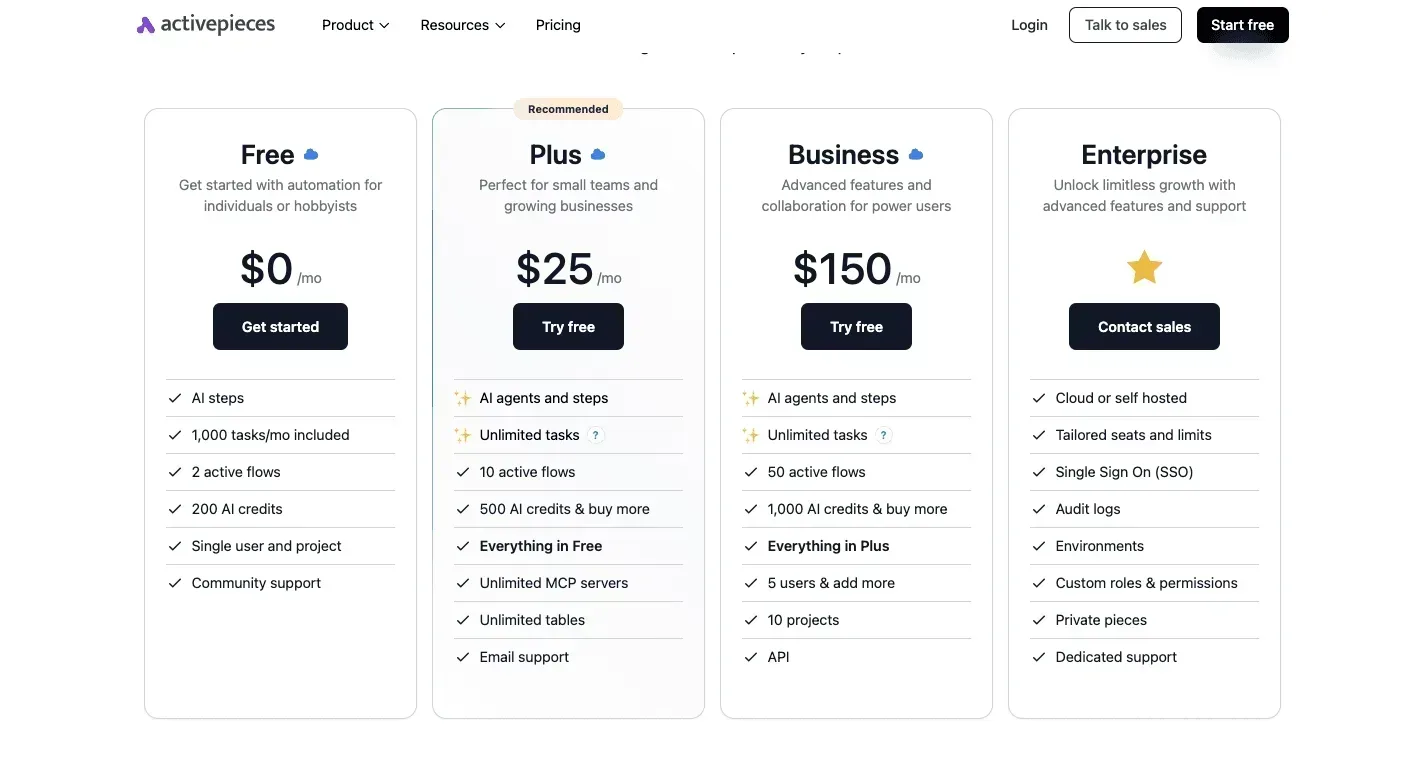
If you are running this arithmetic for your own team, see what the same workload costs on Activepieces.
Translating MAI Code 2 credits into real-world usage
The true cost of development is hidden behind a proprietary credit system. It obscures how much work your team can actually complete before the bill spikes.
The true cost of development is hidden behind a proprietary credit system.
This abstraction makes it impossible to predict monthly expenses. A single task might consume a handful of credits or thousands depending on the underlying model's current price.
Credit cost of a complex code refactor
When a deep architectural change is required, the platform must ingest your entire codebase and generate hundreds of lines of logic. This process drains credits faster than simple autocomplete.
Vandatateam's analysis puts the credit cost per request for high-reasoning models like Claude Opus 5.5 at a level that increases significantly.
A single afternoon of heavy refactoring can exhaust a junior developer's entire monthly allocation. This means teams exceeding their allotment are charged overage fees immediately, rather than being forced to pause work until the next billing cycle refreshes.
Rate limits and concurrency by plan tier
Your ability to run multiple automated tests at once is strictly governed by your subscription level. It dictates how many requests the platform will process per minute.
On the entry-level tiers, the system throttles your connection if three or more developers push code simultaneously.
The run is the meter, not the steps inside it. Activepieces charges 1 credit per flow run regardless of how many steps are executed, which contrasts with the per-module billing found in other platforms.

This allows teams to build highly granular, multi-step code review processes without being penalized for the complexity of their logic.
Your CI/CD pipeline sits idle while waiting for a slot to open. To achieve the instant feedback required for modern deployment, you must move to higher-priced seats regardless of whether you need the extra features.
Context window size and credit burn rate
Models like Gemini 4 Carbon can see more of your project at once thanks to large context windows. Every additional file sent in that window multiplies the credits consumed for that single interaction.
Because the platform charges for every line of code maintained in the model's memory, a developer working on a large enterprise application burns through their budget ten times faster than one working on a standalone script.
This creates a financial penalty for following best practices like providing the AI with full project context to ensure code consistency.
Hidden costs of the MAI Code 2 ecosystem
Unexpected expenses are generated through rigid seat minimums and tiered credit limits. These limits force growing teams to pay for capacity they don't yet use.
While a small team might only need a few licenses, the platform requires a baseline commitment. It inflates the monthly bill before you write the first line of code.
This structure ensures the vendor captures maximum revenue from every account, regardless of the actual output or team size.
Managing MAI Code 2 credit overages
The financial pressure intensifies when developers move between different tiers of intelligence for specific tasks. Accessing flagship models like Gemini 4 Carbon for complex software engineering requires a significantly higher credit burn than using a general-purpose model.
During a single intensive debugging phase, a project’s budget can vanish. If a team exceeds these monthly allotments, overage charges apply immediately. They prevent the work from stopping but often result in a bill that exceeds the original subscription price.
Choosing between the standard model and its high-speed variant illustrates how quickly these costs scale when processing large codebases.
The standard model costs $0.50 for input and $2.50 for output per 1M tokens, which means developers must carefully budget their usage to avoid significant operational expenses.
The Flash version costs $0.05 for input and $0.25 for output, so high-volume applications can scale much more affordably.
10x is the price difference between the standard model and the Flash version for both reading and writing data, making the latter a far more economical choice for large-scale data processing, which means your budget stretches significantly further when scaling operations.
This gap penalizes teams that require the highest level of reasoning for every pull request. This price gap forces a compromise between the quality of the AI’s suggestions and the sustainability of the development budget.
These platform-specific constraints make it difficult to predict long-term spending as a project grows in complexity.
Worth checking against a plan that does not meter every step: one credit covers a whole run on Activepieces.
Comparing MAI Code 2 to industry alternatives
Balancing the simplicity of a single monthly bill against the flexibility of paying only for what the team actually consumes is the key to choosing between MAI Code 2 and its competitors.
While MAI Code 2 simplifies budgeting by charging per user, this approach often forces teams to pay for maximum capacity even when developers are only performing light maintenance.
MAI Code 2 vs GitHub Copilot: the flat-fee trade-off
GitHub Copilot, the AI coding assistant owned by Microsoft, is a predictable monthly subscription that covers unlimited basic suggestions. This prevents the billing shock common with usage-based systems.
However, this flat fee often restricts users to a specific set of models, whereas MAI Code 2 allows teams to toggle between different reasoning engines as task complexity changes.
GitHub Copilot is deeply integrated into the VS Code text editor. It can access local file structures without manual configuration, but it lacks the granular credit controls that allow an administrator to cap spending on a per-project basis.
The following table compares the current market leaders in intelligence and operational cost to show how much a team pays for top-tier performance.
| Model | Performance % | Input Cost per 1M | Output Cost per 1M |
|---|---|---|---|
| MAI Code 2 | 98% | $0.50 | $2.50 |
| GPT-6.2 Sol | 100% | $2.00 | $10.00 |
| Claude Opus 5.5 | 96% | $4.00 | $20.00 |
For high-volume background tasks, MAI Code 2 is more affordable. Switching to a flagship model like GPT-6.2 Sol is necessary for the most difficult logic puzzles.
MAI Code 2 vs Cursor: context vs cost efficiency
Cursor is an AI-first code editor built on a fork of VS Code. It prioritizes long context, meaning it can read an entire folder of files at once to understand how a change in one place breaks a function elsewhere.
By focusing instead on token efficiency, MAI Code 2 uses smaller data windows to keep costs low. This means it may miss dependencies hidden in distant files.
Cursor requires a dedicated editor download to function. MAI Code 2 operates as a plugin, allowing developers to stay within their existing environment at the cost of less awareness of the overall project structure.

Scaling past the MAI Code 2 credit ceiling with Activepieces
Expensive per-seat restrictions can be bypassed using Activepieces, which provides 750+ integrations to route AI tasks through a self-hosted automation engine rather than the vendor's proprietary web interface.
By connecting the MAI Code 2 API directly to this workflow builder, a single API key can serve an entire department.
MoneyGram and Moneypenny run Activepieces in production to manage complex automation environments where uptime is critical. This setup treats the AI as a modular utility rather than a locked-in platform. It allows developers to swap models or providers without rebuilding their entire internal logic.
Automating secure workflows
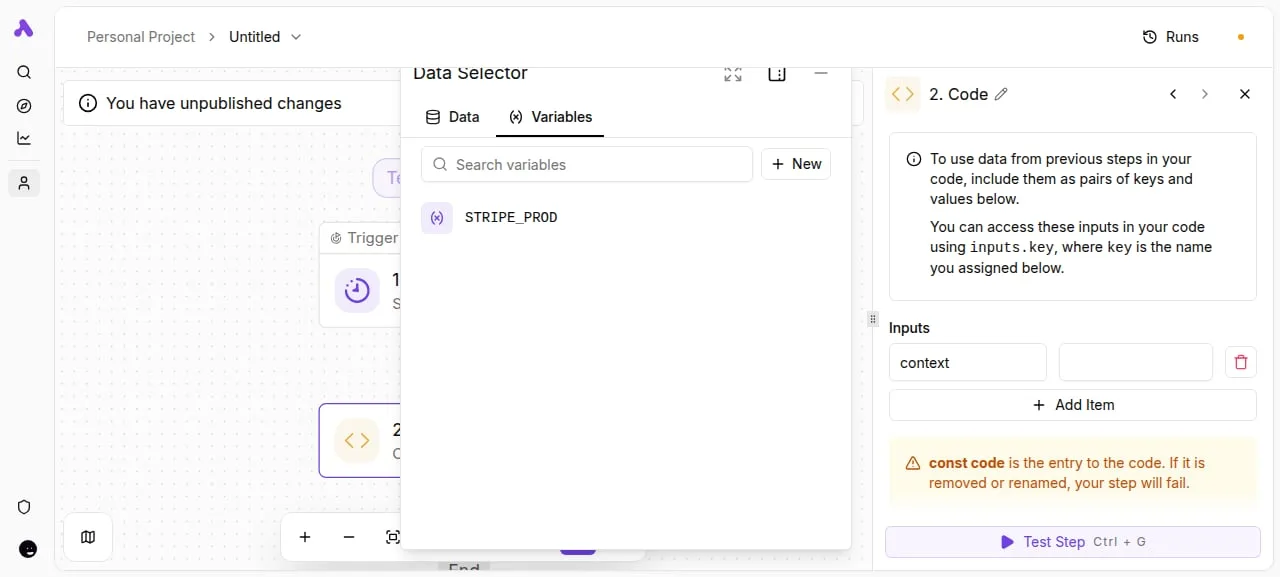
In the Activepieces flow builder, a user maps a "STRIPE_PROD" variable into a custom code step to inject sensitive production data into an AI workflow securely.
The model only sees the specific context it needs to complete a task. By isolating these variables, a team can use high-reasoning models like Gemini 4 Carbon for complex software engineering or GPT-6.2 Astra for general coding tasks without manually copying data back and forth.
External events such as a GitHub pull request or a Jira ticket update can trigger the workflow once these variables are mapped. This automation ensures that the AI performs its role the moment a developer pushes a change.
Because Activepieces offers an MIT-licensed core for self-hosting on private servers, the entire process remains behind a company firewall. This is the data privacy that standard cloud-based AI plugins often lack.

Auditing and right-sizing your MAI Code 2 spend
Auditing your current usage ensures you aren't paying for premium seats. Many tasks are better suited for cheaper, high-volume models.
When a team hits its credit limit, the immediate impulse is to upgrade the entire subscription.
However, this often subsidizes idle accounts or simple tasks with expensive reasoning power. By reviewing how your developers interact with the platform, you can determine if you're hitting a hard ceiling or simply mismanaging your allocated resources.
Steps to optimize MAI Code 2 costs
To visualize where the budget is leaking, the lead developer can follow these steps. A lower-cost model, like Gemini 3.5 Flash-Lite, can take over the heavy lifting of repetitive requests.
- Export monthly credit usage logs to see which specific users are hitting their limits and which are barely active.
- Identify 'Flash-eligible' repetitive tasks, such as basic unit test generation, that could be shifted to DeepSeek-V4.1-Flash-1017 to save premium credits for complex architecture.
- Calculate the May 2027 price jump impact based on your projected headcount to see if the current seat-based model remains sustainable as you scale.
- Reassign seats from inactive users to new hires to avoid purchasing additional licenses before they're truly necessary.
This inventory provides the data needed to justify a move toward a more flexible infrastructure. Once you know exactly how many credits are wasted on low-level debugging, you can start routing those specific tasks to more efficient engines.
Frequently asked questions about MAI Code 2 pricing
Budgeting for development tools requires looking past the initial sticker price to how the vendor handles your unused resources and specific user status. Managing these costs effectively depends on understanding the rigid boundaries of their subscription tiers.
Is there a student discount for MAI Code 2?
By verifying an academic email address or a student identification card, learners can access the Pro tier at a reduced rate.
This lower entry point means students can experiment with high-reasoning models like Claude Opus 5.5 for complex homework assignments without paying the full commercial price.
However, these accounts are restricted to individual use. A student can't share their discounted seat with a study group or a startup team.
Does MAI Code 2 offer a pay-as-you-go option?
Rather than a metered billing model, the platform currently operates on a fixed monthly or annual subscription basis. This structure forces teams to estimate their monthly usage in advance.
This often leads to over-provisioning seats just to ensure developers have access during peak sprint cycles. Without a pay-as-you-go tier, a small agency can't scale their costs down during weeks when they're only performing light maintenance with faster, cheaper models like Gemini 3.5 Flash-Lite.
Are unused credits carried over to the next month?
At the end of the billing cycle, any portion of your monthly credit allowance that remains is permanently forfeited. This policy means a company pays for the maximum potential output of the AI even during holiday periods or slow months.
To avoid wasting this prepaid value, managers often route non-essential tasks to the platform at the end of the month. They use GPT-6.2 Sol for generating documentation simply to exhaust the remaining balance.
Running the numbers
See what the same workload costs here.
Free forever plan, and every paid plan self-hosts at no extra cost.
See pricing Talk to sales