
Mailchimp API: Keys, Rate Limits and Requests (2026)

Nov 22, 202616 min read
The Mailchimp Marketing API (v3.0) is a REST API for audiences, contacts, campaigns, automations and reports, authenticated with an API key or OAuth 2, and it is the same API that tools such as Activepieces call when they connect to a Mailchimp account.
Transactional email is a separate product, Mandrill.
This was checked on 22 Nov 2026, and any limits cited later come from Mailchimp's developer docs.
Mailchimp API overview
What the Marketing API covers
Think of it as the system of record for your marketing data. You can read and write audiences and their contacts, build and send campaigns, manage automations, and pull report data on what happened afterwards.
Before you write any code, count which shape you're building. Most production integrations either push contact changes in or pull campaign results out, and each has different batching needs.
Marketing API versus Mandrill transactional API
Choosing the wrong one means rebuilding your auth, not changing an endpoint, because the two APIs are separate services with separate credentials.
| Marketing API v3.0 | Mandrill | |
|---|---|---|
| What it does | Manages audiences, contacts, campaigns, automations and reports | Sends individual transactional messages triggered by user actions |
| Authentication | API key or OAuth 2 | Mandrill key |
| Used for | Syncing subscribers, sending newsletters and reading campaign results | Receipts, password resets and order notifications |
Use the Marketing API when the recipient is a subscriber on a list. Use Mandrill when the message is a one-to-one consequence of something the user just did.
Activepieces has an MIT-licensed core with 750 integrations, and its Mailchimp integration, HTTP step for the endpoints it doesn't wrap, agents and shared tables all live in one product under one set of controls: custom RBAC, SSO, SCIM, audit logs, environments and git sync, on cloud or self-hosted.
Build the same span from separate tools and a failed Mailchimp sync leaves you with six places to look for what happened.
Before you design around either API, check your current plan against Mailchimp's pricing and developer pages, since plan terms change and I haven't confirmed them here. API access follows your Mailchimp account, and Mandrill is provisioned separately from your marketing plan.
Everything below works on Activepieces' free plan. Start without code or a credit card.
Getting a Mailchimp API key or OAuth app
Generate a key under Account > Extras > API keys when you're integrating with your own Mailchimp account. Register an OAuth 2 app only when other people's accounts need to connect to your software.
Create an API key
Get the base URL right the first time, because every call you make later depends on it. The steps below take you from a signed-in account to a working base URL.

- Open Account > Extras > API keys.
- Choose Create A Key.
- Name the key for one integration, such as the name of the sync job that will use it.
- Copy the key immediately, because Mailchimp shows it once.
- Read the suffix after the dash in the key, for example
us21. - Build your base URL from it:
https://us21.api.mailchimp.com/3.0/.
When something misbehaves, one key per integration pays off. If a runaway job starts hammering the service, you can tell which integration it was from the key name and revoke that one without breaking the others.
Rotate keys on a schedule you can actually keep. Never ship one in browser code or a mobile app, because anyone who opens the page source holds your account.
Find your Mailchimp API data center prefix
Read the suffix as your data center, the server group that hosts your account. Put it in the hostname and nowhere else.
When a key ending in us21 is sent to a different prefix, it fails, and the error looks like an authentication problem when the real cause is the URL. Store the prefix in configuration beside the key, not hard-coded in a dozen places.

When OAuth 2 is the right choice
If you're building a product that lets customers connect their Mailchimp accounts, you can't ask them to paste keys into your app, and you shouldn't hold them. A key is your account's own credential.
Register an OAuth 2 app instead. Each customer authorizes access, you receive a token scoped to their account, and they can withdraw it without touching anyone else's.
A minimal working Mailchimp API request
Two calls get you running: a /ping to prove your key and data center work, then a PUT that creates or updates one contact. Both fit in a few lines of curl with basic auth.
Check the key with /ping
Any string works as the username in basic auth, and your API key is the password. The key ends in a data center suffix such as us19, and that suffix is the subdomain you call.
curl -s --user "anystring:$MC_API_KEY" \
 https://us19.api.mailchimp.com/3.0/ping
If the suffix or key is wrong, the call fails here, before any list data is involved. A healthy key returns a short JSON body with a health_status message. See the ping reference.
Upsert a contact with PUT
Build the member path from a subscriber hash: the MD5 of the lowercased email.
HASH=$(printf '%s' "[email protected]" | tr '[:upper:]' '[:lower:]' | md5sum | cut -d' ' -f1)

curl -s --user "anystring:$MC_API_KEY" -X PUT \
 "https://us19.api.mailchimp.com/3.0/lists/$LIST_ID/members/$HASH" \
 -H "Content-Type: application/json" \
 -d '{"email_address":"[email protected]","status_if_new":"subscribed"}'
Because the address defines the URL, PUT is the safe upsert. Running it twice hits the same resource, so a retry can't create a duplicate.
status_if_new applies only on creation, so an existing unsubscribed contact is not quietly resubscribed. Details are in the (source).
Read the Mailchimp API response
When the call succeeds, you get the full member object back. The id is the same hash you sent, email_address is the stored address, and status is the contact's current state, which is the field to check after a retry.
Read the HTTP status as carefully as the body. A completed run of a single HTTP step shows that pairing: the request that went out, then a 200 and its body coming back.
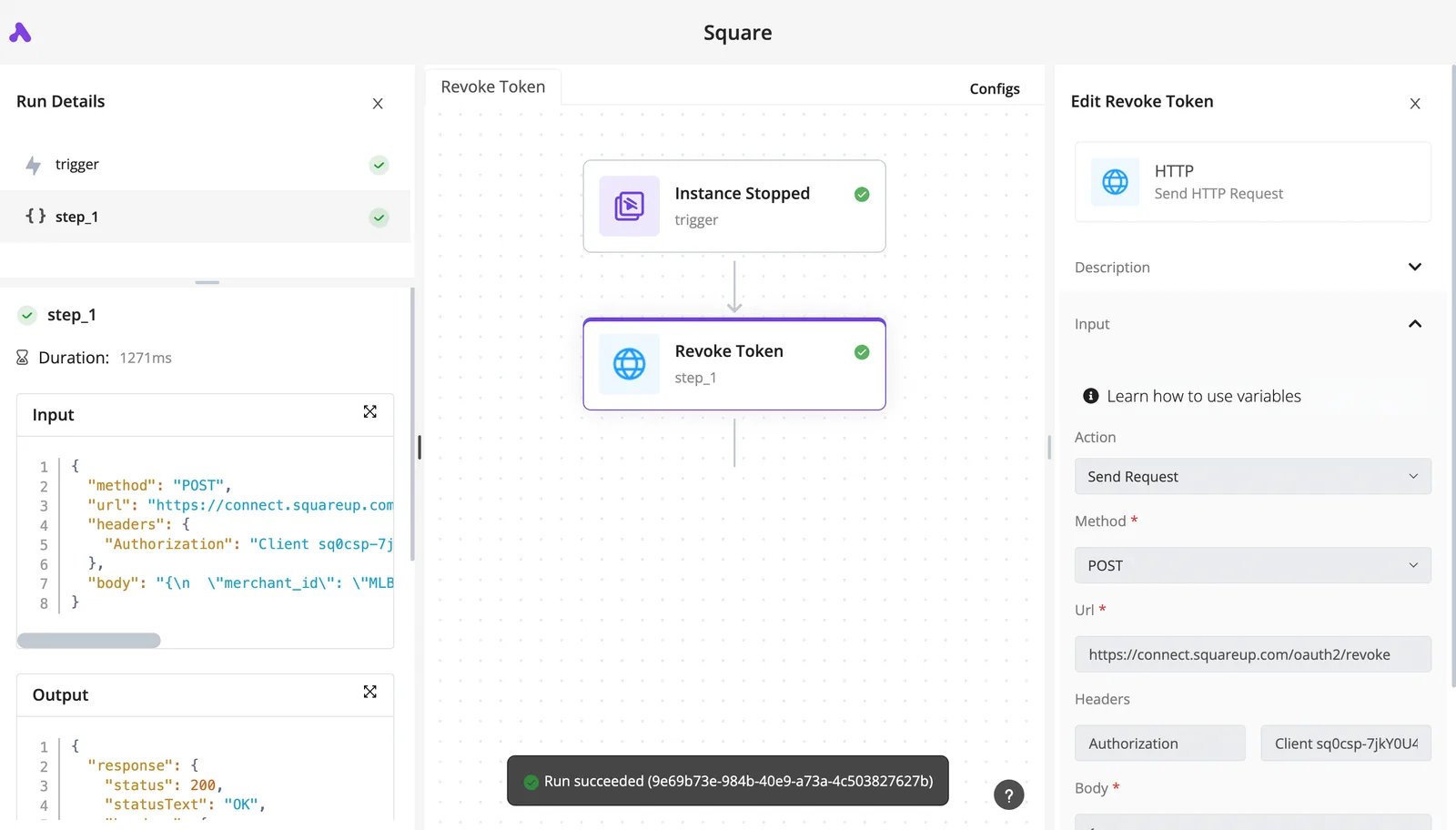
Once one call behaves that way, batching and retries are the next step.
Mailchimp API limits, quotas and pricing per unit
You aren't charged per API call; the real limits are 10 simultaneous connections and a 120-second timeout, while cost follows your plan tier and list size.
Send an eleventh parallel request and it is refused rather than queued, because Mailchimp's docs allow 10 simultaneous connections per account. Size your worker pool at or below 10 and retry refused calls with backoff.

Past 120 seconds, a request is cut off, so a slow call needs a smaller scope, not a longer wait.
Mailchimp API batch operations and pagination
To fetch more than 1000 records you need pagination, because list endpoints accept a count of at most 1000 records per page. Pulling a 50,000-member list therefore takes at least 50 sequential pages, and each page holds one of your 10 connections.

Batching fixes that: the batch endpoint bundles many operations into one request, which spends one connection instead of hundreds. Mailchimp publishes no per-tier rate figure, so measure your own throughput rather than assuming a ceiling.
Mailchimp plan pricing versus Mandrill blocks
Cost tracks the plan, not the call count. According to Chosenly SaaS, Essentials runs $13 to $385 per month, Standard $20 to $800, and Premium $350 to $1,025.
The spread is list size: the same plan can cost many times more once your audience grows, so budget by contacts, not requests.
Mandrill, the transactional email service, is sold in blocks of emails.
Read the cost column as the deciding one, since the limits barely differ; the table compares the three on limit, unit cost and best use.
| Limit | Unit cost | Best use | |
|---|---|---|---|
| Marketing API | 10 simultaneous connections, 120s timeout, count max 1000 | No per-call charge; plan tier and list size | Reads and single updates |
| Batch endpoint | Shares the connection limit; no per-tier rate figure published | No per-call charge; plan tier and list size | Bulk writes and large syncs |
| Mandrill | No per-tier rate figure published | Blocks of emails | Transactional sending |
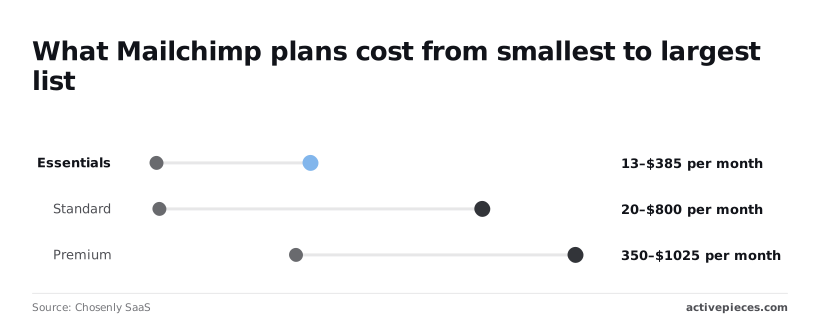
Pick by workload: bulk list work goes through batch, and one-to-one transactional mail goes through Mandrill.
If you would rather not meter the workflow side either, Activepieces counts a run as 1 credit however many steps it has, so a flow that makes several Mailchimp calls per event costs the same credit as one that makes a single call.
The free plan carries 1,000 credits a month and unlimited flows, which is enough to test an integration against your 10-connection ceiling before it costs anything.
Easier to see it running than to read about it: set it up free, no card.
Handle common Mailchimp API errors
When a Mailchimp call fails, it almost always falls into one of three groups: credentials, data that Mailchimp refuses to accept, or too many calls at once.
The table shows each error Mailchimp's glossary documents, what triggers it, and the one change that clears it, so you can match a response to its remedy before you touch your code.
| Error | Cause | Fix |
|---|---|---|
| 400 Invalid Resource | A field in the payload fails validation, such as a malformed email address | Read the field named in the response detail and correct that value |
| 401 | Bad API key, or the wrong data center suffix in the host | Re-copy the key and use the data center it ends with |
| 403 | The key's user lacks permission for the resource | Use a key from a user with access |
| 404 | The list, campaign or member ID doesn't exist | Verify the ID, and hash the lowercase email for member paths |
| Member Exists | The address is already on the list | Use an upsert (PUT) instead of a create |
| Forgotten Email Not Subscribed | The contact was permanently deleted | Have the person re-subscribe through a signup form |
| 429 | Too many simultaneous connections | Cap concurrency, back off, retry |
| 5xx timeout | The request ran too long on Mailchimp's side | Shrink the batch, retry with backoff |
Fix most of these once and they stay fixed. The last two keep coming back, which is why they deserve a pattern rather than a patch.
When you get a 401, the key or the host is wrong, and the host is the usual culprit: the data center in the URL must match the suffix on the key.
A 403 means the credential is valid but lacks rights, so changing the key's owner fixes it, not retrying.
Retrying changes nothing when the response is a 400, a Member Exists, or Forgotten Email Not Subscribed, because all three reject the data, not the connection. Upsert for existing members, and treat a deleted contact as a consent decision you can't override from code.
Retry 429s and timeouts, since both are transient, but with limited concurrency and increasing delays. Before retrying a write after a timeout, check whether it landed, or you'll create duplicates.
Production patterns that keep Mailchimp syncs reliable
Checking before you retry is half of reliability. The other half is making every call cheap to repeat and rare to need: cap concurrency, back off on errors, write idempotently, batch bulk work, and let webhooks replace polling.
Throttle and retry Mailchimp API requests
If a sync is throttled, it is usually because it opened too many connections, since Mailchimp limits how many you can hold open at once.
The sequence below is what each worker should do on a 429 or 5xx. Followed as written, a struggling sync slows down instead of failing or hammering the service.
- Cap workers under 10, so your own parallelism doesn't cause the 429s you're about to handle.
- Send the call.
- On failure, wait 1 second and double the wait on each further failure, adding random jitter so parallel workers don't retry in lockstep, meaning the failed service gets progressively more time to recover between retry attempts.
- Retry up to 5 attempts, which bounds an outage to a short wait rather than an endless loop.
- Then alert, and log the error type and instance ID so you can trace the failing request.
Retry only writes that can be repeated. Use PUT for members, because it sets a record to a known state, where a repeated POST can create a second one.
Use Mailchimp batch requests instead of loops
If you loop with one call per record, you spend your connection budget on overhead. For bulk jobs, submit the operations as a batch and let Mailchimp process them on its side.
You make a handful of requests and poll one result instead of babysitting thousands.
On read calls, use fields or exclude_fields to trim the payload to what the sync uses, which cuts transfer time and parsing work.
Polling is a vanity metric in disguise: it counts calls made, while most of them find nothing changed. Register a webhook so Mailchimp pushes subscribes, unsubscribes and profile edits to you.
Polling is a vanity metric in disguise: it counts calls made, while most of them find nothing changed.
Acknowledge each event quickly and do the heavy work afterward, so slow processing never turns into redelivery or a backlog.
Call the Mailchimp API without code using Activepieces
Reach for Activepieces when you want to drive Mailchimp from a visual workflow. It suits contact syncs and event reactions, but not heavy bulk jobs or custom retry logic, which are still better written in code.
That split follows from the last section. A workflow tool can receive an event and act on it, yet it won't give you the queueing and backoff control you would build yourself.
The screenshot below shows the shape of a typical build, a weekly competitor price monitor.
A schedule trigger fires on Friday at noon UTC, a Google Sheets step finds the rows, a loop walks each competitor, Firecrawl scrapes the pricing page, and an AI utility step checks for changes.
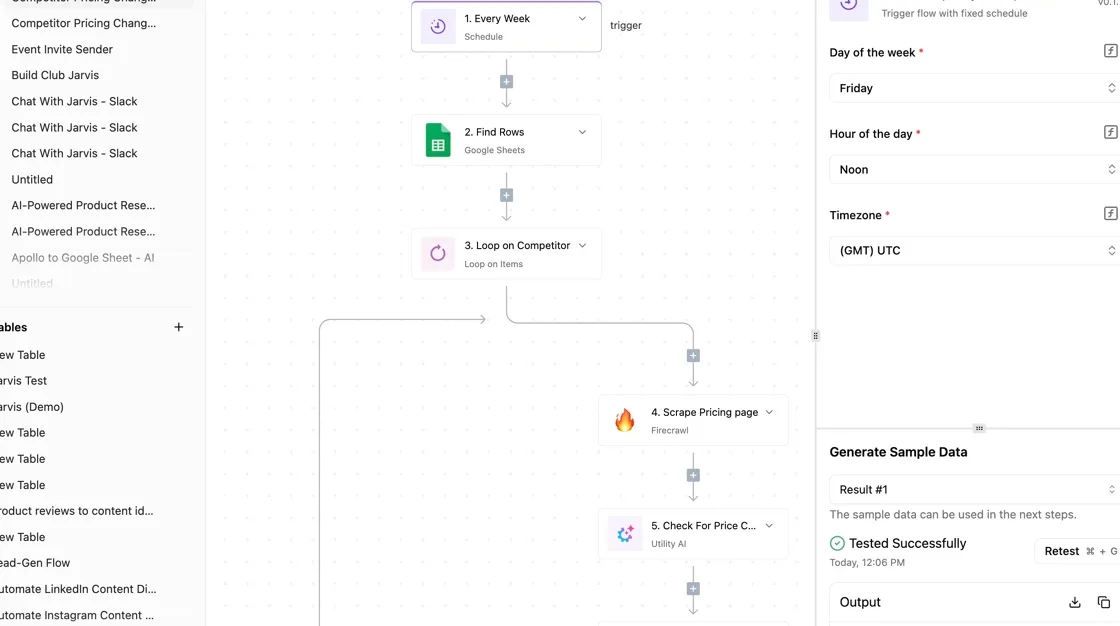
The workflow isn't a Mailchimp flow. It shows the pattern you would reuse: one trigger, then a chain of steps that each do one small thing, with a sample-data test on each step before you turn it on.
That tested-sample habit is the useful part, because it lets you see a real response before the workflow touches live audiences.
Using the Mailchimp integration
For the common jobs, the Mailchimp integration has triggers and actions: adding or updating a contact in an audience, and reacting to events such as a new subscriber.
Connect it once with your account credentials, and the integration handles authentication and the data center URL for you.
Use it where the call is a single, small operation per event. A new signup arrives, the workflow adds a contact, and the work is done.
Keep the loop shape in mind. A loop step that adds one contact per iteration makes one request per contact, which is exactly the unbatched pattern this article warns against. For a large import, write the job in code.
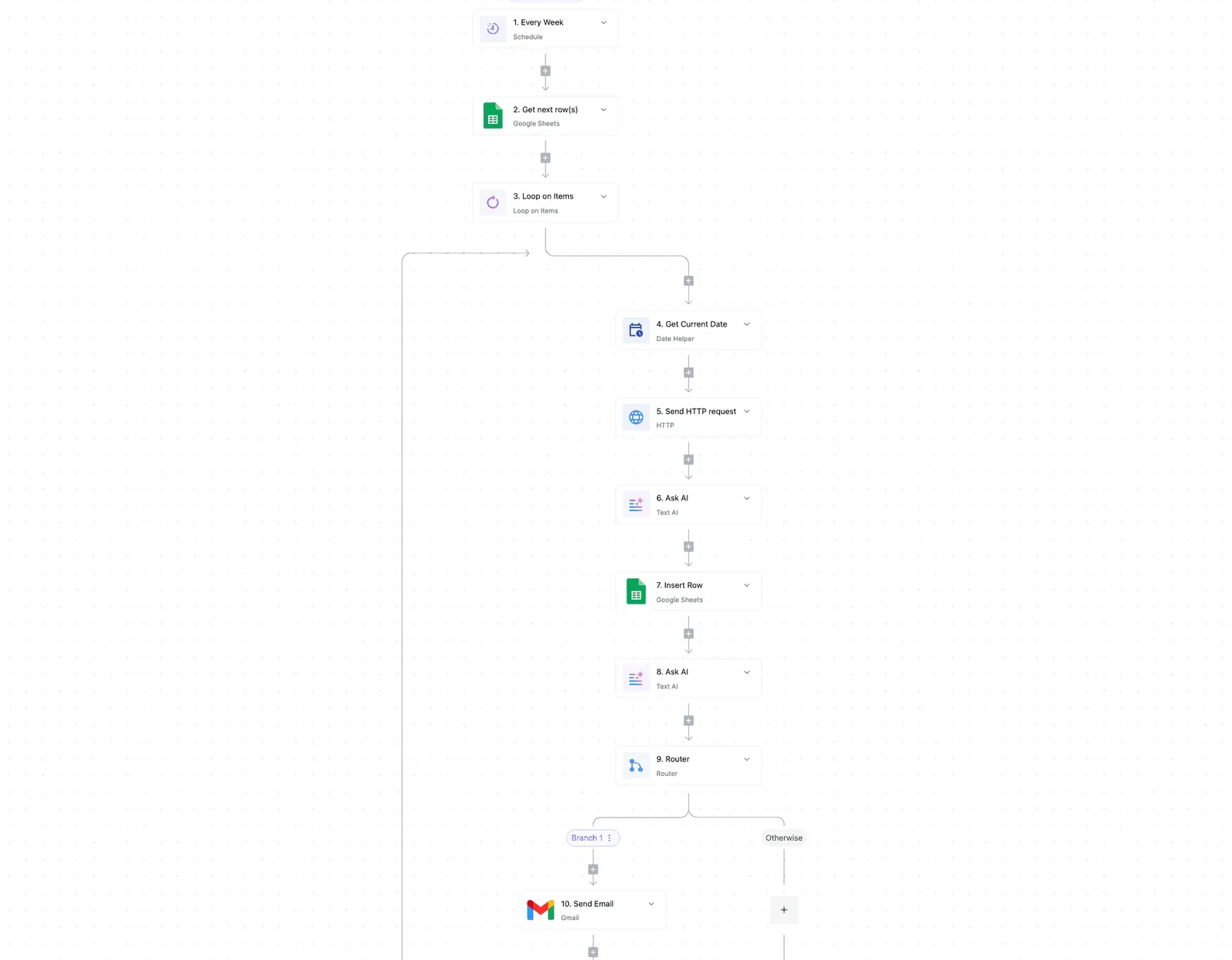
Calling other endpoints with the HTTP step
When the integration doesn't wrap an endpoint you need, the HTTP step reaches it directly. You supply the same API key and the same data center URL you would use in code, and the step sends the request as written.
You get the endpoint coverage of the full API without leaving the builder.
You also take on the details the integration would have handled: the correct base URL, the authorization header and the request body. Test the step against sample data first, and read any error response before you trust the flow.

Frequently asked questions
Testing against sample data surfaces questions the body can't fully settle, and five come up most often. Some stay open even after the answers below:
- Whether the API publishes a Retry-After value for throttled calls, which decides how long your backoff should wait
- Whether the connection limit applies per API key or per account, which decides if extra keys buy you any headroom
- Whether to authenticate with OAuth or an API key for a given integration
- How Mandrill is billed, which matters before you plan transactional volume
- How to find your data center prefix, which every request URL depends on
Check each against Mailchimp's current developer documentation before you build around it.
Is the Mailchimp API free to use? I know of no separate charge for API access.
Your plan's own limits on contacts and sending still apply, so a runaway integration can push you into a higher tier. Confirm the details on Mailchimp's pricing page before launch.
Does Mailchimp have a sandbox or test environment? I have no dedicated sandbox to point you to. The practical substitute is a separate account or audience filled with dummy contacts, so a bad batch never touches real subscribers.
Can I send transactional emails with the Marketing API? No. The Marketing API handles audiences, campaigns and reports. Transactional sending, such as receipts and password resets, goes through Mandrill, a separate service you add to your account.
How do I find my Mailchimp list ID? Mailchimp now calls lists audiences. Open the audience's settings and look for the audience ID under the name and defaults section. You can also list your audiences through the API and read the ID from the response.
Is the Mailchimp API key the same as the Mandrill key? No. They're separate credentials from separate services, and one won't authenticate against the other. Create each in its own settings area and store them separately.