
Manus API: Pricing, Limits and How Tasks Work (2026)

Nov 24, 202617 min read
The Manus API accepts a task, hands it to an agent, and lets you collect the result later.
It's a job queue with an agent behind it, so size your integration around task state, not response time, whether you poll from a script or wire it into a workflow tool like Activepieces.
The Manus API is an asynchronous interface for submitting tasks to a Manus agent, which runs them in the background, consumes credits as it works, and returns results that you retrieve by polling task status or receiving a webhook.
Nothing here answers on an open connection. The Manus API's a programmatic way to submit work to a Manus agent and retrieve what it produces. You create a task, receive an identifier, and check back.
Manus API as an asynchronous agent task interface
What the API lets you do
You can start agent tasks from your own systems, track their status, and fetch the outputs when they finish. Each task spends credits, so the API's a metered work-submission interface, not a free-form text endpoint.
Treat a task as a unit of billable work with a lifecycle, and put limits on who can create one.
Blunt consequence: a timeout on your side doesn't cancel anything. If you lose the task identifier, you've lost your handle on work that may still be running and charging.
Blunt consequence: a timeout on your side doesn't cancel anything.
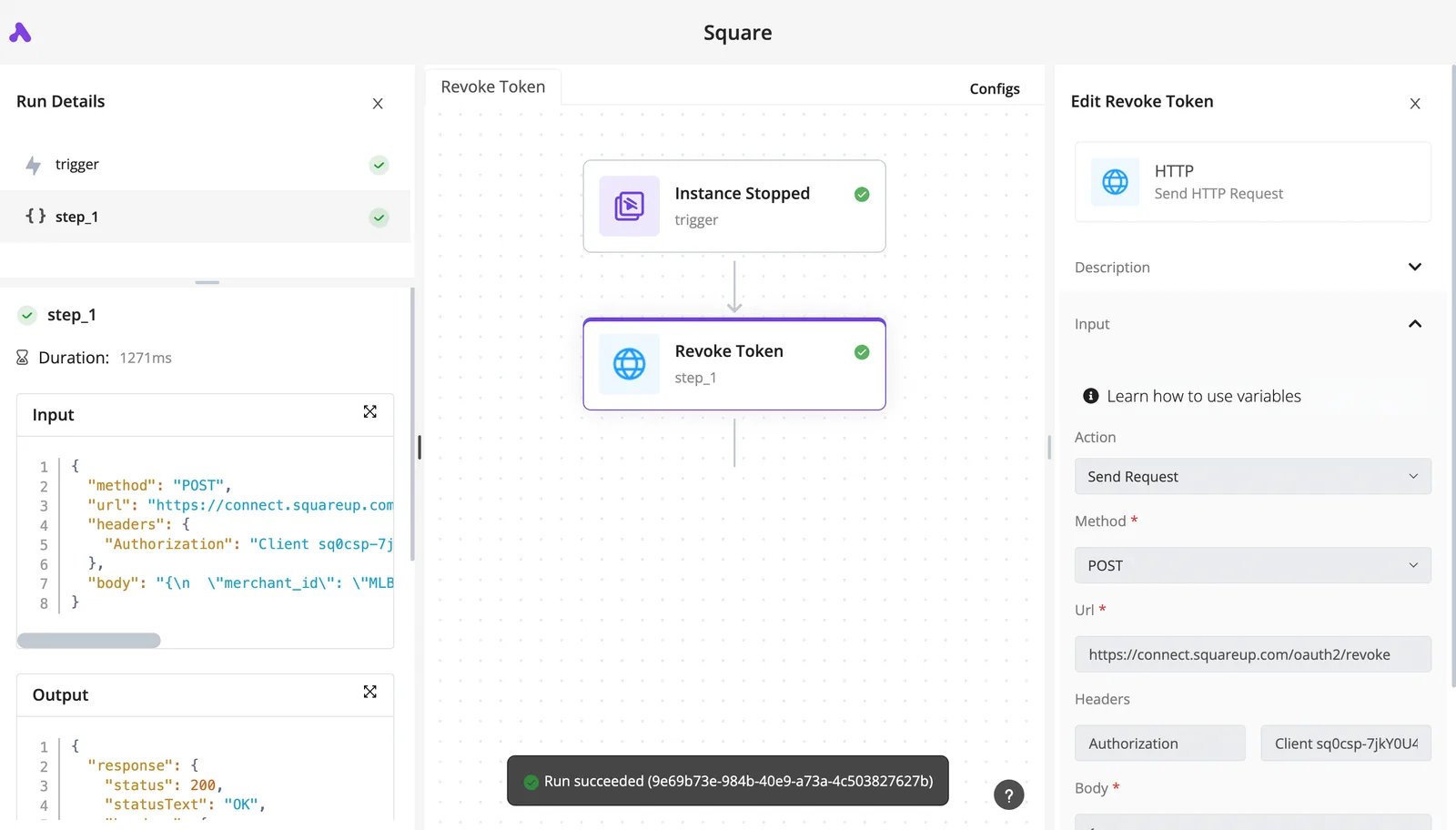
Store the identifier before you do anything else. If you'd rather not write the polling loop yourself, Activepieces can run it as a flow, and it allows unlimited flows on every plan, including free, with a run costing 1 credit however many steps it has.
How a Manus task runs from prompt to result
Every run goes the same way. The client submits a task, it sits in a queue, an agent picks it up, and the result comes back through one of two routes.

Take from it that submission and completion are separate events, so your code needs a place to hold state between them.
When you poll, you ask for status on your schedule. When you use a webhook, Manus calls your endpoint when the task ends.
Polling's simpler to secure, since nothing public is exposed. A webhook removes wasted requests but needs an endpoint you must authenticate and keep reachable.
On 24 November 2026 I checked this article against Manus's own developer documentation. Any figure later in the integration is taken from those docs and carries its own date, because limits and credit rules can change without notice.
Re-check the docs before you commit capacity to them.
If you are running this arithmetic for your own team, see what the same workload costs on Activepieces.
Manus API key, pricing and rate limits
Budget by credits and concurrency slots, not by dollars per call: the price points scale linearly, and the tier limits decide how many tasks run at once.
If you want to know which plan unlocks the API, the sources cited here don't say, so the table marks it "not published". Confirm it on the plan page before buying, because a plan without API access means a wasted month.
Read the key location and header name from Manus's API docs, because they aren't in the figures I could verify. Test with one cheap task before building anything around them.
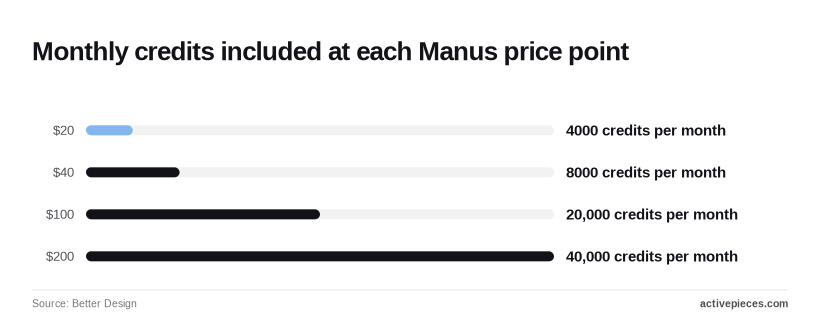
[Better Design] lists:
- $20 for 4,000 credits a month
- $40 for 8,000
- $100 for 20,000
- $200 for 40,000
That's 200 credits per dollar at every point, so a bigger plan buys headroom, not a discount.
[Notis] puts a website build at 360 credits and an app build at 900. On the $20 point that's about eleven website builds or four app builds a month.
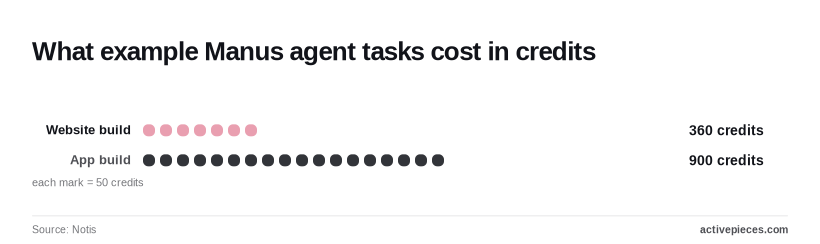
Retry failed app tasks in a loop and a month's credits can be gone within days.
Rate limits and concurrency by tier
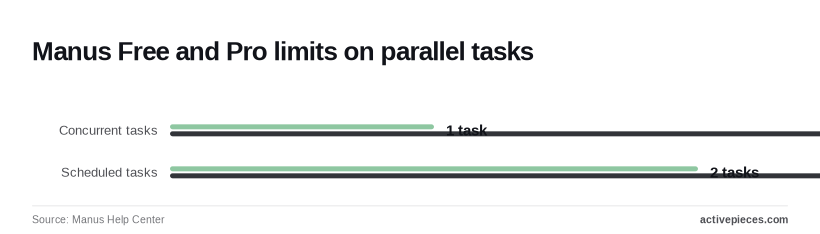
Across Free and Pro, the Manus Help Center gives concurrent tasks as 1 to 20 and scheduled tasks as 2 to 20. The table shows what's published and leaves the rest marked.
| Tier | API access | Price per month | Monthly credits | Daily refresh credits | Concurrent tasks | Scheduled tasks | Requests per minute |
|---|---|---|---|---|---|---|---|
| Free | not published | $0 | not published | not published | 3 | 2 | not published |
| Pro | not published | not published | not published | not published | 20 | 20 | not published |
| Team | not published | not published | not published | not published | not published | not published | not published |
On Free, one task runs at a time, so queued work waits in line, and Pro's 20 slots let you fan out. With no published requests-per-minute figure, poll gently, prefer webhooks, and handle a throttling response as normal.

A minimal working Manus API request
None of the five steps in the smallest working integration waits on a model to finish typing, meaning you can iterate on the integration instantly. The same sequence holds whether you poll gently or let a webhook call you.
- Export the API key to an environment variable in the shell or secret store that runs your code.
- POST to the task-creation endpoint with a prompt.
- Store the task ID the response returns.
- Poll the task's status, or accept the webhook delivery.
- Read the output and download any attached files.
Look at where the work happens: creation returns almost immediately with an ID, and everything useful arrives later. Take from it that the task ID is your only handle on the work. Lose it and you've paid for output you can't retrieve.
Create a task
Set the key first, in a variable such as MANUS_API_KEY, and have your code read it from the environment.
A key pasted into a script ends up in version control, build logs and shell history, and admin visibility into your Manus account won't tell you where it leaked.
Then send one POST with the prompt, using the endpoint path and authentication header exactly as the Manus API reference gives them.
Write the returned task ID to durable storage before doing anything else. A process that crashes between creation and storage leaves a running task nobody can find.
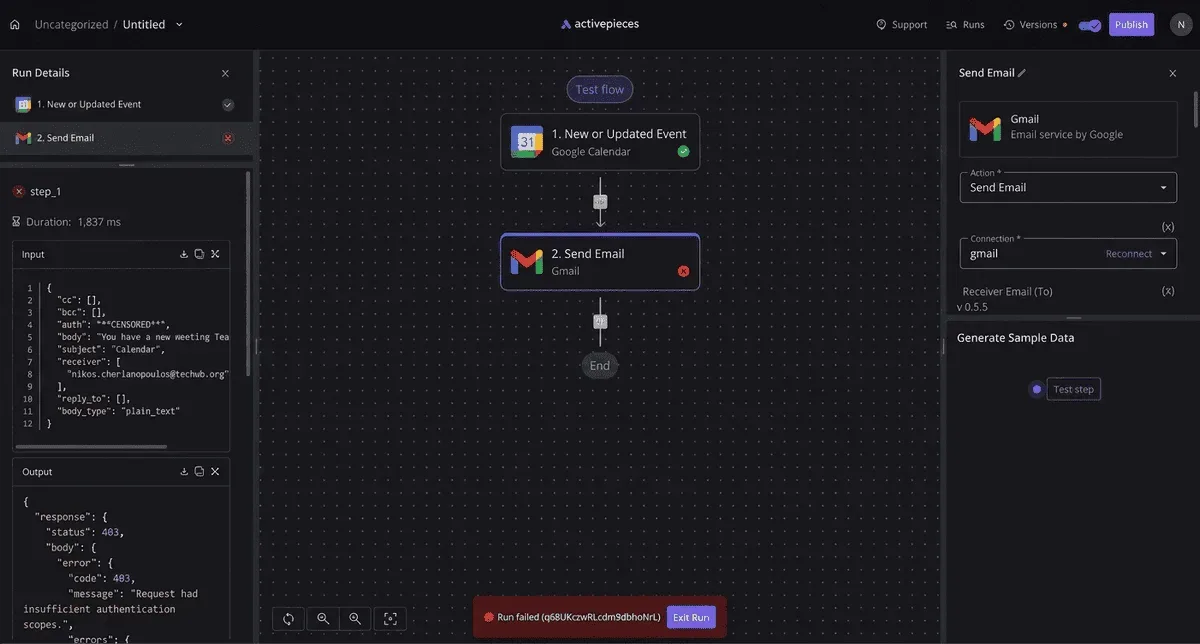
If you want to create and fetch Manus tasks without code, Activepieces can send that same POST from its generic HTTP step. A dedicated Manus connector is optional, and I haven't verified that one exists, so look in your instance's integration list first.
Should you write one, it becomes a integration under packages/integrations in the open source repo, where the community directory holds 750 integrations beneath an MIT-licensed core, so your integration joins a well-established ecosystem.
One integration action serves both uses: it runs as a flow step, and the per-project MCP server exposes that same action as a tool to Claude, ChatGPT or Cursor, which the Integrations Framework and MCP Server documentation describe.
MoneyGram, Moneypenny, Alan and FundingSocieties run Activepieces in production.
Polling Manus API task status or using webhooks
When you poll, you request the task by ID on an interval and read its status field until it reports a finished state. Keep the interval generous and back off on a throttling response.
With a webhook, the direction reverses: Manus calls an HTTPS endpoint you control when the task changes state.
That removes the polling loop, but it adds a public endpoint you must keep reachable, so match each delivery to a stored task ID and ignore any ID you didn't create.
Reading Manus API task results and files
Once the status is final, fetch the task and read its output. Files the agent produced come back as references you download separately.
Treat downloaded files as untrusted data: write each to its own empty directory and don't open or execute them from your application's working directory.
Next comes cost, because credits, not request counts, set your real ceiling.
Worth checking against a plan that does not meter every step: one credit covers a whole run on Activepieces.
Case for plain model APIs
Because credits make the cost visible, that visibility is the objection's best opening. A direct model API with a tool loop you write yourself can be cheaper and easier to audit than a task API that decides its own steps.
The objection at full strength
You submit work and wait, so a task API is slow by design. You also can't predict the bill from the request, since the agent chooses how many steps to take and credits accrue as it goes.
It can be the same prompt: quick one day, wandering the next, so output varies in length, route and quality.
With a plain model API, you own the loop. Every model call is a logged request with a known token count.
Every tool call is a function you wrote, so you can put an allowlist in front of it, cap the iterations, and reproduce a failure from the transcript.
When an auditor asks what the system did, you hand over your own logs instead of a vendor's task history.
For bounded work such as classifying tickets, extracting fields or drafting replies, that control is worth having, and a task API adds latency and cost variance for nothing.
Why the claim still holds for open-ended work
Everything turns on one assumption: that your tool loop is cheap to build. That holds when the tools are a few functions and an API call.
It stops holding when the work needs a browser, a sandbox to run code, and somewhere to read and write files across steps.
You would be the one operating each of those. A browser needs session handling, page rendering and recovery from pages that change under it.
A sandbox needs isolation, resource limits and cleanup. File handling needs storage that persists between steps and gets deleted afterward. None of that is model work, and all of it needs maintaining.
What decides it is multi-step tool use. If the job's one or two model calls with fixed tools, build the loop and keep the audit trail.
If the job's open-ended, where you can't say in advance which sites, files or programs it'll touch, the task API's buying you the environment you would otherwise build, and that's where the cost of a plain model API ends up higher.
Common Manus API errors and limits in production
Late, partway through, or twice: that's how a task API fails, rarely as a timeout on one call. Six failures account for most of the pain, and the fixes below are builder-side practice unless stated otherwise.
I haven't verified Manus docs URLs for them, so none are linked, and each fix should be checked against the current docs page.
- Auth failure: a rejected key. Fix: re-issue the key and check which environment it belongs to.
- 429: too many requests. Fix: retry with exponential backoff and jitter.
- Insufficient credits: the task is refused or halts. Fix: check the balance before submitting.
- Stalled or failed task: no terminal status arrives. Fix: poll with a deadline, then alert.
- Duplicate webhook: the same event delivered more than once. Fix: deduplicate on the task ID.
- Expired files: output is gone when you fetch it. Fix: copy results to your own storage on completion.
Manus API authentication and permission errors (401, 403)
Treat any 401 or 403 as a configuration fault, not a transient one, and don't retry it in a loop. Keep keys in a secrets store, one per environment, so a revoked staging key can't take down production.
The docs are the authority on which scopes exist. If a permission error appears that the docs don't explain, log the response body and ask support.
Back off on 429 and honor any retry header the response carries. I have no confirmed limit values, so don't hardcode any.
Credits are a separate failure: a loop that submits tasks until the balance hits zero stops production for everyone. Cap spend per task and per day on your side.
Slow is normal for an agent task. Stuck is not. Set a deadline per task type, and when it passes, alert a human rather than resubmit.
Resubmitting spends credits again on work that may still be running. The docs don't, to my knowledge, promise automatic recovery, so assume none.
Make your handler idempotent: store the task ID, and ignore any event you've already processed. Fetch and store output files as soon as the task completes, because I can't confirm a retention window. Treat file expiry as possible until the docs say otherwise.
Calling the Manus API from Activepieces without code
No code is needed to drive Manus tasks from a form, a schedule or an incoming email: Activepieces uses its HTTP step to create the task and a webhook to receive the result, and the free plan includes unlimited flows and 1,000 credits a month, with a run costing 1 credit however many steps it has.
It adds no capacity of its own. Every limit and credit charge that applies to Manus still applies, and a busy workflow just spends them faster.
In the screenshot below, a "Lead Nurturing" flow sits in the Activepieces builder, with its first step, a daily schedule trigger, open in the configuration panel. The panel sets the hour (11 am), the timezone (America/New York) and whether the flow runs on weekends.
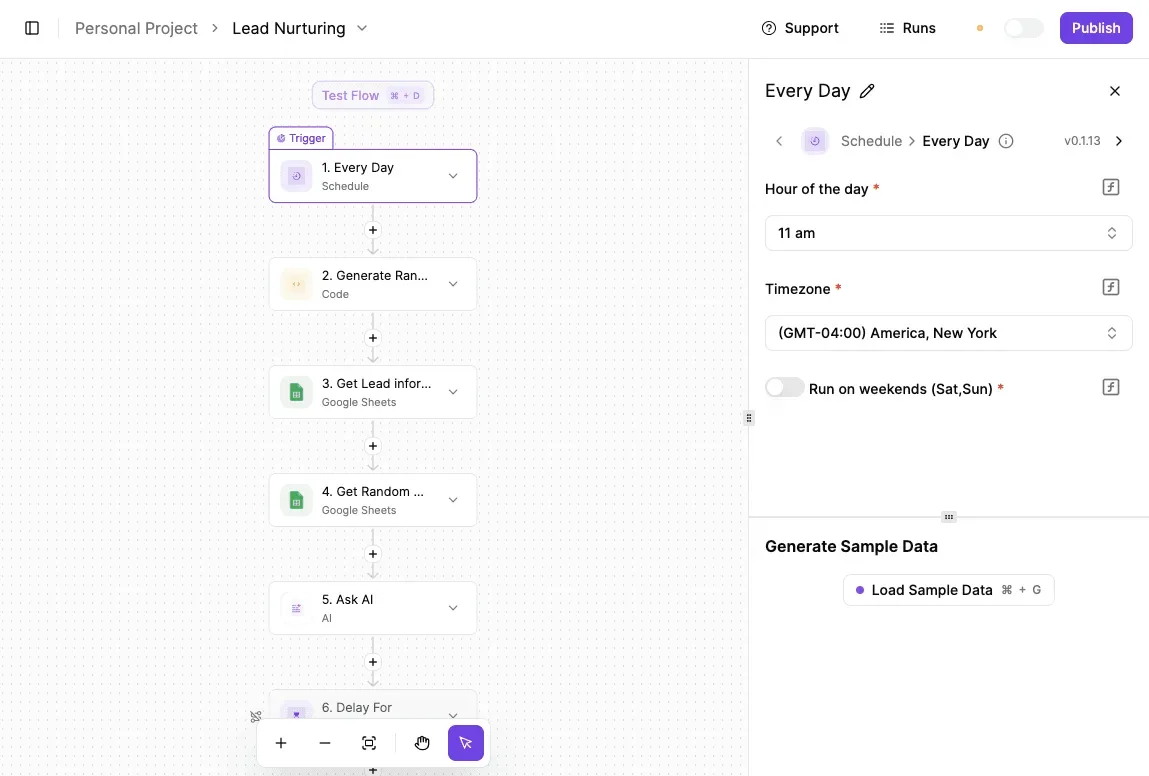
That last toggle matters here. A schedule that fires on a weekend creates tasks nobody is watching and spends credits on them, so set it deliberately.
Beneath the trigger, the steps (a code step, two Google Sheets lookups, an AI step, a delay) show the shape you'll reuse: a trigger, some preparation, then the call that does the work.
In that flow every step runs in order, and a Manus task doesn't finish in order. That gap shapes the two stages below.
Create and fetch Manus tasks with the HTTP step
Among the 750 integrations in the Activepieces open source repo, I can't point to a Manus one that I've verified, so build on the generic HTTP step.
Check the integration list in your own instance first; if a Manus connector is there, use it, and the same reasoning applies.
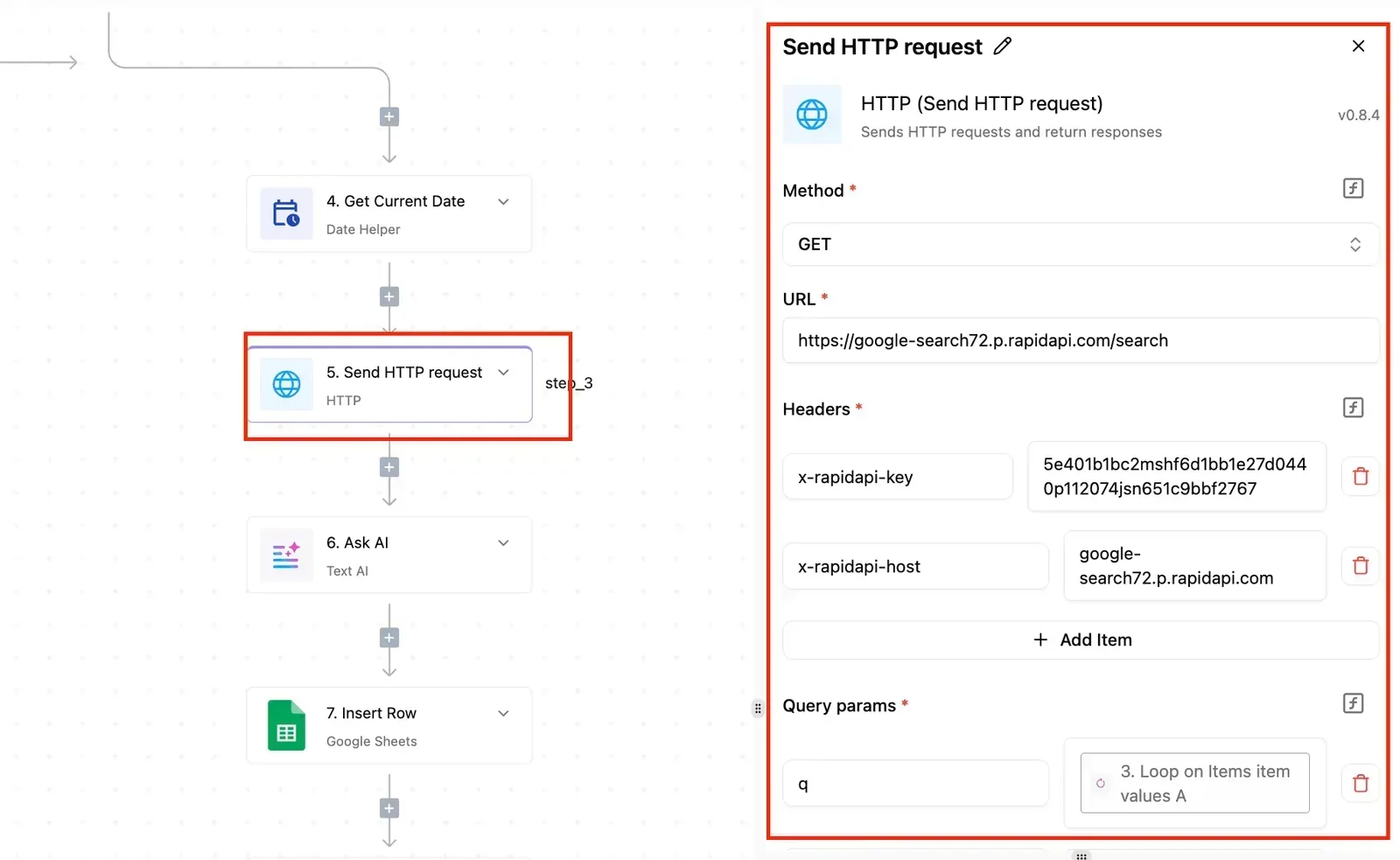
Put the API key in a connection or a stored secret, never pasted into the step body.
Anyone with edit access to the flow can read a pasted key in the step configuration, and admin visibility into who edited the flow won't tell you who copied it.
Send the POST that creates the task, then store the returned task identifier. That identifier is the only handle you have on work that is still running, so write it to a sheet or table alongside the originating lead or request.
Don't hold the flow open waiting. Creating a task returns before the work is done, so a step that assumes finished output will pass an empty result downstream.
Handle the webhook result in the workflow
Use a second flow with a Catch Webhook trigger, and register its URL with Manus as the task callback as the Manus docs describe.
When the result arrives, look up the stored task identifier, match it to the original request, and only then route the output onward: to email, a spreadsheet, a ticket.
Design for two failure modes. A webhook can arrive more than once or not at all, so make the routing step safe to repeat and keep a polling fetch on a delay as a fallback.
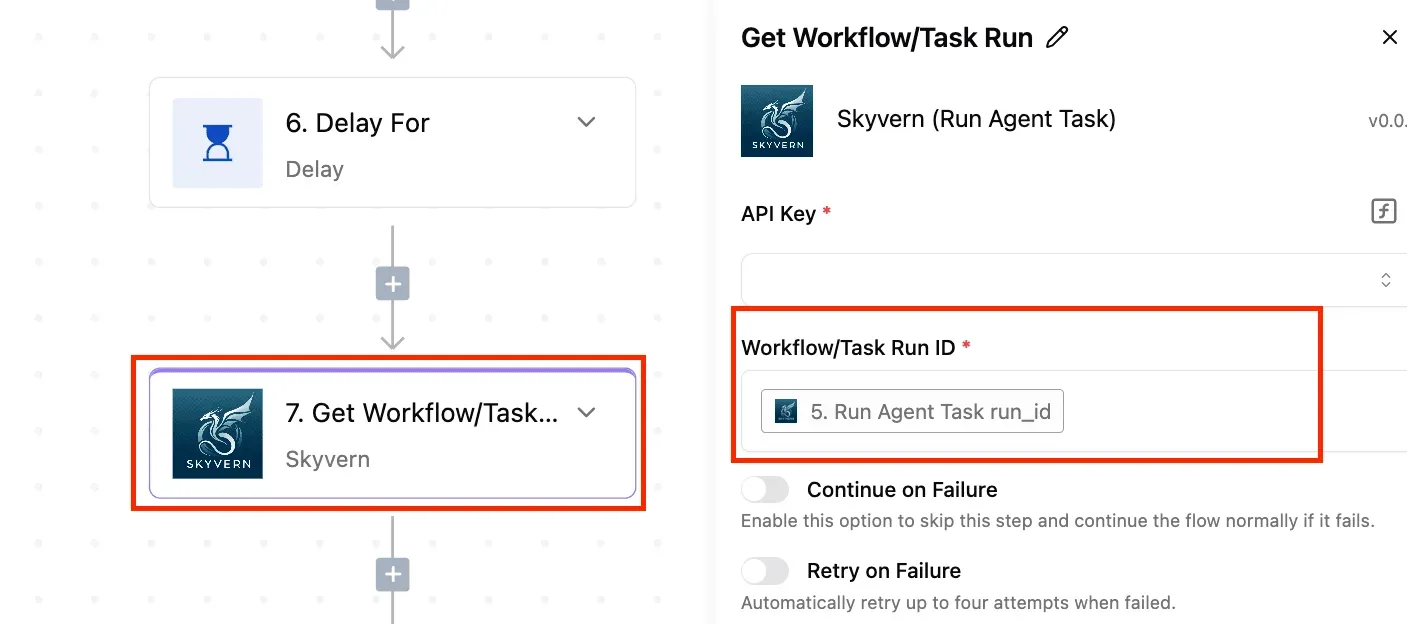
And a failed task still arrives as a result, so branch on status before you send anything to a customer.
Monday: the first three things to do.
- Store the Manus API key as a connection in Activepieces and confirm that only the people who need edit access to the flow have it.
- Build the create-task flow with one manual trigger and one test request, and record the returned task identifier.
- Build the Catch Webhook flow, publish it, send one real task through, and check that the result matches the stored identifier before you attach a schedule or form.
Frequently asked questions
These are the questions the body leaves open. Each answer is only as firm as Manus's current docs, so confirm anything that touches billing or limits there before you build on it.
Is the Manus API free to use?
Assume not until the docs say otherwise. Every task spends credits, so the real question is whether your plan includes API access and how many credits it carries.
Read the pricing page and the API docs together, then run one small task and check the balance before and after. That tells you the cost per task for your workload, which no pricing table will.
Can the Manus API stream results in real time?
Streaming
Plan for no. The API's built around creating a task and then collecting the outcome by polling or by webhook, not around a held-open response.
If the docs later add a streaming option, treat it as a bonus. Your design should still work with a status check or a callback, because those are the mechanisms this article's argument rests on.
Official SDK
Does Manus have an official SDK? This article doesn't establish one. The API is plain HTTP, so any HTTP client works, and a thin wrapper of your own around create, poll and fetch is a small job.
If you want a vendor-maintained library, look in the docs for one and check how recently it was updated before depending on it.
Task duration
How long can a single Manus API task run? Don't hard-code a maximum, because none is confirmed here. Because the task runs apart from your request, duration doesn't hold a connection open.
Set your own timeout on the polling loop, decide what happens when it fires, and branch on the final status as described above. Check the docs for any stated ceiling.
File input
Can I use my own files as input to a Manus task? Don't build on an assumption here, since the body doesn't cover this.
Check the docs for how files are attached to a task, which formats are accepted, and whether there is a size limit.
Test with a real sample of your data first, since a task that quietly ignores an attachment still returns a result.
Related reading
References
Running the numbers
See what the same workload costs here.
Free forever plan, and every paid plan self-hosts at no extra cost.
See pricing Talk to sales