
Manus Automation in 2026: Free Tier, Pricing and Setup

Nov 17, 202614 min read
Manus automation means you describe a job in plain English.
An AI agent carries it out in its own cloud workspace, and you get a finished file back, once or on a repeating schedule, much as people who build flows in tools like Activepieces already expect a recurring task to run without them.

Type the task, check the first result, then schedule it. Whether you can keep doing that depends on how its credits drain.
Manus automation basics
What a Manus task looks like
Here's the kind of sentence I type: "Every Monday, check these five competitor pricing pages and give me a one-page summary of anything that changed."
That's the whole setup. The agent opens a browser, reads the pages, runs code if it needs to, and saves a report.
What Manus can and cannot automate
If the job is research or document work with a clear output, Manus suits it: gathering information from the web, tidying it, and producing a report or spreadsheet.
It's a poorer fit when you need something to fire the instant an event happens in another app, which is the territory of trigger-based workflow tools.
Confirm anything below against the pricing page before you commit, because limits and credit rules get changed. Most of this comes from Manus's own pricing page, documentation and changelog, with some figures from third-party trackers.
If you are running this arithmetic for your own team, see what the same workload costs on Activepieces.
Account setup and first task
Stage 1: Sign up and find your credit balance
Sign up at manus.im, then find your credit balance before you run anything, because every task draws that balance down. Use an email you'll keep, since scheduled tasks later will be tied to this account.
Write down the number you start with. That baseline is the only way to tell whether a task cost you a little or a lot.
Stage 2: Write a prompt with goal, inputs and output
Keep the first prompt plain: state the goal, the inputs and the output format in ordinary sentences, and nothing more clever than that.
Mine was: "Every Monday, check these three competitor pricing pages, tell me what changed since last week, and give me a five-line summary I can paste into an email." That has a goal (spot changes), inputs (three pages) and an output (five lines, email-ready).
Leave out the inputs and the agent guesses at them. Leave out the format and you get whatever it felt like producing.
Pick a small task you already do by hand, so you know what a right answer looks like.
Stage 3: Run it and check the result
Run the task once, then check the output against something you already know to be true, and look at your balance again.
Open the result and compare it with the inputs you gave. Did it use all three pages? Is the summary the length you asked for?
If it drifted, change the prompt rather than accepting the output, because a loose prompt will drift the same way on every scheduled run.
Then do the part most people skip. Subtract your balance now from your baseline. That difference is the cost of one run.
Multiply it by how often you'd schedule the task, and you have a rough monthly price in credits before you've built anything.
Schedule Manus tasks and connect apps
If the test run cost what you can live with, schedule it. Take the prompt that worked, set how often it runs, then point the output at email, Slack or a sheet.
I typed: "Every Monday at 8am, pull last week's new signups from the report I uploaded, summarize them in five bullets, and flag anything that dropped."
Then I set the schedule fields to match.
Keep the prompt identical to the one you tested. Rewording it "to make it better" means you're no longer running the task whose cost you measured.
Start with the slowest cadence you could tolerate, not the fastest.
Keep the prompt identical to the one you tested. Rewording it "to make it better" means you're no longer running the task whose cost you measured.
Every scheduled run draws on your credits just like the test did, so a daily schedule burns through them far faster than a weekly one. Check your balance after the first two runs before you tighten the schedule, or you'll make it unworkably tight.
Stage 5: Send results to email, Slack or a sheet
You have to remember to open a summary that sits inside Manus. Ask for delivery in the same plain English, and authorize each app when it prompts you:
- Email: "Send the summary to me at the end of each run."
- Slack: "Post it in the channel I name, with the flagged items first."
- A spreadsheet: "Add one row per run with the date and the key numbers."
Pick one destination first. Each connection is another thing that can break quietly, and a run that fails at the delivery step still used credits.
If you need something the built-in connections don't cover, Manus also exposes an API, which suits you only if you're comfortable with a little code.
When to add a workflow automation tool
Add one when the job should start because something happened, such as a new form entry or a new customer, not because the clock says Monday. A scheduler can't do that.
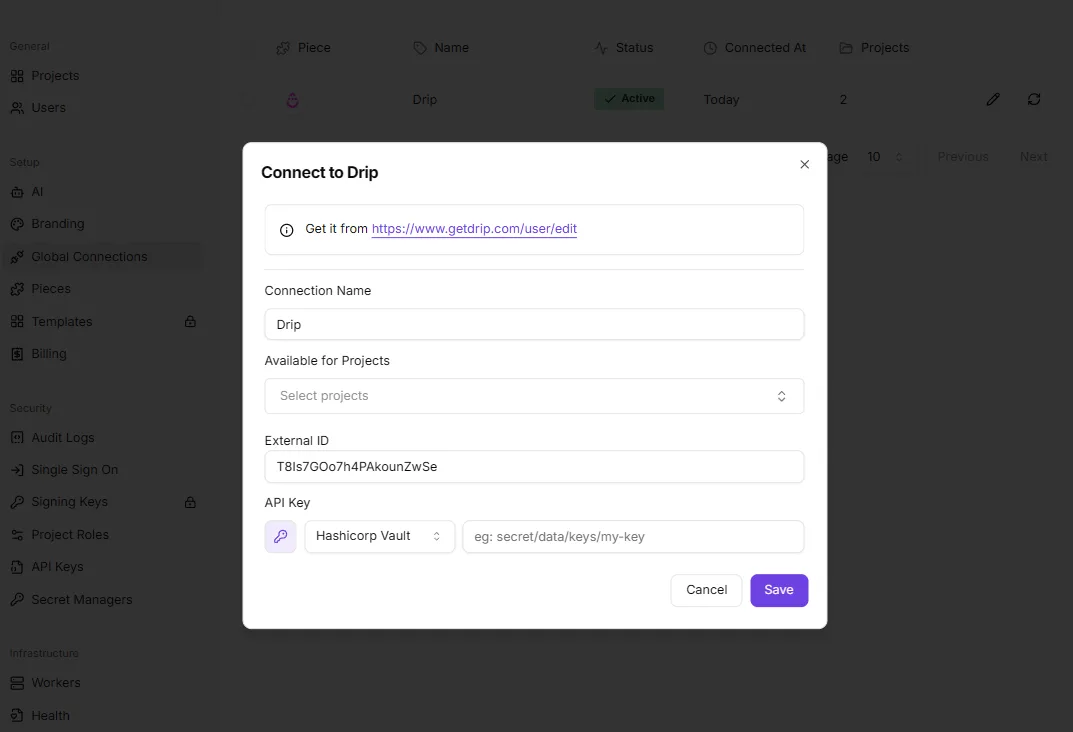
In the dialog below, you name the connection, choose which projects may use it, and paste in an API key for the service, here Drip, an email marketing platform whose key comes from its account settings page.
Before you pay for the extra tool, know that it means doing that setup, and it's only worth it when you need event-driven runs.
A job that starts on a new form entry or a new row is where Activepieces can sit around Manus, calling it and routing the result onward.
Manus credits are consumed by task complexity and duration, so a ten-step flow can cost more than the two-step shortcut it replaced.
Zapier's per-task billing and Make's per-module billing work the other way, charging more as the flow gets finer.
For a plain weekly report, skip it and keep everything inside Manus, where you only have one set of limits to watch.
Manus pricing and plans
You will hit credits before anything else. Free gives you 1,500 a month, and paid plans run from $20 to $200 a month, with the allowance rising in step with the price.

At 1,500 credits a month, the free plan is enough to find out whether a prompt works but thin for anything you plan to repeat.
I verified the 300-credit daily free refresh, but I couldn't verify every other limit or which features are gated, so the table marks those "not stated" rather than guessing.
Paid plans compared on price, credits and limits
According to Rankdude, Standard is $20 a month ($17 on annual billing), Customizable is $40 ($34 annually) and Extended is $200 ($167 annually). Annual billing saves 17%, so only commit yearly after your own test runs.
For credits, the Manus Help Center lists 4,000 for Standard, 8,000 for Customizable and 40,000 for Extended.
The takeaway from the table is that the limits that matter for repeated runs are mostly unpublished.
| Plan | Price | Monthly credits | Daily credits | Concurrent tasks | Scheduled tasks | Gated features |
|---|---|---|---|---|---|---|
| Free | $0 | 1,500 | not stated | not stated | not stated | not stated |
| Standard | $20/mo | 4,000 | not stated | not stated | not stated | not stated |
| Customizable | $40/mo | 8,000 | not stated | not stated | not stated | not stated |

40,000 credits for $200 on Extended works out to the same 200 credits per dollar as the other paid plans at monthly pricing. Moving up buys headroom, not a discount, so don't upgrade expecting cheaper runs.
Manus credit costs and running out of credits
Manus publishes example per-task credit costs, but your own tasks will differ, so measure your own. Run the task you want to automate three times, note the balance before and after each, and multiply by how often it will run in a month.
If that number sits above your plan's allowance, the schedule will stall before the month ends.

There is also a daily refresh of credits, and Manus's help article covers what to do when it doesn't arrive. Check that page before assuming you've been cut off.
If you run out mid-month, the choice is between upgrading and trimming the prompt. Cutting a task's scope costs nothing, so try that first.
Worth checking against a plan that does not meter every step: one credit covers a whole run on Activepieces.
Common Manus errors and fixes
Check your balance and what the task costs before you change anything else, because most Manus failures come down to credits, not bugs.
The table matches symptom to cause and fix.
| Symptom | Documented cause | Documented fix | Source |
|---|---|---|---|
| Daily credits not refreshed | Free credits and your paid balance are tracked separately | Read the refresh rules before assuming a fault | Manus credits |
| Credits run out mid-task | The task costs more than your remaining balance | Shrink the task or top up first | Manus credits |
| Scheduled task not running | Each run needs credits to start | Keep a balance that covers every run | Manus credits |
When a run dies halfway, the balance has usually run out. Split the job into smaller prompts, and finish the first before starting the second.
Why Manus credits drain faster than expected
Task size is the whole story. The NBA chart cost 200 credits, so one run is cheap and ten are not.
At 360 credits, the wedding webpage cost nearly twice the chart. The sky-events app cost 900 credits, which is more than four NBA charts in a single run.

If a prompt asks for an app when a chart would do, you pay for it every time.
Put a task on a schedule and the cost repeats. If each run costs the same, the NBA chart on a daily schedule is 6,000 credits a month. Check that your balance can cover that before you trust it to fire unattended.

I have no documented fix to give you for connector or login problems, so I won't invent one. Reconnect the account, rerun the smallest version of the task, and check your balance afterward, because a failed attempt can still cost you something.
Your Monday plan:
- Pick one task you'd actually schedule and type it in plain English, the way you'd tell a colleague.
- Run it three times.
- Write down the credit cost of each run. If the numbers differ, use the highest.
- Multiply that by the runs you want per month and compare it to your balance.
- Only then schedule it.
What Activepieces does about this
The problem in this article is repeated runs against a credit balance. Activepieces doesn't change what Manus charges per run, and I wouldn't claim it does.
What it does is put a layer you control around the call, so the schedule and the spend stop being the same decision.
You can trigger a flow from a schedule, a webhook, a new form entry or a new row, and have it call Manus only when there's something to process. Only needs to run when a pricing page has changed doesn't have to run every Monday.
A cheap check step can decide first, and the credit-heavy agent task fires only when it's worth it. That is the nearest thing to a cap on repeated runs that Manus's own unpublished scheduled-task limits leave you.
The flow's run history also gives you a second record next to your Manus balance. You can see how often the job fired and which runs failed at the delivery step, which matters when a failed run still used credits.
Activepieces is open source under the MIT licence for its community edition, so you can self-host it and read how a flow behaves before you rely on it. The integrations that connect to apps are open too.
If you only need a weekly report, skip all this and stay inside Manus. If the job has to start on an event, that's where to try it at activepieces.com.
Frequently asked questions
Confirm every answer below on Manus's own pricing and help pages before you build on it, because credit rules change and I'd rather you read the live page than trust my memory.
Is Manus automation free to use?
Partly. There's a free tier with a limited credit allowance, enough to try a small task, but credits are what every run spends, and a repeated automation spends them every time.

Run your real task once on the free tier, see what it cost, and multiply by how often you want it to run.
If that math doesn't fit the allowance, you're looking at a paid plan, so check the current plan details on the pricing page.
Can Manus run tasks while I'm offline?
Yes for scheduled tasks, because they run in Manus's cloud rather than in your browser tab. You can close your laptop and the run still happens.
Even offline, a run still draws on your credits. If you're out of them or an account connection has expired, it can fail while you're not watching. That's why the reconnect-and-check routine matters most for scheduled work.
Does Manus have an API?
There is API access, but it's a separate route from the chat box, and what's included can differ by plan.
Read the developer documentation first if you want to trigger tasks from your own code or another app. Confirm that your plan includes access and how API runs are billed. Don't assume they cost the same as a task typed into the chat.
How does Manus compare with Zapier or n8n?
Think of Zapier and n8n as workflow builders. You define the steps and connections once, and the same steps run the same way each time, so the cost per run is predictable.
Describe the job in plain English and Manus runs with it, which is faster to set up, but the agent decides how to do the job, so credit use can vary from run to run.
If your task is fixed and high-frequency, a builder is usually the steadier bet. If it's one-off or fuzzy, Manus gets you started sooner.
Can I cancel or downgrade a Manus plan at any time?
You would normally handle plan changes in your account's billing settings, but I haven't confirmed the exact terms.
What I'd check before paying is whether a cancellation takes effect immediately or at the end of the billing period, and what happens to credits you haven't used. Those two answers decide whether a mistake costs you nothing or a full cycle.
Related reading
References
Running the numbers
See what the same workload costs here.
Free forever plan, and every paid plan self-hosts at no extra cost.
See pricing Talk to sales