
Metabase Pricing 2026 When You Need SSO or Embedding

Oct 25, 202614 min read
According to Metabase, Metabase costs nothing self-hosted, $100 a month on Starter, $575 a month on Pro, and a custom quote on Enterprise.
That makes the minimum for a hosted instance $100 monthly, which is worth knowing whether you're wiring dashboards into a workflow built with Activepieces or simply budgeting for analytics.
Metabase is an open-source BI tool that connects to your SQL database and lets non-analysts build dashboards and ask questions without writing queries. Its cloud base prices rose in late 2025, so older figures you find are now too low.

Read the limits column first, because it shows where each plan stops being enough. The table puts all four plans side by side.
| Plan | Price | Users included | Extra-user price | Hosting | Inclusions | Limits |
|---|---|---|---|---|---|---|
| Open Source | $0 | Unlimited | None | Self-hosted | Dashboards, questions, SQL editor | No SSO, no row-level permissions |
| Starter | $100/month | 5 | $6/month | Metabase Cloud | Managed upgrades and backups | No SSO, no row-level permissions |
| Pro | $575/month | 10 | $12/month | Cloud or self-hosted | SSO, advanced permissions, white-label embedding | Per-user fees grow with headcount |
| Enterprise | Custom quote | Custom | Custom | Cloud or self-hosted | Pro features plus negotiated support and terms | No published price |
Metabase plans as checked on 2026-10-25 against metabase.com/pricing and the docs.
There is no seat cap on the free edition, so headcount never raises the bill.
What it costs you is a server and someone to run it, and the same trade applies to Activepieces, whose MIT-licensed core lets you generate a missing connector with AI and add it privately to your own instance instead of waiting on a vendor release, in a catalogue of 744 integrations where roughly 60% were built by the community.
The missing integrations are SSO and row-level permissions, so the moment you must show a client only their own rows, free stops being an option.
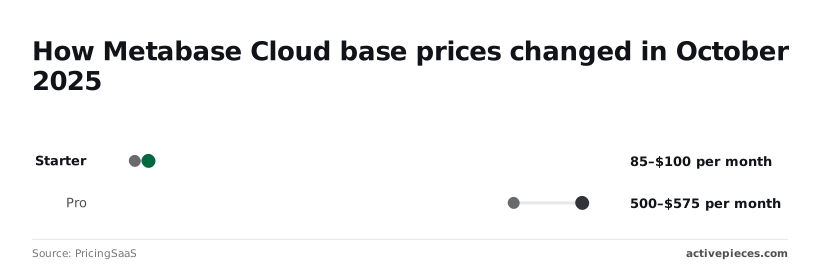
According to PricingSaaS, Starter went from $85 to $100 a month and Pro from $500 to $575. That's roughly 18% more on Starter and 15% more on Pro, before any extra users.
A 25-person team on Starter pays about $220 a month, and on Pro about $755.
You can't budget from the Enterprise page, because it has no published price. Plan on a sales conversation before you know the number.
What Metabase costs a 5-person and 25-person team
Five people pay $100 a month on Starter or $575 on Pro, and 25 people pay $220 or $755, according to Metabase's pricing page. So the tier you choose moves your bill far more than headcount does.
viz type=distribution title="Monthly Metabase Cloud bill by plan and team size" unit="$ per month · by users" source="Metabase - https://www.metabase.com/pricing" target="575" benchmark="Pro base price, $575"00 to $220 on Starter, so the plan matters far more than the headcount." Starter, 5: 100 Starter, 25: 220 Pro, 5: 575 Pro, 25: 755
Starter stays cheap at both sizes, while Pro starts $475 higher at five users. The chart sets those four bills beside the cost of a self-hosted server.
Starter at $100 a month is $1,200 a year, which is the figure self-hosting has to beat. Open source carries no license fee, so you're comparing a server plus your own hours against $1,200.
Pro at five users is $6,900 a year, 5.75 times Starter.
Pro at 25 users is $755 a month, or $9,060 a year. Going from five to 25 adds $180 on Pro, about $9 per extra user, against $120 on Starter, about $6.

Starter at 25 is $220 a month, $2,640 a year. Adding people is the cheap part; changing tier is the expensive part.
Hidden costs: hosting, upgrades and the engineer who owns them
Self-hosting is free only if your time is. Someone provisions the server, backs up the application database, applies upgrades and answers when a dashboard breaks.
The number that would disprove this article is simple: if hosting plus that person's hours cost you more than $575 a month at five users, Pro is the cheaper option. In that case you should buy it.
When SSO, embedding, row-level security or support is on your list, that is what pushes a team from the $100 line to the $575 line. Budget for Pro from day one rather than starting on Starter and migrating.
If you are running this arithmetic for your own team, see what the same workload costs on Activepieces.
Compare Metabase against leading BI competitors
While you stay on Starter, Metabase wins on cost against most of these rivals, but not Preset, whose free tier covers up to 5 users. Starter runs $100 to $220 a month for 5 to 25 users, and Metabase loses its edge the moment governance pushes you to Pro.
The table shows where each tool puts its free tier and its paywall, so you can see which line you'll cross.
| Tool | Entry price | Price at 25 users | Free or self-hosted | Governance behind paywall |
|---|---|---|---|---|
| Metabase | $100/month (Starter, 5 users) | $220/month (Starter) | Open-source self-hosted | Permissions, SSO, embedding on higher plans |
| Superset on Preset | $0 (Starter, 5 users) | $500/month | Superset is open source | Managed hosting is what you pay for |
| Looker Studio | Free | Free tier | Free hosted | Paid tier adds team management |
| Power BI | Per-seat licence | Scales with every seat | Free desktop authoring | Sharing and governance need paid seats |
| Tableau | Per-seat licence | Scales with every seat | No self-run option | Role-based licensing |

Free or self-run: Superset and Looker Studio
If you host it, Superset costs nothing in licence fees, so the bill becomes your own time patching it. Preset's managed Professional plan runs $0 to $500 a month across the same 5 and 25 user range.
That means a five-person team pays nothing but 25 users pays more than double Metabase Starter.
Looker Studio is free hosted, which suits dashboards for clients who never log in.
Cost climbs with every viewer you add on Power BI and Tableau, since both charge per person. That makes them awkward for the broad, read-only audience Metabase handles on a flat plan.
Where Metabase wins and loses on total cost
At 25 users, Metabase Pro costs $575 to $755 a month, so adding SSO and fine-grained permissions roughly triples the Starter bill. Preset undercuts that at $500, but you take on Superset's heavier setup, so the cheaper option is the more difficult one.
If you need governance, price Pro, not Starter, as your real baseline.
The strongest case for Metabase's price jump
On the fair-price argument, the jump isn't a trap. You're paying for features that cost money at every BI vendor, and Metabase still comes out well below the big names.
Why Metabase Pro pricing is worth paying
Believers make three points, and each one has weight.
First, Pro is far cheaper than Tableau or Looker (Google's BI platform, sold on custom quotes). Those tools charge per seat and bundle in enterprise sales overhead.
Second, open source suffices for teams with simple access needs. If your people sit inside one trust boundary, everyone sees the same dashboards, and you share links internally, the free edition does the job.
Third, SSO and row-level permissions cost money everywhere. Nobody gives away single sign-on and per-person data restrictions on a free tier.
I accept all three. The answers don't dispute the comparison; they show where it stops applying.
Why the jump still catches teams out
Only if you were going to buy Tableau or Looker does the comparison to them help. The real comparison for many buyers is Metabase against its own free edition, and that's the gap that hurts.
The cheapest serious tool becomes a paid contract the moment a requirement lands on your list.
"Open source suffices" is true for a team with simple access needs on day one. It's false for the team that must show each customer, or each regional manager, only their own rows.
Those teams don't get to grow into the paid plan at their own pace. They need it before launch, so the low entry price never applies to them.
Everywhere-costs-money is also true, but it doesn't help your budget. A fair price is still a price you have to fund. If you pay at the start for permissions you can't ship without, you have bought a different product than the one you priced.
So the deciding question is simple: must you restrict rows by person? If yes, budget for the paid tier now. If no, the objection holds and the free edition is your answer.
If you pay at the start for permissions you can't ship without, you have bought a different product than the one you priced.
Worth checking against a plan that does not meter every step: one credit covers a whole run on Activepieces.
Send Metabase results to other apps with Activepieces
To make a Metabase result trigger action in apps Metabase doesn't reach itself, you use Activepieces, an MIT-licensed workflow automation tool with 744 integrations. It's worth adding only when a Slack message or an email isn't the end of the job.
It isn't a BI replacement, and it doesn't change what you pay Metabase.
When Metabase alerts and subscriptions are enough
If the people who need the answer live in email or Slack, Metabase's own alerts and dashboard subscriptions already do it. You save a question, set the condition, pick the channel, and you're done.
Nothing new to host, nothing new to patch, no second system to explain to the next person who inherits your setup.
That matters more than it sounds. Every extra tool is a thing that breaks on a Friday, and you're the one who knows how it works.
For a founder-run team, "a Slack ping when signups drop" needs no workflow engine. If that describes your need, stop reading this section and keep the stack small.
When Metabase needs a workflow automation tool
When a result has to cause something in another system, the gap opens. A row of overdue accounts should create tasks in your CRM, or a weekly figure should land in the spreadsheet your finance person actually opens.
Alerts can't do that. A workflow tool can.
The pattern in Activepieces has three parts. A schedule or webhook trigger starts a flow, and a step calls the Metabase API to run a saved question and fetch its results.
Connectors from that catalogue of 744 then pass those results on to Slack, a CRM or a spreadsheet.
Read the illustration below from left to right: one Metabase question feeds a single flow, which fans out to three destinations.
Take from it that Metabase stays the place where the query lives, and Activepieces only carries the answer onward, at 1 credit for the run however many steps the fan-out takes.
That split is the maintainability argument. Your logic stays in one saved question that analysts can edit, and the flow holds only delivery. When a definition changes, you change it once in Metabase and every destination follows.
Be clear about the limits. Activepieces adds a system to run or subscribe to, and it does nothing about the permissions, SSO or embedding line this article is about.
Your Metabase bill is the same with or without it, and the Activepieces free plan is $0 with 1,000 credits a month and unlimited flows.
What to check before choosing Metabase
Start with who needs to see which data, because that answer, not your headcount, decides which side of the price line you're on. Before any pricing page can anchor you, the sequence below puts the free checks first, so you know your needs.
- List every group that looks at dashboards and which tables each may see.
- Count the people in each group, separating those who build questions from those who only view.
- Check whether you need SSO, embedding or row-level security. Any one of them can move you to a higher tier.
- Price open source against Starter and Pro, including the hours someone spends hosting, patching and backing up.
- Trial Cloud with real data and your real permission rules.
- Re-verify the pricing page on the day you buy.
Each plan answers those steps differently, so here's how each one holds up.
On open source, the software costs nothing, but you pay with a person's time for servers, upgrades and backups. If step three came back empty and one engineer can own the install, this is the cheapest serious route.
If nobody wants that job, the saving is imaginary.
If you'd rather swap your hosting hours for a subscription, Cloud on Starter or Pro does that. Compare the plan price with what those hours cost you, then check whether your step-three needs appear in the plan's feature list.
If your permissions are simple, Starter may cover you. If they aren't, the trial will show it quickly.
Where a price isn't published, as with Enterprise, you negotiate, and the quote reflects your size and needs. Come with your user counts and requirements from steps one to three, and ask what is included before you ask what it costs.
Because plan limits and fees change, this checklist quotes no prices, and a stale figure would mislead you more than none. Treat the vendor's pricing page as the source on purchase day, and read it against your own list.
Frequently asked questions
Confirm each answer against the pricing page on the day you buy, since these are the questions it leaves half-answered.
Is Metabase really free? Yes, the open-source edition costs nothing in licence fees, but you pay to host and maintain it.
You run the server, the backups and the upgrades, which is real engineering time. Paid plans add the permissions, single sign-on and embedding features that the free edition lacks.
Can I move from open source to Pro without losing dashboards? Generally yes, because your questions and dashboards live in Metabase's application database, not in the license. Upgrading a self-hosted install usually means applying a license key to the same instance.
Moving to Metabase's hosted Cloud is a migration, so take a backup first and ask support to walk you through it.
Does Metabase charge for viewers or only for builders? Paid plans charge per user account, and a person who only views dashboards still holds an account. Check how the docs define a user before you count seats.
The practical consequence is that rolling dashboards out to a whole company costs far more than a small analyst team does, so size the bill by everyone who will log in.

Is there a Metabase free trial?
Yes, Metabase has offered trials of its paid tiers, but terms change, so read the current offer rather than trusting a blog post. The open-source edition is also a free way to test everything except the gated features.
Use any trial to try permissions, single sign-on and embedding against real data, since that's what you'd be paying for.
Does Metabase offer discounts for nonprofits or startups? Metabase has run discount programs for some groups, but I can't confirm current terms, so ask sales directly.
Come with your user count and the features you need. A quote built on your actual requirements beats a generic discount request, and you'll learn early which side of the pricing line you're on.
Related reading
References
Running the numbers
See what the same workload costs here.
Free forever plan, and every paid plan self-hosts at no extra cost.
See pricing Talk to sales