
Microsoft 365 Copilot Pricing: Plans and Costs (2026)

Oct 31, 202614 min read
Microsoft 365 Copilot is an AI assistant that Microsoft licenses per user, on top of a qualifying Microsoft 365 plan, which means organizations must commit to both a Microsoft 365 plan and a Copilot subscription, a stacking of costs that teams weighing Activepieces or other automation options often notice quickly.
The price on the web page is only the add-on and never the whole bill.
Microsoft 365 Copilot pricing is the per-user, per-month licence fee Microsoft charges for the Copilot add-on, which is payable only on top of a qualifying Microsoft 365 plan and separate from any usage-based charges for agents.
Everything here was checked on 31 October 2026 against Microsoft's own pages.
Microsoft 365 Copilot pricing: the direct answer
What Microsoft 365 Copilot is
You will find Copilot inside the apps your staff already use, such as Word, Excel, Outlook and Teams. It drafts, summarizes and answers questions using the documents, email and meetings that person can already open.

That attachment to a person is where the cost starts. If you simply approve a company-wide rollout, you pay for every seat, including the ones that open the assistant twice and forget it.
Outside the per-seat price, two other charges apply. Heavy use can run into limits on how much a person can do.
If you simply approve a company-wide rollout, you pay for every seat, including the ones that open the assistant twice and forget it.
And when your team builds custom assistants (often called agents) that take actions on their own, some of that work is billed by how much it's used, not by seat.
Where Microsoft 365 Copilot prices come from
I read the figures from Microsoft's published pricing and licensing pages on the date above, not from resellers, comparison sites or forum posts. Microsoft changes its plans, bundles and regional prices without much notice, so treat anything here as accurate for that day only.

If you are running this arithmetic for your own team, see what the same workload costs on Activepieces.
Review Copilot plans, pricing, and limits
The Copilot prices in this table are US list prices per user per month, taken from Microsoft's Copilot pricing page on 31 October 2026. Other countries, currencies and agreements differ, so treat them as a benchmark and not a quote.
| Plan or offer | Annual vs monthly price | Base licence | Included | Limits |
|---|---|---|---|---|
| Copilot (enterprise) | $30 per user a month on an annual term; $31.50 billed monthly | Eligible Microsoft 365 or Office 365 enterprise plan | Copilot inside Word, Excel, Outlook, Teams | Usage caps apply. Exact thresholds not published here |
| Copilot Business | $21 per user a month on an annual term; $25.20 billed monthly | Eligible Microsoft 365 business plan | Same apps, for small companies | Usage caps apply |
| Copilot Business promo | Temporary discount. Terms vary by market | Eligible Microsoft 365 business plan | Same apps, for small companies | Ends when the promo does |
| Copilot Chat | No extra charge | Microsoft 365 work account | Web-grounded chat | Agents inside it are metered |
| Pay-as-you-go agents | Billed on use, no seat fee | Azure subscription | Agent actions as they happen | No ceiling unless you set one |
| Capacity pack | Prepaid; $200.00 per pack a month for 25,000 Copilot Credits | Tenant admin setup | A bundle of agent usage | Runs out, then metering resumes |
Prices and plan limits checked against docs.claude.com and claude.com and openai.com and gemini.google on October 30, 2026.
Copilot Business is the smaller-company version, and the promotional price is a door that closes. If you buy at the promo rate, find out what the price becomes afterward before you roll it out to everyone.

If your people aren't already on an eligible enterprise plan, you're buying two licences, not one.
For many staff, Chat costs nothing extra and is all they need. Test it first, because every seat you skip is a seat you never pay for.
What Copilot costs at realistic team sizes
Whatever you pick from those lines, you pay for a base Microsoft 365 licence first. It ranges from $7 to $60 per user a month across all Microsoft 365 licences, billed per seat.
According to IT Broker, Business Basic is $7, Business Standard $14, Business Premium $22, E3 $39 and E5 $60.
The chart shows annual cost at 10, 50 and 250 seats, base licence against Copilot add-on, by which organizations can estimate their expected annual spending. A second bar at each size shows a 30% rollout, meaning the majority of employees initially lack access to Copilot.
The add-on is the part you can shrink by buying only for proven users.
Copilot cost for a ten-person team
Ten seats on Business Standard at $14 cost $1,680 a year before Copilot. On Business Basic at $7, the same ten seats cost $840, so the cheapest tier is half the price of the next one up.

Copilot Business at $21 on an annual term adds $2,520 for all ten seats, which lifts the total to $4,200. The add-on costs more than the base licence it sits on.
Copilot cost for 50 users, partial rollout
Fifty seats on Business Premium at $22 come to $13,200 a year in base licences, so this is your minimum annual spend before deciding on Copilot.
A 30% rollout means 15 people carry the add-on while all 50 keep the base licence. The other 35 cost you nothing extra, and that's the saving.
Those 15 Copilot Business seats at $21 add $3,780 a year, for a total of $16,980. Giving all 50 people the add-on would cost $12,600 instead.
At 250 seats, E3 at $39 is $117,000 a year. E5 at $60 is $180,000. The $63,000 gap between them is bigger than most teams' whole pilot budget, so check which tier you are really on.
A 30% rollout is 75 users, and the other 175 stay on the base licence at no extra cost.
On an enterprise plan those 75 seats take Copilot at $30, which is $27,000 a year and brings the E3 total to $144,000. Buying for all 250 would add $90,000, so the rollout decision moves the bill far more than the list price does.
Hidden costs and limits that surprise Copilot buyers
Even a 75-seat pilot carries two charges outside the Copilot seat price. They are the base licence underneath it, metered agent messages, monthly query caps, and the staff time to get your data ready.
Microsoft 365 base licence and Copilot terms
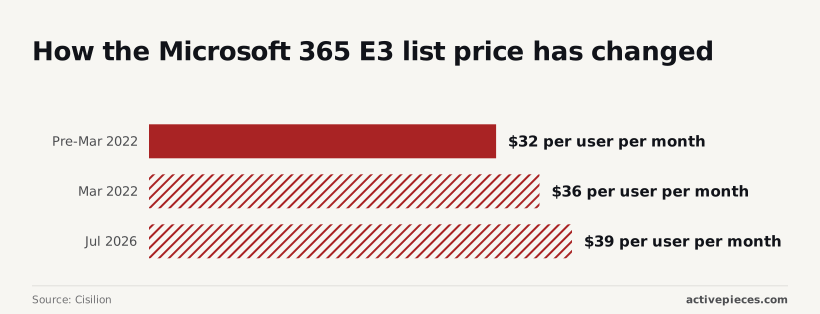
Since early 2022, Microsoft 365 E3 has risen 22% per user. It cost $32 per user per month before March 2022, $36 after it, and $39 from July 2026.
That's a $7 rise on every seat you own, Copilot or not. The annual term means a seat you bought for a user who never opens it is still paid for.
Building custom assistants in Copilot Studio bills $0.01 per message. One cent sounds trivial, but an agent answering a few thousand questions a day turns it into a line item nobody budgeted for.
Metering by the message or the step also taxes careful design: break a hand-off into smaller, more reliable steps and the count climbs with every cut.
Activepieces bills the run instead, 1 credit per flow run whether it holds two steps or ten, while Zapier counts tasks and Make counts modules, as their pricing pages show.
A heavy user can hit usage caps on Researcher and Analyst, the deeper research tools, though the exact thresholds are not published, so check how often your pilot group would actually run into the cap.
When folders are messy and sharing settings loose, Copilot surfaces the wrong documents, because it reads what your people can already open. So someone has to tidy permissions and train staff first. That's wages, not a line on Microsoft's invoice.
Worth checking against a plan that does not meter every step: one credit covers a whole run on Activepieces.
How Copilot compares with ChatGPT, Gemini, Claude
The seat prices sit close together, so the gap that matters is what each plan needs you to already own and what it stops you doing once you have it.
Comparison table
| Plan | Price per user per month | Base licence | Document and email integration | Limits |
|---|---|---|---|---|
| Microsoft 365 Copilot | $21 annual, $25.20 monthly (Copilot Business) | A Microsoft 365 plan | Word, Excel, Outlook, Teams | Usage caps; agent actions metered |
| ChatGPT Business | $20 annual, $25 monthly | None | Through connectors | Usage limits by plan |
| Gemini in Workspace | Priced with the Workspace plan | Google Workspace | Gmail, Docs, Drive | Usage limits by plan |
| Claude Team | $20 annual, $25 monthly (Standard); $100 annual, $125 monthly (Premium) | None | Through connectors | Premium seats carry higher usage |
Those prices come from WorkAICompare. The $21 in the Copilot row is Copilot Business, not Copilot enterprise, which lists at $30 annual and $31.50 monthly. Against the enterprise price, ChatGPT and Claude Standard are $10 a seat cheaper.
Paying monthly adds $4.20 to a Copilot Business seat and $5 to a ChatGPT or Claude Standard seat, so a flexible contract costs roughly a fifth to a quarter more. On Claude Premium the gap is $25 a seat.
If your people already live in Outlook, Word and Excel, Copilot works on the files where they already sit. That saved step is the product.
When ChatGPT or Claude costs less than Copilot
ChatGPT and Claude Standard start $1 below Copilot Business's annual price and need no Microsoft 365 plan underneath, so the cost advantage exceeds the initial $1. For a team that mostly drafts, summarises and researches, that's the cheaper route.
Gemini fits the same way for teams already on Google Workspace. Claude Premium, at $100 to $125, is a seat for a heavy user, not a default, so assign it by name.
Buy Copilot by seat, not by headcount
Copilot deserves the same treatment as Claude Premium: assign each paid seat by name. Give it to a person whose work has already shown it earns its keep, and leave everyone else off the bill.
Break-even minutes per seat
Run a short pilot with a fixed end date, then do the arithmetic. Take the verified seat price from your own Microsoft agreement, not from a brochure.
Divide it by what an hour of that person's time costs you. The result is the minutes they must save each month before the seat pays for itself.
If your pilot users can't say they saved at least that much, the seat is a cost, not a tool. Ask them to track it, because a feeling that it helps won't survive a budget review.
Which team members get Copilot seats first
Start with people who live in long documents and back-to-back meetings: the analyst summarising reports, the manager drowning in call notes, the proposal writer. Those tasks are where Copilot saves the most time, so the break-even is easiest to clear.
In the floor plan below, a minority of desks carry a seat tag, and the rest share the free Copilot Chat icon. That is the intended shape, so don't "fix" it by evening out the tags.

Everyone else can use Copilot Chat, the free assistant that answers questions and drafts text without reading your files and meetings. For occasional users, that covers most of the value at no extra cost.
Revisit the tags at each renewal: take seats from people who stopped using them, and add one only when someone's use proves the case.
What to do on Monday before buying Copilot
Do five things in order, none of which costs anything. Check what you already license, check the current price, choose a small group, cap the metered spend, and put a review on the calendar. Skipping them means finding out what Copilot costs from the invoice.
Start with the licences, since a seat of Copilot that sits on the wrong base plan is a purchase you can't use, or one you pay for twice.

- Open the Microsoft 365 admin centre, look at which plans each person holds, and note who doesn't hold one Copilot requires. Anyone missing it needs an upgrade before they can have a seat, and that upgrade belongs in the cost.
- Re-read Microsoft's current pricing page the day you decide, not last quarter's slide deck. Prices, bundles and usage limits change, and a figure you quoted internally may already be out of date.
- Choose a pilot group of people whose daily work is documents, email and meetings, and who will tell you plainly if it helps.
- Agents that bill by use can run up charges nobody approved. Set a spending limit and name one person who sees the bill weekly.
- Book a 60-day review now, with the question already written: who used it, and what did it save?
What Activepieces does about this
The bill this article describes grows in the metered part: agents billed per message, and the repetitive hand-offs that run through them. Activepieces is where we'd move that work.
It is an automation platform that charges 1 credit per flow run, whether the flow has two steps or ten, so splitting a hand-off into smaller, safer steps doesn't raise the cost.
Take a routine job such as filing a form submission, updating a record and notifying a channel. Run it as a flow and the cost per run is fixed and easy to forecast.
Reserve the Copilot agent for work that needs judgement, and the cap you set on metered spend goes further.
The core is open source under the MIT licence, so a team can self-host it and read the code before trusting it with company data. MoneyGram and Moneypenny run it in production.
None of this replaces a Copilot seat for the analyst or the proposal writer. It only keeps the cheap, repetitive work off the metered line, so your pilot budget pays for the seats that earned them.
Frequently asked questions
Can I buy Microsoft 365 Copilot without a Microsoft 365 licence? No: Copilot is an add-on, and each person who gets it needs a qualifying Microsoft 365 base licence underneath.
If you have staff on no base plan, the real cost of giving them Copilot includes upgrading that plan first. Microsoft's licensing requirements page lists which plans qualify.
Is Copilot Chat really free?
With eligible work accounts, Copilot Chat comes at no extra charge, so people can use it without a Copilot seat. It's not the same product as the paid seat, which adds Copilot inside Word, Excel and Outlook and access to your work files.
A free chat window can still produce a bill if you let it, because agents built on top of Chat can be billed by use.
Can I pay month to month for Copilot?
It depends on the billing term you choose when you buy, and the terms on offer differ by purchase route. Check this before you buy, because a longer commitment means paying for every seat whether anyone opens it or not.
For a team still proving the tool, the shorter term is worth asking for even if it costs more per seat.
Do education and nonprofit organisations get different pricing? Yes, Microsoft runs separate pricing programmes for education and for eligible nonprofits, and the Copilot price and eligibility rules can differ from the commercial list.
Don't assume the commercial price applies to you. Ask your Microsoft partner for a quote under the programme you qualify for.
Does Copilot pricing change by country? Yes. Microsoft sets prices by region and currency, and local taxes are added on top, so a price quoted in another country won't match your invoice.
Use a quote from your own region and budget from that number, not from a headline price you saw online.
Related reading
References
Running the numbers
See what the same workload costs here.
Free forever plan, and every paid plan self-hosts at no extra cost.
See pricing Talk to sales