
Mistral API Free Tier: Limits, Models & Credits (2026)

Oct 30, 202615 min read
You won't pay money for Mistral's free API tier, but you will pay in rate limits, token caps and data terms.
I couldn't confirm the exact limits on 2026-10-30, so the table marks them as unverified, much like the numbers I'd otherwise copy into a workflow built on Activepieces and then have to correct later.
Until you've read them, you can't calculate what a run costs or when it stops.
On Mistral's pricing page, the API free tier is the entry plan. It lets you call hosted models through the API for evaluation, in exchange for tighter throughput and different data terms than the paid plans.
Plans and limits of the Mistral free tier
Mistral free tier plan comparison table
Before launch, read the unverified cells as open questions to settle, not as zeros. The table below sets the three plans side by side on the five things that decide whether a plan can carry production traffic.
| Plan | Price | Models | Rate limits | Token caps | Data terms |
|---|---|---|---|---|---|
| Free | No charge | Unverified | Unverified | Unverified | Unverified |
| Paid | Unverified | Unverified | Unverified | Unverified | Unverified |
| Enterprise | Unverified | Unverified | Unverified | Unverified | Unverified |
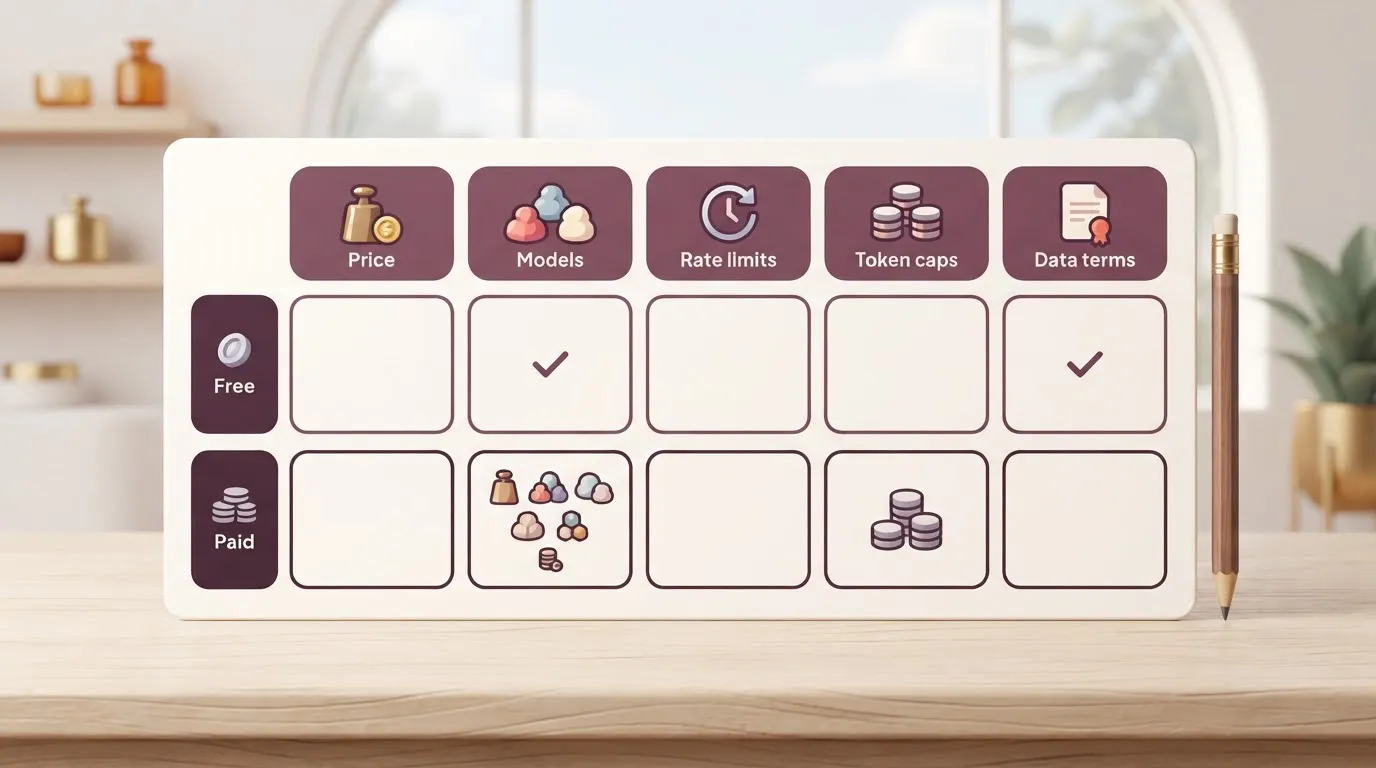
Because every cell that matters for capacity is unverified, any plan to run real workloads on Free assumes a number instead of knowing it. The next two parts cover what the free tier is for and how this table was built.
What the free tier includes and excludes
Trying Mistral's models is what the free tier exists for. That makes it a fit for prototyping a prompt, comparing outputs and testing an integration.
It's a poor fit for anything a customer waits on, because a plan with a ceiling you haven't read is a plan that fails without warning.
Cheap insurance exists, and it's a paid plan or a fallback model; both are far less expensive to set up in advance than during an outage.
Sources for the Mistral plan figures
I used Mistral's own pricing page, read on 2026-10-30, for prices; the daily-request figures come from a DEV Community comparison. Where I couldn't confirm a value there, the cell says unverified. I didn't fill the gap with another vendor's numbers.
Claude, ChatGPT and Gemini all publish their own free tiers with their own terms, and none of that carries over.
Everything below works on Activepieces' free plan. Start without code or a credit card.
The 09:12 Monday rate-limit failure in one workflow
At 09:12 on a Monday, a five-person support team's ticket-triage workflow started returning 429 "too many requests" errors. It was running on a free-tier Mistral key, and nobody knew for ninety-odd minutes.

The sequence below shows how a quiet rejection became a morning of untagged work. The point to take from it is that missing monitoring, not the limit itself, created the gap between steps one and three.
- 09:12: the first 429 responses come back from the Mistral API as the Monday inbox surge hits the workflow.
- Tickets keep arriving and land in the queue untagged, with no category and no priority.
- 10:40: a team member notices the untagged queue and raises it.
- A temporary patch goes in: the team triages by hand and swaps in a different key.
- The team replays the backlog through the workflow once calls succeed again.
Three of those steps get a closer look below: the first, the third and the quietest.
On Monday a triage workflow carries its heaviest load, and a free-tier key is meant for experiments, not for a queue that fills while the team makes coffee.
The API answered with 429s, and the workflow treated each as a failed step, not as a stop sign. Tickets still arrived. They simply carried no tag.
10:40: someone notices the untagged queue
No alarm fired. An agent saw that the queue looked wrong, and the team found the cause by reading logs backward.
That's the expensive part: every ticket that waited untagged cost a person's time later, and that cost dwarfs any fee a paid plan would have charged.
While someone swapped the key, the patch was manual triage. Once calls went through, the team replayed the queue, and the team had to check every ticket to see whether it had been handled twice.
Built for the case where the model answers, the workflow turned a rejected call into an error entry, not a notification. No one had defined what "too many failures in a row" meant.

A paid plan raises the ceiling, but it doesn't add that alert. Both need to exist before the first busy Monday.
Activepieces closes the gap between the failed call and the rules that answer it, because the Mistral call sits as an Agent step inside the same flow as the 429 check, the retry and the alert.
On that Monday, the rejection and every step that followed it would have shown up in one run trace, with no webhook handing the failure to a second product.
The limits are still Mistral's, so confirm them on the pricing page before you size that flow.
Cost of the failure versus paid usage
While the paid tokens that would have kept it moving cost tens of dollars a month, even at high volume, a stalled queue costs hours of customer waiting.
Measure the incident in three numbers:
- the hours the queue was throttled
- the tickets that sat unanswered
- the delay each customer absorbed
Multiply tickets by delay and you have the waiting your customers paid for. That's the figure to hold against the bill below.
The same workload at paid per-token prices
Per million tokens, Mistral's pricing page lists these prices:
| Model | Input | Output |
|---|---|---|
| Ministral 3 3B | $0.10 | $0.10 |
| Small 4 | $0.15 | $0.60 |
| Large 3 | $0.50 | $1.50 |
| Large 4 | $0.70 | $2.10 |
| Medium 3.5 | $1.50 | $7.50 |
According to the Docs, output on Medium 3.5 therefore costs 75 times what Ministral 3 3B charges, so model choice moves the bill more than volume does.
Over time, flagship prices have mostly fallen. Large 2 input cost $3 per million tokens in July 2024 and $2 in September 2024, according to tokenprice.fyi. That means the cost fell by a third in two months.
In December 2025, Large 3 launched at $0.50, and Large 4 is $0.70 as of October 2026, so deploying the newest model will cost more. That's a 77% drop from the first price to the latest.
Large 4 costs 40% more than Large 3, so budget for the current list price rather than the trend.
Cost at 500, 5,000 and 50,000 tickets a month
I assume 2,000 input and 500 output tokens per ticket, which is a short thread plus a drafted reply. That works out to $0.0006 per ticket on Small 4 and $0.00175 on Large 3. The chart shows both models at each volume.
At 500, 5,000 and 50,000 tickets, Small 4 comes to $0.30, $3 and $30 a month, and Large 3 to $0.88, $8.75 and $87.50, so each tier costs roughly 10 times the previous.
Even the 50,000-ticket month on Large 3 stays under $90, which means large-scale workloads remain affordable on that model. The gap between the two models at that volume is $57.50.
Beside the hours of delay you counted above, a paid plan is a rounding error, so choose the model on answer quality and keep the saving as a secondary consideration.
Easier to see it running than to read about it: set it up free, no card.
Hidden limits and terms behind the free tier
Before the first request went out, every constraint that caused the failure was already published by Mistral, in the documentation or in the account console.
Nothing was hidden; the habit of not reading a free plan's terms the way you would read a contract did the hiding.
Below are the limits a team would have found on day one, each with the date it was published or changed. They are requests per second, tokens per minute, the monthly token cap, model access by tier, phone verification, data-use terms and limit revisions.
Take from it that no single limit was the trap. The trap was that they bind at different moments, so passing one check tells you nothing about the others.
Rate limits versus monthly token caps
In the middle of a burst, a per-minute limit throttles you, and your retry logic can absorb that. A monthly token cap doesn't throttle, it stops you, and it does so at whatever point in the cycle your usage crosses it.
Usually that's late in the month, when the pipeline is busiest and the team has stopped watching it.
Phone verification belongs here too: the account is tied to one person's number, so if that person leaves, the whole workflow depends on a credential nobody else controls.
Data-use terms on the free tier
Free access is often paid for in data rights.
Read the terms for whether your prompts and outputs can be used to improve the provider's models, because that clause decides whether customer text, internal documents or source code can go through the free tier at all.
If your legal team would say no to a paid vendor with those terms, the answer is the same here. Finding out after launch is the expensive way to learn it.
Model access and limit changes over time
Free keys don't always reach every model. The strongest one you benchmarked may sit behind a paid tier, which means your quality testing and your production ceiling can describe different products.
Limits also move. A figure you planned around in one quarter can be revised in the next, and a free tier doesn't have a commitment to keep it.
So the working habit is to date every limit you rely on and recheck it on a schedule, which is what the next section sets up.
Mistral free tier versus the closest free alternatives
, which makes it a fair prototype tool and a poor production plan. The table, dated because limits drift, shows where each option gives way.
| Plan | Price | Rate limits | Models | Commercial use | Data terms | Source date |
|---|---|---|---|---|---|---|
| Mistral free | $0 | Unverified | Mistral Small 4, Medium 3.5 | Read the terms first | Inputs may train models | 2026-10-30 |
| Gemini API free | $0 | 500 requests/day | Gemini 2.5 Flash, Flash-Lite | Permitted under its terms | Content may improve products | 2026-10-30 |
| Groq free | $0 | 1000 requests/day | Hosted open-weight models | Per Groq's terms | Per Groq's terms | 2026-10-30 |
| Cohere trial | $0 | Capped trial key | Command family | Not for production | Trial terms apply | 2026-10-30 |
| OpenAI paid API | Per token | Rises with spend | GPT-6.1 Sol, GPT-6 Luna | Yes | Not used for training by default | 2026-10-30 |
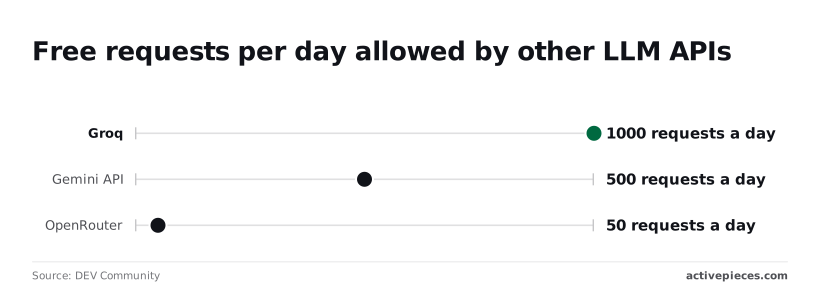
For Mistral, DEV Community gives 2000 requests a day. That's four times Gemini's 500, so Mistral suits a prototype that makes many small calls. Groq sits at 1000, enough for a demo but not for a workflow that fires on every customer message.
At 50, OpenRouter, a routing service that fronts many models, allows a smoke test and nothing more.
Divide 2000 by 24 hours and you get about 83 requests an hour. A support tool that makes three calls per ticket tops out near 660 tickets a day, and the day it passes that, it stops.
From that, the verdicts follow. For a prototype, use Mistral free, with Groq as the second key. For an internal workflow, use Mistral free only if volume stays well under the cap and you accept that inputs may train models; otherwise pay.
For anything customer-facing, use a paid plan, since only the paid column pairs commercial rights with no-training data terms.
The 2000, 1000, 500 and 50 daily-request figures all come from the same DEV Community comparison, which also notes that these limits keep changing. Treat them as a snapshot taken on one date, not a contract.
Reread the live terms page before you sign off on a use case, because the commercial and data entries come from each vendor's terms as summarized here.
Fix the failure with Activepieces retries and fallbacks
Once the terms you reread allow your use case, Activepieces, an open-source workflow automation tool, can absorb a 429 for you. It can't raise the ceiling the free tier sets. The ceiling is lifted in Mistral's console, not in the flow.

Rules for using the Mistral free tier
First, production runs on a paid key, and the free key is kept for experiments. The retry logic below is insurance on a plan that fits your volume, and it doesn't make a free tier into one.
Second, a 429 is an expected event with a defined response: wait, retry, then reroute. Third, a person finds out after a set number of failures, so a silent outage can't last a weekend.
Treat the rules as a budget for failure. Every retry is a paid call that produced nothing, and a fallback model has its own price per run.
Price both before you wire them in. A fallback that costs more than the primary will quietly erode the savings that justified the choice.
Building the retry and fallback workflow
Activepieces runs the model you choose, or your own provider key, so a primary and a fallback provider can sit in the same flow; if an API has no integration, generate one with AI and add it privately to your instance.
Steps can be set to continue on failure, and a router can branch on the result. The sequence:
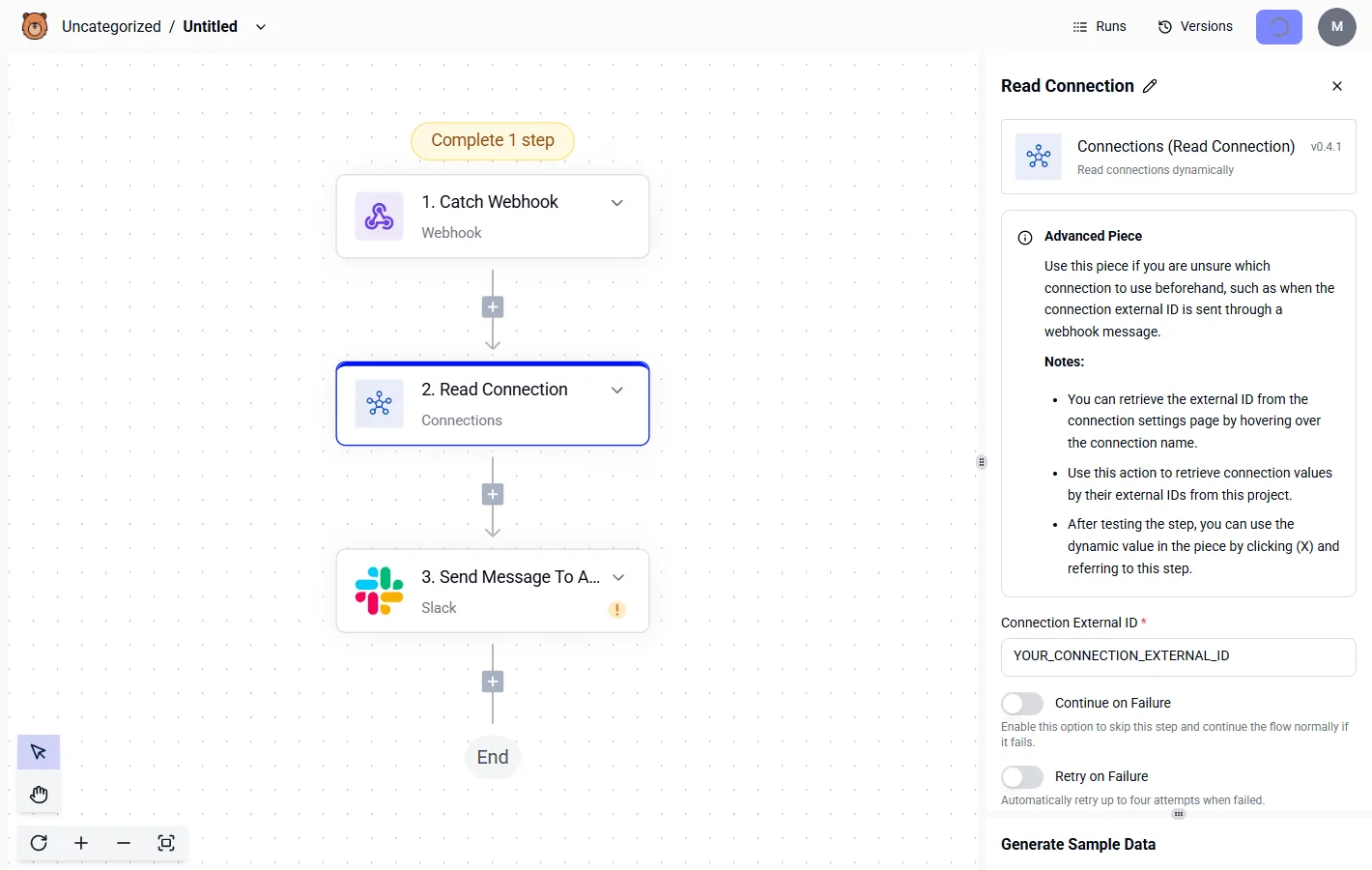
- Create a paid key in Mistral's console and store it in the Mistral connection, replacing the free one.
- Let the Mistral step fail without stopping the flow, then branch on whether the response was a 429.
- On a 429, wait, retry, and lengthen the wait each time, adding a random offset so parallel runs don't all retry at once.
- When retries run out, call the second model or provider through the HTTP step, with its own key.
- Count consecutive failures, and when the count passes your threshold, post to Slack, the team chat, with the flow name and the last error.
That order matters because each step limits the cost of the one before it. What follows is the part the flow can't do for you.
Open the run history and look for runs that reached the fallback branch. A few are healthy. A steady stream means your paid limits are too low for your traffic.
Also confirm the Slack alert reached a channel someone reads, and check that the fallback's output format matches what downstream steps expect.
Frequently asked questions
More than any others, five questions come up. Most answers below were checked against Mistral's own pages on 2026-10-30. Re-run the same checks before you sign off on a budget:
- Is the free tier cleared for commercial use?
- Does it need a card on file?
- Is your data used for training?
- Will the limits change under you?
- What's the cheapest paid model for your workload?
Below, the answers cover the ones that cause the most surprises, and each one is a line item to confirm in writing.
Is the Mistral API really free? Yes, in money: the free tier charges nothing, but you pay in rate limits and in terms of use.
Treat it as a trial allowance, not a plan. A trial allowance doesn't have a commitment behind it, so nothing in your budget should depend on it staying as generous as it is today.
Can I use the Mistral free tier for a commercial product?
Read the current terms before you do, because the free tier is positioned for experimentation and prototyping. Shipping a paying customer's workload on it means your revenue rests on a tier that was never sold as a service level.
The safe reading is to prototype there and move production traffic to a paid plan. Where the terms leave you unsure, ask Mistral in writing and keep the reply.
What happens when I hit the Mistral free tier limit?
When you hit the limit, requests start failing with rate-limit errors until the window resets, and your application sees those failures as outages.
Nothing bills you, which is exactly why the failure is silent on the finance side and loud on the user side.
Retry with backoff, alert on the error rate, and route overflow to a paid plan or a fallback provider, as set up earlier in this article.
Is Le Chat free the same as the free API? No. Le Chat is Mistral's consumer chat product, and the API is a separate developer product with its own account settings, limits, and billing.
A free Le Chat account gives you no API capacity, and API usage doesn't draw on a Le Chat subscription. Budget them as two different line items.
Do Mistral free API credits expire? Don't assume they last. The free tier works as an access allowance under usage limits, not a prepaid balance you can bank.
If you hold promotional credits or a paid balance, check the expiry terms on your billing page, since unused credit that lapses is money you paid for and didn't get to use.