Mistral OCR Pricing 2026: Cost Per 1,000 Pages

Nov 10, 202616 min read
According to Mistral AI, Mistral OCR's current list price is $4 per 1,000 pages on OCR 4 and 4.1, metered per page through the API, which is the same per-page unit that teams wiring OCR into a workflow built in Activepieces would see on their invoices.

Mistral OCR is a model that turns PDFs and images into structured text, so pages are the only unit that matters, however you call it.
Read the "not published" cells as gaps you must close on Mistral's pricing page before you budget. The table lists each access tier against what it costs and what limits it.
| Tier | Monthly price | Per-1,000-page rate | Inclusions | Deciding limit |
|---|---|---|---|---|
| Free | not published | not published | not published | not published |
| Pro | not published | not published | not published | not published |
| Team | not published | not published | not published | not published |
| API pay-as-you-go | not published | $4 (OCR 4 / 4.1) | OCR 4.1 with bounding boxes and confidence scores | Pages processed |
| Batch API | 50% discount | not published | not published | not published |
Checked 10 November 2026 against Mistral's pricing documentation.
Only a few rows carry a confirmed rate: API pay-as-you-go and the Batch API discount are the tiers you can cost today.
Which OCR model version the price applies to
Ask which model version before you ask the price, because the rate depends on it, not on "Mistral OCR" as a product.
According to Mistral's pricing page, OCR (March 2025) and OCR 2 (May 2025) were each $1 per 1,000 pages, so large-scale document processing remained economically viable.
OCR 3 (December 2025) rose to $2, and OCR 4 / 4.1 is $4, meaning per-page costs have quadrupled from the original rate.
If you find a "$1 per 1,000" figure in a blog post, it is stale: newer means four times the March 2025 rate.
At 50,000 pages a month, that's $200 on OCR 4.1 against $50 on the original model. Pinning an older version may save money, but OCR 4.1 is the one that returns bounding boxes and confidence scores.
Because billing is per page, cost tracks volume exactly, with no seat fee.
Mistral's pricing documentation publishes no monthly figure for Free, Pro or Team, so I won't guess at what a subscription saves. Price a subscription only once you have its page allowance in writing.
Mistral OCR Monthly Cost at Realistic Volumes
At 10,000 pages a month, Mistral OCR 4.1 costs $40 at the standard rate or $20 in batch, rising to $50 or $25 with structured extraction.
These figures come from Mistral's OCR 4.1 page, and the metered unit is the page, so no seat or allowance is involved.
For a small team processing invoices and contracts in real time, $40 is the floor: standard plain is $4 per 1,000 pages, so 10 × $4 = $40.
Mistral likely bills a re-run of the same batch of pages again, so a second pass would double it to $80.
Wait for the results and the price halves. Batch plain is $2 per 1,000 pages, so 10 × $2 = $20. If invoices can wait for an overnight run, standard mode is a $20 monthly premium you don't need to pay.

Mistral OCR Annotation Cost Versus Standard Mode
Turn on annotation and the bill climbs $10 over plain standard: annotated mode is $5 per 1,000 pages, so 10 × $5 = $50. Batch annotated is $2.50 per 1,000 pages, so 10 × $2.50 = $25.
**If invoices can wait for an overnight run, standard mode is a $20 monthly premium you don't need to pay.
Mistral lists Document AI at the same $5 per 1,000 pages, so at this rate choosing it over annotated mode doesn't change the bill.
Run those four rates across three volumes and the pattern holds at every size: batch halves the plain bill, and annotation adds a fixed 25% to each rate.
| Pages per month | Standard plain ($4/1,000) | Batch plain ($2/1,000) | Standard annotated ($5/1,000) | Batch annotated ($2.50/1,000) |
|---|---|---|---|---|
| 1,000 | $4 | $2 | $5 | $2.50 |
| 10,000 | $40 | $20 | $50 | $25 |
| 100,000 | $400 | $200 | $500 | $250 |
At 100,000 pages, the gap between standard annotated and batch plain is $300 a month, so the choice of mode matters more than the volume.

If you are running this arithmetic for your own team, see what the same workload costs on Activepieces.
Uncovering hidden Mistral OCR costs and limits
Because mode moves the bill more than volume, the extras layered on top of a mode matter as much as the page rate. Five of them can change what you pay, and Mistral documents only some:
- Annotation surcharge: Mistral's pricing page lists it as a separate line.
- Requests-per-minute rate limit: in Mistral's docs.
- File-size and page-count caps per document: in Mistral's docs.
- Re-processing after failures: not listed as a cost; it depends on your pipeline.
- Downstream LLM tokens: not part of Mistral OCR pricing at all.
You can look up the first three. The last two you have to estimate yourself, so they are where budgets go wrong.
Switch annotation on and you pay a different rate from a workload that doesn't, because Mistral meters it separately from plain page extraction. Read the annotation line against your own page count before you assume the headline rate applies to every page.
When a long scan runs past the page cap or a burst of uploads hits the ceiling, you pay in engineering, not dollars.
The docs publish a requests-per-minute ceiling, a maximum file size and a maximum page count per document, and none of these adds a charge directly.
You must split a long scan and queue a burst of uploads. Exact limits can differ by account tier, so check the figures for yours rather than copying someone else's.
Mistral OCR Retries and Downstream Token Costs
In the pages I reviewed, Mistral doesn't say whether it bills a failed request, so treat that as unconfirmed and test it.
Any page you submit twice, whether after a timeout or a split that overlaps, Mistral likely meters twice. Count your retry rate and multiply it into the page volume.
Once OCR hands you text, it becomes tokens as soon as you pass it to a model for extraction or summarising. That bill comes from whichever model you choose, so price it from that vendor's page.
For a long document, it can exceed the OCR charge.
Mistral OCR Against Google, Azure and AWS Alternatives
Since all four vendors meter OCR per page, the comparison turns on what each one charges when a page contains tables or forms, not on the plain-text rate alone.
Send two 5-page PDFs or one 10-page PDF and the cost is the same, because the unit is always the page, not the character or the file, and plain text is the cheapest unit on every pricing page.
That makes the plain-text rate a fair opening comparison and a poor final one, because it assumes your pages hold nothing but paragraphs.
Table and Form Extraction Pricing Across OCR Vendors
Here the vendors diverge. Amazon Textract prices plain text detection and table or form analysis as separate features, so a form-heavy workload pays the higher feature rate on every page.
Azure AI Document Intelligence separates its read model from layout and prebuilt models. Google Document AI prices by processor type.
With Mistral's current OCR model, OCR 4.1, you get bounding boxes and confidence scores, which lets you route only low-confidence pages to review instead of re-running everything.
OCR Free Tiers and Batch Discounts Compared
For a prototype, the free allowances at Azure and Textract help; in production they do nothing, because both limit them to new accounts or small page counts.
At volume, batch discounts matter more: Mistral has a batch API, while the other three pages show no separate batch discount that we found. If you re-process pages, that gap compounds.
Take the price columns from each vendor's own page on the day you budget. The table below sets the four side by side on the qualitative differences and carries no dollar figures.
| Vendor | Plain-text price | Tables/forms price | Free tier | Batch discount | Output format |
|---|---|---|---|---|---|
| Mistral | Per page | Per page, with structure in the OCR output | Limited, check plan | Batch API | Markdown with bounding boxes and confidence scores |
| Google Document AI | Per page, by processor | Higher-tier processors | Trial credit | None found | JSON layout |
| Azure Document Intelligence | Per page, read model | Layout and prebuilt models | Small free tier | None found | JSON, optional markdown |
| Amazon Textract | Per page, text detection | Separate per-feature rate | New-account allowance | None found | JSON blocks |
Worth checking against a plan that does not meter every step: one credit covers a whole run on Activepieces.
Ways to Lower a Mistral OCR Bill
Five fixes cut a Mistral OCR bill, and each one hits a different cost line: pages sent, pages billed or the rate on each page.
- Hash-deduplicate files, so Mistral bills a document uploaded twice once.
- Skip pages with embedded text, so pages that never needed OCR go unmetered.
- Cap pages per document, so one oversized file can't inflate a month's bill.
- Batch non-urgent work at 50% off, which halves the per-page rate.
- Test a sample first, so a wrong setting costs a few dozen pages, not the whole archive.
Use batch for anything that can wait
At 10,000 pages, the standard bill is $40 a month on Mistral's pricing page. That works out to $0.004 a page, so every page you move to batch saves $0.002.

Move the same 10,000 pages to batch and you pay $20, undercutting on-demand rates, since you process at half the per-page cost. Anything nobody is waiting on, such as archive back-fills or overnight ingestion, belongs here.
The trade is latency, not accuracy.
Check whether a PDF already has a text layer before you send it. Born-digital pages, such as exported invoices and contracts, can be read directly.
Each page you skip costs nothing instead of $0.004, or $0.002 in batch, so this fix scales with how much of your mix is digital.
Deduplicate Documents Before Sending to Mistral OCR
Hash each file's bytes, for example with SHA-256, and store the OCR result under that hash. When the same file arrives again, you read the stored result instead of paying to re-process it.
Forward an email attachment twice, re-upload a file or retry a job, and none of it costs money again. Combined with a page cap and a small test sample, this keeps you from paying twice for the same page.
Automating Mistral OCR Document Intake with Activepieces
Don't expect Activepieces to lower Mistral's per-page price. It's the layer that decides how many pages reach Mistral, so the controls you set there are the ones that keep the bill predictable.
The flow below runs as a single chain of steps, and each step is a place to stop a page from being billed twice.
Trigger, dedupe, extract, route
On each run, a schedule trigger fires, and Google Sheets holds the list of files already processed. A loop walks through the new items, a date helper stamps each one, and an HTTP request step sends the document to Mistral OCR.
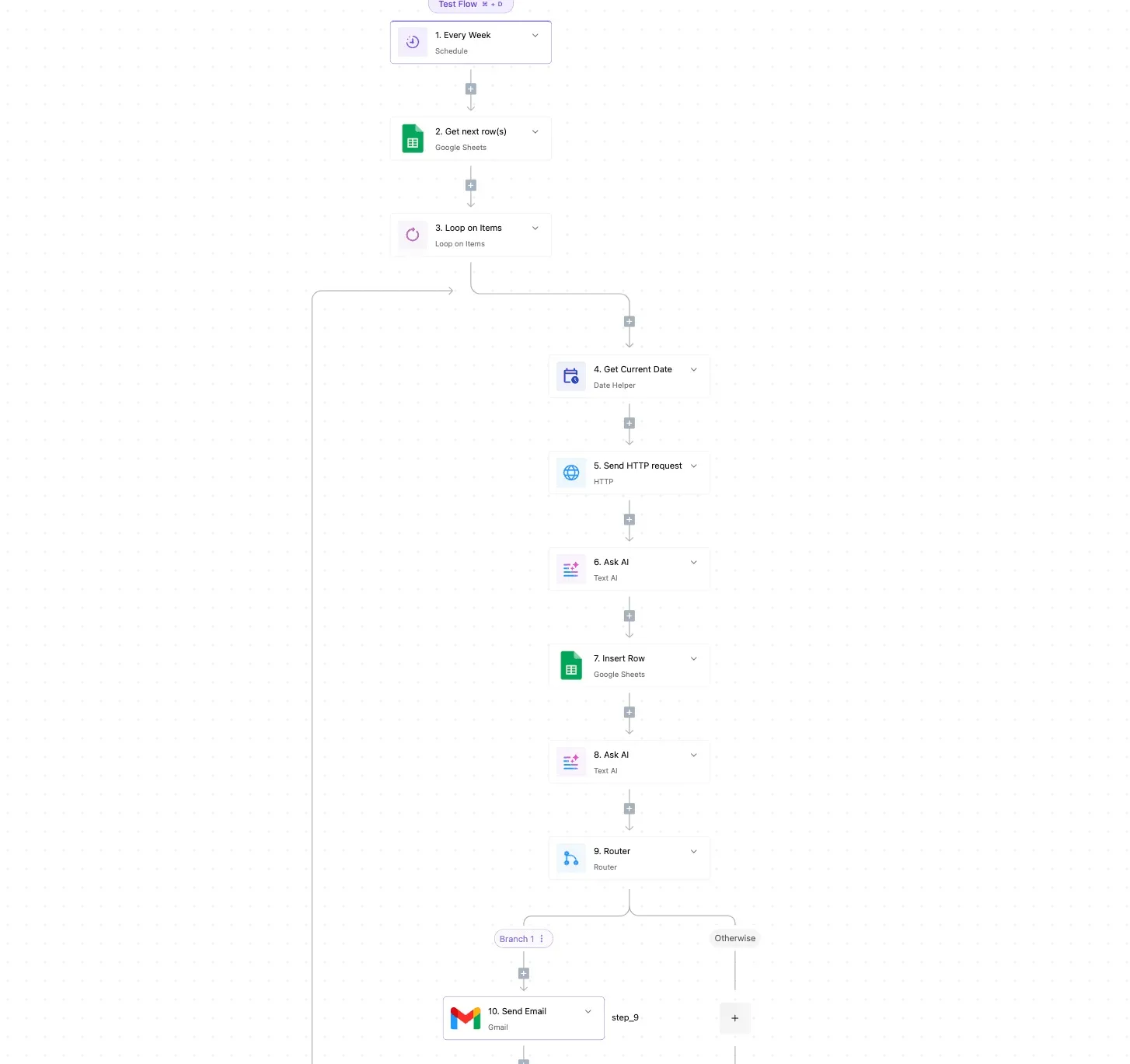
Two AI steps then clean and classify the extracted text, and a Google Sheets insert logs the result, making your output clean, classified, and permanently auditable, so you can always prove what was extracted.
After the AI steps, a router splits the output: Branch 1 handles documents that meet your conditions, and the Otherwise path catches the rest. A Gmail step then sends a notification email.
In the builder canvas, titled "Test Flow", the screenshot shows this 10-step flow. What to take from it is the order: the lookup against the sheet sits before the HTTP request, so a duplicate file is dropped before it can cost you a page.
Activepieces' pricing page lists 1 credit per flow run, any number of steps, so this 10-step flow costs the same single credit as a two-step version; Zapier's pricing page bills per task and Make's per module, so on those the same chain costs more with every step you add.
The extra lookup and the page-budget check cost nothing to add.
If a file lands in the inbox twice and that lookup has no condition on it, the file is processed twice, and you pay twice for the same page. Skipping a duplicate is a plain condition on the lookup.
Retries and a page budget
Re-processing creeps in at the rate limits. Set the HTTP step to retry on a rate-limit response, and have the flow wait before it tries again.
A retry that fires on a failed call is cheap; a retry that fires after a call already succeeded isn't, so check that the earlier attempt actually failed before sending the document again.
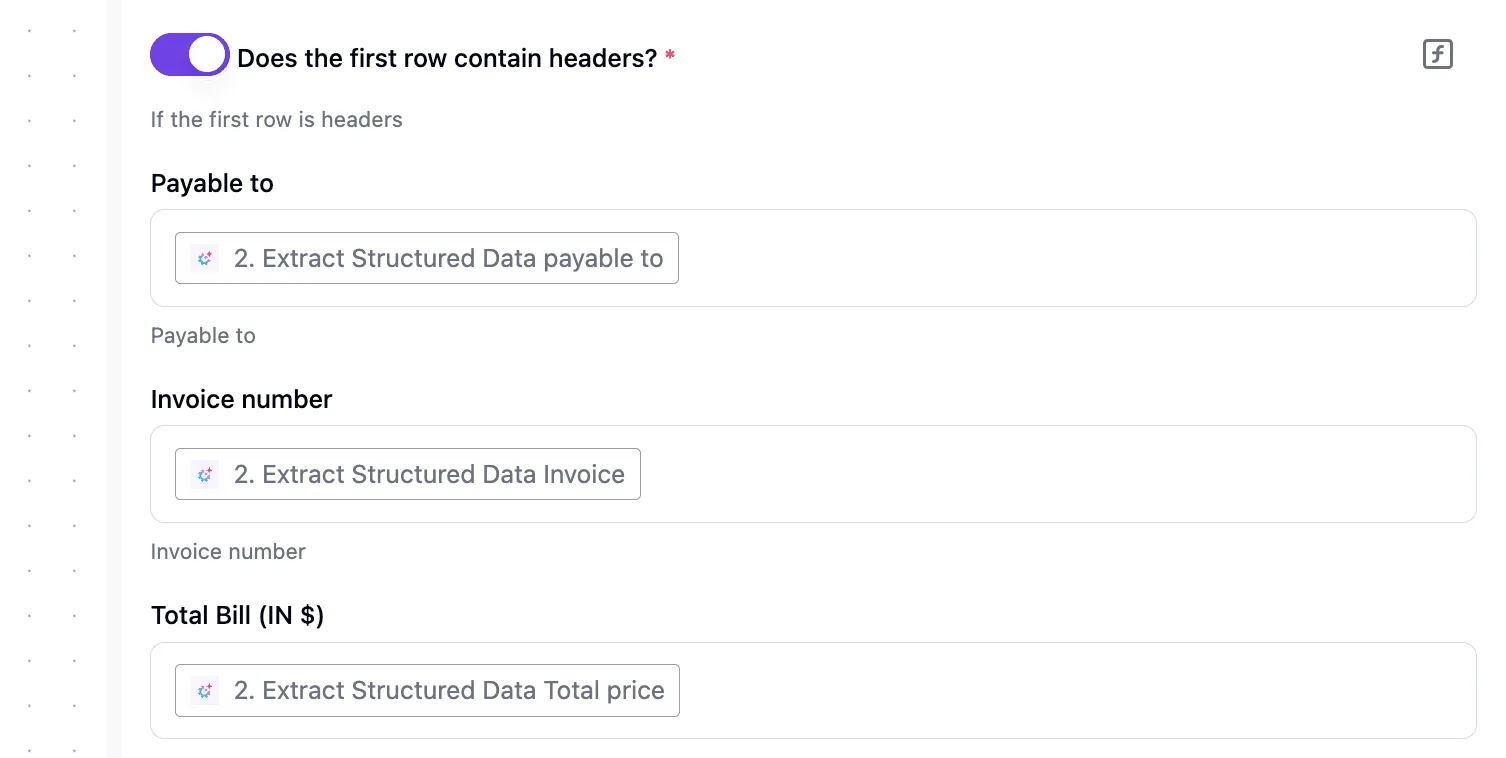
For the page budget, keep a running page count in a sheet row and compare it with your cap before each call.
If the next document would push you past it, send it down the Otherwise path and notify yourself instead of calling Mistral. Price the workload from Mistral's own pricing page, then set the cap to match.
What to Do on Monday Before Sending Pages
Run six steps in order, and you'll have a bill built from your own pages instead of a headline rate, plus a cap that matches it, so your spending stays transparent and bounded.
The steps below are the whole routine, and the list is deliberately short so one person can finish it in a morning.
- Open Mistral's pricing page and write down the date you read it. Rates change, so a bill you computed without a date can't be checked against the page later. Note the per-page rate for OCR 4.1, any separate charge for the features you plan to enable, and the discount for batch processing, if the page lists one.
- Pull last month's page count from whatever stores your documents or logs your jobs. Count pages, not files, because pages are what Mistral meters, and a folder of 2,000 files can hide a very different number. Add the pages you re-ran after a failure or a template change, since you paid for those twice.
- Run 50 sample pages through the standard endpoint and again through batch. Choose pages from your real mix: clean scans, bad scans, tables, handwriting. Compare the cost recorded for each run and the time each took, so you learn whether batch's wait is acceptable for your jobs.
- Compute the bill. Multiply your page count, including re-runs, by the rate for the mode and features you tested, and keep the standard-mode and batch-mode totals side by side. The gap between them is what the delay is worth to you.
- Set a spend alert on the account at a figure just above your computed total. A runaway retry loop then shows up as a notification within days, not as a surprise on the invoice.
- Consider another vendor only if the 50-page test shows accuracy you can't work with. A lower error rate matters when it saves manual correction. Price isn't a reason on its own, because step 4 has already told you what Mistral actually costs you.

Frequently asked questions
Is Mistral OCR free to try? Mistral has a free way to experiment. What it covers is set by its console and pricing page, so check whether it includes API calls before you plan a pilot on it.
A free tier that only covers the chat interface tells you nothing about your API bill, and the API is the meter you will be paying on.
Does Mistral OCR charge per page or per token?
Count pages and multiply by the rate, because the headline unit is the page, which makes the bill easy to forecast. The caveat is that switching on extra features, such as structured annotations, can be priced separately from the base page rate.
Read the line items for the model version you use, OCR 4.1 or the older OCR 3, rather than assuming one rate covers everything.
Can I self-host Mistral OCR to avoid per-page fees?
You can't avoid the fee with Mistral OCR itself: it is a hosted service, so the per-page fee comes with it.
On your own GPUs, an open-source model such as olmOCR is the usual alternative. That swaps a per-page charge for compute hours, engineering time and maintenance.
It tends to pay off at steady, high volume and to lose at low or spiky volume, so run it through the same workload math as the hosted option.
Does Mistral OCR price change by language or document type? Mistral prices by the page, not by language, so a page of scanned French and a page of English are metered the same way.
What changes the bill is which features you enable and how many times you re-process the same document. Confirm any exception on the pricing page before you commit.
How often does Mistral change OCR pricing? New model versions arrive regularly, and each can carry its own rate. Treat any figure in a spreadsheet as dated, and re-check the pricing page before each budget review.
Related reading
References
Running the numbers
See what the same workload costs here.
Free forever plan, and every paid plan self-hosts at no extra cost.
See pricing Talk to sales