
Hugging Face Inference API Pricing: A 2026 Guide

Oct 24, 202613 min read
Hugging Face Inference API pricing
The direct answer and what the Inference API is now
The Inference API is Hugging Face's hosted way to call models over HTTP. It now has two products: Inference Providers, which route requests to third-party hosts, and Inference Endpoints, which rent you dedicated machines.

You pay by plan credits for the first and by compute time for the second.
That split matters under GDPR before it matters to a budget. Under Article 28, each provider that touches your prompts is a processor, and Chapter V governs where they may send them.
When an Activepieces flow sends customer text into the API, it can run the AI step on your own provider key, which makes the step 1 credit and leaves the model cost on your own provider bill, so someone still has to know which billing path that text takes.
Hugging Face Inference API plans compared
The cells stay qualitative where the pricing page doesn't fix a single public figure.
| Plan | Price | Included inference credits | Usage limits | Checked |
|---|---|---|---|---|
| Free | No charge | Small monthly allowance | Low rate limits; requests stop when credits run out | 2026-10-24 |
| PRO ($9/month) | $9 per month | Larger monthly allowance than Free | Higher limits than Free | 2026-10-24 |
| Team | Per-user monthly fee | Pooled at the organization level | Shared organizational limits | 2026-10-24 |
| Enterprise | Contract pricing | Set by agreement | Set by agreement | 2026-10-24 |
| Inference Endpoints | Billed for compute while the endpoint runs | None; you pay for the instance | Bounded by the hardware you provision | 2026-10-24 |
When spiky traffic outgrows its allowance, you pay routed usage rates, because the $9 PRO fee is the only flat price that's easy to forecast. Endpoints reverse the risk: the cost is predictable per hour but accrues whether or not requests arrive.
How the pricing page was checked and when
I read every row against huggingface.co/pricing on 2026-10-24. Where the page lists no single public figure, such as Enterprise terms or Endpoint hardware rates, the table says so instead of estimating.
Endpoints reverse the risk: the cost is predictable per hour but accrues whether or not requests arrive.
Provider routing rates and plan allowances change without notice, so confirm the live page before committing a budget.
If you are running this arithmetic for your own team, see what the same workload costs on Activepieces.
How Hugging Face Inference API billing works
Credits are spent per request, provider routes charge the provider's own rate, and Endpoints charge for every hour a replica runs, whether or not traffic arrives.
On Free accounts the monthly credit is a token amount, and it may have ended on 15 October 2026.
Pro, Team and Enterprise inclusions
None for Free, $2.00 for Pro, and $2.00 per seat for Team and Enterprise: that is the included monthly inference credit.
Don't assume a ten-seat team gets a $20 shared allowance, or you'll miscalculate the cost. Per-seat credits are shared across the organization.
Pay-as-you-go through Inference Providers
Here a request is the unit of charge. Hugging Face routes the call to a third-party provider, and you pay that provider's rate for the tokens or compute used. Cost scales to zero when traffic does, which suits spiky or low-volume workloads.
Under GDPR Article 28 each provider acts as a processor or sub-processor, so a change of route is a change to your processing chain, not only to your bill.
Dedicated Inference Endpoints by the hour
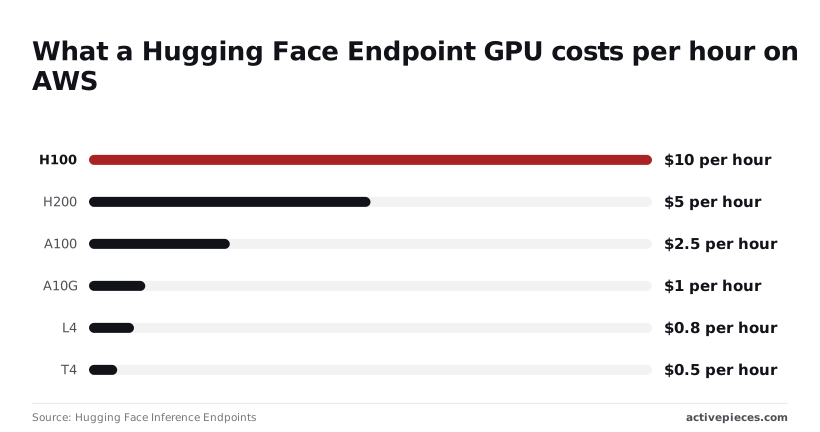
By the hour, Endpoints charge for the GPU you reserve, per Hugging Face Inference Endpoints, on AWS:
- H100: $4.50 per hour if left running
- H200: $5 per hour, slightly above the H100 figure
- A100: $2.50 per hour, about $1,825 a month
- A10G: $1 per hour
- L4: $0.80 per hour
- T4: $0.50 per hour, about $365 a month

Unlike provider routing, an always-on replica bills through idle hours, which makes steady, predictable traffic the case where Endpoints earn their cost.
Hugging Face Inference API cost examples by workload
The cheapest plan changes with traffic shape, not model: free for a prototype, per-token routing for a one-off batch, a dedicated Endpoint only for always-on load.
To see how far apart the options sit, the table shows each workload's cheapest plan and what the next option would cost. Batch figures assume 400 tokens per ticket and an eight-hour GPU run for the alternative.
| Workload | Best plan | Arithmetic | Monthly cost | Runner-up cost |
|---|---|---|---|---|
| Prototype chatbot | Free tier | Usage inside included credits | $0 | $9 (Pro) |
| 50,000-ticket classification | Pay-as-you-go routing | 50,000 × 400 = 20M tokens × provider rate | 20 × rate per million | $80 (8 h × $10) |
| 730-hour always-on GPU | Dedicated Endpoint | 730 × $10 | $7,300 | $1,927.20 (730 × $2.64) |
Until the included credits run out, a prototype with a handful of testers costs nothing. Pro, at $9 a month, only makes sense once you hit that ceiling.
Batch classification of 50,000 tickets
Fifty thousand tickets at 400 tokens each is 20 million input tokens. Routing through a provider bills you only for those tokens.
Run the same job on a dedicated GPU for eight hours and it costs $80, so routing wins whenever the provider's rate is under $4 per million tokens. Above that, the Endpoint wins, but you also pay for idle minutes at start and finish.
Always-on dedicated GPU endpoint cost
At $10 an hour on a Hugging Face H100, a month of 730 hours is $7,300, which is why running inference 24/7 is expensive.
Elsewhere the same hour is cheaper: Compute Prices lists it at $2.64 on Spheron, $2.89 on RunPod, $3.29 on Lambda and $6.88 on AWS.
At Spheron's rate the month comes to $1,927.20, so you pay about $5,373 extra for managed deployment. Even AWS, at $5,022.40 for the month, is cheaper.
If a regulator asks where inference ran, an Endpoint's pinned region answers cleanly, and that documentation is what the premium buys. If it doesn't, the other four providers cost less.
Worth checking against a plan that does not meter every step: one credit covers a whole run on Activepieces.
Hidden Hugging Face Inference API costs and limits
Each billing model fails at a different point, so the surprises come from limits rather than list prices:
- credits exhausted mid-month
- tier rate limits
- cold starts and model-size caps
- idle Endpoints that keep billing, with a 1-hour default timeout
- price gaps between providers serving the same model
Inference credit exhaustion and rate limits
Before the month ends, a busy week can empty the credit allowance, because routed requests draw it down. Calls then fail or start charging, depending on your plan.
Because they differ by tier, rate limits tighten the problem. A burst that passes on Pro may be throttled on the free tier, so test at your expected peak, not your average.
Idle Endpoint billing and cold starts
A dedicated Endpoint bills while it's running, whether or not anyone calls it. The 1-hour default timeout means a demo left up overnight keeps charging until that timeout fires, so confirm it's set for your usage.

If you scale to zero you save money but get cold starts, so the first request after a quiet spell waits while the model loads. Serverless routes also cap model size, which can push a large model onto an Endpoint.
Provider price differences for the same model
Routing hides a wide spread. For Llama 3.3 70B, LLM Price Compare lists Novita at $0.135 to $0.40 per million tokens. Groq runs $0.59 to $0.79.
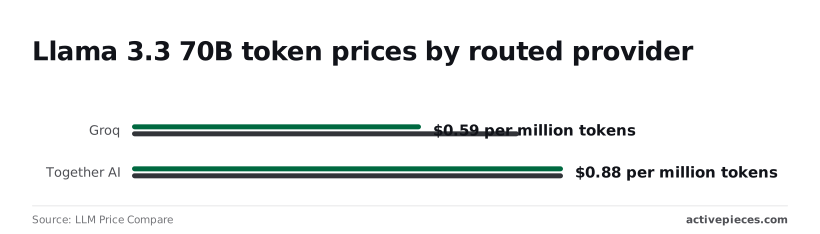
At a flat $0.88 for Together AI and $0.90 for Fireworks, those two give predictable bills at a premium. Cerebras spans $0.85 to $1.20, so its top rate is nearly nine times Novita's floor.
Providers also process data in their own regions, so under GDPR Article 28 a price-driven switch may change which processor handles personal data.
Monitoring Hugging Face usage with scheduled workflows
To watch usage, Activepieces can run a scheduled flow, and its pricing page prices a flow run at 1 credit however many steps it has, with 1,000 credits a month on the Free plan.
Zapier's per-task billing and Make's per-module billing, both stated on their own pricing pages, charge for each step instead. A daily check therefore costs one credit a day, whether it has three steps or thirty; you don't pay extra for complex checks.
Set a daily run that does these things in order:
- Read your usage figures.
- Compare them with the share of the month elapsed.
- Post an alert to chat or email when consumption runs ahead.
That warning arrives days before credits run out.
Add a second check listing running Endpoints, so one left idle shows up the same day.
Hugging Face versus Replicate, Together AI and OpenAI
If the workload is many open models under one account, Hugging Face suits it. It loses when one steady model, bursty jobs or a closed model is the whole workload.
The table sets out how each vendor bills and what it covers, so you can match the unit to your traffic.
| Vendor | Billing unit | Free tier | Open-model coverage | Dedicated deployment |
|---|---|---|---|---|
| Hugging Face | Per request through routed providers, or per hour for Endpoints | Small free allowance | Broadest, across many providers | Inference Endpoints |
| Replicate | Per second of compute, or per output | Not something to plan around | Large community catalogue | Private deployments |
| Together AI | Per token for text models | Not something to plan around | Curated popular open models | Dedicated endpoints |
| OpenAI | Per token | No free tier to plan around | None; sells its own closed models | No dedicated hardware to rent in the same sense |
Because Hugging Face routes to third-party providers, each request may be processed by a different company.
Under GDPR Article 28 each is a processor you must be able to name, and under Chapter V, which governs Articles 44 to 49, you need to know where each one runs.
Replicate per-second and per-output pricing
Depending on the model, Replicate bills for compute time or for each output. That suits sporadic image, audio or video jobs, since nothing accrues between runs.
It suits sustained text traffic less well, because cost tracks how long the hardware runs.
Choose Replicate over Hugging Face when your jobs are bursty and you want no standing deployment to forget.
Together AI: per-token open models
Per token is how Together AI charges for a curated set of open models, so cost scales directly with usage and a bill is easy to forecast from token counts.
Choose Together AI over Hugging Face when you run one or two popular open models at steady volume and don't need the wider catalogue. A niche or fine-tuned model may not be there.
If your requirement is a specific closed model, Hugging Face is the wrong choice outright. If your requirement is control over where weights run, OpenAI can't meet it, and Hugging Face Endpoints can.
What Activepieces does about this
The forecasting problem is that nobody sees consumption until the bill arrives. Activepieces covers that gap with a scheduled flow that checks usage against the share of the month elapsed and alerts you when it runs ahead.
It also lists running Endpoints, so an idle one shows up the same day. At 1 credit per run, a daily check uses about 30 of the Free plan's 1,000 monthly credits.

Activepieces' community edition is open source under the MIT licence, so you can self-host it. The flow that watches your billing, and any customer text passing through it, can then stay on infrastructure you control.
That keeps one more processor out of the chain you'd have to name under Article 28.
It won't pick a plan for you or cap spend on Hugging Face's side. What it gives you is an early warning, set up before traffic stops matching the shape you planned for.
Frequently asked questions
Where the request runs and who bills for it: most of these questions turn on that one point. They are the ones that stay open after the pricing models are laid out.
Is the Hugging Face Inference API free? Partly. The free tier gives you a small allowance for experimenting, which suits prototypes and occasional calls.
It isn't a production commitment, so a workload with steady traffic will outgrow it and move you onto one of the paid models. Treat it as a way to test integration, not as a basis for a forecast.
Can I use Hugging Face Inference for commercial projects?
Yes, but the permission comes from the model's license, not from the platform. Each model on the Hub carries its own terms, and some restrict commercial use, require attribution or limit certain applications.
Check the license of the specific model before you ship, and record that check. If you're ever asked to show how you assessed your processing tools, a dated note of the license terms is the evidence you'll want.
Do I need Pro to use Inference Endpoints? No. Endpoints are billed on the compute you reserve, not on a subscription tier, so Pro is a separate decision.
Pro matters for the included credits on routed inference. If your traffic is steady and you need to say where the weights run, Endpoints are the relevant product whether or not you hold Pro.
What happens when my monthly credits run out?
It depends on your plan and on how the request is routed. On the free tier, requests are generally limited or refused once the allowance is spent.
On Pro, usage routed through providers can continue at pay-as-you-go rates, which means the bill becomes variable at exactly the moment the included credits stop covering you.
Set a spending limit if the account allows one, and watch usage before the end of the month, not after it.
For routed requests there's a second consequence: the provider handling the call may sit in a different jurisdiction from the one you assumed, and that matters for any personal data in the prompt.
Is Hugging Face cheaper than calling OpenAI directly?
It depends on traffic shape, not on the vendor name. Spiky, low-volume traffic tends to favor per-request billing, while sustained, predictable load can favor a dedicated Endpoint you pay for by compute time.
Compared with a closed API, open-weight models open up a comparison it can't offer. The two are different products, though: with OpenAI you buy a hosted model, and with Endpoints you rent infrastructure running weights you chose.
Compare them against your own request volume and your data-location requirements, not against a list price alone.
Related reading
Running the numbers
See what the same workload costs here.
Free forever plan, and every paid plan self-hosts at no extra cost.
See pricing Talk to sales