
Final Cut Pro Price: One-Time vs Subscription (2026)

Nov 9, 202613 min read
According to Final Cut Hub, Final Cut Pro costs $299.99 once on Mac.
Apple Creator Studio charges $12.99 a month or $129 a year, so the annual subscription costs less than paying month-to-month over a full year, a gap that is easy to miss when you only track the monthly charge in a spreadsheet or a Activepieces workflow.
Final Cut Pro pricing is the set of ways Apple sells its professional video editor: a one-time $299.99 purchase for Mac, or access through the Creator Studio subscription, billed at $12.99 a month or $129 a year.
The subscription is cheaper only in years one and two
Final Cut Pro is Apple's professional video editor, and the metered unit is time:
- A one-time licence is paid once
- A subscription is billed every month or year you keep editing
- The table shows what each plan includes and where it stops
- Unconfirmed cells are marked, so treat those as open questions rather than assumptions
| Plan | Price | Inclusions | Limits | Who it fits | Checked |
|---|---|---|---|---|---|
| Mac one-time | $299.99 | Final Cut Pro on Mac | Mac only; iPad and Logic Pro access unconfirmed | Mac-only editors who keep software for years | 9 Nov 2026 |
| Creator Studio monthly | $12.99 | Creator Studio bundle; full app list unconfirmed | Billing terms unconfirmed | One short project, or a trial run | 9 Nov 2026 |
| Creator Studio yearly | $129 | Creator Studio bundle; full app list unconfirmed | Billing terms unconfirmed | Editors who want iPad or bundled apps and will use them for one or two years | 9 Nov 2026 |
Final Cut Pro for Mac
Pay $299.99 once and the Mac licence is yours, according to Final Cut Hub, the price tracker used for every figure in this section.
Against the yearly plan, you break even after 2.33 years, which means year three is the first year the licence is clearly cheaper.
On iPad, a separate price is unconfirmed as of the check date. Assume iPad access comes through the Creator Studio subscription until Apple's own page says otherwise.
Apple Creator Studio bundle and student price
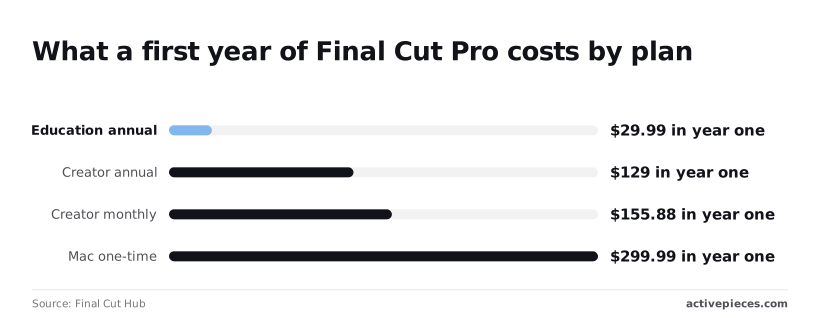
$155.88 is what Creator Studio's $12.99 monthly adds up to in year one. That's $26.88 more than the $129 yearly plan, so the monthly option only makes sense for short projects.
If you are a student, price the education annual plan first: it is $29.99 in year one, according to Final Cut Hub. That's about a tenth of the Mac licence.
If your workflow also includes scheduled exports or uploads, Activepieces handles them across 747 integrations with unlimited flows on every plan, including free, so that cost sits outside every plan here.
I couldn't confirm a price change over the last twelve months. Apple has put Final Cut Pro inside a subscription bundle alongside the one-time Mac purchase, which is why the comparison has two forms rather than one.
Final Cut Pro costs over five years
The pricing comparison shows:
- Final Cut Pro costs $299.99 once on a Mac, while the Creator Studio subscription costs $129 a year, or $645 over five years (Apple Creator Studio pricing via The Tool Shelf)
- The subscription overtakes the Mac price during year three
- The subscription is cheaper only in years one and two
Solo creator on one Mac
By year five, the Mac route has not moved from $299.99, so every extra year of use is free. The subscription reaches $129, then $387, then $645 at years 1, 3 and 5. That's $345.01 more than the Mac route by year five.
Assume one person, one Mac and no price change. If you edit for fewer than three years, the subscription's lower entry cost is real. If you expect to keep editing, the $299.99 is the cheaper bill.
Student price versus full price
The arithmetic still tells you what a discount has to do.
Over five years the Mac route works out to $60 a year ($299.99 divided by five). A discounted subscription only beats it if it costs less than that.
Short of that, the one-time purchase still wins for anyone who keeps editing after graduation.
Assume one seat per editor. Three one-time Mac purchases cost $899.97 and stay there, so there are no recurring charges.
****, $1,161 by year three and $1,935 by year five. The gap widens with headcount, so a team feels the compounding three times as fast.

A team that needs iPad editing or a bundle for every seat may still pay for that. A team that only needs Final Cut Pro on Macs is paying roughly $1,035 extra by year five for flexibility it may not use.
The fastest way to settle a shortlist is to try one. Activepieces is free to try, no credit card.
Final Cut Pro's hidden costs and limits
Budgets slip here, and it's easy to miss why: the one-time price covers the license, not the Mac it runs on, the companion apps, or the storage.
- Final Cut Pro runs only on a Mac with a recent enough macOS, so a team on older machines is buying hardware before it buys the software.
- Motion, Apple's motion graphics app, is a separate purchase unless your plan bundles it, so titles and animated effects cost extra outside a bundle.
- Compressor, Apple's batch export and encoding tool, follows the same rule, and a team that delivers many formats should price it in.
- Plugins come from third-party vendors, so effects and transitions add recurring or one-off spend that no Apple plan covers.
- Storage is on you: video fills drives fast, and an editor's real cost includes fast local disks and backups.
Hardware and storage
If your team is on Windows, you can't adopt Final Cut Pro without buying Macs, because it has no Windows version. The real price is the license plus the machine.
For a team that already owns Macs, that cost is zero. For everyone else, it's the largest line in the budget, and it dwarfs the software fee.
Storage works the same way. Project libraries and media grow with every shoot, so budget for external drives and a backup routine from the first project.
Companion apps and plugins
Most editors end up wanting Motion and Compressor, the two Apple apps that sit beside Final Cut Pro. If your plan bundles them, the question disappears. If you buy Final Cut Pro alone, price them separately before you commit.
Plugins are a second layer: they're priced by their own vendors, and a workflow built around them carries that cost whichever Apple plan you choose.
Mac versus iPad feature gaps
Don't treat the iPad version as a smaller copy of the Mac app with the same abilities. Its feature set is narrower, and it's sold on a subscription basis.
Check each feature your work depends on, including third-party effects, before you move a project between devices.
Buy the iPad plan only if you'll use it for editing, not for the sake of having it.
Final Cut Pro versus Premiere and DaVinci Resolve
Apply the same test to the other editors: Final Cut Pro and DaVinci Resolve Studio are bought once, Premiere is rented, and CapCut is free with a paid tier.
Price and model side by side
Read the table for what you're metered on: a one-time licence, a recurring subscription or nothing at all. That decides whether the cost grows with each year you keep editing. Confirm the current figure on each vendor's own page before buying, because prices move.
| Editor | Price model | Platforms | Free tier and limits |
|---|---|---|---|
| Final Cut Pro | One-time purchase on the Mac App Store | Mac; separate iPad subscription | Free trial, then purchase |
| Premiere | Subscription, billed by the month or year | Mac and Windows | Free trial, then subscription |
| DaVinci Resolve | Free edition; one-time paid Studio licence | Mac, Windows, Linux | Free edition with no time limit; Studio adds features |
| CapCut | Free app with an optional paid Pro tier | Mobile, desktop and web | Free to use; some effects and exports sit behind Pro |
On a Mac, Final Cut Pro costs $299.99 once, while the Creator Studio subscription costs $129 a year, or $645 over five years, so the one-time purchase is cheaper over five years.
According to Apple Creator Studio pricing via The Tool Shelf, the subscription overtakes the Mac price during year three.
At $295 once, DaVinci Resolve Studio makes the two paid licences nearly identical in price. A subscription editor has to stay under that figure to beat either, which is why Premiere's meter keeps running while theirs stops.
Which buyers Final Cut Pro suits best
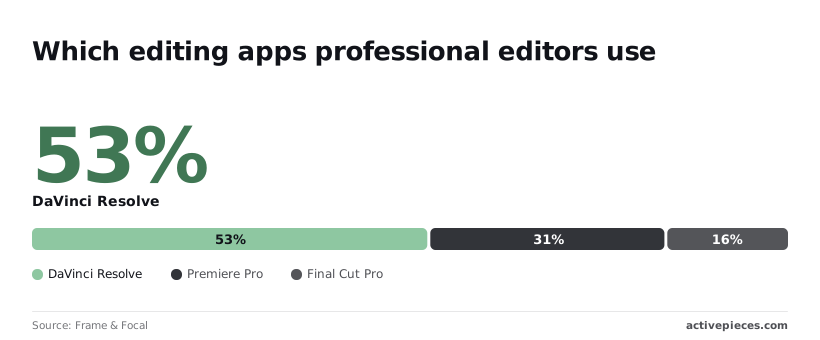
Market share is the other half of the cost. In the Frame & Focal poll of professional editors, DaVinci Resolve had 47.2% of usage and Premiere Pro 28.1%, so professional editors are more likely to be trained in DaVinci Resolve than Premiere Pro.
Resolve and Premiere together cover about three in four editors, so if you hand project files to outside colleagues, Final Cut Pro's 14.3% means you'll often export instead of sharing a timeline.
Final Cut Pro suits a solo Mac editor who wants to pay once. Resolve suits anyone who wants to start at zero and decide about Studio later. Premiere suits teams already working in Adobe's other apps. CapCut suits short social clips, not long projects.
Use the free trials before paying anything. Cut the same real project in Final Cut Pro and in Resolve's free edition, and time the export in each.
If you're on a Mac and neither slows you down, the one-time licence beats a subscription within a few years. If you need Windows, that choice is already made for you.
Reading a table only gets you so far. Build the same workflow in Activepieces and compare it yourself.
Automating what happens after a Final Cut Pro export with Activepieces
When a Final Cut Pro export finishes, Activepieces handles only the work that follows: uploading the file, notifying the team and logging a tracker row. It isn't an alternative to Final Cut Pro, and it doesn't change what you pay Apple.
Activepieces connects apps through a trigger and a chain of actions, across 747 integrations counted from its open source monorepo, with unlimited flows on every plan including free, meaning there's no cost barrier to building extensive automations. Its fit here is narrow.

The editing, the Mac and the license stay exactly as the earlier sections priced them. This only removes the manual chores at the end. The flow looks like this:
- Final Cut Pro finishes an export into a watched folder.
- The Activepieces trigger fires on the new file.
- The file uploads to cloud storage.
- A notification goes to the team.
- A row is added to the tracker.
Every step after the first is a repeated chore, which is the only kind of work worth automating. The export itself still happens by hand inside Final Cut Pro. What follows is who gains from the flow.
A solo creator gains the least. With no team to notify, the useful steps are the upload and the tracker row, and both take a minute to do by hand.
Build the flow only if you forget to log deliveries. Otherwise it adds a second tool to maintain, and nothing about it makes your one-time Mac purchase cheaper or more expensive.
None of this touches the gap between the student and full Final Cut Pro prices, because Activepieces has no bearing on it. That gap is an Apple decision and sits entirely in the license. Treat the automation as a separate line item.
Read Activepieces' own pricing page, note the date you checked, and find the unit it meters, such as runs or tasks, before comparing it to anything. Each export triggers a run, so how many exports you make decides what the flow costs you.
A team is where the flow earns its place. When three people share finished exports, someone otherwise has to say "it's up" in chat and update the tracker by hand.
The notification and tracker steps replace that handoff. Run volume still scales with exports, so tally a month of deliveries against Activepieces' current pricing before committing.
Frequently asked questions
Is Final Cut Pro a one-time purchase or a subscription?
Both, depending on the device. The Mac version is a one-time purchase from the Mac App Store, while the iPad version is sold only as a subscription.
On a Mac, the unit you pay for is the licence, so the cost stops accruing once you've bought it.
On iPad the unit is time, so the meter keeps running for as long as you use the app. Source: Apple's Final Cut Pro pages, checked 2026-11-09.
Does Final Cut Pro have a free trial?
Yes, Apple offers a free trial of the Mac version. Apple has also offered a longer trial window to people who buy a new Mac, and the trial length is the detail most likely to change.
Before you plan a project around it, read the current length on Apple's Final Cut Pro page, and start the trial when you have footage ready to cut, so you don't spend it on setup. Source: Apple, checked 2026-11-09.
Can I use one Final Cut Pro purchase on several Macs?
Generally yes, for Macs signed in to the same Apple Account, because Mac App Store purchases attach to the account rather than to one machine. That makes a desktop-plus-laptop setup a single purchase.
The limits come from Apple's Mac App Store terms for personal use, so a team or studio should check those terms before buying one copy for several editors. Source: Apple's Mac App Store terms, checked 2026-11-09.
Do I have to pay again for the next major version?
Historically, no. Apple has delivered Final Cut Pro's major updates to existing Mac buyers at no extra charge, which is the main reason the one-time price pays off over years.
Apple doesn't promise this for future releases, though, so treat free upgrades as a pattern and not a guarantee. The assumption holds only as long as Apple keeps that policy. Source: Apple's Final Cut Pro release notes, checked 2026-11-09.
Is Final Cut Pro for iPad included with the Mac version?
No. Buying the Mac version doesn't unlock the iPad app, and Apple offers no one-time purchase for iPad.
If you edit on both devices, you pay once for the Mac and keep paying for the iPad, or you look at a bundle that covers both. Source: Apple, checked 2026-11-09.
Related reading
Still comparing
The fastest way to settle it is to build something.
Open source under MIT, so you can self-host the same thing later.
Start free Talk to sales