
DaVinci Resolve Pricing: Free vs Studio Cost (2026)

Nov 5, 202615 min read
According to ClipVerdict, DaVinci Resolve, Blackmagic Design's editing, color, audio and effects application, costs $0 in its free version and a one-time $295 for Studio, with no subscription listed, which means you won't face monthly subscription bills.
That's one invoice line, not a recurring one, and it never needs re-approving, much like a Activepieces automation you set up once and leave running.
DaVinci Resolve pricing is the two-tier model in which Blackmagic Design gives away the full free version of its editing, color, audio and effects application and sells DaVinci Resolve Studio, which adds extra features, as a single one-time purchase rather than a subscription.
The table below, checked 5 November 2026, puts all four options side by side. Read the caps column first, since it shows what the free tier withholds.
| Plan | Price | One-time or subscription | Inclusions | Caps |
|---|---|---|---|---|
| Resolve free | $0 | One-time | Editing, color, audio, effects | 4K / 60fps |
| Studio one-time | $295 | One-time | Everything in free, plus Studio-only tools | 32K / 120fps |
| Studio rental | Not stated | Not stated | Not stated | Not stated |
| Studio with Speed Editor | Not stated | One-time | Studio plus the keyboard | 32K / 120fps |
No rental or monthly plan is listed, so there's nothing to cross-subsidize across clients month to month.
Free tops out at 4K and 60fps. A client delivering UHD at 30 or 60fps never hits that ceiling, so the cap only bites on high-frame-rate or very large-format work.
What Studio adds
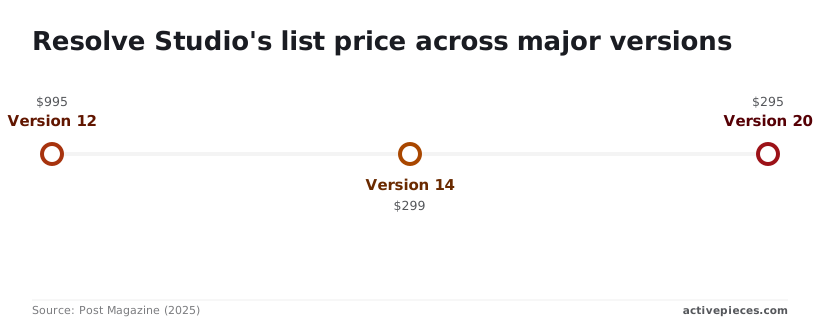
Studio raises the ceiling to 32K and 120fps, and it adds the Studio-only tools. Its price has dropped over time. According to Post Magazine, version 12 listed at $995, version 14 at $299 and version 20 at $295.
Since version 14 the price has barely moved, so waiting for a cheaper Studio is unlikely to save anything.
The criteria for judging an editor's real cost
Judge DaVinci Resolve Studio against five criteria. Each has a test that uses only Blackmagic Design's published figures, so the decision rests on what you'd actually pay and not on the sticker.
- Upfront price: what leaves your account on day one for Studio, set against the free version.
- Three-year cost: the total after three years of ownership, including anything you must replace or add.
- Hardware needed: the GPU and RAM Blackmagic lists, and whether your current machine meets them.
- Free-tier caps: the resolution and frame-rate ceilings on the free version, and whether your delivery specs exceed them.
- Team or collaboration cost: what it takes for more than one person to work on the same project.
Because Studio is a one-time purchase, the sticker price is also close to the whole bill. Compare that against any subscription editor over the same span, then add what a client would see on your invoice: a machine upgrade, extra storage, or a second seat.
If Studio's features don't change what you can bill, free costs nothing.
Before you buy, check Blackmagic's stated GPU and memory requirements against the machine you already own. A purchase that forces new hardware is really two purchases.
Then check the free version's resolution and frame-rate caps against your deliverables. If a client's spec exceeds them, the cap is the cost.
On shared projects, a single account quietly subsidizes someone who should be paying. Work out which collaborators need Studio-only features, keep the rest on free, and price only those seats.
If you are running this arithmetic for your own team, see what the same workload costs on Activepieces.
Costs for solo, team, and enterprise
Free costs nothing at any size. Studio costs one license per seat that needs it, paid once, so your bill depends on how many seats need Studio and not on how many years you keep them.

The table prices every seat at one Studio list price, so the arithmetic is the seat count times that price.
| Buyer | Free, 1 year | Free, 3 years | Studio, 1 year | Studio, 3 years |
|---|---|---|---|---|
| Solo creator | Nothing | Nothing | 1 × Studio price | 1 × Studio price |
| 5-person team | Nothing | Nothing | 5 × Studio price | 5 × Studio price |
| 20-seat company | Nothing | Nothing | 20 × Studio price | 20 × Studio price |
The Studio columns match because the purchase is one-time. The three-year figure only moves if you add seats, or if a paid upgrade is ever required, which this table doesn't assume.
I have no published team or volume pricing to cite, so every multiple above uses the single-seat list price. Ask a reseller for a quote before you budget a bulk discount.
As a solo creator you are one seat, so the question is whether one Studio-only feature earns back one license. If it doesn't, free is your answer, and the three-year column costs nothing.
If you bill clients for work that needs those features, the license is a single line you recover on the first job that needed it.
With five people, the license count is the lever. Price only the people who touch Studio-only features, such as the finishing editor, and leave the rest on free.
Putting all five on Studio quietly makes the team pay for four people who never open those tools.
At twenty seats, buying a license for everyone is the most expensive mistake available. Audit who needs which features, price that subset, and treat the rest as free seats. Since team pricing isn't published, get a written quote for the subset before you commit.
Hidden costs and limits people hit with Resolve
A quote covers the license, but the bigger spend is usually the machine it runs on, the drives behind it, and any control surface you add later.
GPU and RAM requirements for DaVinci Resolve
When the graphics card is underpowered, Resolve shows it as dropped frames in color and effects work as well as slower exports, because it leans on the GPU more than most editors do.

Budget the card and RAM first. Check Blackmagic's current minimums for your version before buying, because they shift between releases.
Storage is the quieter cost: camera originals eat drives quickly, and proxy files (lightweight copies for smooth editing) add a second set of media to store and back up. If you bill clients, that storage is a real line item.
Free-version export and codec limits
UHD resolution and 60 frames per second are where the free version caps output. That's enough for most web and broadcast delivery, but a client asking for higher resolution or frame rates means Studio, whatever else you were happy with.
Check your camera's codec against the free version's decode support before a shoot, not after, so you find the gap while a fix is still cheap.
If your real chore after the export is moving finished files and client approvals between apps, Activepieces has no cap on how many flows you build, on Free at $0 or any paid plan, and only runs draw on credits: 1,000 a month on Free, 1 credit per run however many steps it has.
Splitting delivery and approvals into ten small flows therefore costs nothing extra to keep, whereas Zapier bills a task per action and Make a credit per module, so the tidier setup is the pricier one there. None of it changes what Resolve costs.
Optional hardware and training
Panels are optional, and the prices show why you shouldn't buy them on impulse. B&H Photo Video lists the Speed Editor at $348, which makes it the cheap way to get a physical edit surface.
Per B&H Photo Video, the Micro Panel costs $949, nearly three times that, and it only helps if you grade daily, so this is an expensive investment unless color grading is your daily workflow.
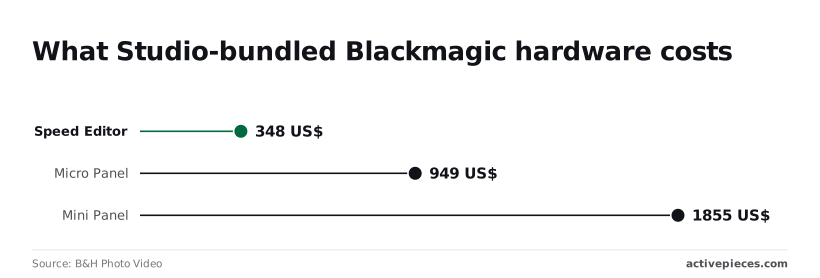
The Mini Panel costs $1,855, which is more than many people spend on the software and the GPU combined.
Whichever you pick, the license stays a one-time purchase, and the panels are one-time purchases too.
Worth checking against a plan that does not meter every step: one credit covers a whole run on Activepieces.
Resolve pricing versus rival editors
Over three years, Resolve Studio at 295 $ lands within 5 $ of Final Cut Pro at 300 $. Both cost far less than a subscription, which is what a client sees on every invoice for as long as you edit.

Those totals come from ClipVerdict. The table shows how the four differ on the terms that decide who carries the cost.
| Price model | Free tier | Hardware | |
|---|---|---|---|
| Resolve | One-time Studio purchase | Free version | Mac, Windows, Linux |
| Premiere Pro | Subscription | Time-limited trial only | Mac, Windows |
| Final Cut Pro | One-time purchase | Free trial | Mac only |
| CapCut | Free, with paid Pro tier | Free version | Desktop, web, mobile |
Only Resolve pairs a one-time purchase with a permanent free version, so you can bill a client while you test the Studio-only features before paying.
Premiere Pro cost versus DaVinci Resolve Studio
Premiere Pro comes to 828 $ over three years, according to ClipVerdict. That's nearly three times Resolve Studio, so the extra 533 $ has to be recovered in your rates, or you're quietly subsidizing the software out of margin.

Avid's Media Composer, a broadcast-oriented editor, reaches 1457.99 $ in the same comparison, which shows how steep subscription pricing gets at the top.
Final Cut Pro costs 300 $ once, in the same range as Studio, but it only runs on Macs.
If a freelancer or second editor works on Windows, you pay for hardware as well as software. Resolve avoids that because one purchase covers every platform it supports.
There is no three-year figure for CapCut here, so it sits in the table without one. Its free version suits short social work, but a client who expects a licensed, repeatable pipeline should ask what the Pro tier adds before it appears on an invoice.
Upgrading from free to Studio
Start with the free version. Buy Studio only when a feature you keep hitting costs you more in hours or client risk than the one-time price.
When free is enough
If your work is cuts, color, and a clean export, free covers it. Studio is a one-time purchase, so you aren't carrying a subscription line on your books.
Buying it "just in case" is the same mistake as bundling an unused seat into a retainer: you pay for it, and nobody is billed for it.
A solo editor or a small shop doing short-form work has no reason to buy before a real project forces the question.
When Studio pays for itself
Studio earns its price in three places. They are features a client deliverable depends on, GPU-heavy effects that make free slow or unusable on your machine, and team workflows where several people share a project. In each case, put a cost on the problem.
If a missing feature adds hours to every job, that time belongs in your rate, and a one-time purchase repays itself quickly.
When one person pays for Studio and the whole team benefits, that person is quietly subsidizing everyone else, so decide who owns the license.
This checklist turns the decision into a test you can run against your own work rather than a feature list you read once.
When one person pays for Studio and the whole team benefits, that person is quietly subsidizing everyone else, so decide who owns the license.
- Open a real, current project in the free version and work it as you normally would.
- Write down every Studio-only feature you hit, and note whether it blocked you or only annoyed you.
- Compare that list against the Studio price, counting the hours each blocker costs you and whether a client is paying for them.
- Recheck the pricing page before you buy, because the price and the feature split can change.
If the list is empty, you've made your decision, and it costs nothing. If it isn't, you now have a number to weigh against the invoice.
What Activepieces does about this
Activepieces doesn't touch the Resolve decision, and I'd be suspicious of any tool that claimed to. The Studio question is still the one the checklist above answers: free unless a feature you keep hitting costs you more than $295.
What Activepieces covers is the work around the export. That means
- moving finished files to a client
- requesting approval
- logging the delivery
- chasing the reply
It's easy to ignore when you total up an editor's cost, and it eats unbilled hours.
It's a workflow automation tool where you build flows that connect apps, and the pricing is the part that matters for a cost-conscious editor.
There's no cap on how many flows you can build, on Free at $0 or on any paid plan, so you won't have to restructure workflows to fit budgetary tiers.
Only runs draw on credits: 1,000 a month on Free, and one credit per run however many steps the flow has.
A delivery flow with a dozen steps costs the same as one with two, so you can split delivery, approvals and invoicing reminders into small flows without paying more to keep them tidy.
That's a different shape from the per-action billing elsewhere. Zapier counts a task for each action and Make counts a credit for each module, so a longer chain costs more every time it runs.
For a freelancer billing clients on thin margins, a fixed cost per run is easier to predict than one that grows with every step you add.
The Community Edition is open source under the MIT licence, so if you'd rather keep client files and credentials on your own machine than in someone else's cloud, you can self-host it.
I'd start on Free, wire up one delivery flow after your next export, and see whether the 1,000 monthly runs cover your real volume before paying for anything, which means you'll learn if paid plans are necessary.
For a freelance editor who wants to automate delivery, approvals and invoicing reminders around their exports, Activepieces is the better choice on pricing structure: it never meters how many flows you build, and each run costs one credit however many steps the flow has.

Zapier's per-task and Make's per-module billing make a longer chain cost more every time it runs, which is a fair model for some users but harder to budget on thin margins.
It won't change the Resolve Studio decision, but for the work around the export, a flat cost per run lets you split things into small, tidy flows without paying more for it.
Frequently asked questions
Is the free version watermarked?
Is DaVinci Resolve really free, or is there a watermark? The free version has no watermark on exports. Blackmagic Design limits it in other ways: output resolution and frame rate sit below what Studio allows, and some Studio-only tools are locked.
So a deliverable can go out clean, but a client who specs a higher-end delivery format may force the upgrade.
Upgrades and commercial use
Do I pay again when a new major version comes out? Historically, no. Blackmagic has let Studio license holders move to new major versions without a second charge.
That's a pattern, not a contract, so check the current Studio page before you amortize the license across years of client work.
Can I use DaVinci Resolve free for commercial work? Yes. Blackmagic doesn't restrict the free version to non-commercial use, so you can invoice for work cut and graded in it.
The only cost is whatever Studio-only feature you'd have used and now have to work around, which is time you can't always bill.
Multiple computers and student discounts
Does one Studio license work on more than one computer? A Studio license can be activated on more than one machine, but only a small number at once, and Blackmagic's license terms set the exact count.
In a shared suite, that cap is where a single purchase quietly ends up serving several editors. Count seats before you assume one license covers the room.
Is there a DaVinci Resolve student discount? I couldn't confirm a discount run by Blackmagic itself. Students can use the free version, which covers most coursework, and some resellers offer education pricing on Studio, so ask the reseller directly.
Don't budget for a discount you haven't seen in writing.
Related reading
References
Running the numbers
See what the same workload costs here.
Free forever plan, and every paid plan self-hosts at no extra cost.
See pricing Talk to sales