
Monday.com Claude integration: Automate Project Analysis

Oct 16, 202612 min read
Integrating Monday.com with Claude transforms a static repository of task statuses into a dynamic reasoning engine. This setup, which often utilizes Activepieces to facilitate the data flow, identifies bottlenecks and forecasts project delays.
By piping unstructured communication from the project management platform into the Large Language Model (LLM), managers move from manual data entry to automated synthesis.
Monday.com and Claude integration for automated analysis
Why connect project data to an LLM?
Project data remains trapped in silos until an LLM provides the linguistic context necessary to interpret why a team missed a deadline. Recording the delay isn't enough.
Project data remains trapped in silos until an LLM provides the linguistic context necessary to interpret why a team missed a deadline.
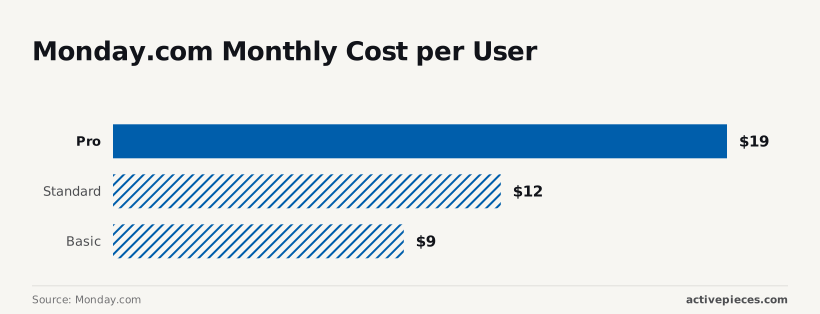
Monday.com reports that a standard plan costs $12 per user, which means a small team faces a predictable monthly overhead. A team of ten is paying $1,440 annually for a system that only tracks what has already happened.
Upgrading to the Pro tier at $19 per user increases that annual commitment to $2,280. This 58% jump in overhead only yields a positive return if the platform begins to actively mitigate risks through automation.
The investment is contingent on operational efficiency gains.
Why automate Monday.com project analysis
Even at the Basic tier of $9 per user, the cost of human oversight remains the primary expense. Connecting Claude allows the software to perform the first pass of analysis and reduces the billable hours spent on status reporting.
This allows teams to reallocate the budget toward higher-value strategic tasks.
80% of the friction in these integrations comes from mismatched thresholds. A single bulk update on a large board can trigger a rate-limit error, stalling the entire automation pipeline.
Managing these mismatched thresholds requires a structured middleware layer to queue requests and prevent data loss.
What you need for the Claude integration
A functional integration requires a source of truth, a reasoning engine, and a secure bridge to facilitate the exchange of data.
Required Monday.com and Anthropic accounts
Real-time exports require a Monday.com Enterprise or Pro account to provide the necessary Webhook triggers and API permissions. An Anthropic API Key acts as the gateway to Claude, providing the computational logic needed to process project descriptions.
Activepieces exposes every connected action as a tool schema on a per-project MCP server, meaning a Monday.com integration configured once is instantly reachable as a tool for Claude or Cursor.
Because the same action that runs in a flow is the one exposed as an MCP tool in the open source repo, teams avoid a second migration by using the same logic for both deterministic workflows and agents.
Establishing these three pillars ensures that data flows predictably between the interface and the intelligence layer.
This takes minutes, not a project: automate it in Activepieces free.
Step 1: Prepare your Monday.com board for automation
A structured board architecture prevents Claude from processing irrelevant data, which directly lowers the cost per successful automation. By isolating the AI's workspace, you ensure the LLM only consumes tokens when specific logic is met.
To maintain this control, use the following configuration to define the boundaries of the integration:
- Add a 'Status' column named 'AI Trigger'.
- Add a 'Long Text' column named 'Claude Analysis'.
- Create a 'Text' column for 'Context/Prompt'.
- Set the 'AI Trigger' status.
This sequence establishes a filter. The middleware only fetches data when the 'AI Trigger' is toggled. This prevents unnecessary API calls.
Creating the AI Trigger status column
The 'AI Trigger' status column acts as the primary switch for the webhooks that communicate with Claude. Without this specific trigger, every minor edit to a task could inadvertently fire a request to the middleware.

When you configure a status labeled "Generate Analysis," you create a discrete event that the middleware can listen for. The intelligence layer activates only when the data in the row is finalized and ready for processing.
Creating the Claude Response text column
A dedicated 'Claude Analysis' long-text column is necessary because standard text columns in Monday.com are capped at 2,550 characters. Monday.com is the project management software used here as the data source.
Utilizing the Long Text type allows for exhaustive responses and ensures that the metadata returned by the AI, such as confidence scores or source citations, remains intact and readable for the end user.
Item limits per Monday.com board
Board capacity dictates the longevity of your automation strategy. According to Monday.com, the Standard and Pro tiers are limited to 10,000 items per board.
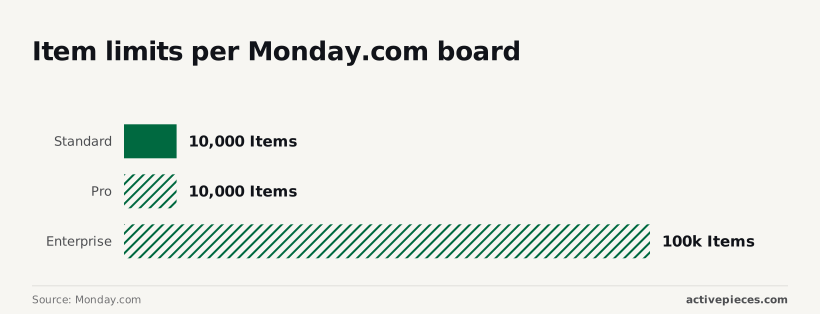
100 tickets a day will cause a high-volume support desk to hit a performance ceiling in roughly three months. For global operations, the Enterprise tier supports 100,000 items.
Monitoring these thresholds is vital. Exceeding them causes significant latency when the middleware attempts to query the board's state.
Step 2: Generate an Anthropic API key for Claude access
Establishing a secure handshake requires generating a unique API key within the Anthropic Console. This is the centralized management portal for developer credentials and billing.
This key is the bridge between your Monday.com middleware and the large language model. It ensures that every request is authenticated and tied to a specific project environment.
Generating your Anthropic API key
The Anthropic Console is the administrative hub where you provision access keys and monitor the real-time consumption of your project’s credits. Upon logging in, navigating to the "API Keys" section allows you to create a secret string that identifies your middleware to the Claude models.
Because this key grants full access to your funded balance, you must store it in an encrypted vault. A compromised key allows unauthorized third parties to drain your API credits.
Monitoring integration health
The dashboard provides a visual overview of your integration health, as seen in the workflow management interface.
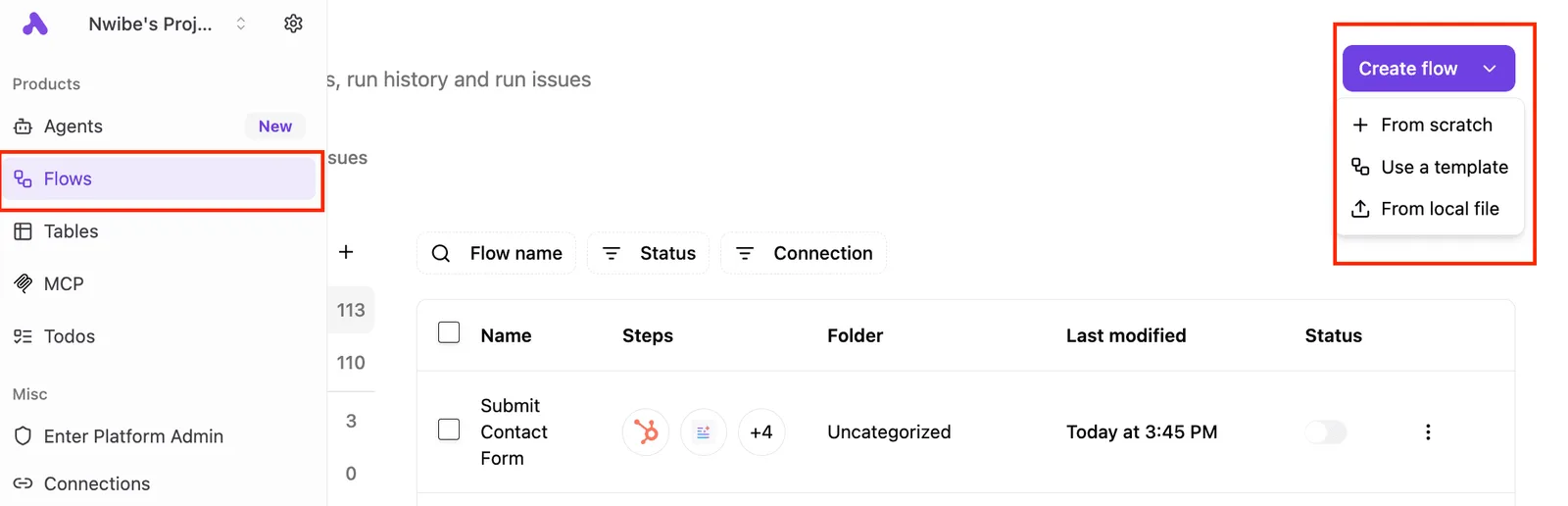
The main panel shows a flows list with columns for Name, Steps, Folder, Last modified, and Status.
One flow titled "Submit Contact Form" is visible with 4 steps, located in the Uncategorized folder, last modified "Today at 3:45 PM", which means the workflow is currently up to date.
A "Create flow" button with a dropdown menu is highlighted in the top right, showing options: "From scratch", "Use a template", and "From local file".](https://www.activepieces.com/docs/_next/image?url=%2Fdocs%2Fimg%2Factivepieces-dashboard.png&w=3840&q=75)
By using this centralized view, you can track which specific flows are consuming your Anthropic tokens. Selecting the right model for these flows is the primary lever for controlling your monthly overhead.
Claude API cost per million tokens: past Claude 3 pricing
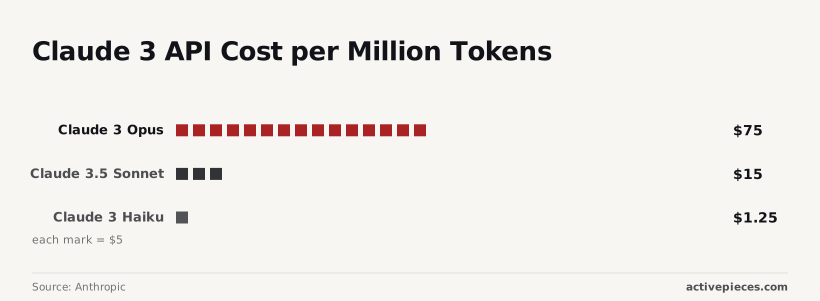
Selecting a model requires balancing the complexity of your Monday.com automation against the unit price of intelligence. Current options include Claude Haiku 5.5 for high-volume tasks, Claude Sonnet 5.5 for balanced work and Claude Opus 5.5 for demanding agentic work; check Anthropic's pricing page for their rates.
| Model | Cost per Million Output Tokens | Operational Consequence |
|---|---|---|
| Claude 3 Opus (past pricing; today's equivalent is Claude Opus 5.5) | $75.00 | High-reasoning tasks like budget forecasting cost 60x more than basic data entry under this legacy pricing. |
| Claude 3.5 Sonnet | $15.00 | This mid-tier pricing allowed for sophisticated status updates without the premium overhead of Opus. |
| Claude 3 Haiku | $1.25 | Simple text classification was affordable enough to run on thousands of board items daily at that price. |
Selecting a model requires balancing the complexity of your Monday.com automation against the unit price of intelligence. Current options include Claude Haiku 5.5 for high-volume tasks, Claude Sonnet 5.5 for balanced work and Claude Opus 5.5 for demanding agentic work; check Anthropic's pricing page for their rates.
Setting Anthropic API usage limits
Hard usage limits prevent unexpected billing spikes by automatically disabling the API key once a specific dollar threshold is reached. Setting a monthly limit of $50 means that a malfunctioning loop in your middleware can't generate a four-figure surprise invoice.
You should also utilize the "Custom rate limits" feature to restrict the number of requests per minute. Capping this ensures that a sudden influx of Monday.com updates doesn't exhaust your budget before the billing cycle resets.
You can follow the rest of this with the builder open. Start free, no card.
Step 3: Build the bridge in Activepieces to link the apps
Configuring the Monday.com 'New Item Heartbeat' trigger
Activepieces runs the Monday.com 'New Item Created' trigger on your own provider key, ensuring that model spend for project analysis lands on your account. By using the MIT-licensed core, teams like MoneyGram or Moneypenny maintain control over their AI strategy while automating board updates.
Activepieces provides 735 integrations to ensure that these triggers connect to the rest of your stack without custom code. This trigger requires a specific Webhook URL generated by the platform to be pasted into the Monday.com "Developer" section.
Once the connection is live, the "Test Trigger" function pulls the JSON payload of the most recent item. This provides the exact key-value pairs that will serve as the raw materials for the intelligence engine.
This architectural separation ensures that your internal documentation remains behind your firewall until specifically invoked.
Mapping board data into the Claude 'Create Message' action
The "Create Message" action in the Anthropic integration allows you to construct a prompt template that injects Monday.com variables into a predefined instruction set. You must map the "Item Name" and "Column Values" from the trigger output into the "User Message" field.

Claude relies entirely on the data packet you pass it. This mapping should be wrapped in XML tags (such as <task_description>) within the prompt box.
Writing the result back to the Monday.com item
The final step is the "Update Item Column Value" action. It delivers Claude’s analysis back to the specific Monday.com Pulse ID that triggered the flow.
The Pulse ID identifies the exact row to update so the intelligence is attached to the correct task. The Column ID specifies the target text or status field.
This prevents the automation from overwriting manual notes. The "Content" field maps to the "Text" output from Claude, completing the loop from raw data to actionable insight.
Step 4: Test the workflow and refine the AI prompt
Testing ensures the middleware correctly maps Monday.com column IDs to Claude’s prompt variables. Without this verification, a mismatch in data types will cause the automation to fail.
Testing the Monday.com Claude data flow
Successful validation requires a systematic check of how data moves from the board trigger to the AI and back. If the middleware doesn't catch an empty mandatory field before it reaches the API, the request will error out.
Trigger a test item in Monday.com using a dedicated "Testing" status so that live production data remains unaffected. Inspect the JSON payload in the middleware to confirm that hidden column values contain the expected strings.
Verify that the AI’s output adheres to the character limits of the destination Monday.com column. Monitor the "Last Run" logs for any 400-series errors, which indicate that the authentication token has insufficient permissions.

Writing an efficient Claude AI prompt
Prompt engineering must balance the depth of context provided to Claude against the total token count. Every redundant instruction or repetitive board description included in the prompt increases the overhead of every single item update.
System Prompt Caching reduces the cost of repeated instructions so that high-volume boards become cheaper to process over time. Variable Stripping removes empty Monday.com columns from the payload so the AI doesn't process null data.

Output Formatting forces the AI to return only the necessary data points to avoid paying for conversational "filler" text.
Frequently asked questions about Monday.com and Claude
Managing Monday.com monthly cost per user
Operational costs scale based on the frequency of triggers rather than the total headcount of the team.
Because Monday.com charges for automation actions in fixed monthly buckets, a single Claude-powered recipe that triggers on every status change can exhaust a mid-tier plan's entire monthly allowance in hours.
This means the controller must implement "gatekeeper" columns. Checkboxes or specific status labels ensure the LLM only consumes an action when a human explicitly requests a summary or analysis.
Handling large board performance
Large boards require a filtered synchronization strategy to prevent the Claude context window from becoming saturated. When a board contains hundreds of items, passing the entire dataset into a prompt causes the API latency to increase.
To maintain performance, the middleware must be configured to only fetch items updated within a specific recent window or those tagged with a "Current Sprint" attribute. This selective data retrieval ensures the model processes only the necessary tokens.
Data privacy and security protocols
Data privacy is maintained by establishing a strict boundary between the Monday.com workspace and the Claude training environment. Using the Anthropic API rather than the consumer-facing Claude.ai interface ensures that submitted data isn't used to train future iterations of the model.
To further harden this architecture, teams should employ zero-retention policies where the middleware deletes the payload immediately after the API call is completed. PII stripping scripts redact names or email addresses before the data leaves the Monday.com environment.
Related reading
References
Build it
Set this up in minutes.
No code required. Connect your accounts, and Activepieces runs it from there.
Start free Talk to sales