8 Best Monday.com Alternatives for 2026 Compared

Sep 30, 202612 min read
When the platform transitioned from a visual project tracker to a comprehensive "Work OS," a shift that mirrors how tools like Activepieces handle complex logic, it introduced an architectural overhead that complicates simple workflows.

While the interface remains colorful, the underlying logic now requires you to navigate layers of CRM and DevWare modules even when you only need a functional list.
Why teams are moving away from Monday.com
The complexity tax of the 'Work OS' approach
By assuming that every department should live within a single environment, the "Work OS" philosophy forces a standardized schema onto teams with specialized needs.
Horizontal expansion results in a cluttered interface. Features intended for sales teams distract product teams who only require a status board.
By assuming that every department should live within a single environment, the "Work OS" philosophy forces a standardized schema onto teams with specialized needs.
80% of the headcount explosion at Monday.com signifies a pivot toward enterprise-grade complexity, which means the company is shifting its focus away from individual users to capture high-value corporate accounts.
The following data illustrates the aggressive scaling of the organization, which correlates with the rapid introduction of these overlapping features:
- 2020: 799 employees
- 2021: 567 employees
- 2022: 1,549 employees
The product roadmap supports massive corporate structures rather than the agility of small teams. Consequently, the "everything for everyone" UI creates friction for users.
Monday.com seat minimums and pricing tiers
Monday.com enforces a seat-based billing model that requires purchasing licenses in predefined blocks rather than paying for actual headcount. If a team grows from three to four members, they're often forced to pay for a five-seat tier.

Nobody uses the "ghost" seat, yet the company pays for it. This lack of granularity penalizes growing companies.
By limiting the number of "actions" an automation can perform per month based on the subscription tier, the platform creates a ceiling on operational efficiency.
When a team hits their monthly limit, all automated status updates and cross-board mirrors stop functioning until the next billing cycle or an expensive tier upgrade.
To avoid this, technical teams are using Activepieces to handle logic externally, where the run is the meter rather than the steps inside it.
The published pricing page shows 1 credit per flow run regardless of complexity, which ensures that a ten-step process costs the same as a two-step workaround.
By decoupling the execution of logic from the project board, you avoid the recurring fiscal penalties associated with native automation limits.
The fastest way to settle a shortlist is to try one. Activepieces is free to try, no credit card.
Comparing seat minimums across top project tools
Entry barriers for project management software are defined by seat minimums. These mandates force smaller teams to pay for unused capacity before they can access professional-grade features.
Analyzing the churn data for Work OS platforms reveals that these rigid billing structures are a primary driver for teams migrating to more granular alternatives.
The top 4 reasons for churn include: Seat minimums (paying for 3 seats when you need 1), Automation caps (25k limit on Pro), Feature bloat (interface clutter), and Rigid hierarchy, which signals that fiscal friction starts at the point of purchase, long before a user hits a technical limit, so the product is losing customers based on pricing structure rather than software performance.
The following table compares the minimum commitment required to start a paid plan across the industry:
| Tool | Minimum Seats | Impact on Small Teams |
|---|---|---|
| ClickUp | 1 Seat | Allows a single user to pay only for their own seat, keeping the entry cost at the advertised per-user rate. |
| Monday.com | 3 Seats | Forces a 200% over-spend for a solo user, as they must pay for three licenses regardless of headcount. |
| Smartsheet | 10 Seats | Sets a high barrier where a 5-person team pays double their actual size, effectively pricing out micro-businesses. |
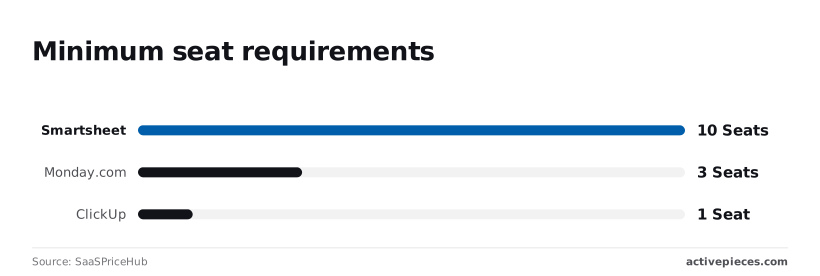
According to SaaSPriceHub, Smartsheet requires a 10-seat minimum for its business tier. Monday.com mandates a 3-seat minimum, according to SaaSPriceHub. SaaSPriceHub's analysis shows that, in contrast, ClickUp permits a 1-seat minimum.
You can access paid features as a single project manager without paying a penalty for your team size.
The case for staying with Monday.com
Despite the friction of the Work OS model, Monday.com remains a market leader because it offers a visual polish that competitors struggle to replicate.
For teams that prioritize executive-level reporting and aesthetic dashboards over technical flexibility, the platform provides a cohesive experience that requires very little initial configuration.
Monday.com dashboard and visualization features
The platform excels at turning raw project data into high-level visual summaries. The dashboard widgets allow managers to see resource allocation and budget burn across dozens of boards simultaneously.
This level of native visualization is often superior to the basic charts found in simpler task managers.
Monday.com's third-party app marketplace
Monday.com has built a massive marketplace of third-party apps that extend the platform's functionality. If a specific feature is missing, there is likely a paid add-on available to bridge the gap.
This ecosystem allows non-technical teams to add complex capabilities like time tracking or advanced document generation without ever leaving the interface.
Best alternatives for traditional project management
Teams that find the Monday.com interface cluttered often transition to ClickUp or Asana to regain focus on task velocity. These tools prioritize structured hierarchies that reduce the time spent configuring visual widgets.
ClickUp as an all-in-one workspace
For teams that want to eliminate the need for separate documentation or goal-tracking software, ClickUp functions as a centralized hub.
Its architecture is built around a nested hierarchy (Spaces and Folders) which prevents the "board sprawl" common in Work OS platforms where every new project requires a custom schema from scratch.
ClickUp Docs for task context
By integrating a native document editor directly into the task sidebar, the platform allows a developer to reference technical specifications without losing the context of the ticket.
ClickUp automation and integration logic
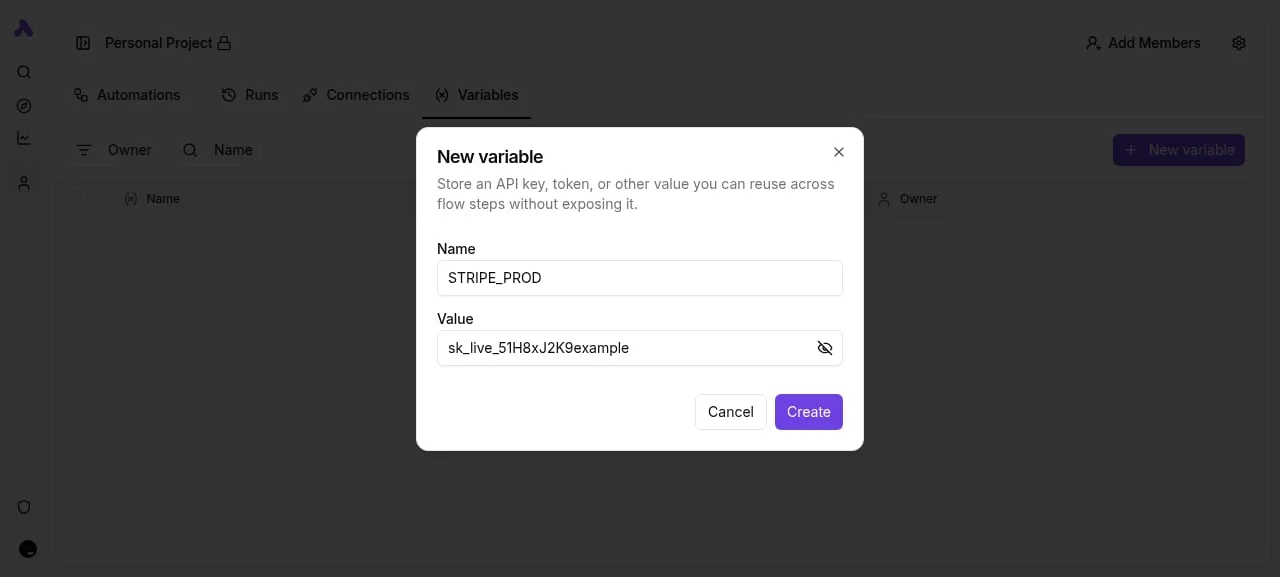
The following interface demonstrates how a centralized logic layer can manage data across various spreadsheet services without manual entry.
This visual approach to logic allows teams to move data between specialized tools like ClickUp and external databases without writing custom scripts.
Asana for enterprise reporting and clarity
Asana focuses on the "Work Graph," a data model that maps the relationships between individuals and organizational goals. Unlike platforms that treat every row as a generic item, Asana enforces a distinction between a task and a subtask.
The reporting engine is built to aggregate data across multiple portfolios. When utilizing Anthropic’s Claude Sonnet 5.5 for automated status summaries, Asana’s API provides clean endpoints for task descriptions and comments. The model receives structured context for every update.
Reading a table only gets you so far. Build the same workflow in Activepieces and compare it yourself.
Specialized alternatives for data and speed
Airtable: The relational database powerhouse
Airtable is the superior choice for teams whose work is data-heavy rather than task-heavy. While Monday.com struggles with cross-board relationships, Airtable excels at connecting disparate data points into a single source of truth.
The platform allows you to build custom interfaces on top of your data. A creative director can view a gallery of assets while a producer looks at a timeline, all pulling from the same relational records.

Trello: Unmatched simplicity for visual teams
Trello remains the gold standard for teams that value speed and simplicity. Its Kanban-first approach is intuitive enough that new hires require zero training.
The platform avoids the feature bloat that plagues larger Work OS tools by keeping the interface focused on the immediate flow of work.
Solving the automation bottleneck with Activepieces
Activepieces provides the unlimited flows and granular execution control required by teams that find Monday.com’s automation limits too restrictive.
Decoupling automation from your project management budget
By separating the execution of logic from the project management seat count, Activepieces removes the financial friction of scaling workflows.
In traditional Work OS environments, increasing your automation frequency often forces a migration to an "Enterprise" tier for every user in the system. By offloading these tasks to Activepieces, you maintain a lean project management setup while running sophisticated logic in a dedicated environment.
Building cross-platform workflows without per-action penalties
The platform utilizes a modular architecture that allows you to install specific "integrations" for the services you actually use.
Roughly 60% of Activepieces' 735 integrations are community-contributed, a breadth enabled by its MIT-licensed core, so the platform scales its utility far beyond what a single internal team could maintain.
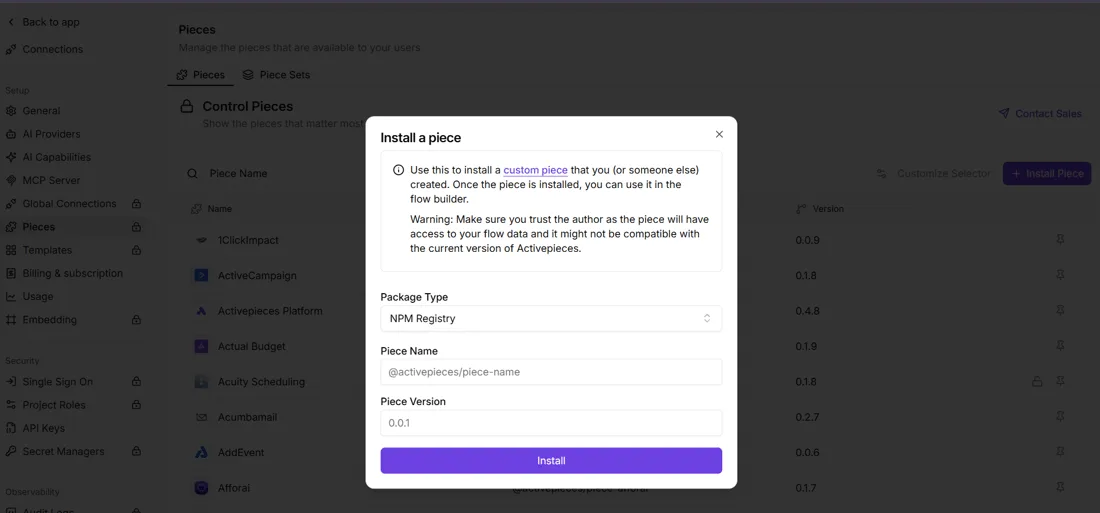
You can verify this by checking the contributor attribution for each integration in the public monorepo. Administrators can manage specific npm-based packages to ensure that a breaking change in a third-party API doesn't take down your entire production pipeline.
The screenshot of the Activepieces admin interface shows the Integrations management page where a user is manually installing a specific version of a package via the NPM Registry.
When you connect a reasoning model like Gemini 3.8 Flash to your Slack channels, this interface ensures you're pinning the integration to a verified release.
Self-hosting for total data sovereignty
Activepieces runs on your own infrastructure to ensure that sensitive payloads never leave your own virtual private cloud.
Processing proprietary code through an agentic model like GPT-6 Sol adds risk when sending that data through a third-party SaaS automation provider. Running the platform on your own infrastructure means your execution logs, API keys, and data payloads remain behind your firewall.
MoneyGram and FundingSocieties run Activepieces in production to maintain this level of control over their automated data flows.
By shifting the billing unit from individual tasks to the overall flow run, Activepieces eliminates the cost penalties associated with building complex, multi-step sequences.
Activepieces is the better choice for organizations scaling sophisticated logic who need to decouple their automation expenses from their project management seat count. Its execution model ensures that workflow depth does not lead to exponential cost increases, providing a more sustainable path for high-volume operations.
How to migrate your team to a new platform on Monday morning
Migrating your team requires a scripted handover of data structures and user permissions to prevent operational downtime.
Mapping your current Monday.com boards to new structures
Because Monday.com utilizes a specific "Pulse" architecture, you must define how these translate to the object-oriented or card-based systems of your new tool.
If you move to Airtable, your status columns become Single Select fields and your "Connect Boards" columns become actual Linked Record relationships. In a flatter tool like Trello, your Monday columns often need to be converted into Custom Fields or Labels.
Exporting Monday.com data with full task history
The standard export from Monday.com generates a CSV file that captures the current state of your board but ignores the "Updates" section.
To retain this audit trail, you must use the Monday.com API to fetch the updates object for each item_id. Once you have the raw JSON or CSV, you can use a migration script to push these comments into the activity feed of your new platform.
The following sequence ensures a clean break from the old workspace while maintaining data integrity:
- Export boards to CSV
- Map custom fields to new tool
- Bulk invite team
- Archive the Monday workspace
Running a parallel pilot with your new tool
A two-week overlap allows you to verify that your integrations and automations trigger correctly under load.
During this window, the team performs their daily standups in the new tool. A designated admin mirrors high-level status changes back to Monday.com to keep stakeholders informed. By the end of the second week, the team’s muscle memory has shifted to the new interface.
Frequently asked questions about Monday.com alternatives
Which alternative has the best free tier for small teams?
For teams that require unlimited seats, Trello offers the most permissive free tier. This means a growing department can add new members without hitting a hard paywall based on headcount.
Many Work OS tools gate their core collaboration features behind per-user monthly fees. This model allows a team to scale its user base indefinitely provided they stay within the limit of ten active boards.
Can I import Monday.com boards directly into Airtable?
Airtable includes a dedicated import wizard for Monday.com that maps board structures to its native grid view. You don't have to manually recreate columns or re-type row data.
The importer attempts to match field types, such as converting a status column into a single-select field, which preserves the data integrity of your original workflow.
However, because Airtable operates as a relational database rather than a flat list, complex Monday.com features like "Mirror" columns must be re-linked using Airtable’s "Link to another record" field type.
How do automation limits differ between ClickUp and Monday.com?
ClickUp calculates automation usage based on successful "Actions" executed, whereas Monday.com counts the "Action" every time a trigger is fired, regardless of whether the subsequent steps succeed.
This distinction matters for error handling. A failed automation step doesn't deplete your monthly allowance in ClickUp. In contrast, Monday.com’s billing model treats every triggered instance as a consumption unit.
Related reading
References
Still comparing
The fastest way to settle it is to build something.
Open source under MIT, so you can self-host the same thing later.
Start free Talk to sales