
Comparing ClickUp Alternatives for 2026

Oct 1, 202614 min read
The best ClickUp alternative is a move away from monolithic software toward a modular stack. This involves using specialized tools linked by Activepieces.
Teams typically seek these alternatives when the operational overhead of maintaining a single, massive workspace begins to outweigh the convenience of having every feature in one tab.
ClickUp alternatives for teams outgrowing all-in-one tools
The performance cost of feature density
Accumulating thousands of tasks across custom docs, whiteboards, and dashboards results in heavy document object models, causing significant latency, which means users experience frustratingly slow interface responsiveness. In platforms like ClickUp, every added module increases the JavaScript execution requirements in the browser.

When a project manager opens a complex Gantt chart, they may experience UI freezing while the application parses non-essential background data. This lag is a structural consequence of loading a comprehensive feature set for every user session, regardless of which module is active.
Why ClickUp's all-in-one design gets hard to maintain
For a tool designed to satisfy every department simultaneously to remain usable, high degrees of administrative maintenance are required. The interface becomes cluttered with menus that often serve no purpose for the majority of the team.
Organizations are forced by this "all-in-one tax" to pay for high-tier seats to unlock specific automation limits. The bulk of the included modules, such as Mind Maps or Email, often remain untouched.
The shift toward specialized productivity stacks

Modern teams are migrating toward a "Best-of-Breed" architecture to regain speed. Performance lag slows down daily data entry, while over-complicated UI increases training time for new hires.
Activepieces provides the governance layer for these modular stacks, consolidating agents, workflow automation, and shared data under a single control plane.
Performance lag slows down daily data entry, while over-complicated UI increases training time for new hires.
Organizations like MoneyGram and Moneypenny run it in production to manage these environments using a unified set of tools including RBAC, SSO, SCIM, audit logs, and git sync.
By centralizing these controls in one product, self-hosted or on cloud, teams avoid the fragmented visibility that comes from managing six different vendors and six separate audit trails.
The fastest way to settle a shortlist is to try one. Activepieces is free to try, no credit card.
Comparing the top project management contenders for 2026
Market leading project tools in 2026 differentiate themselves through specific architectural constraints and pricing floors.
| Product | Starting Price (Annual) | Core Strength | Scaling Limit | Ideal Team Profile |
|---|---|---|---|---|
| Monday.com | $9.00 | Visual Workflows | Automation Seats | Marketing & Creative |
| Asana | $10.99 | Goal Tracking | Reporting Speed | Mid-market Ops |
| Jira | $8.15 | Software Dev | Configuration Debt | Engineering |
| Notion | $10.00 | Knowledge Base | Database Rigidity | Small Startups |
| Activepieces | $0 (Self-Host) | Workflow Logic | Infrastructure | Enterprise IT |
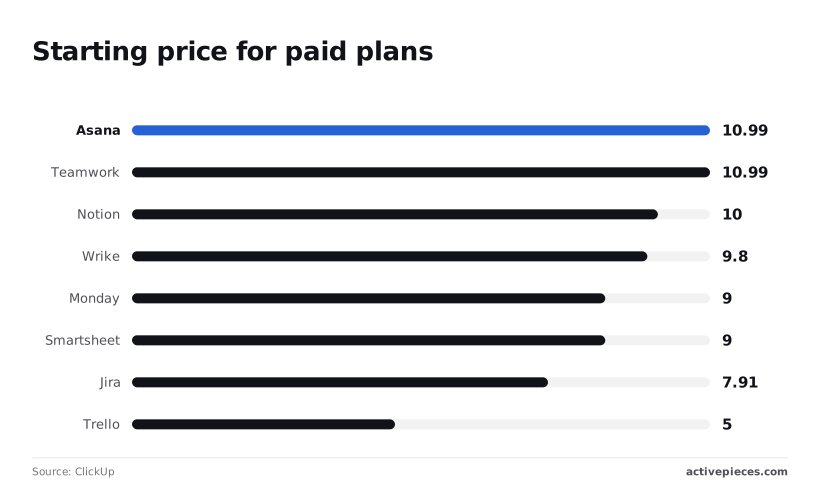
Asana and Teamwork both start at $10.99 according to ClickUp. This means a ten-person pilot requires a $1,318 annual commitment.
Notion follows at $10.00, which simplifies budgeting for document-heavy teams but lacks native automation depth, so organizations must sacrifice advanced workflow capabilities for predictable monthly costs.
According to ClickUp, Wrike positions itself at $9.80, while Monday.com and Smartsheet share a $9.00 floor, making these platforms the more cost-effective choice for budget-conscious organizations, as they allow teams to allocate fewer resources toward software licensing, which means these companies can redirect saved capital into operational expansion.
The case for staying within the ClickUp ecosystem
ClickUp remains a formidable choice for organizations that value extreme centralization over specialized performance. For teams that do not have the technical resources to manage multiple API keys or a central automation hub, the platform provides a ready-made environment where every tool is already connected.
ClickUp's unified search across tasks and docs
The primary advantage of the ClickUp architecture is the ability to search across every document, task, and chat message from a single search bar. This eliminates the "silo effect" where information is lost between a dedicated wiki and a separate project tracker.
For small to mid-sized teams, the convenience of a unified inbox often outweighs the latency issues that larger enterprises face.
Rapid deployment of new workflows
Because the feature set is so broad, a team can launch a new department (such as HR or Customer Support) without vetting a new vendor. They simply enable a new Space or Folder within the existing hierarchy.
This speed of deployment is valuable for startups that are still defining their internal processes and need to pivot their workflow structures weekly.
Native feature parity and cost efficiency
While specialized tools often charge premium prices for advanced features like Gantt charts or time tracking, ClickUp includes these in its core offering. For a budget-conscious manager, paying for one "everything" seat is significantly cheaper than paying for five separate best-of-breed licenses.
This makes it a logical choice for teams that need a wide range of basic utilities rather than deep, specialized power in a single area.
Monday.com for visual resource and workflow management
Monday.com functions as a visual database that allows teams to construct specialized project trackers. By treating every row as a flexible item, it gives the transparency needed for high-level resource allocation.
Customizing the Work OS interface
The interface centers on boards where every column type defines how data behaves. Status labels trigger color-coded visual cues for immediate recognition of bottlenecks. Without clicking through individual tasks, a manager can view team capacity and project budgets in a single pane.
Monday.com automation versus external AI integrations
Internal automation relies on a "trigger-condition-action" recipe system. While these native recipes reduce manual data entry, they operate within the Monday environment.
When workflows involve specialized LLMs, teams connect to external models to process board data. Gemini 3.8 Flash summarizes high-volume status updates into executive reports. Claude Opus 5.5 analyzes complex project documentation attached to items.

GPT-6 Astra generates code snippets or technical specifications based on board requirements.
Monday.com pricing tiers and seat requirements
Access to advanced features is governed by a tier system. The Basic tier has fundamental board creation, while the Standard tier adds automation and external integrations. Enterprise-grade security requires the highest tier.
Because the vendor enforces seat minimums, a small team must pay for a fixed block of licenses even if their actual headcount is lower.
Asana for enterprise-scale coordination and goal tracking
Asana prioritizes structural stability and executive-level visibility over rapid feature iterations. While frequent interface overhauls in competing tools can force retraining cycles, Asana maintains a consistent environment designed for long-term roadmaps.
Managing cross-departmental dependencies
Asana uses a dedicated dependency management system that allows project managers to link tasks across different projects. When a delay occurs in a product launch schedule, the system automatically alerts the marketing team waiting on final assets.
Departments can negotiate timelines based on actual blockers rather than estimated completion dates.
Asana's work graph model for task relationships
The Work Graph data model maps the relationships between individuals, tasks, and organizational goals. Multi-homing is possible here: a single task exists in multiple projects simultaneously without being duplicated.
When a developer updates a bug fix in a technical sprint, that same task reflects the update in a customer success tracker.
Enterprise security and reporting features
Asana has Service Accounts and an Audit Suite to track user activity, which is necessary for organizations maintaining strict compliance standards.
The Universal Reporting dashboard aggregates data from every project in the organization into a single view, allowing executives to monitor team capacity without manually auditing individual workspaces.
Reading a table only gets you so far. Build the same workflow in Activepieces and compare it yourself.
Jira for technical teams and software development
Jira remains the industry standard for engineering teams that require deep integration with the software development lifecycle. Its architecture is built around the specific needs of Agile methodologies and version control systems.
Agile frameworks and sprint management
The platform provides native support for Scrum and Kanban boards, allowing developers to manage backlogs and track velocity with precision. Because it integrates directly with Bitbucket and GitHub, status updates can be triggered by code commits or pull requests.
This reduces the need for manual status reporting during active development cycles.
Jira's permission schemes and issue tracking controls
Jira allows for highly specific permission schemes that control who can view, edit, or transition specific issue types. This level of detail is essential for large engineering departments that must maintain strict separation of duties.
While this complexity can lead to configuration debt, it provides the rigor necessary for technical project governance.
Notion for document-heavy teams and internal wikis
Notion serves teams that prioritize structured knowledge. While project software often treats documentation as an attachment, this approach reverses the hierarchy by placing the "Source of Truth" at the center.
Notion's flexible databases versus fixed task lists
Notion utilizes a relational database model where users define their own properties. This allows a single set of data to be filtered into a Kanban board for developers, a calendar for marketing, and a gallery view for creative assets.

A status change in one view updates all others instantly.
Notion AI and knowledge management
Centralizing documentation allows for automated retrieval. By indexing every page, Notion AI can answer natural language queries about company policy. Using Gemini 3.8 Flash for summarization or Claude Opus 5.5 for reasoning, the system can synthesize meeting transcripts into actionable project briefs.
Activepieces for building a modular productivity stack
Activepieces enables the move away from monolithic software toward a modular stack where specialized tools are linked by a unified automation backbone.
By acting as the central nervous system for your operations, it allows teams to use the best tool for every specific task rather than compromising on a platform that does everything poorly.
Replacing ClickUp's internal automations with open-source flexibility
Activepieces provides an MIT-licensed core that replaces the "black box" logic found in ClickUp’s native builder with fully transparent, self-hostable workflows. Activepieces allows developers to write custom integrations in TypeScript.
Because the platform can be self-hosted, your automation logic and sensitive API keys remain behind your firewall.
The platform's 738+ integrations grow based on user needs; roughly 60% are community-contributed, meaning the ecosystem expands organically to address specific niche requirements without waiting for official developer updates.
Check the open-source monorepo on GitHub to see how these connectors are built and maintained by the community rather than waiting on a vendor's roadmap.
Syncing Jira, Slack, and Google Workspace without code
The platform coordinates data handoffs between specialized tools. Jira is the source of truth for engineering. Slack is the notification layer. Google Workspace handles document storage.
When a status change occurs in the project management software, it can automatically trigger a document generation step, removing the need for manual data entry.
Scaling workflows without per-task pricing penalties
Activepieces removes financial friction by decoupling the automation platform from the cost of the underlying intelligence. Activepieces allows you to connect directly to your own API accounts for frontier models.
Claude Fable 5.1 handles demanding reasoning and long-horizon agentic work. Gemini 3.8 Flash processes high-throughput summarization and enterprise workflows. GPT-6 Astra manages the most complex coding and reasoning tasks. This architecture ensures you aren't penalized with escalating per-task fees as your volume grows.
By consolidating enterprise-grade governance features like RBAC, SSO, and git sync into a single, transparent platform, Activepieces eliminates the need to manage fragmented security tools across a modular stack.
Activepieces is the better choice for organizations that require a unified automation backbone with full administrative control and self-hosting flexibility.
Its ability to provide a complete suite of audit logs and event streaming without compromising features between cloud and on-premise versions makes it the superior fit for teams prioritizing comprehensive governance.
How to choose your next project management platform
Selecting a platform involves matching your team’s operational complexity to a tool’s specific structural constraints.
Auditing your current ClickUp usage patterns
Identifying which features your team actually relies on prevents you from paying for redundant capabilities. Examine your workspace to determine if your data is primarily structured as hierarchical tasks or if you're using the platform as a makeshift database.
If your team spends more time managing notifications than completing work, you're likely suffering from feature bloat.
Choosing one all-in-one tool versus best-of-breed apps
A single platform reduces the need for synchronization but often results in mediocre performance for specific tasks like high-level resource planning.
Conversely, a best-of-breed approach allows you to pair a dedicated task manager with a specialized documentation tool, ensuring each department has the exact interface they need.
How to migrate your tasks and documents
- Map your current custom fields to the destination platform’s data types to avoid losing historical context.
- Export all attachments separately, as most CSV-based migrations will only carry over text.
- Run a pilot migration with a single project to verify that user permissions and notification settings translate correctly before moving the entire organization.
Frequently asked questions about ClickUp alternatives
Can I export my ClickUp data directly to Monday or Asana?
Direct, one-click database migrations between these platforms aren't supported. You must rely on CSV exports or third-party middleware to move your tasks.
When moving to Monday, you can import Excel or CSV files, but you'll need to manually map your ClickUp Custom Fields to Monday’s column types to avoid data loss.
Asana provides a CSV importer that handles basic task names and due dates. Nested subtasks often flatten into a single list during the transition, requiring manual reorganization of your project hierarchy.
Which alternative has the best offline mode?
Most modern project management tools operate as web-first applications. This results in significant functional gaps when an active internet connection is lost.
Asana allows you to create tasks and heart items while offline on mobile devices, but these changes only sync once you reconnect to a network.
Monday offers a read-only mode for previously loaded boards. This prevents you from updating statuses or adding comments until you're back online.
Smartsheet needs a constant connection for its grid interface, meaning you can't open or edit sheets in a disconnected environment.
Are there free alternatives for small teams?
Free tiers exist across the market, but they function primarily as entry points with strict caps on advanced features or seat counts.
Asana offers a Personal tier for individuals and small teams that includes unlimited tasks and projects, but it restricts access to Timeline view and automated workflows.
Monday provides a Free version limited to two seats, which serves as a basic task list rather than a collaborative project engine, effectively excluding teams that require multi-user coordination, thereby forcing growing groups to upgrade to a paid tier immediately, so scaling businesses must factor subscription costs into their overhead sooner than anticipated.
Trello’s free version allows for unlimited cards but limits the number of Workspace command runs. This restricts how much you can automate repetitive board actions.
Do these tools offer native time tracking?
Native time tracking is frequently gated behind higher-priced subscription tiers rather than being a standard feature across all versions.
In Monday, the Time Tracking Column is only available on Pro and Enterprise plans. Teams on the Basic or Standard tiers must integrate external software like Toggl.
Asana includes native time tracking on its Advanced and Enterprise levels, providing built-in reporting on estimated versus actual hours.
For tools without these native counters, you must use browser extensions or API-based integrations to log duration against specific tasks.
Related reading
References
Still comparing
The fastest way to settle it is to build something.
Open source under MIT, so you can self-host the same thing later.
Start free Talk to sales