n8n Insights Dashboard Limits by Plan in 2026

Oct 26, 202615 min read
What n8n Insights is and what it answers
What n8n Insights is in short
n8n Insights is the built-in dashboard that reports on the health of your production workflows: how often they run, how often they fail, and roughly how much time they save.
Much like the run summaries in other automation tools such as Activepieces, it answers "is this estate healthy over time?" and nothing finer.
At 2 a.m., when a revenue-critical workflow stops syncing orders, a trend view tells you nothing. On Monday it tells you that failures went up.
It reads from executions that have already completed, so everything it shows is a record of the past, filtered by your plan and by how you have configured execution logging.
Used as intended, it's a useful weekly check: which workflows are drifting, which are quietly expensive, which justify their upkeep. Used as a control, it creates a gap between what leadership believes is monitored and what anyone actually watches.
What n8n Insights does not do
It doesn't alert you, because it pages no one when a run fails. It's not a per-execution debugger, because it aggregates rather than showing the inputs and outputs of a single failed run.

And it doesn't give you an audit trail, because a summary of counts cannot prove who changed what, or reconstruct a specific run for a reviewer.
For rollback and incident review, you need those three jobs covered by something else, which means an outage blocks both.
We checked this guide on 26 October 2026 against n8n's own documentation and the Insights behavior visible in the product. Because plan limits and retention rules change, this opening section quotes no figures.
Everything below works on Activepieces' free plan. Start without code or a credit card.
Metrics shown on the n8n Insights dashboard
None of these metrics can warn you about a run that hasn't happened yet or explain why one went wrong. Each is a count of runs that already finished.
Before you quote any figure to someone who funds the workflow, take its limit from this table, which sets what n8n's docs say each metric counts against what it cannot tell you.
| Metric | What the docs say it counts | What it cannot tell you |
|---|---|---|
| Production executions | Runs triggered in production, not manual test runs | Whether those runs produced the right business outcome |
| Failed executions | Production runs that ended in an error | Which error, who was notified, or whether anyone fixed it |
| Failure rate | Failed runs as a share of production runs | Whether a low rate hides one critical workflow failing repeatedly |
| Time saved | A value you assign per workflow, summed across runs | Whether the saving is real; it's an estimate you entered |
| Average run time | The mean duration of production runs | Where inside the workflow the time goes |
| Previous-period comparison | The change against the preceding period | Whether the change reflects load, a code change or a settings change |
| Per-workflow table | The same metrics broken out by workflow | Step-level detail, payloads or who changed what |
The n8n Insights summary banner
For a quick trend check, the summary banner gives you the headline totals and their change against the previous period, and nothing more. A rising failure rate tells you to look; it doesn't tell you where.

Because the comparison depends on the period you select, record that choice whenever you report a number, or the next reader can't reproduce it.
To turn a vague trend into a named suspect, use the per-workflow table. Sort by failures to find the workflow worth opening first.
It still shows totals, not the failing step or the input that caused it, so you go to the execution log for the cause.
How n8n Insights time saved is set
You tell n8n what one run is worth, and it multiplies. Time saved is arithmetic on an assumption, so the figure is only as defensible as that input, and you should write down who set each value and on what basis.

If you can't reconstruct that reasoning for an auditor, don't present the total as a measured saving.
n8n Insights limits by plan and date range
Because your plan caps how much of the dashboard you can see, a correctly configured Insights view can still answer a narrower question than you think.
The table shows what we could confirm per tier on 26 Oct 2026; read every "Unconfirmed" as a gap to check before you buy.
| Plan | Dashboard availability | Date ranges | Retention | Who can view | Price | Executions |
|---|---|---|---|---|---|---|
| Community | Unconfirmed | Unconfirmed | Unconfirmed | Unconfirmed | Unconfirmed | Unconfirmed |
| Starter | Unconfirmed | Unconfirmed | Unconfirmed | Unconfirmed | 20 € per month | Unconfirmed |
| Pro | Unconfirmed | Unconfirmed | Unconfirmed | Unconfirmed | 50 € per month | Unconfirmed |
| Business | Unconfirmed | Unconfirmed | Unconfirmed | Unconfirmed | 667 € per month | Unconfirmed |
| Enterprise | Unconfirmed | Unconfirmed | Unconfirmed | Unconfirmed | Unconfirmed | Unconfirmed |
We confirmed only the prices, so verify the rest on your own instance before building a review process around any tier.
What a 7-day n8n Insights window hides
In n8n's source code, Insights is kept for 365 days but raw executions for only 14. That means a year-long trend survives. The individual failed run you need to explain an audit question is gone after two weeks.

For alerting, many teams add Prometheus, the open-source metrics store, and it keeps 15 days by default, one day more than executions, meaning metrics outlast the execution context they document. It's no substitute for history either.
A short window also hides anything slower than a week, such as a monthly billing job that quietly started failing.
What the plan upgrade costs
According to n8n's pricing page, Starter is 20 € per month and Pro is 50 €. Moving up costs 30 € a month, which is trivial against one missed failure.

At 667 €, Business is a further 617 € over Pro, so don't buy it for the dashboard alone. Pay for it only if you need the other things that tier brings, and keep your alerting and audit records outside Insights regardless.
Mistakes that make n8n Insights numbers misleading
Most wrong conclusions from Insights begin with a figure the docs already qualify. Below, the list pairs six common misreadings with what the documentation says in correction.
- Manual runs look missing, because the docs state that only production executions are counted.
- Time saved looks like zero, because the docs say it appears only once you set it per workflow.
- A low failure rate looks like success, but the docs define it as failed runs against total runs, not as correct outcomes.
- A quiet workflow looks healthy, but the docs describe a summary of executions that happened.
- Instance totals look like your team's numbers, but the docs scope figures by instance or by project.
- A long trend looks complete, but the docs tie how far back you can see to your plan.
If you tested heavily and the totals look low, that's by design, not data loss. Insights leaves manual runs out.
When a workflow's trigger breaks, it produces no executions, so it produces no failures either. Absence is invisible here, which is why external alerting is required.
Before you promise anyone a year-over-year view, check how far back your plan lets the data go, and export what you need to keep.
Easier to see it running than to read about it: set it up free, no card.
n8n Insights use cases and limitations
As a trend view of production workflows, Insights earns its place. It can't be the system that tells you a failure happened or proves what occurred, because it summarizes runs that have already finished.
Four things n8n Insights does well
It pays off in four places. It shows which workflows fail most often, so you fix the noisy one first and stop guessing.
It shows whether failure rates are rising or falling after a release, which gives you evidence for keeping a change or rolling it back.
To see which automations the business actually depends on, watch how run volume shifts over time in Insights. And it gives non-engineers a readable summary, so an executive can see health without opening the execution list.
Jobs n8n Insights cannot do
It can't wake anyone at 2 a.m., and it can't reconstruct what a single run did. Those jobs belong to other tools, and the table shows how each one answers a different question and how quickly you learn of a failure.
| Tool | Question answered | How fast you learn of a failure | Plan needed |
|---|---|---|---|
| Insights | Is the fleet healthy, and which way is it trending? | After the fact, when someone looks | Depends on your plan and settings |
| Execution list | What happened in this one run? | When someone opens it | Available on all plans, with retention limited by your settings |
| Error workflows | Which run just failed, and who should know? | Immediately, as the failure occurs | Available on all plans, but you must build it |
| Log streaming | What is the permanent record of activity? | Near real time, in your own logging system | Higher-tier plans; confirm against current n8n documentation |
Build both before you rely on the dashboard: alerting belongs to error workflows, and your audit trail belongs to log streaming.
Routing n8n error alerts to external tools
If a second automation tool already routes tickets or on-call pages for you, an error workflow can send its webhook there, and Activepieces is one option.
A security review of that alert path tends to stall on trust in the vendor, and Activepieces has an MIT-licensed core, so the reviewer can clone the repository, read the queue and worker design, and run it self-hosted or fully air-gapped before the webhook goes live.
That is evidence a reviewer can file, where a maturity claim only reopens the question. It's a destination for alerts, not a record of what happened.
It doesn't replace the log store, and it can't tell you a schedule never fired, so keep the heartbeat check separate and independent of the platform it is watching.
Alerts and external monitoring for n8n Insights
Close the gaps with three integrations outside the dashboard, meaning you cannot rely on the dashboard alone. Use an error workflow that alerts you, an export that keeps history longer than your plan does, and a heartbeat that notices when nothing runs at all.
Each covers something Insights can't see.
Error workflow alerts
Attach an error workflow to every production workflow and have it post the workflow name, the failing node and a link to the execution into your team's chat channel.
Failures then reach a person within minutes, instead of surfacing when someone reads a failure-rate trend days later.
Stream execution logs to an external store you own, such as a log platform or a database. Insights shows only the date range your plan allows, so anything older may not be visible when an auditor asks what ran and who changed it.
Your own store sets the retention, and you can reconstruct events and show evidence for a rollback decision.
A Monday plan for reading n8n Insights
Configure it first and keep a record outside it, and Insights earns its place. Six steps in order get you there without turning a trend view into something it was never built to be.
The sequence below gives each step a specific misreading to prevent.
- Confirm your plan and the date range Insights actually covers.
- Set the time-saved value on your ten most important workflows.
- Record a failure-rate baseline.
- Attach an error workflow to every production workflow.
- Schedule a weekly export.
- Recheck the release notes every quarter.
Today, before anything else
Start with steps one and two. Check which plan you are on and how far back the dashboard reaches, because a short window means a trend you can't see, and a decision made on it is a guess.
Then enter a time-saved estimate on your ten busiest or most valuable workflows. Without it, the savings total is blank or misleading.
This week
Record the current failure rate as your baseline, so a later rise means something against a known starting point. Then attach an error workflow to each production workflow.
Finally, schedule a weekly export of the figures. If the plan trims history, the export is your retained record and your route back to an earlier state when a change goes wrong.
Quarterly n8n Insights review checklist
Reread the release notes for changes to Insights, including what each plan includes and how metrics are calculated. A definition that shifts quietly breaks your baseline comparison.
When one does, note the date in your export log and restart the baseline.
What Activepieces does about this
The gap this article describes is between a summary of finished runs and the two things you need in production: a notice when something fails, and a record you can show a reviewer.
Activepieces is an automation platform, and it approaches that gap by keeping run-level detail in the product rather than leaving it to a trend view.
Each flow run is stored with its step-by-step inputs and outputs, and you can open a failed run, see the step that broke, and retry from that step. That covers the per-execution debugging job that a dashboard of counts cannot do.
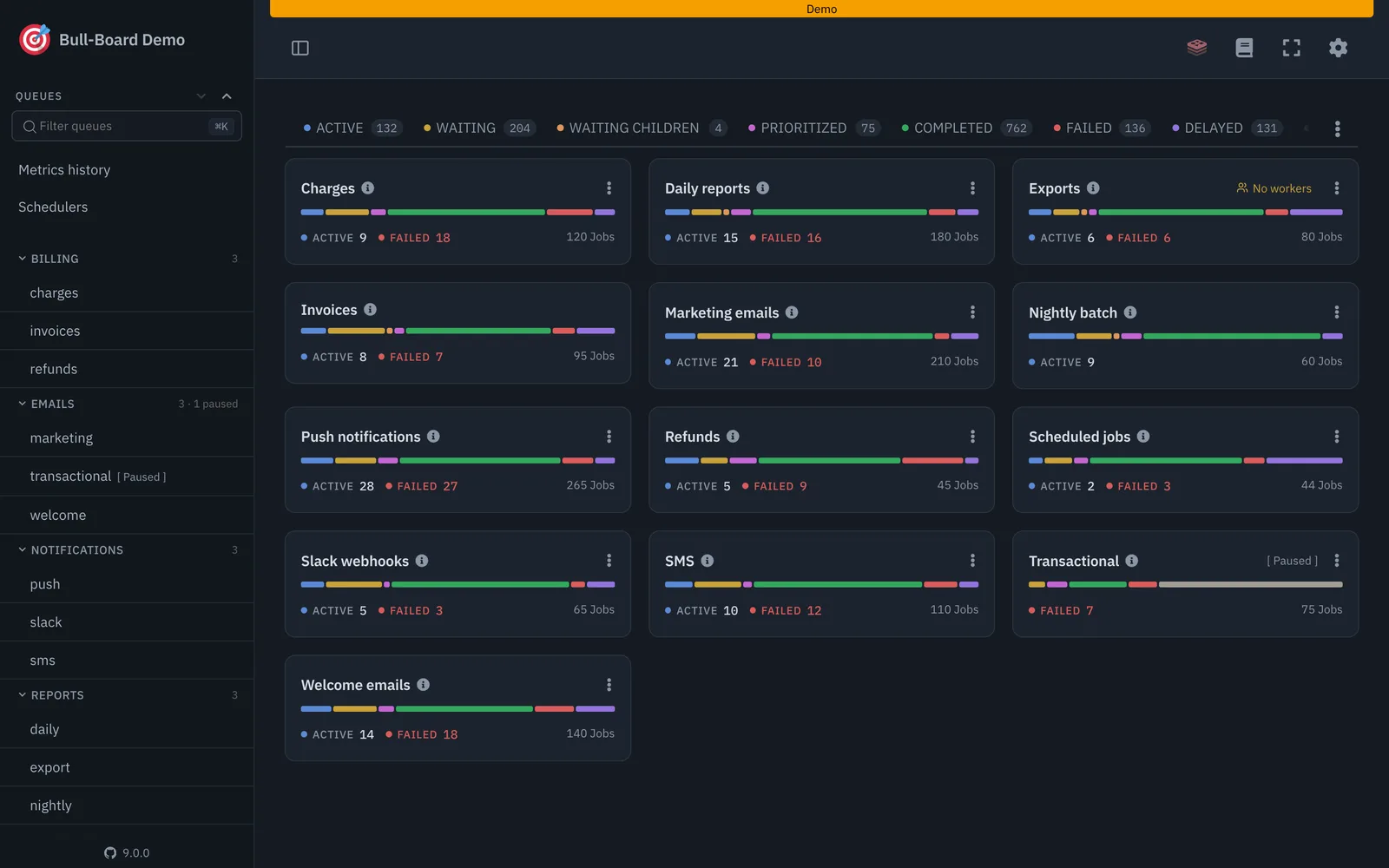
Alerting is part of the same design. You can set a failure notification on a project, and you can also build a flow that is triggered by failures and sends them to chat, email or a pager, which matches the error-workflow pattern recommended above.
I have not verified retention limits or alert options for each Activepieces tier, so check them against the current Activepieces documentation before building a process around them, just as you would for any n8n plan.
The part that matters most for audit is the licence. The Activepieces core is MIT-licensed, so you can clone the repository, read how the queue and workers behave, and self-host it on your own infrastructure.
Run history then sits in a database you control, and you set how long it is kept. Nothing about your retention depends on what a vendor's plan allows, which is the limit this article keeps returning to.
Activepieces will not replace the independent heartbeat check, because a platform cannot reliably report its own silence.
If you are weighing it against n8n, keep the test simple: ask which tool lets you see a single failed run, alert on it, and keep the record for as long as your auditors require.
Insights remains a useful weekly trend view whichever tool you choose.
Frequently asked questions
Below, each answer was checked against n8n's Insights documentation page on 26 Oct 2026. Where that page is silent, we say so rather than guess.
Plans and scope
Is n8n Insights free on the Community edition? Partly. The Community edition includes only the 7-day summary banner, not the full dashboard.
Budget for that gap, because it limits how far back you can compare. The plan-by-plan limits are on n8n's Insights page, so confirm them there before relying on a trend.
What the dashboard shows
Can I see Insights for a single workflow? Yes. The dashboard breaks the same measures down per workflow, so you can find the one driving your failures.
Treat that as a pointer to where to look, not as a record of why it failed. For the cause, you still open the execution itself.
Does n8n Insights count manual test executions? No. Insights is built around production runs, so your test clicks shouldn't distort the picture.
The consequence is that a workflow you only ever run by hand will look quiet on the dashboard. Absence from Insights doesn't mean the workflow is idle.
Exports and access
Can I export n8n Insights data? n8n's page doesn't describe an export feature as of 26 Oct 2026. Plan as though the dashboard can't hand you a file.
If someone needs evidence for a review or an audit, keep your own log of executions and outcomes outside the dashboard.
Who can see the n8n Insights dashboard? It is available on n8n Cloud Pro and Enterprise, and on self-hosted Business and Enterprise, according to n8n's documentation.
That keeps it narrow, but it also means an operations lead without an admin role may have no view at all. Decide who needs access before an incident, not during one.