
n8n Custom Variables: How They Work and Plan Limits

Oct 26, 202614 min read
Read-only, set once outside your workflows and read inside them through $vars: that is what n8n custom variables are. They're key-value pairs holding non-secret values such as a base URL or a region code, and they depend on your plan.

n8n custom variables: what they are and require
What n8n custom variables are and do
Think of a custom variable as a named constant that every workflow in the instance can see. You define it in the n8n interface, then reference it as $vars.myKey.
A workflow can't change it, so it can't count runs or remember the last record it processed. If you need a value to change at runtime, you need a different tool, whether n8n's data tables or an external database.

Teams comparing automation tools, Activepieces among them, should check that this limit fits their design.
Custom variables vs environment variables vs credentials
Only credentials are built to hold secrets, so that column decides where a value belongs. The table shows three different homes for configuration.
| Where set | How read in workflows | Writable from workflow | Safe for secrets | Plan requirement (26 Oct 2026) | |
|---|---|---|---|---|---|
| Custom variables | n8n interface | $vars |
No | No | Pro and Enterprise on Cloud; Business and Enterprise self-hosted |
| Environment variables | Server or host configuration | $env |
No | No, readable by anyone who can edit a workflow | Not stated |
| Credentials | Credentials area of the interface | Selected on a node, not typed into expressions | No | Yes, stored encrypted | Not stated |
Anything that's a password, token or API key belongs in the last row. The other two rows are for settings you would be comfortable seeing in a screenshot, which means the first row contains settings unsuitable for public exposure.
Which plans and permissions are required
On n8n's pricing page, Community costs 0 € per month, Starter 20 € and Pro 50 €, and the page lists Community first.
At 667 € per month, Business is more than thirteen times the Pro price, so a team that needs only variables shouldn't assume a jump to Business is the cost of getting them.

The pricing page doesn't say which of these tiers include custom variables, but the docs do: Pro and Enterprise on Cloud, Business and Enterprise self-hosted. Confirm availability in the n8n docs and in your own instance before building around them.
At 667 € per month, Business is more than thirteen times the Pro price, so a team that needs only variables shouldn't assume a jump to Business is the cost of getting them.
Permissions are a second check: defining a variable is an administrative action, so an ordinary workflow editor can read variables but may not be able to create them.
Everything below works on Activepieces' free plan. Start without code or a credit card.
Stage 1: create a variable and read it
From an account that's allowed to define variables, you add one on the Variables screen and read it in a workflow through $vars.
Add the variable
Open the Variables screen from the left-hand navigation and choose the button to add a new variable. If the screen or button is missing, your plan or role is the cause, not your setup.
Enter a key and a value, then save. Keys should use only letters, numbers and underscores, so support_email works and support-email doesn't. Pick a name a teammate can read without context, because every workflow in the instance will see it.
In the screenshot below, a "New variable" dialog has a name and a value filled in. Its value is a live-looking payment API key, which is exactly what you shouldn't enter here.
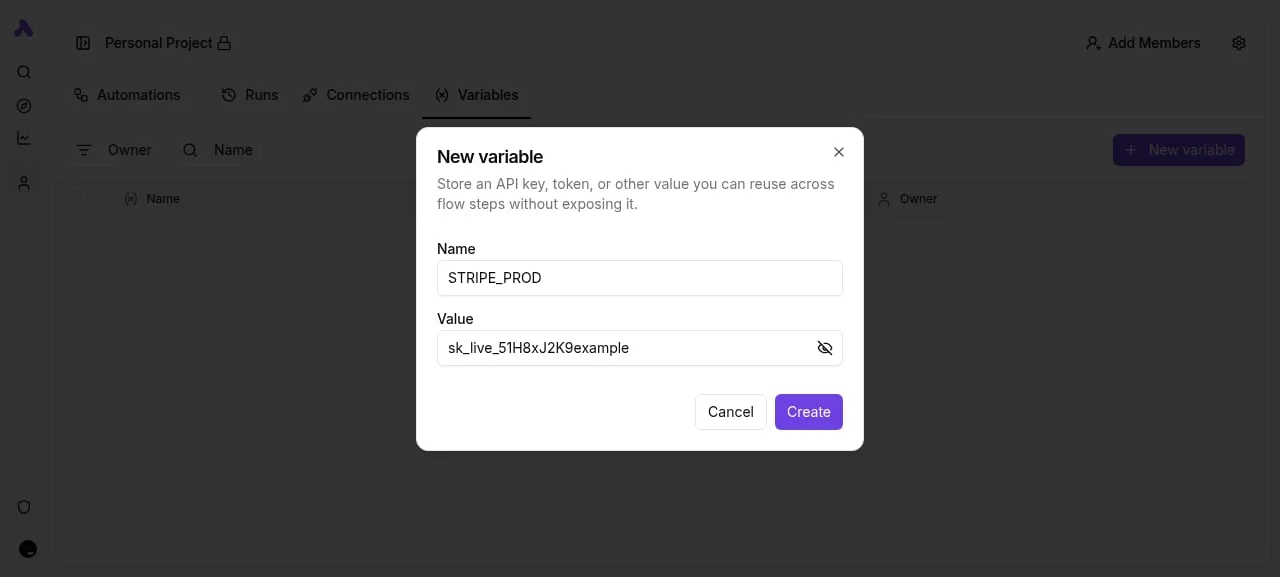
Variables are plain values that anyone with workflow access can read, so a key like that belongs in a credential.
For this walkthrough, use something harmless, such as support_email with an address your team already publishes. That gives you a safe value to test with, and it's the kind of shared, non-secret setting variables suit.
Read it with $vars in a Set node
Build the workflow in three steps:
- Create a new workflow and add a Manual Trigger, so you can run it on demand with no external event.
- Connect a Set node after it and add a new string field, for example
contact. - In the value box, switch to expression mode and enter:
{{ $vars.support_email }}
Use the exact key you saved, including case. A typo here doesn't fail loudly in every setup; you may just get an empty field.
The workflow can read the variable but can't change it, so the Set node outputs a copy and the stored value stays as it was.
Confirm the value in the execution
Run the workflow with the test button and open the Set node's output. You should see your field populated with the stored value, not the expression text. That proves the variable exists, the key is spelled correctly and your workflow can reach it.
If the field is empty, check the key spelling first, then confirm the variable was saved.
Stage 2: use variables for real workflow settings
Once the value reads back correctly, put variables to work on the settings that change most often: base URLs, thresholds and channel names.
Using n8n variables for base URLs
In the HTTP Request node, replace the hard-coded host with an expression such as {{ $vars.API_BASE_URL }}/orders. Every workflow that calls the same service now reads one value.
When the vendor moves to a new host, you edit the variable once and rerun, and each workflow follows without being opened.
In the canvas below, a four-step flow puts the HTTP request between a code step and an agent step, which reads earlier results by reference. Treat a shared setting the same way: reference it, never paste it.

Next comes a threshold, which controls which branch a run takes.
Using n8n variables for IF thresholds
Put the number that defines "too large" or "too old" in a variable, for example ORDER_REVIEW_LIMIT. In the IF node, compare the incoming field against {{ $vars.ORDER_REVIEW_LIMIT }}.
Finance then changes the limit in one place, and you rerun to confirm items now route to the other branch.
Do the same with the Slack channel. Store ALERTS_CHANNEL and reference it in the Slack node's channel field.
Because variables are read-only inside workflows, a workflow can't update a threshold for the next run. If a value must change as a result of a run, it belongs in a data table or a database, not here.
Test versus production values
Keep the same variable names in every environment and give each instance its own value. Test points API_BASE_URL at a sandbox address and posts alerts to a test channel. Production holds the live address and the real channel.
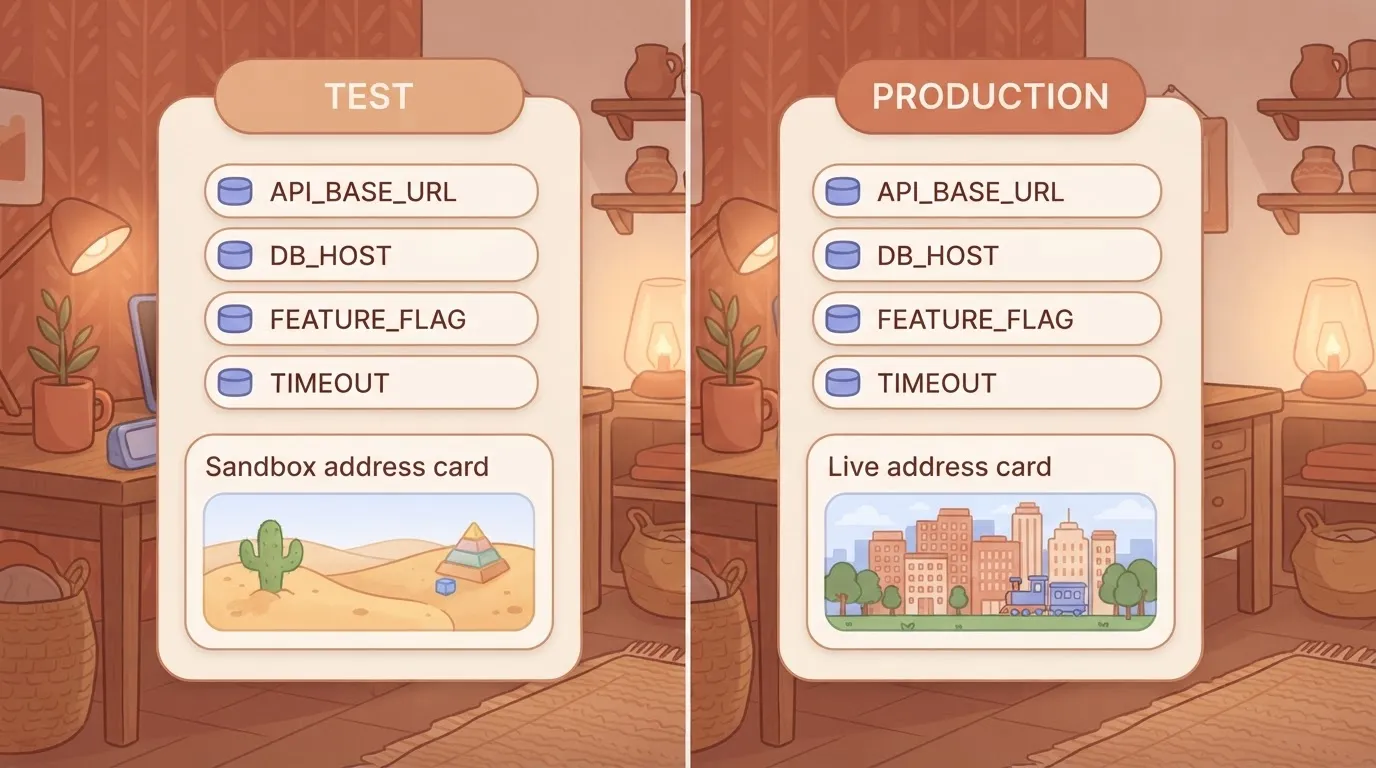
This is what makes templates a lever you can measure. A workflow exported from test imports into production with no edits, so the only thing to check after import is that each variable exists and holds the right value.
Easier to see it running than to read about it: set it up free, no card.
Mistakes with n8n custom variables and fixes
Before you read any code, you can usually recognize the symptom: most variable failures trace back to six mistakes.
The table below pairs each symptom with its cause and fix, so a team can match a failing run to a known pattern and skip the debugging.
| Mistake | Symptom | Cause | Fix |
|---|---|---|---|
| Secrets in variables | An API key is visible to anyone who can view variables | Variables are plain values, not encrypted credentials | Move the key into a credential and rotate the exposed one |
| Writing to variables | A workflow runs but the value never changes | Variables are read-only inside workflows | Keep changing state in a database, data table or static data |
| Wrong expression syntax | Empty output or an expression error | The variable is referenced with the wrong prefix or path | Use the $vars prefix, as in {{ $vars.myName }} |
| Non-string assumptions | A comparison fails or a number behaves like text | Values arrive as strings | Convert explicitly, for example with Number() |
| Assuming every plan has them | The Variables screen is missing or locked | The feature is plan-gated | Check your plan first, or use another mechanism |
Confusing with $env |
A value set in one place is blank in the other | Variables and environment variables are separate stores | Reference each with its own prefix |
Secrets belong in credentials
Putting an API key in a variable is the most serious mistake, because a variable is built for shared, non-secret values such as a base URL or a region code. It has none of the protection a credential gives a secret.

The fix is mechanical: create a credential, point the node at it, and delete the variable. Treat the old key as exposed and replace it, since anyone with access to variables could have read it.
Variables are read-only inside workflows
Reading is all a workflow can do with a variable; it can't update one. Teams building counters, "last run" timestamps or cursors for pagination tend to hit this first, because it feels like a natural use.
It's a data store job, so move that state to a database or a data table, and keep variables for settings that a person changes deliberately.
n8n variable syntax and type errors
- Reference variables through
$vars, not through$envor a bare name - Expect every value to be text: a "true" is a string, and "10" won't compare as a number until you convert it
- When a run fails on an empty expression, check both the spelling and the conversion
Plan and access surprises
If a screen appears in a colleague's setup but not in yours, the reason is that variables are not on every plan.
Don't confuse them with $env, which reads environment variables set on the host and is a separate store. A value defined in one won't appear in the other, so decide which one owns each setting and document that choice.
When variables are not enough and where Activepieces fits
Once you have decided who owns each setting, anything that's secret, changes while workflows run, or must differ by environment belongs somewhere other than a variable.
The trouble usually starts when a second team begins copying workflows, and the first guardrail to go is often a sales operations team pasting an API key into a variable because it was the quickest field to find.
Alternatives inside and outside n8n
Match the storage to the need rather than stretching variables to cover everything:
- Credentials, for secrets, because they are stored encrypted and aren't exposed as readable text to people editing a workflow.
- An external config store, for shared configuration, because one source can serve several instances and has its own change history.
- Data tables or a database, for values that change at runtime, because workflows can write to them and variables can't.
- Separate instances per environment, for development, staging and production, because each keeps its own values and a mistake in one can't reach the others.
None of these is as quick as a variable; each costs a little more setup. That setup's also what makes a workflow reusable.
A template that points to a credential by name can be copied to a new team without carrying anything sensitive, so the adoption of your templates is easier to measure and safer to scale.
Secret exposure across integrations
Separate from n8n, Activepieces speaks to the first row of the mistakes table, the secret that ends up somewhere everyone can read it, and it does so across 744 integrations in an MIT-licensed core, so the secret-exposure vulnerability spans hundreds of services.
Activepieces supports secret managers in its enterprise governance and holds connection credentials centrally rather than per team, which comes with Ultimate and with self-hosted or air-gapped enterprise control.
The secret-manager support sits in the enterprise feature set beside SCIM, custom RBAC, SSO/SAML and audit logs, and MoneyGram, Moneypenny, Alan and FundingSocieties run Activepieces in production.
That's a description of its design as presented in its documentation, which changes over time. Check the current docs before you plan around it, because this article can't confirm plan limits or behavior as of today.
It's not a claim that switching tools fixes the mistakes above. A secret pasted into a shared setting is still a mistake in any product, and most teams will get further by applying the alternatives above inside the tool they already run.
Frequently asked questions
Once a pilot moves toward wider rollout, these are the questions teams ask. Each answer reflects n8n's documentation and pricing page as read on 26 October 2026, so check both again before you commit a plan.
Are n8n custom variables on the free self-hosted version?
No. According to n8n's documentation on 26 October 2026, custom variables are a paid-plan feature, so the free self-hosted Community edition doesn't include them.
A team still at the proof-of-concept stage should keep shared values in environment variables or a pinned configuration workflow, and treat the move to a paid plan as a rollout decision.
Can a workflow change a custom variable's value?
No. The docs describe variables as read-only inside workflows, as of 26 October 2026. A workflow can read a value through $vars but can't write one back.
Anything that must change at runtime, such as a counter, a last-run timestamp or a cursor, belongs in a data table or an external database. A variable that holds state is the first sign the feature is being used as a data store.
Are n8n custom variables safe for API keys?
No. n8n's docs say variables are for non-sensitive values, and that guidance was current on 26 October 2026. Variable values are visible to people who can view them, and they can appear in expressions and execution data.
Credentials are encrypted and scoped, which is why they exist. The team that pastes a key into a variable "just for the pilot" usually becomes the team that has to rotate it later.
How many custom variables can I create?
Before you design a naming scheme around dozens of values, check the pricing page for your tier: it ties the feature to the plan, as read on 26 October 2026, and I have no confirmed per-plan allowance to quote.
If you plan to give each client or environment its own set, count the variables first.
Do custom variables work in Code nodes?
Yes. The docs, as of 26 October 2026, show $vars as available in expressions and in the Code node, so a script can read a variable like any other built-in.
It's still read-only there. A Code node that tries to assign to a variable won't persist the change, so use it only for lookups such as a base URL or a feature flag.