
Stripe HubSpot Integration: Setup Guide (2026)

Oct 17, 202614 min read
Install the native Stripe app in HubSpot first, because it syncs customers and payments without a build, and add a workflow, whether in HubSpot itself or in an automation tool such as Activepieces, only for jobs it leaves undone.
Limits below were checked against vendor docs on 17 October 2026.
The Stripe HubSpot integration is the connection between a Stripe account and a HubSpot CRM that syncs customer and payment records, using HubSpot's native Stripe app first and a custom workflow only for tasks the app doesn't cover.
Stripe HubSpot integration: the fastest working setup
What the native integration syncs
Connect a Stripe account to HubSpot and customer and payment records come into the CRM. A rep sees what a contact paid without opening Stripe, so finance stops answering "did they pay?" by hand.
If you take payments through HubSpot, the fee's combined, and the payment method matters more than the plan. According to HubSpot:
| Payment type | Combined fee | On a $2,000 invoice |
|---|---|---|
| Domestic card | 3.65% | $73 |
| International card | 5.15% | $103 |
| ACH debit | 1.55% | $31 |
Steering large invoices to bank debit is worth more than any workflow tweak, because ACH costs less than half of a domestic card.
What the native integration does not do
Anything outside customer and payment sync needs separate logic. That means custom field updates on events the app doesn't expose, conditional routing, or writes to other tools. A workflow built in any automation tool fills those gaps.
Steering large invoices to bank debit is worth more than any workflow tweak, because ACH costs less than half of a domestic card.
Missing any of these tends to surface as a half-finished install or duplicate records:
- HubSpot permission to install apps
- Stripe admin access
- A shared email field on customers in both systems
- The correct Stripe account and currency
- A list of jobs the native app must cover
The email field matters most. It's the key that matches a Stripe customer to a HubSpot contact, so a customer who paid with a different address becomes a duplicate instead of a match.

This takes minutes, not a project: automate it in Activepieces free.
Connect Stripe to HubSpot in four stages
Work through four stages and the native app is syncing. Each leaves something you can check before moving on, which matters because email's the matching key and a bad first sync is hard to undo.
Install the app from the HubSpot marketplace
Sign in to HubSpot with a user who has permission to install apps, open the App Marketplace from the main navigation, and search for Stripe. Choose the listing published by Stripe, then select Install app.
Done means the app appears in your connected apps list. Nothing syncs yet, and that's the correct state.
Authorise Stripe and choose what to sync
Partway through the install you land in Stripe to approve access. Use a Stripe login that can authorise third-party apps, and confirm you're in the right Stripe account before approving, since the wrong one's the commonest cause of "the data is missing" tickets.

Back in HubSpot, pick which objects to sync, such as customers and payments, and review how Stripe fields map to HubSpot properties.
Sync only what a report or a workflow will use, because every extra object is another thing to audit. Done means the connection shows as active with your chosen objects listed.
Confirm the first customer and payment appear
Pick a Stripe customer you know well, ideally one who has paid, and search for their email in HubSpot contacts. You should see one contact, not two, with payment information attached.
If you see a second contact, compare the email Stripe holds with the one HubSpot holds.
Don't trust a "sync complete" status as proof. Open the records.
Test with a Stripe test-mode payment
Before real customers depend on this, create a payment in Stripe's test mode using an email address that already exists as a HubSpot contact. Then watch whether it matches.
Test mode may not flow through the app at all, so treat a silent absence as a finding, not a failure of your setup.
If test data does sync, delete the test contact afterwards so it doesn't pollute lists. If it doesn't, run one small real payment on a staff email instead, and note the result.
Field mapping between Stripe and HubSpot records
Each Stripe record maps to one HubSpot object through one matching key, and the gaps in that mapping are what stage two has to fill.
| Stripe record | HubSpot object | Matching key | Behaviour on mismatch | Vendor doc page |
|---|---|---|---|---|
| Customers | Contact | Email address | A different email produces a second contact | Stripe API reference, Customers; HubSpot Knowledge Base, Stripe app |
| Charges | Payment | Stripe charge ID, associated through the customer | A payment with no matching contact sits unassociated | Stripe API reference, Charges |
| Invoices | Invoice | Stripe invoice ID | An invoice for an unmatched customer has no contact to attach to | Stripe API reference, Invoices |
| Subscriptions | Subscription | Stripe subscription ID | A subscription for an unmatched customer is orphaned | Stripe API reference, Subscriptions |
| Products | Product | Stripe product ID | A renamed or recreated product appears as a new entry | Stripe API reference, Products |
Treat the mismatch column as what I would expect, not what I have verified for your portal. Reproduce each row in a test portal with deliberately mismatched data before trusting it.
Matching a Stripe customer to a HubSpot contact
The cause is almost always an email that differs between checkout and the CRM, such as a work address in one and a personal address in the other. Email's the key, so the sync sees two people, and the payment history splits across both.
Fix the contact data before widening any workflow.
Properties created by the sync
Once the app runs, it adds its own properties and objects to your portal. Mapping a workflow onto those, rather than onto custom properties you invent, avoids two fields holding the same fact with different values.
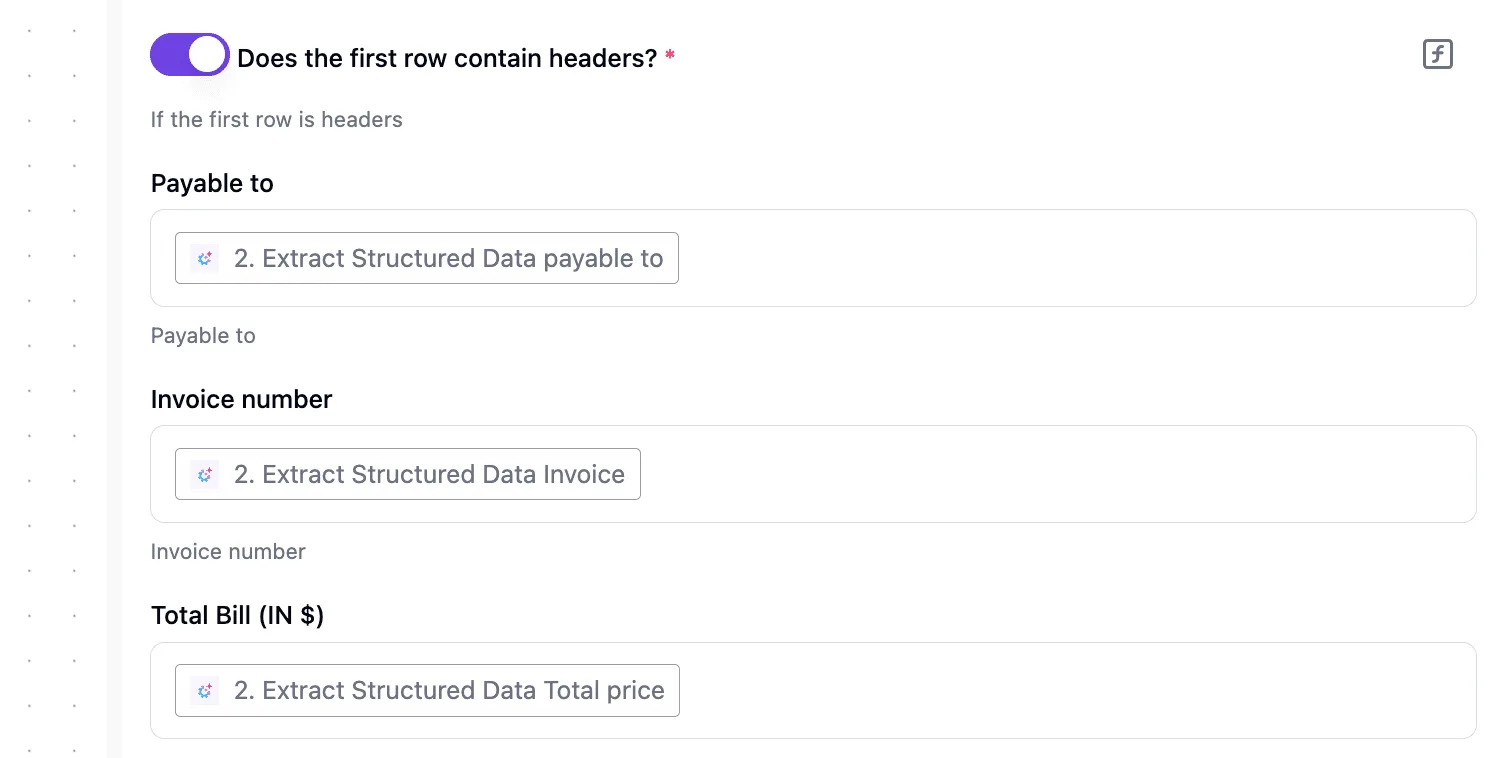
Stripe invoices to HubSpot deals and line items
Check this row yourself, because deals and line items are where the native app is least likely to do what you assume. Don't assume a paid invoice moves a deal stage or that a subscription line becomes a deal line item.

Create a test invoice, watch what HubSpot records, and only then decide whether a workflow should create or update deals.
If the deal stage is the gap, Activepieces has both a Stripe integration and a HubSpot integration, so a Stripe payment can update a HubSpot deal without code.
They are two of the 741 integrations in the packages/pieces/community folder of its public monorepo, which is where that count comes from rather than a marketing page, so the platform supports extensive third-party integrations.
Roughly 60% of that folder was contributed by the community, and the contributor attribution on each integration shows who wrote it.
The core is MIT-licensed, so if a trigger or action you need is missing, you can have AI draft the missing integration and run it only on your own instance rather than wait on a vendor release.
MoneyGram, Moneypenny, Alan and FundingSocieties run it in production.
You can follow the rest of this with the builder open. Start free, no card.
Stripe HubSpot sync limits and errors
Four causes account for most failures: duplicate contacts, missing payments, rate limits and update loops.
Confirm the "not documented" rows in your own portal before relying on them; the table below lists each symptom with its fix and whether the vendor documents it.
| Symptom | Fix | Source page | Documented? |
|---|---|---|---|
| Duplicate contacts | Match on email, lowercase it first | HubSpot contacts docs | Not documented as a sync failure |
| Missing payments | Check webhook delivery log, resend event | Stripe webhooks docs | Documented |
| Wrong account | Reconnect app to the intended Stripe account | None found | Not documented |
| HubSpot rate limits | Batch calls, back off on errors | HubSpot developer changelog | Documented |
| Stripe webhook retries (3 days) | Make handlers idempotent | Stripe webhooks docs | Documented |
| Two-way loops | One-way field ownership | None found | Not documented |
Normalise to lowercase and search by email before creating anything. Treat any "create" step with no prior search as a duplicate generator.
A payment succeeded in Stripe but never appeared in HubSpot. Open the webhook delivery log first; a failed delivery is visible there.
If the event never arrived, the problem's the endpoint. If it arrived and nothing happened, check that the connected Stripe account's the one that took the payment, because a second account fails silently.
API rate limits on both sides
HubSpot allows 250,000 requests per day on Free and Starter, 650,000 on Professional, and 1,000,000 on Enterprise.

At three calls per charge, Free/Starter covers roughly 83,000 charges a day, so steady traffic is safe but a historical backfill can exhaust it and stall live syncs behind it.
Run backfills off-hours, in batches, and stop on the first rate-limit error rather than retrying blindly.
Stripe webhook retries and HubSpot sync loops
Stripe retries failed webhook deliveries for up to three days, so one payment can arrive several times. Store the event ID and skip repeats.
Loops are the reverse problem: HubSpot updates Stripe, which fires an event, which updates HubSpot. Give each field one owner and ignore changes your own workflow made.
Native app, Zapier, n8n or Activepieces for this pair
Start with the native app, and add a workflow tool only for the job it leaves undone, proving that job in the same logged test run.
The table compares the four on what you'll feel first; its last column is deliberately a prompt, not a date I can vouch for.
| Setup time | Triggers/actions | Duplicate and retry handling | Pricing model | Best fit | Check date | |
|---|---|---|---|---|---|---|
| HubSpot native app | Install and authorize | Fixed sync of customers and payments | Handled inside the app | No per-run metering | Standard sync | Confirm in vendor docs |
| Zapier | Connect two accounts | Hosted catalog of both apps | Add a find step yourself; replay failed runs | Tasks | Small teams, low volume | Confirm in vendor docs |
| n8n | Build nodes; host or use cloud | Nodes you wire and code | Per-node retry, error workflows | Executions | Teams wanting control | Confirm in vendor docs |
| Activepieces | Build a flow; host or use cloud | Stripe and HubSpot pieces, two of 741 integrations | Retry from run history; add your own dedupe step | Unlimited flows on every plan, including free; cloud usage metered in credits; self-hosting available | Custom payment-to-deal logic | Confirm in vendor docs |
If the report is "customers and payments appear in HubSpot," the native app does that without a workflow to maintain. Move on only when you need behavior it doesn't offer, such as changing a deal stage when a payment lands.
Zapier and n8n for the same job
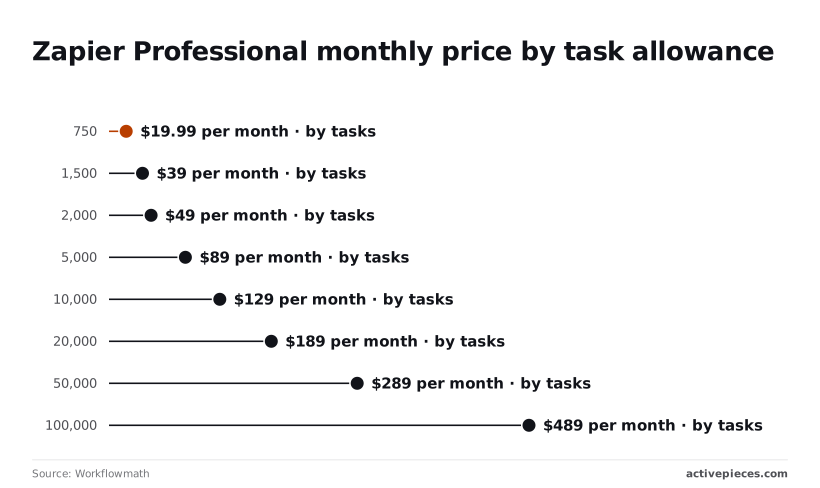
Zapier bills by task, and each action step after the trigger counts. Workflowmath lists Professional at $19.99 a month for 750 tasks, so a three-action flow covers roughly 250 payments. At 1,500 tasks it's $39, which is still about 500 payments.
At 2,000 tasks it's $49, and at 5,000 it's $89, so scaling up cuts your per-task cost significantly. The 10,000-task tier is $129, and 20,000 is $189, meaning the pricing advantage only improves as you scale higher.
The per-task cost falls as you climb, but a busy checkout can push you up a tier without warning.
n8n counts executions, so a long flow costs the same as a short one, but you build more of it yourself.
Update deal status when payment received
Chase the paid invoice whose deal still says "Proposal sent." Here's a flow that addresses it:
- Trigger on a successful payment from the Stripe piece.
- Search the HubSpot piece for the contact by email.
- Search for that contact's open deal.
- If one exists, update its stage. If not, stop and log the payment.
Step 4's stop is your duplicate guard: the flow never creates a deal blindly.
A failed run can be retried from its run history, which is why you test with logging before widening it. Verify which triggers the integration exposes in your build. You can start the flow free.
Frequently asked questions
Four questions come up after the flow is built, and the sections above leave them open. Several more are worth settling in a test account before you trust the sync with real customers:
- Does the app backfill historic payments, or only sync new ones from the connection date?
- Do refunds come through as their own records, or only change the status of the original payment?
- How does the app match an incoming Stripe customer to an existing HubSpot contact, and what happens when the emails differ?
- Which fields are one-way, and which can be overwritten from HubSpot?
Each of these changes what your reports show, so check them against HubSpot's and Stripe's current documentation rather than a blog post.
Does the Stripe HubSpot integration cost extra?
Stripe's processing fees apply as they always do, and what you can do with the native app depends on your HubSpot plan, though the app itself is listed in HubSpot's marketplace.
Read the app's listing and your plan's feature page before assuming a payments feature is included.
Can HubSpot create Stripe invoices or subscriptions?
Not as a general rule. The native app is built to bring customers and payments into HubSpot, and it's not a billing engine.
If a deal reaching a certain stage should produce a Stripe invoice or start a subscription, that's the kind of job the workflow stage exists for.
Build it as its own flow, with the trigger on the HubSpot deal and the action in Stripe, and run it in test mode first.
How do I disconnect or switch Stripe accounts in HubSpot?
Disconnect from the app's settings in HubSpot, then connect the other account. Expect the sync to stop at that point, and don't assume records already imported will vanish or update.
Before you switch, export or note the existing payment records, then connect the new account and check that new payments land on the right contacts. Switching accounts is also where duplicate contacts tend to appear, because the same customer may exist in both accounts.
Does it work with Stripe test mode?
Don't assume so. Whether the native app can read test-mode data depends on how it authorizes against your account, and the documentation is the authority here.
To be safe, pair a separate HubSpot test account with a Stripe test setup, where you can create a customer, a payment and a refund and watch what arrives.
If the data shows up in HubSpot, you have reproduced the behavior. If it doesn't, you have found the limit before a customer did.
Related reading
References
Build it
Set this up in minutes.
No code required. Connect your accounts, and Activepieces runs it from there.
Start free Talk to sales