
n8n Queue Mode vs Regular Mode, and When to Switch

Oct 26, 202616 min read
In queue mode the main n8n instance stops running workflows itself and puts each execution on a Redis queue, much as other Activepieces-style automation tools do when they separate scheduling from execution.
n8n queue mode is Redis-backed execution scaling
Separate worker processes pick those jobs up and run them, and Postgres holds the shared database.
Adopt it only after you have measured that one process can't keep up. This section reflects the n8n docs as checked on 26 October 2026.
The direct answer
You usually arrive here because of a log line like Error: Execution stalled or a UI that freezes while a heavy workflow runs.
Both come from the same design fact: in regular mode, the process that serves your editor, receives webhooks and runs workflows is one process.
A big execution competes with everything else for the same event loop and memory.
Queue mode splits those jobs. The main instance keeps the editor, the schedule triggers and the webhook intake. Workers do the execution. Redis sits between them as the broker, and Postgres is the one database every process reads and writes.
The main box passes job cards into the Redis queue, three workers pull cards from it, and a Postgres cylinder underneath is linked to all of them, which means job processing decouples from main's submission rate.

Take from it that Redis only carries the job, while every process still depends on Postgres for the record of what ran.
Once you see that, the cost is plain:
- You now run a broker: - You now run a real database
- You now run several processes
- Any of them can be the one that fails at 3am
What changes compared with regular mode
Regular mode is one process and, for small installs, often a local SQLite file. Queue mode needs Postgres, because workers on different machines can't share a file.
It also needs Redis reachable from every process, and the same encryption key on all of them, or workers will fail to decrypt your credentials.
When a workflow sticks, it is no longer a matter of "the n8n process is busy"; it might be a dead worker, a full queue or a Redis connection that dropped.
Your monitoring changes too. You gain horizontal scaling, but you also gain failure modes you didn't have before.
Who should use n8n queue mode
It's for teams whose measured load shows a single process saturating. The signs are executions queuing behind each other, the editor going unresponsive under production traffic, or memory spikes from a few large runs. Measure first, then decide.
It's not for teams that feel they might grow, or that want it because it sounds more serious. If one instance copes, queue mode adds operating work with no payoff.
Other automation tools, Activepieces among them, have their own scaling paths, but the question here is the same: is your current process actually the bottleneck? If you can't show that, stay in regular mode.
The fastest way to settle a shortlist is to try one. Activepieces is free to try, no credit card.
How main, Redis and Workers divide work
Lose any one of them and a different thing stops, which is worth knowing before you add any of them.
Each integration owns one job: main takes the triggers and the UI, Redis holds the queue, workers run the executions, and optional webhook processors absorb incoming HTTP, so each can be independently optimized or replaced.
Read the last column of the table below first: it tells you which failures stop new work and which ones only slow it down. The table shows what each process does, what it must reach, and what happens to executions when it dies.
| Process | What it does | What it must reach | When it goes down |
|---|---|---|---|
| Main | Serves the editor and API, fires schedules and triggers, enqueues executions | Postgres and Redis | Editing and scheduled triggers stop; jobs already queued keep running on workers |
| Redis | Holds the queue of pending execution IDs | Nothing else; main, workers and webhook processors connect to it | Nothing can be enqueued or picked up; new executions fail or stall |
| Worker | Pulls a job, loads the workflow from the database, runs it, writes the result | Postgres and Redis | Its in-flight job isn't finished; queued jobs wait for another worker |
| Webhook processor | Receives production webhook requests and enqueues them | Postgres and Redis | Production webhook calls get connection errors until it returns |
Read the table as a dependency graph with Redis in the middle, because that's where the single point of failure sits. The sections below take each integration in turn.
Main instance
Main is the process you already run. In queue mode it stops executing workflows and becomes the coordinator: it serves the editor, runs schedule and polling triggers, and pushes jobs onto the queue.
If main dies, nobody can edit and nothing fires on a timer, but workers keep draining what is already queued. It still needs Postgres for workflow definitions and credentials.
Nothing but job references passes through Redis, not workflow data. The workers fetch the actual workflow and write results through Postgres.
That keeps Redis small, but it also means every other process depends on it. When it's unreachable, the whole system stops accepting work, so it needs monitoring and persistence you may never have set up before.
Workers are the part you scale. Each one pulls a job, runs it, and writes the outcome, so adding workers raises throughput without touching main.
A worker crash costs you the job it was holding, and the cost is retry behavior you should test, not assume.
Webhook processors are optional. They take production webhook traffic off main so a burst of requests can't starve the editor.
Without them, main receives those calls itself. With them, you need a load balancer routing webhook paths to them, which is one more thing to run.
What queue mode requires and costs
You need Postgres, Redis, and a main process plus workers. The Redis line on the bill is small; the cost that grows is the processes you have to run and watch.
Check these before you start a worker, because each item is a place a deployment can silently break. The list below is what n8n documents:
- Postgres as the database, since workers and the main process must share one store
- Redis 7 or later, or 6 or later if a username is set
- the same encryption key on every process, or workers can't decrypt credentials
- the execution mode set to queue
- worker concurrency, which defaults to 10 and should be at least 5

When one of these is missing, you usually get a worker that starts and then fails on its first job, not a clear startup error.
n8n queue mode licence and Cloud plan limits
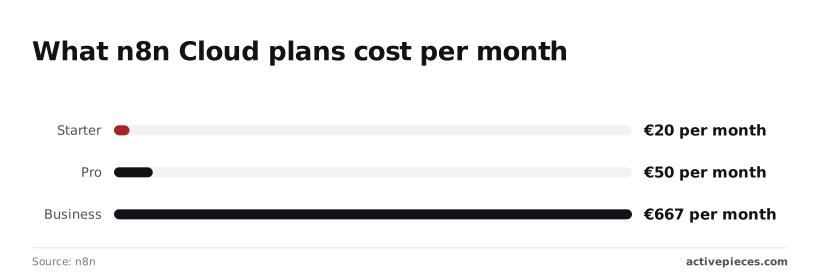
The alternative is to let n8n run it. n8n Cloud's pricing page lists Starter at 20 € per month and Pro at 50 € per month.
Business is 667 € per month, a thirty-fold step over Starter that you only justify with real volume.
The ceiling is concurrency. AI Productivity reports Starter at 5 concurrent executions and Business at 30. A single self-hosted worker at the default of 10 already beats Starter, and three workers match Business, so you don't need to pay for these tiers if you self-host.
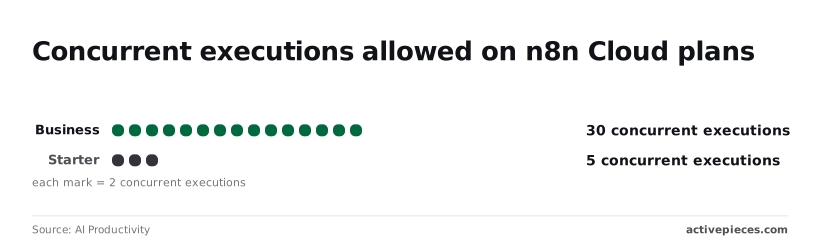
Prices checked 26 October 2026.
n8n queue mode infrastructure costs by setup size
Managed Redis is the cheap part. Redis lists Redis Cloud from $5 per month, AWS ElastiCache from $6 and Upstash from $10.
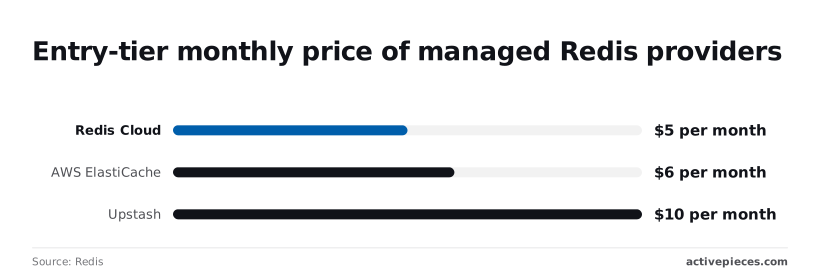
Those are entry prices, so a queue handling modest traffic costs less than a streaming subscription, and the choice between them barely moves your total.
For a small setup, that means one Redis instance, one Postgres database, the main process and one worker. The money is trivial; the work is monitoring four things instead of one.
Step up to a mid-size setup and you add workers and webhook processes behind the load balancer. Redis still costs about the same, while compute and Postgres grow with the worker count.
Compared with 667 € for Business, self-hosting wins on price at scale. It loses on the hours someone spends keeping it alive.
If the servers have to stay yours but you don't want to give up the controls a larger team needs, Activepieces has an air-gapped self-hosted build, and the enterprise list in its docs for that build (SSO, SCIM, custom RBAC, audit logs, release management and secret manager integration) is the same list the managed cloud carries.
MoneyGram, Moneypenny, Alan and FundingSocieties run Activepieces in production.
Reading a table only gets you so far. Build the same workflow in Activepieces and compare it yourself.
Set up n8n queue mode in six steps
Six steps take you from one process to a main instance, workers and webhook processors. The order matters because nearly every failure traces back to config that differs between processes.
The list below shows the sequence, and the thing to take from it is that steps 1 to 3 are shared state and steps 4 to 6 are processes that read it.
Exact variable names change between releases, so copy them from the n8n queue mode docs rather than from here.
- Provision Postgres and Redis. Queue mode needs Postgres because SQLite can't be shared across processes, and Redis because it holds the queue of pending executions. Make sure every process you start later can reach both.
- Set the shared variables and the encryption key. Every process needs the same database settings, the same Redis settings and the same encryption key. A worker with a different key can't decrypt credentials, so it fails on the first node that needs one.
- Start main in queue mode. Set the execution mode variable to queue and restart. Main now hands executions to Redis instead of running them itself, so a workflow that triggers and then sits idle means no worker exists yet.
With main only coordinating at this point, the next three steps are where the capacity comes from, so improvements to capacity must come from optimizing those stages, not from main.
- Start workers with concurrency. Launch the worker command on one or more machines and set its concurrency option. Concurrency is per worker, so raise it only while the machine has CPU and memory to spare, and add workers when it doesn't.
- Add webhook processors. Run the dedicated webhook command behind your load balancer and route webhook paths to it, so incoming calls stop competing with the editor on main. Skip this until webhook latency is what you measured as the problem.
- Test with a slow workflow. Build one that waits a while, trigger it several times at once, and watch the executions spread across workers. If they all land on one process, the others aren't reading the same Redis.
If that test passes cleanly, the install works, and what remains is keeping it observable and alive.
Prevent configuration mistakes in queue mode
When executions get lost or stuck in queue mode, the cause is most often the main process, workers, Redis and Postgres disagreeing about configuration, not a flaw in the queue itself.
The best argument for staying on regular mode
A single process has one failure point you can reason about. Queue mode adds Redis, a shared database and several processes, each of which can drop a job without telling you.
When executions get lost or stuck in queue mode, the cause is most often the main process, workers, Redis and Postgres disagreeing about configuration, not a flaw in the queue itself.
If your load fits on one larger server, that server may be cheaper to run and far easier to debug at 1am. Where one process is enough, that's a good reason to stay.
n8n queue mode vs regular mode benchmarks
That argument holds only until load really has outgrown a process, and n8n's own benchmark shows what happens then.
On a c5.4xlarge, single mode peaked at 23 requests per second with 31% of requests failing, while queue mode on the same instance reached 162 with none failing.
On the same hardware the peak is roughly seven times higher and the failures vanish, so a bigger box alone doesn't close that gap once one process is the bottleneck.
That result is the reason to move, and only if you measure something like it. What follows is how people lose the gain.
- Workers and main use different
N8N_ENCRYPTION_KEYvalues, so jobs fail with credential decryption errors the moment a worker picks one up. - A process still points at the default SQLite database or a different Postgres, so it never sees the executions the others wrote.
- Redis runs with a memory eviction policy, which lets it discard queued jobs under pressure. The execution then sits in "running" forever.
- Binary data stays in filesystem mode, so a worker can't read files another process saved, and workflows that handle attachments break only under queue mode.
- Workers are killed without a graceful shutdown, or run with concurrency beyond what Postgres and memory can bear. Jobs stall mid-run and appear stuck.
Each of these passes a light smoke test and fails under real load, which is why the observability work comes first.
When Activepieces is a fair alternative to self-scaling n8n
If your real problem is that you don't want to run Redis, Postgres and workers yourself, Activepieces Cloud runs the hosting for you: Plus is $20 a month flat for 10,000 credits, and every plan, including free, has unlimited flows.

Your flows also need to be simple enough to rebuild without much loss.
It's a hosted product that runs the queue for you, so the smoke-test failures above become the vendor's problem, not yours.
Where the comparison genuinely applies
The comparison holds for one specific reader: someone whose measured load has outgrown a single n8n process and who would rather pay a bill than staff an operations rota. For that reader, the question is who owns the queue.

The table below shows that split, and the takeaway is that the two Activepieces tiers differ mainly in how many credits they include, not in who does the operating, which means both use the same infrastructure but differ only in credit limits.
| Option | Who runs the queue | Price | Limit unit |
|---|---|---|---|
| n8n self-hosted queue mode | You | Your servers, Redis and Postgres | Whatever your hardware sustains |
| n8n Cloud | n8n | Per n8n's pricing page, by plan | Workflow executions |
| Activepieces Plus | Activepieces | $20 | 10,000 credits |
| Activepieces Team | Activepieces | $200 | 50,000 credits |
Note the Team tier costs ten times Plus for five times the credits. If you are near the Plus ceiling, you are paying a premium per credit to move up, so price your actual volume before assuming the larger tier is the sensible one.
What to verify before switching
Credits are not executions. Until you know how many credits one run of your busiest flow consumes, you can't compare the Activepieces figures with an n8n execution count.
Read the credit definition in the Activepieces docs and the current pricing page, both as of 2026-10-26, because tiers change.
Then count the migration cost. Your n8n workflows don't import. Each one is rebuilt, and each custom code node, credential and webhook URL has to be recreated and retested.
Every upstream service that calls your webhooks needs its endpoint updated, and a missed one fails silently.
Finally, check that every integration your flows depend on exists as an Activepieces integration. If one is missing, you are writing it yourself, which is operational work again, only in a different place.
Frequently asked questions
Does n8n queue mode work with SQLite?
No. Queue mode needs Postgres, so a SQLite install has to migrate its data before the main process and workers can share one database.
Workers on separate processes or hosts would otherwise write to a file only one of them can reach. The error you will see is a worker that starts and then fails on its first job, not a clear startup error, and the design mistake behind it is treating the default database as permanent.
On n8n Cloud you don't run queue mode at all. It's a self-hosting configuration, and on Cloud n8n runs the execution infrastructure for you.
If your reason for moving was operational control over workers, Cloud takes that decision away. If your reason was load, Cloud's plan limits are what you should check first.
How many workers do I need?
Start with one worker and add more only when the queue shows executions waiting. Each worker has its own concurrency setting, so raising that setting is often the cheaper first move.
Measure wait time between "queued" and "running" before you add processes, because every extra worker is one more thing to monitor, upgrade and keep on the same n8n version as the main instance.
You can't leave Redis out: it is required for queue mode. It's the broker that holds the job queue, and the main process and workers all connect to it.
n8n offers no alternative broker. If Redis goes down, the main process can't hand out new jobs, so executions stop being dispatched until it returns.
What happens to running executions if a worker crashes?
When a worker crashes, its job stops being acknowledged, and the queue can treat it as stalled and hand it to another worker. That means a workflow may start again from the beginning rather than resume where it died.

If a step has a side effect, such as sending an email or creating a record, it can then run twice. Make those steps idempotent, and don't assume the retry is clean just because the queue recovered.
References
Still comparing
The fastest way to settle it is to build something.
Open source under MIT, so you can self-host the same thing later.
Start free Talk to sales