
Dify vs n8n: Features, Pricing and Use Cases (2026)

Oct 17, 202615 min read
Pick Dify when the AI app is the product: a chatbot, retrieval over your documents, or an agent users talk to.
Pick n8n when the job is moving data between business apps and AI is one step along the way, a pattern that tools like Activepieces also serve.
Putting them in one comparison table misleads, because they start from different ends of the problem.
If you are building and running LLM applications, Dify is the platform for it. You assemble prompts, connect a knowledge base for retrieval-augmented generation (RAG, where the model answers from your own documents), and publish the result as a chat interface or an API.
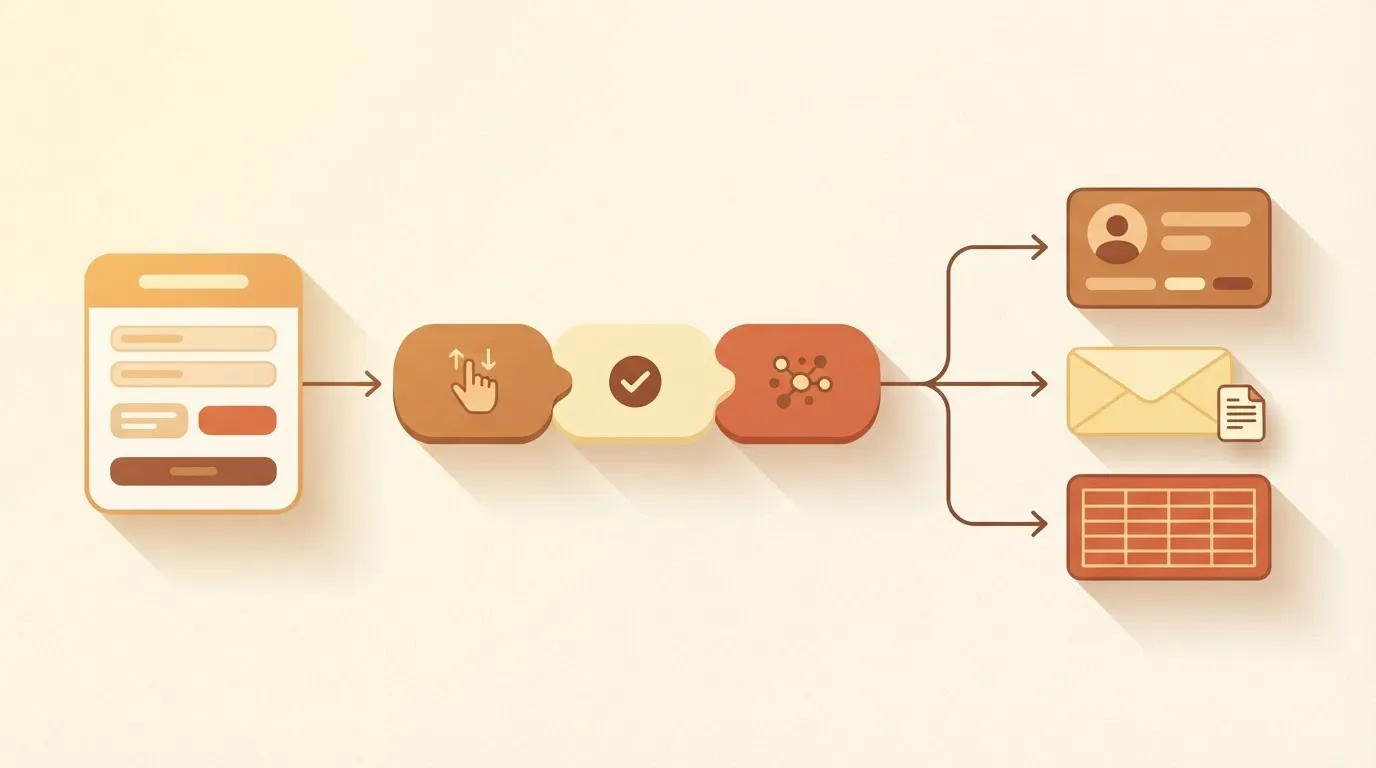
When a trigger fires, such as a new form submission or a schedule, n8n passes data along a chain of steps between apps like your CRM, email and spreadsheets. It is a workflow automation tool.
Dify vs n8n: the short answer by situation
One-line rule for choosing Dify or n8n
Ask what your team would be stuck without: a working AI app, or data arriving in the right place. Four common situations show how it plays out:
- Shipping a document chatbot for customers or staff: Dify
- RAG over internal files such as policies, manuals and contracts: Dify
- Routing new leads across your CRM and email: n8n
- A nightly sync between systems with an AI-written summary at the end: n8n
In the first two, what matters is the quality of answers, so you need retrieval and prompt control. In the last two, it is plumbing, so you need reliable connections to many apps.
If you are running this arithmetic for your own team, see what the same workload costs on Activepieces.
Four criteria that decide Dify versus n8n
Answer the same four questions for both tools.
The takeaway is that you should answer all four for your own job before you read a feature list.
- Apps it can act in: which systems can it read from and write to without custom code?
- Building and testing AI behaviour: how do you shape a prompt, retrieval or agent, and check it before users see it?
- Human approval and self-hosting: can a person stop an action before it happens, and can you run the tool on your own servers?
- How cost scales with usage: what happens to the bill when volume grows?
Apps the tool can act in
If your team's lead tracker sits in a spreadsheet, your invoices in an accounting package and your tickets in a helpdesk, the tool has to reach all three.
That is what the first criterion, apps the tool can act in, asks: where the work actually lives.
A tool with few connections means someone writes glue code, and that someone is usually you at 2am.
Building and testing AI behaviour
Shaping what the model does, and knowing that it works, is the second criterion, building and testing AI behaviour. Prompt editing, retrieval over your documents, agent tool use and test runs all count.
A tool with few connections means someone writes glue code, and that someone is usually you at 2am.
If you can't see why an answer went wrong, you can't fix it, so the ability to inspect each step matters as much as the ability to build one.
Human approval and self-hosting in Dify and n8n
For teams with data-residency rules or unreliable connectivity, hosting location is a requirement, not a preference.
The third criterion, human approval and self-hosting, asks two linked things. Can a person review an action, such as a refund or an email to a customer, before the agent takes it? And can you keep data on your own infrastructure?
How Dify and n8n costs scale with usage
When volume grows, the fourth criterion, how cost scales with usage, asks what a busy month does to the bill.
Pricing can follow runs, steps, seats or the model calls underneath, and each shape punishes a different workload.
Dify and n8n pricing and feature limits
Side by side, Dify limits what you can build and who can build it. n8n lists over 1,000 native integrations. The two rows that differ most are usage unit and integrations, so these are the deciding factors.
Dify vs n8n comparison table
Across seven rows, the table puts both products through the same questions: plans and prices, usage unit, integrations, AI and agent features, human approval, self-hosting and licence, and stated limits. Read the usage-unit row before any price, because it tells you what each vendor counts.

| Dify Cloud | n8n Cloud | |
|---|---|---|
| Plans and prices | Sandbox free; Professional $59/month; Team $159/month | Starter €20/month; Pro €50/month; Business €667/month; Enterprise custom (annual billing) |
| Usage unit | Message credits, roughly one per model call, weighted by model: 200 on Sandbox (one-time), 5,000/month on Professional, 10,000/month on Team | Executions, one per complete workflow run however many steps it has: 2,500/month on Starter, 10,000 on Pro, 40,000 on Business |
| Integrations | Model providers and tools you attach to apps | Over 1,000 native |
| AI and agent features | Knowledge base, RAG, prompt tooling, agents, chat front end | AI Agent, chat model, memory and vector store nodes inside workflows |
| Human approval | Human-input step in workflows | Approval and wait steps in workflows |
| Self-hosting and licence | Yes; open source with added conditions | Yes; source-available under n8n's own licence |
| Stated limits | Apps and seats per tier (below) | Monthly executions per tier |
Prices and plan limits checked against n8n.io on October 17, 2026.
Dify Cloud tiers: price, apps and seats
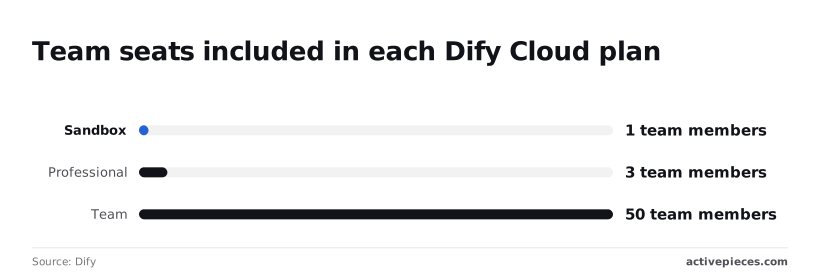
On Dify Cloud's free Sandbox plan you get 5 apps and 1 team member.
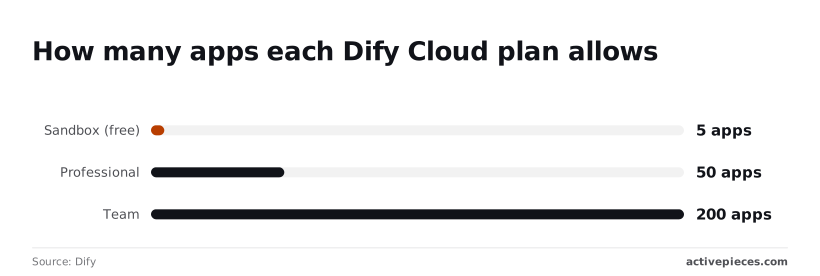
According to Dify, Professional allows 50 apps and 3 team members. Ten times the apps is room for a real portfolio of chatbots and RAG tools.
Step up to Team and you get 200 apps and 50 team members.
Seats jump from 3 to 50, so a group of four people has to buy the top tier even if it'll never build anywhere near 200 apps. Seats, not apps, are the likelier reason to move up.

Vendors change plans without notice, so open the linked page before you budget. Every Dify cell and figure here was read from Dify's own pages in October 2026. The n8n cells were read on 2026-10-17 from n8n's own pages.
Where Dify wins and where n8n wins
If the AI app is what you ship, Dify wins; if the work is moving data between business apps and the model is one step in it, n8n does.
Choose Dify when
Picture a document chatbot: a support team uploads product manuals and wants customers to ask questions and get cited answers. Dify is built around that shape.
You manage the knowledge base, retrieval settings, prompts and the chat front end in one place, so the chatbot itself is the thing you tune and hand over.
When staff ask about leave policy or onboarding, the quality of retrieval is the product; the internal knowledge assistant follows the same logic.
If you're spending your week adjusting chunking and prompts rather than wiring up apps, you want a tool where that work is the main screen.
Choose n8n when
n8n for lead routing and data syncs
Now take the opposite case, lead routing. A form submission arrives, the lead is enriched, the customer relationship system (the CRM) is updated, a sales rep gets an email, and a model scores or summarises the inquiry in the middle.
Here the hard part is reliable connections to many apps, and the AI is one node among many.
This is what n8n's canvas is made for. So is the nightly sync that pulls records from one system, asks a model for a summary, and writes it somewhere a manager will read it.
What an n8n workflow looks like
In the screenshot below you can see what that looks like in practice: a trigger, a chat receiver, and an AI Agent step with an OpenAI chat model and simple memory attached. The execution log sits beside it.
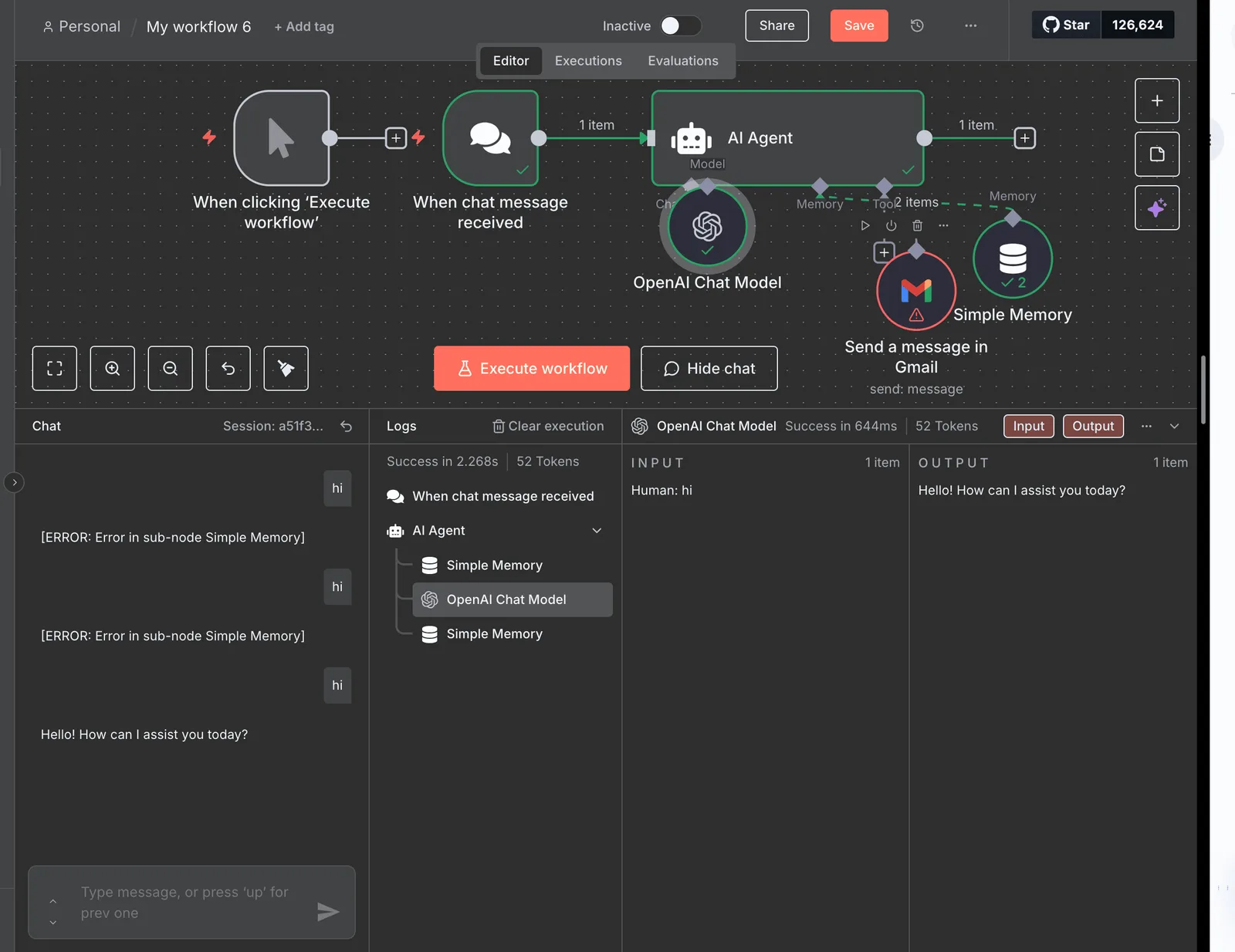
Take from it that the agent is just one block in a visible chain, and that you can inspect its input and output on every run.
After that step, it is ordinary workflow: branch, approve, write back.
Using Dify and n8n together
When a workflow needs a real LLM application, the two combine cleanly. Build the document chatbot in Dify, then have n8n call it as a step, passing in the lead's question and routing the answer onward.
Worth checking against a plan that does not meter every step: one credit covers a whole run on Activepieces.
Activepieces as a third option for cross-app agents
Only one kind of job makes Activepieces worth a look: an AI agent that acts across many business apps, waits for a person to approve, and may need to run on your own servers.
Its MIT-licensed core can be self-hosted, and its agent step can reach any of its 741 integrations, so you probably don't need to build custom connectors.
Otherwise, the choice between Dify and n8n already covers you.
When a third option is worth a look
Picture the request that lands on your desk on a Monday. "Can the agent read new support emails, check the order in our billing system, draft a refund, and ask me before sending it?"
That's not a chat app and not a RAG product. It's a task that crosses several tools, and a human has to say yes before money moves.
If that's your job, the comparison below is the quick check. It shows where each of the three tools fits, so you can see whether Activepieces adds anything beyond the two you're already weighing.
| Best fit | Open source status | AI agent across integrations | Human approval | Self-hosting | |
|---|---|---|---|---|---|
| Dify | Building the AI app itself: chat, RAG, agents | Open source | Agents sit inside the app you build | Not its core design | Yes |
| n8n | Moving data between many business apps, AI as one step | Source-available, not fully open source | AI steps within workflows | Possible inside workflows | Yes |
| Activepieces | Agents acting across business apps | Open source, MIT-licensed core | AI agent step works across its 741 integrations | Built into flows | Yes |
Read the table by row, not by column. Dify wins when the app is the product. n8n wins when the workflow is.
Activepieces, with 741 integrations under an MIT-licensed core, only enters if the agent, not the pipeline, is your center of gravity, which means pipeline-centric teams won't find it suitable.
What Activepieces does differently
Activepieces has an MIT-licensed core and 741 integrations, which it calls pieces, and its AI agent step can use any of them.
Activepieces puts the agent in the same flow as the fixed-rule steps, so your Monday request is one flow rather than an agent framework bridged to a workflow tool by a webhook.
Place an Agent step beside a plain step in the flow builder and the run trace logs a single execution from the support email to the refund, with approval as another step before the risky action.
You can also host it yourself when data must stay in your own environment. MoneyGram, Moneypenny, Alan and FundingSocieties run it in production.
It doesn't replace Dify's app-building. If you need a knowledge base, a chat front end, and prompt iteration, stay with Dify.
If the cross-app agent sounds like your Monday request, you can try it free.
For a team whose agent has to read support emails, check a billing system, draft a refund and pause for a person's approval, Activepieces is the better fit, judged on whether that whole job can live in one place.
An Agent step sits beside a deterministic automation step in the same flow, and the run trace logs one execution from start to finish, rather than two products bridged by a webhook and a callback.
If your agent doesn't span many apps, wait on human approval, or need to run on your own servers, the Dify-or-n8n choice still covers you.
One-day trial plan for Dify or n8n
You can choose between Dify and n8n in one day if you test your own job instead of reading feature lists.
It matters because Signisys, citing Gartner 2026, reports that of every AI project started, only 48% reach production and only 28% meet their ROI target.

Define your workflow and monthly run volume
Write the job as one sentence. For example: "When a supplier invoice lands in the shared inbox, extract the total and post it to the finance sheet, about 600 times a month."
An invoice flow that touches five business apps leans toward n8n, while a support chat over your own documents leans toward Dify.
Build the identical small task in each tool, then run these steps in order:
- Wire the trigger and one AI step, and note how long that took you.
- Force a failure by feeding a malformed input or revoking a credential, and see whether you're alerted or the run fails quietly. A silent failure at 2am becomes a wrong number in someone's report.
- Add a human approval before the final action, and check whether the run waits or skips ahead.
- Run it ten times and compare the results.

Check the pricing unit against your volume
Open both vendors' pricing pages today instead of trusting a blog's numbers, including this one. Note what each plan counts, such as workflow executions or seats.
Then multiply your monthly volume from step one by the number of units one run consumes. If a single invoice triggers three executions, 600 invoices is 1,800 units, and that's the figure to compare against each plan's ceiling in the usage-unit row of the table.
Frequently asked questions
Is Dify or n8n cheaper for a small team?
It depends on what you count as a run. n8n bills by workflow executions. Dify's plans are structured around apps and team members, with message credits on top, so the same traffic costs differently on each.
If a small team fires many short automations, it will feel n8n's execution count; a team running one busy chatbot will feel Dify's message limits.
Both also offer a self-hosted route, which swaps the plan fee for server and maintenance time.
Can n8n build RAG chatbots like Dify?
Yes, n8n can, but you assemble it yourself. Its AI nodes include vector store and chat model components, so you can wire up ingestion and retrieval as a workflow.
In Dify, a knowledge base is a built-in feature, with document upload, chunking, and retrieval settings in the interface.
That means a RAG chatbot is a setup task in Dify and a design task in n8n. If retrieval quality is your product, the built-in controls save you work.
Can Dify replace n8n for workflow automation?
Only partly. Dify has workflow and agent builders, but they're aimed at AI application logic, not at syncing records across dozens of business apps.
The long list of app integrations in n8n, plus its triggers for webhooks, schedules, and app events, is what carries that work.
If your job is "when a form arrives, update the CRM and notify finance," Dify leaves you writing HTTP calls by hand where n8n gives you a ready node.
Can I self-host both Dify and n8n?
Yes. Both publish a self-hosting path, and both are commonly run in Docker. Dify's stack has more moving parts, since it runs a database, a vector store, and several services, so budget for more server capacity and upgrades. n8n is lighter to stand up.
Read each project's license terms before you host it for customers or resell it, because source-available licenses restrict some commercial uses.
Do Dify and n8n support human approval before an action?
Both can pause for a person, but the mechanism differs. In n8n you add approval or wait steps in a workflow so a human responds before the next action fires, including through chat and email channels.
Dify's workflows offer a human-input step you can place before a sensitive action.
In either tool, the approval only protects what you route through it, so place the gate directly before the write, send, or delete.
Related reading
References
Running the numbers
See what the same workload costs here.
Free forever plan, and every paid plan self-hosts at no extra cost.
See pricing Talk to sales