
NetSuite QuickStart for Startups

Oct 16, 202611 min read
On October 14, 2026, NetSuite released QuickStart, a free AI-first financial platform for early-stage technology startups, per NetSuite's newsroom.
Anything outside the table is attributed to its source, which matters for founders who already stitch their back-office tooling together with automation layers like Activepieces and want to know what, if anything, changes.
NetSuite QuickStart is a free, AI-first financial platform from NetSuite that early-stage technology startups can use to run their finances from their first days through to an eventual IPO.
Use the table as the baseline for any change request. It lists what NetSuite itself states, and nothing else here is confirmed.
Get started with NetSuite QuickStart
| Item | What NetSuite states | Source link |
|---|---|---|
| Maker | NetSuite | Newsroom |
| Release date | Oct 14 2026, Austin | Newsroom |
| Audience | Early-stage technology startups | Newsroom |
| Price | $0 | Newsroom |
| User cap | Five users | Newsroom |
Prices and plan limits checked against netsuite.com and netsuite.com and activepieces.com on October 16, 2026.
Below, three paragraphs turn one row each into a constraint you can plan around.
Two days old at the check date, it was released by NetSuite in Austin on October 14, 2026. Expect little third-party documentation and no track record yet.
If your finance team is larger than five people, the five-user cap means you can't all hold seats. The stated audience is early-stage technology startups.
Everyone else needs the data pushed to them, and a brand-new product rarely has a connector yet. Activepieces lets you generate the missing integration with AI and add it privately to your own instance, with no vendor release to wait on.

At $0, no procurement cycle stands in the way of a trial. The cost that remains is your time, which is why the integration test comes before any process change.
Everything below works on Activepieces' free plan. Start without code or a credit card.
What is measurably new in NetSuite QuickStart
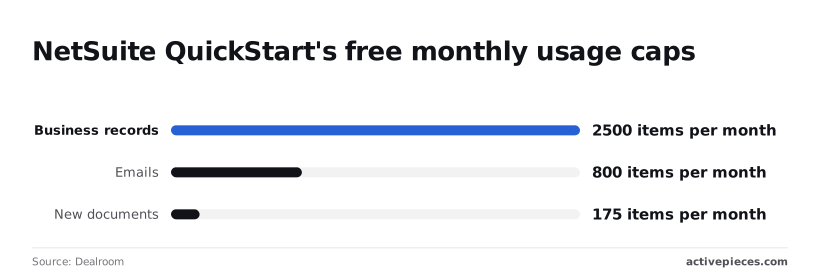
2,500 business records, 800 emails and 175 new documents: those are the three stated monthly caps on NetSuite's free tier for tech startups, as reported by Dealroom. Everything below stays within what the sources state.
On the QuickStart page, NetSuite describes a free AI-powered finance solution for tech startup founders. It states that the product is built on Oracle Autonomous AI Database and Oracle Cloud Infrastructure (OCI).
That tells you where the data lives, but it doesn't tell you how your other apps get to it.
What the caps mean for volume
Because each cap applies per month, the figures are ceilings on volume, not on time.
2,500 business records is the ceiling on what the system holds as new entries each month, so a team that creates one record per transaction can model its headroom directly.
800 emails caps outbound messages, so any automation that sends reminders or approvals draws from the same pool.
175 new documents is the tightest figure: it's roughly six a day, so a bulk invoice upload would exhaust it quickly.
Once the document cap is the binding constraint, the useful question is what arrives through your integrations, not how much you store.
You will not find API rate limits, webhook or event support, or the way a connection to outside apps is authenticated in the sources cited here. Treat each as absent until you test it.
Why NetSuite QuickStart matters to finance automation teams
Your automations get a new system of record to feed and read from, and the manual work around it is still large.
In the Brex/NetSuite survey, 59% of small teams spend 10+ hours on month-end close, 25% spend 5-9 hours, and 14% spend 1-4. That means most small teams lose an entire working day each month to accounting reconciliation alone.

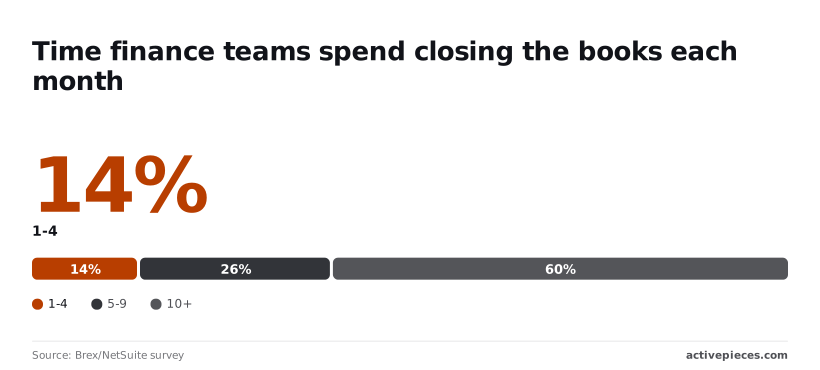
That leaves most teams with a recurring, repeatable workload to hand off.
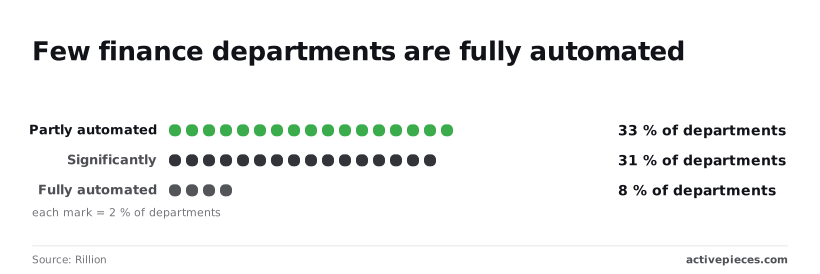
About nine in ten departments still have manual steps left to remove: Rillion finds 33% partly automated, 31% significantly, and 8% fully, meaning full automation remains the exception rather than the norm.
At the center of the diagram sit invoices and bank feeds, with the bank, a spreadsheet and the CRM feeding in, and Slack, email and a reporting sheet reading out.
A gate of two concurrent requests sits on the arrows, so a burst of invoices queues rather than running in parallel. Check that limit first.
NetSuite QuickStart eligibility and release details
NetSuite, part of Oracle, released QuickStart. Take it from NetSuite's own announcement.
Whether your region and company size can sign up isn't confirmed here. Confirm that your account can sign up before you plan any process change around it.
"Free to start" is the claim to verify. The article lists only the $0 price, so budget nothing beyond that until NetSuite's page shows what follows the free tier.
Those answers decide whether the connection test below is worth running.
Easier to see it running than to read about it: set it up free, no card.
Connect NetSuite QuickStart to your other apps with Activepieces
Nothing specific to NetSuite QuickStart has shipped at Activepieces that we can point at. What exists is a general NetSuite integration, which may or may not work against a QuickStart account.
That answers the connection test above only in part, so the table below separates what is documented from what isn't.
| Item | Status | Source link | Date |
|---|---|---|---|
| NetSuite piece (5 actions, 0 triggers) | Listed in catalog | Activepieces | Not stated on the page |
| QuickStart-specific piece | None supplied | None | None |
| Our own testing | Not run | None | None |
Read the table as one documented integration and two gaps. Treat the integration as a starting point, not as evidence that QuickStart is supported.
Five actions and no triggers: that is what the catalog lists for the NetSuite integration, @activepieces/piece-netsuite, a package you can read in the open source repo under packages/pieces/community. No trigger means Activepieces can't start a workflow when something changes in NetSuite. Your other apps can call NetSuite, but NetSuite can't call them through this piece.

We can't date it, because the page gives no release date. We haven't run NetSuite QuickStart ourselves.
Constraint first: the integration only acts, so the workflow must start elsewhere.
- Pick a starting event outside NetSuite, such as a schedule, a webhook, or a form submission.
- Add the NetSuite integration and authenticate against a non-production account.
- Use one of the five actions on a single test record.
- Read the record back in NetSuite to confirm it matches.
NetSuite QuickStart integration requirements to check
Confirm that your QuickStart account accepts the integration's authentication method. Confirm that the action you need is among the five. If you need NetSuite to start the workflow, plan a webhook or scheduled poll, since the integration offers no trigger.
Run the four steps above with the network visible to you, and keep the result before changing any live process.
NetSuite QuickStart cost and speed against current options
Nobody can yet cite a published QuickStart price or setup time. The comparison below rests on setup effort and automation reach, and the price cells for Xero and QuickBooks read "not published" because I have no dated vendor figure to put there.
Take from the table that no row lets you skip the connection test; the options differ only in how much work comes before it.
| Option | Monthly price | Setup effort | Automation reach |
|---|---|---|---|
| QuickStart | Free within usage limits | Light, guided start | Unverified until you test it |
| Spreadsheets | not published | Minimal | Manual, or scripted by you |
| Xero Growing | not published | Light | Vendor-documented integrations |
| QuickBooks Simple Start | not published | Light | Vendor-documented integrations |
| Paid NetSuite | not published | Heavy, usually a project | Broad, configured per account |
For every row, the price must come from the vendor's own page, dated on the day you read it.
Treat any price you can't link to a vendor page as unknown. A free start tells you nothing about what the plan costs once your usage grows, so record the date you checked.
Start with spreadsheets and they cost the least; keep them running by hand and they cost the most. Paid NetSuite sits at the other end, and a procurement cycle may come before any work begins.
Start with spreadsheets and they cost the least; keep them running by hand and they cost the most.
Reach is the deciding column. A cheap tool that can't send events to your other apps leaves the manual work in place, so run the connection test before you rank anything.
What to verify and test in NetSuite QuickStart
Watch three things on NetSuite's own pages (pricing terms, eligibility rules and integration documentation), and this week test one low-risk workflow's connection before you change any process. Until the terms are confirmed, assume nothing about what "free to start" covers or when it stops.
When the free period ends, the pricing terms tell you whether a pilot becomes a bill. Eligibility tells you whether your company can use QuickStart at all, which matters before anyone spends time on it.
For the connection claim, documentation is the evidence: it should show which records and events can leave NetSuite, and how. If a capability isn't written there, treat it as absent until you have reproduced it yourself.
In the order below, the cheapest checks come first, so a "no" costs you an afternoon rather than a project:
- Read the pricing terms and eligibility rules on NetSuite's QuickStart pages, and note anything that limits use or ends the free period.
- List the finance tasks that cross apps today, such as invoice approvals that start in one tool and post in another.
- Pick one low-risk workflow from that list, meaning one that is easy to reverse and doesn't touch period close or audit evidence.
- Test the connection with a test record: create it in NetSuite, confirm the event reaches the other app, and confirm the data arrives intact.
- Review the result with whoever owns the process, and change nothing until the test passes twice.
If step 4 fails, you have your answer on QuickStart for this quarter, and your current process remains untouched.
Frequently asked questions
Below, a graphic lists five questions: is it free, who is eligible, how many users, what the monthly limits are, is there a trigger-based connector.
Each has a one-line answer dated and linked to the NetSuite page it came from. Treat each line as valid only on its date, because terms on a new offer can change without notice.
Answers that decide whether to proceed
To decide whether you proceed, read the four answers below.
Is NetSuite QuickStart really free? It's free to start, which isn't the same as free to run.
The constraint is the monthly limits on NetSuite's page, so check them against your volume before you plan a process around the account. A free tier that throttles your automation mid-month leaves the process half-done.
Who is eligible for NetSuite QuickStart? Eligibility is set by NetSuite, not by this article.
Read the criteria on the maker's page and confirm them against your own company before you spend any procurement effort. If you don't qualify, nothing else in this section applies to you.
Can NetSuite QuickStart connect to other apps? This is the question the article turns on, and the answer is whatever your own test shows.
Check whether NetSuite documents a trigger-based connector. Then confirm that a record change in QuickStart fires an event your other apps receive. A connector you haven't seen fire is a claim, not a capability.
Does NetSuite QuickStart replace a paid NetSuite account? Don't assume it does. Use it as a place to test, and keep your current process and any paid account untouched until the connection test passes and the limits fit your workload.