New Relic Pricing 2026 – How Much Will You Pay?

Nov 3, 202615 min read
For the first 100 GB of data each month, you pay nothing, meaning you can build for free up to this limit, whether you're wiring up a side project or an automation in a tool like Activepieces.
Past that, New Relic bills for the data you send in and the people who log in with full access, and the bill follows those two things, not the sticker on the plan page.

Review New Relic plans, prices and limits
How New Relic charges: ingest plus users
Ingest means the telemetry your software sends to New Relic: logs, metrics and traces. It's measured in gigabytes. A full-platform user is someone with complete access to the tools, as opposed to a read-only viewer.
If you only watch the per-gigabyte rate, you'll miss half the estimate. A chatty application can multiply the data you send without anyone deciding to, and every engineer who needs full access adds a seat.
Both grow quietly, so you want them in the budget before signing.
The plan table, checked 3 November 2026
Use the table to see which lever each plan pulls, then check the rate on your own quote. It shows how each plan is built, meaning what it charges for, what it allows and where it stops, and it leaves out dollar rates.
| Plan | Monthly price | Full-platform user terms | Ingest allowance | Retention | Data Plus | Limits |
|---|---|---|---|---|---|---|
| Free | No charge | Limited full-platform access; other users get basic access | 100 GB free each month | Default retention only | Not offered | Hard ceiling on full-platform seats; built for trying the product |
| Standard | Per-user charge plus per-GB ingest | Full-platform seats are paid, each one adds to the bill | First 100 GB free each month, then billed per GB | Default retention, extendable with Data Plus | Available as an add-on | Seat and feature caps suit small teams |
| Pro | Per-user charge plus per-GB ingest | Paid seats, with fuller access than Standard | First 100 GB free each month, then billed per GB | Default retention, extendable with Data Plus | Available as an add-on | Fewer caps; cost grows with headcount and data |
| Enterprise | Negotiated contract | Seat terms set in the contract | Free allowance plus contracted volume | Set by contract | Available | Limits agreed in the contract |
Read two things off the table. Only the Free row has no meter running, and every paid row charges on both levers.
What the free tier includes and where it stops
For a single service or a side project, the full 100 GB each month and one full-platform seat can be enough to run indefinitely, which means small teams have a perpetual free tier.

It stops when you add a second engineer who needs full access, or when logging volume climbs past the allowance.
A team that wants a warning before it crosses 100 GB may find its tracker has no connector, and Activepieces lets it generate one with AI and add it privately, with roughly 60% of its 746 integrations already community-built in the open source monorepo, so teams bypass integration gaps through AI-assisted connectors.
Staying on Free by accident is cheap, but crossing the line without noticing isn't.
If you are running this arithmetic for your own team, see what the same workload costs on Activepieces.
Monthly bills at three realistic usage levels
Once you cross 100 GB, the bill is mostly people rather than gigabytes:
- The bill is about $556 to $636 a month for five engineers sending 500 GB
- The bill is over $3,000 for twenty people sending 3 TB
- These figures assume $0.40 per GB, or $0.60 with Data Plus, and $99 per full-platform user with the first one free
- Check that seat price against New Relic's current page, because commit discounts are unpublished and will move everything
Once you cross 100 GB, the bill is mostly people rather than gigabytes:
Double the headcount and the bill jumps more than if you double the data, as the table shows: seats grow faster than ingest.
| Team | Billable GB after 100 free | Cost at $0.40 | Cost at $0.60 (Data Plus) | Full-platform seats billed | Total monthly range |
|---|---|---|---|---|---|
| Small: 5 engineers, 500 GB | 400 | $160 | $240 | 4 ($396) | $556–$636 |
| Mid-size: 10 people, 1 TB | 900 | $360 | $540 | 9 ($891) | $1,251–$1,431 |
| Larger: 20 people, 3 TB | 2,900 | $1,160 | $1,740 | 19 ($1,881) | $3,041–$3,621 |
Treat 1 TB as 1,000 GB. If some of your people only read dashboards, a cheaper user type may apply, and the totals fall.
For five engineers at 150 GB a month, seats are roughly 95% of the bill. Only 50 GB is billable, so ingest costs $20 at $0.40 or $30 at $0.60.
Four paid seats add $396, for a total of $416 to $426, so seat costs become substantial even at four-person scale. A small team's cost is decided by who gets a login, not how chatty its servers are.
For twenty engineers at 1 TB a month, seats are still about four-fifths of the bill, and trimming data would save far less than trimming logins, which means cost control should focus on headcount before storage optimization.
Of that terabyte, 900 GB is billable: $360 to $540. Nineteen paid seats add $1,881, so the total is $2,241 to $2,421.
New Relic Data Plus and retention costs
At 900 billable GB, Data Plus adds $0.20 per GB, which is $180 a month, so $2,160 per year. That's a modest increase if you need what it provides.
Longer retention is priced separately, and I have no published figure for it, so ask for it as its own line in the quote.
Look at what buyers actually sign: Vendr shows annual contracts running from $24,793 to $495,952.

The high end is twenty times larger, so most of that spread comes from usage and negotiated commits, not list prices. Model your seats and gigabytes first, then bring those numbers to the negotiation.
Identify hidden costs in New Relic billing
Before you sign, check the five lines on the invoice that do most of the inflating: full-platform seats, log and trace volume, extended retention, extra synthetic checks, and telemetry you send twice. Each one is listed in New Relic's pricing documentation.
Read the list below as a checklist for your own usage, not a forecast. It shows where a bill drifts away from the headline price.
- Full-platform user upgrades, charged per person and priced differently by edition and billing model
- Log and trace volume, which counts against your ingest allowance
- Extended retention, billed per gigabyte kept past the default window
- Extra synthetic checks, billed per check once you pass what your plan includes
- Duplicated telemetry, where the same data reaches New Relic through two paths and you pay for both
Every one of them grows quietly, which is why doing nothing about these is the expensive choice. The sections below take them in turn.
New Relic full-platform vs basic user pricing
You pay nothing extra for basic users, but they can't do everything an engineer needs. Anyone who has to run deep queries or investigate an incident usually needs a full-platform seat, and that seat is billed per head.
Count the people who really need that access, not everyone who might log in someday. A seat handed out "just in case" is a monthly charge for a person who opens the tool twice a year.
Noisy logs and high-cardinality metrics
Logs are the usual culprit. Debug-level output, health checks and repeated error loops each add gigabytes without adding insight.
High-cardinality metrics, meaning measurements split by many unique values such as user IDs, multiply the data points you send. Evidence on exactly how much these inflate bills is mostly anecdotal, from teams comparing notes, so measure your own sources before assuming.
Retention, Data Plus and compliance add-ons
For day-to-day troubleshooting, default retention is enough. If an auditor or a contract requires longer, you pay for it per gigabyte, and that cost applies to everything you keep.
The Data Plus option and compliance features are also add-ons rather than part of the base price. Ask which of your data actually needs them, since keeping everything longer is the easy way to overpay.
You can discard data you've decided you don't need before it counts against you, using drop rules. Ingest limits and usage alerts stop a runaway service from surprising you at month-end.

Set both before go-live, because a limit installed after the first overage doesn't refund it.
Worth checking against a plan that does not meter every step: one credit covers a whole run on Activepieces.
Compare New Relic with Datadog, Grafana and Dynatrace
Which vendor is cheapest depends on whether your growth shows up as data, servers or people, because the four each charge for a different thing. A limit only helps once you know which one you're capping.
Read the table below as four different meters, not four prices for the same product. It sets the four side by side on what they count, what you get free, what the first paid step looks like and what makes the bill climb.
I've left dollar figures out on purpose, because they change often and a quote you can't date is worse than no quote.
| Vendor | Pricing model | Free tier | Entry paid price | Cost-growth driver |
|---|---|---|---|---|
| New Relic | Per GB ingested, plus per full-platform user | 100 GB of ingest a month | Per-GB rate above the free allowance, plus a fee for each full user | More data, and more people who need full access |
| Datadog | Mostly per host, with separate add-ons by product | Limited free plan | Per-host fee for each product you switch on | More servers, and each extra product |
| Grafana Cloud | Usage-based by data type, with per-user charges on paid plans | Standing free tier | Usage above the free allowance | Volume of metrics, logs and traces |
| Dynatrace | Consumption-based, tied to monitored infrastructure | Trial rather than a standing free tier | Quote-based | Size of the monitored estate |
None of these is like-for-like. A per-GB bill rewards you for trimming noisy logs, while a per-host bill doesn't care how much data each server sends.
Free tiers compared
Only some of these free tiers are a place to live. New Relic's 100 GB lets a small team run in production for nothing, as long as it stays under that line and keeps the number of full users low.

Grafana Cloud also keeps a standing free tier.
Treat Datadog's free plan as a way to try the product, because it is narrower. Dynatrace offers a trial, which means the clock starts on day one and a real bill follows it.
Doing nothing here is expensive: a trial that quietly rolls into paid usage costs more than a free tier you outgrow on purpose.
Cheapest observability tool at small and large scale
At small scale, a standing free tier usually wins, and New Relic and Grafana Cloud are the two to price first.
At large scale, the answer turns on your shape. Many servers sending little data favor per-GB pricing. A few servers sending a flood of logs favor per-host pricing. A big engineering team where everyone needs full access pushes New Relic's user charges up.
Model your own gigabytes and your own headcount against each meter before you sign. Whichever vendor you pick, get the current rate in writing and note the date you received it.
Watch New Relic usage with an Activepieces workflow
Before you cross the free allowance, Activepieces can check your New Relic usage on a schedule and message you, and its free plan allows unlimited flows and 1,000 credits a month, so a weekly check of four or five runs barely registers.
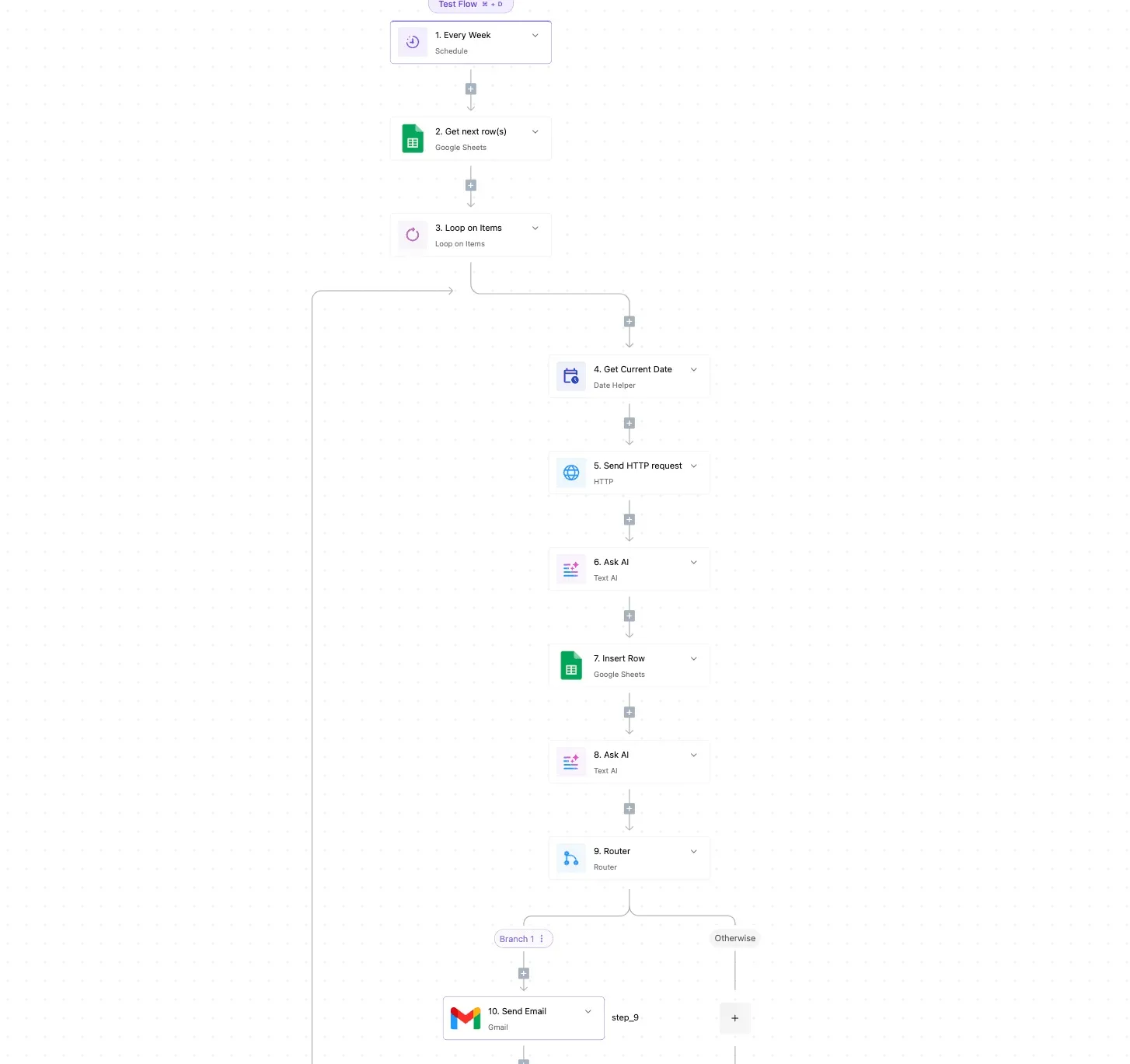
That keeps the rate you wrote down from being quietly outrun by volume.
It doesn't lower the bill. It makes sure you hear about the problem while you can still fix it.
Doing nothing costs the most here. When a team turns on a noisy service or a new environment, ingest creeps up and nobody sees it until the invoice. Paid users creep up the same way, one access request at a time.
Do it once by hand, then repeat it whenever your usage changes. The list below runs in the order that saves the most money first, because each step tells you what to do in the next.
- Audit your full-platform users. List everyone holding a paid seat and downgrade anyone who only looks at dashboards occasionally.
- Check ingest by source. Find which services, hosts, or log streams send the most data, since a few usually account for most of it.
- Set drop rules. In New Relic, discard the data you never query, such as verbose debug logs, before it counts against you.
- Set a usage alert near the free allowance, so you get a warning while there's still room to act.
- Calendar the renewal date, and put a reminder ahead of it so you can renegotiate with your usage numbers in hand.
Only the alert and the renewal reminder are parts a machine can carry; steps one through three need a person's judgment.
Automating a monthly usage alert
If you want the alert in step four, Activepieces bills a run at 1 credit however many steps it has, so the flow below costs the same as a one-step version. Build a flow that starts on a schedule, such as every Monday morning.

Add a step that calls New Relic's API with an HTTP request and asks for your ingest total for the billing month.
Then add a condition: if the total has passed your chosen threshold below the free allowance, post to a Slack channel or open a ticket in your tracker.
Because New Relic's own alerting can do something similar, the benefit is one place that routes the warning to wherever your team actually reads.
Check the API request against New Relic's current documentation before you rely on it, because the setup takes some care. The flow only reports. A person still has to act on what it finds.
Frequently asked questions
Before you sign anything, get answers to the questions the estimate can't settle for you. Here are the ones teams ask most, with the cost of guessing wrong attached.
The free plan and its single seat
Is New Relic really free for one user? Yes, the free plan includes one full-platform user, and that account is the only seat with every feature.
Anyone else you add who needs that level of access moves you toward a paid plan. Decide who truly needs the full seat before you rely on the free tier, or you'll find out at the first invoice.
Going over 100 GB
What happens when you exceed 100 GB on the free plan? The free allowance is a monthly cap on data, and going past it means you either lose data or upgrade.
I haven't confirmed exactly how New Relic enforces the cap today, so read the current terms on your account page.
Doing nothing is the expensive choice here, because gaps in your data show up exactly when something breaks.
Per-host charges
Under its current pricing, New Relic doesn't charge per host. That pricing is built on the data you send and the number of full-platform users, not on how many servers you run.

It helps if you run many small machines, since adding one doesn't add a line item. It hurts if those machines are chatty, because each one adds to the data total.
Negotiating an annual commit
You can generally negotiate New Relic pricing on an annual commit. Committing to a yearly spend is the usual route to a lower rate, and the vendor's sales team can quote it.
The catch is that a commit is a floor you pay whether you use it or not. Commit to what your last few months of real usage support, not to what you hope to grow into.
How do I find out what I'm currently ingesting?
Ask your own account. New Relic's usage pages show ingest by source, and you can run a query against its consumption data, along the lines of:
SELECT sum(GigabytesIngested) FROM NrConsumption WHERE productLine = 'DataPlatform' FACET usageMetric SINCE this monthThat breaks your total down by type, so you can see which source is driving the bill.
Run it before any sales call. A number you measured yourself is stronger leverage than one you were quoted, and it shows whether the free tier will cover you at all.
References
Running the numbers
See what the same workload costs here.
Free forever plan, and every paid plan self-hosts at no extra cost.
See pricing Talk to sales