
Nonprofit Workflow Automation Software: 2026 Guide

Nov 22, 202614 min read
Nonprofit workflow automation software is any tool, whether a simple connector or an open-source platform like Activepieces, that moves donor, volunteer and grant data between your systems without someone retyping it.
The right one depends on who will maintain it and where that data is allowed to sit, not on how many apps it connects to.
Nonprofit workflow automation software: the short answer
Best nonprofit automation tools by team type
You are one of three kinds of team, and which tool fits depends on which.
A volunteer-run team needs something a non-technical person can fix on a Sunday night, which usually points to a hosted, no-code builder.
A Microsoft shop already pays for identity, storage and permissions in Microsoft 365, so the tool that lives inside it, Power Automate, saves a second security review.
If you handle case notes or health-related giving, you are a data-sensitive organisation and need the option to keep records on your own infrastructure. That narrows the field to self-hostable tools like n8n and Activepieces, whose core is MIT-licensed.
How the tools were judged
I put every platform through the same four questions.
Each one fails in a different way: a discount you can't claim, a price that grows past your budget, a workflow nobody can fix, or a data location your board never approved.
- Nonprofit discount: does the vendor publish one on its own pricing or nonprofit page, and do you need to apply and prove status before it takes effect?
- Small-team monthly price: what does a team of a few people pay on the plan with the features you need, not the I don't see a sentence to rewrite. The only text after your instructions is "I don't see the sentence to rewrite. The text that came through, "cheapest plan on the page?", is a fragment with no competitor compliment, numbers, or product names, so there's nothing to edit.
Please paste the full original sentence and I'll return the rewritten version, keeping the fact, numbers, and product names and dropping the superlative. Could you paste the sentence (and the page, if you want the cheapest plan checked)? I'll return the rewritten sentence only.
- Who maintains the workflows: when a connection breaks, can the person who owns it fix it without a developer or a consultant?
- Where donor data is stored: in which region and on whose infrastructure do records sit, and can you get that in writing?
How we compared nonprofit automation tools and when
I took prices, discounts and data-hosting terms from each vendor's own pricing, nonprofit and security pages, not from reviews or resellers. Each claim in the comparison carries the date it was read, because plans and discounts change without notice.

Where a vendor's page doesn't confirm something, the comparison says so rather than filling the gap, and that includes Activepieces, whose price and free-tier cells read "Not confirmed" as of 2026-11-22.
This takes minutes, not a project: automate it in Activepieces free.
Nonprofit automation tools compared on price and limits
Of the three platforms with a confirmed cloud entry price, Make is cheapest at 9 a month. Zapier costs 19.99 and n8n 20.
The comparison table
At 9 a month, Make Core (10k credits) undercuts Zapier Pro (750 tasks) at 19.99 and n8n Starter at 20, per Neomanex, 4Spot Consulting and n8n's pricing page, so budget-focused teams have an obvious cost winner. The sources list the currency as dollars or euros.
Though Zapier costs more than double Make for its first paid step, the two meter usage differently, tasks against credits. Compare your monthly volume before you compare the sticker.
| Platform | Entry price | Free tier limit | Strength | Main limit | Nonprofit discount | Best for | Date checked |
|---|---|---|---|---|---|---|---|
| Zapier | 19.99 a month (Pro, 750 tasks) | Not confirmed | Hosted, nothing to maintain | Task-based metering | Not confirmed | Volunteer-run teams | 2026-11-22 |
| Make | 9 a month (Core, 10k credits) | Not confirmed | Lowest listed entry price | Credit-based metering | Not confirmed | Small budgets | 2026-11-22 |
| Power Automate | Not confirmed | Not confirmed | Sits inside Microsoft 365 | Price not confirmed | Not confirmed | Microsoft shops | 2026-11-22 |
| n8n | 20 a month (Cloud Starter) | Not confirmed | Can be self-hosted | Someone has to run it if self-hosted | Not confirmed | Data-sensitive teams | 2026-11-22 |
| Activepieces | Not confirmed | Not confirmed | Not confirmed | Not confirmed | Not confirmed | Not confirmed | 2026-11-22 |
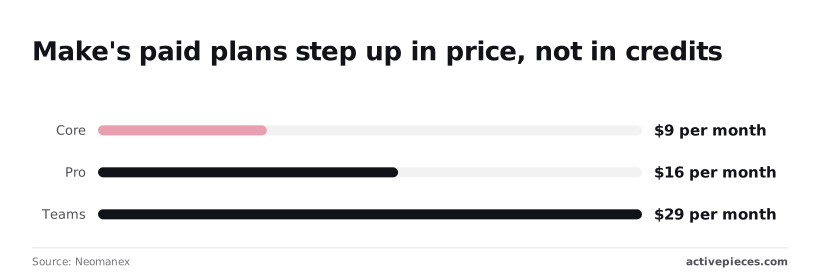
Look twice at Make's own ladder. Core is 9 a month, Pro is 16 and Teams is 29, according to Neomanex.
Those steps raise the price rather than the credits, so moving up from Core to Pro adds 7 a month and buys features, not volume. Upgrade only when you need a feature.
Nonprofit discounts and prices we couldn't confirm
When the table says "Not confirmed", the vendor's page didn't state the figure on the date checked. It doesn't mean the answer is no. Zapier's 15% nonprofit discount is confirmed; ask the other vendors directly before you budget.
Since free tier limits are also unconfirmed across the board, check the current plan page before you build a workflow on a free account.
Power Automate's price depends on how your Microsoft licensing is set up, which is why we haven't put a single number on it.
1. n8n and Activepieces for self-hosted donor data
Read the licence before you build. n8n's fair-code licence and Activepieces' MIT-licensed core both let donor data stay on your own servers, but they differ in what you may do with the code and in who carries the upkeep.
n8n self-hosted and cloud
Under n8n's fair-code licence, which is not a standard open-source one, you can run it free on your own server for your own organisation's work. Selling it, or building a hosted service on top of it, falls outside those terms.
For a charity automating its own donor workflows, that restriction rarely bites, but read the licence text before you commit.
If donor data must stay in your hands, n8n's hosted cloud version defeats the purpose. Treat it as a way to prototype with dummy records, not as your production home.
Activepieces open-source edition
There's no ambiguity about what your organisation may do with Activepieces' community edition, which is open source under the MIT licence. The company also sells a hosted cloud with a free tier and paid plans, plus enterprise features under a separate commercial licence.
I haven't confirmed the current free-tier limits or plan prices, so check the pricing page rather than trust a figure from me. Check the features behind the commercial licence against what you need, such as access controls.
For the maintenance problem, Activepieces lets a volunteer describe a process in plain words to its chat, which then builds and publishes the flow in your account.
That flow is the same kind of artefact a builder would have assembled by hand, so it sits under the same RBAC and audit logs as every other flow, and every run leaves a trace that anyone on the team can read without touching code.
MoneyGram, Moneypenny, Alan and FundingSocieties run Activepieces in production.
The server is the part that needs a named owner. This sequence shows what that ownership looks like, and the last step is the one most teams skip:
- Choose a server region and host that match where your donors' data is allowed to live.
- Install Activepieces with Docker, the tool that packages the app and its database so they start together.
- Put it behind HTTPS so logins and webhooks are encrypted in transit.
- Store credentials encrypted and set up regular backups of the database, then test a restore.
- Name the person who applies updates, and write down who covers when they are away.
Once those five are done, the tool is the easy part. The ongoing work is steps four and five.
When nonprofits should not self-host automation tools
Skip self-hosting if nobody on your team will own step five. An unpatched server holding donor records is a worse position than a vendor's cloud with a signed data agreement.
If your volunteers rotate often and nobody inherits the server, self-hosting is the wrong choice.
**An unpatched server holding donor records is a worse position than a vendor's cloud with a signed data agreement.
It's the wrong choice, too, if a niche app you depend on isn't among Activepieces' 750 integrations, about 60% of them community-contributed, so check the list against your own apps first. In those cases, use a hosted tool and get the data terms in writing.
You can follow the rest of this with the builder open. Start free, no card.
2. Zapier and Make for non-technical nonprofit teams
If staff or a part-time volunteer, not an IT department, will own the workflows, Zapier and Make fit, and unlike Power Automate their prices are published.
Charity surveys on IT support show most small nonprofits lean on outsourced help or volunteers, so a tool that someone can fix without writing code matters more than how many apps it connects to.

Because both Zapier and Make are hosted services, donor data passes through the vendor's cloud, with no self-hosted option. That settles the second question early.
Zapier for staff-run teams
Open a Zapier automation and it reads as a linear chain: a trigger, then actions. A development officer can read one top to bottom and see what it does, so a handover to the next person is a short conversation rather than a code review.

There is a free plan, but it limits volume and keeps multi-step workflows out of reach. Anything beyond a single "new form entry, add a row" flow pushes you onto a paid plan.
15% is the discount Zapier gives nonprofits, making their platform pricing more attractive to these organizations.
On annual cost, Professional falls from $239.88 to $203.90, and Team from $828 to $703.80, meaning the discount compounds into material annual savings.
The discount saves about $36 a year on Professional and about $124 on Team, so Team tier deployments unlock substantially greater annual savings for nonprofits.
What does change the bill is metering. Zapier counts usage in tasks, one for each action a workflow completes, so a ten-step workflow that runs on every donation uses far more of your allowance than a two-step one.
Before you commit, count the steps in your busiest workflow and multiply by your monthly volume.
Make for visual workflows
On a Make canvas, workflows appear as connected modules, with branches, filters and loops visible on screen. For a team that wants to route a gift differently by amount, campaign or donor type, that picture is easier to reason about than a long chain.
Expect a steeper first week: staff who have never seen a flowchart-style builder will need time to get comfortable.
On Make's free plan usage is capped, and it meters by operations, meaning each module that runs counts, not each finished workflow. A branching scenario that touches many modules per record can use up an allowance faster than its simple appearance suggests.
I haven't put a nonprofit discount figure here because I couldn't confirm one, so ask Make directly before assuming one applies.
3. Power Automate for Microsoft 365 nonprofits
If your nonprofit already runs on Microsoft 365 licences, Power Automate may cost nothing extra to start, because basic automation arrives inside plans you already hold. The trouble starts when a flow needs a premium connector.
Best for
This fits nonprofits whose staff live in Outlook, Teams, SharePoint and Excel, and whose donor records sit in Microsoft tools.
A flow that files a gift-acknowledgement email into SharePoint, or pings a Teams channel when a form comes in, needs no new vendor, no new login and no new procurement conversation.
If someone on your team already administers Microsoft 365, Power Automate suits you too, since the permissions model is the one they know.
Power Automate nonprofit pricing and licensing
| Licence | Price | Automation included | Catch |
|---|---|---|---|
| Microsoft 365 Business Basic (nonprofit) | Free up to 300 users | Power Automate for Microsoft 365, with standard connectors | The 300-user cap matters if you count volunteers as users; premium connectors aren't covered |
| Microsoft 365 Business Premium | $5.50 per user/month | The same standard-connector automation | You're paying for security and device management, not extra automation |
| Power Automate Premium licence | Set on Microsoft's Power Automate pricing page | Premium connectors and wider automation features | Microsoft licenses by user or by flow, so the cost depends on who builds and who runs each automation |
Moving up from Basic to Premium therefore doesn't unlock more automation. Only the separate Power Automate licence does, so budget for it only when a specific flow needs it.
Before you plan around the free tier, confirm eligibility and current terms on Microsoft's nonprofit pages, because its nonprofit offers change.
Where it limits you
Where it bites is premium connector licensing. Many connectors that nonprofits reach for, such as those for databases or custom web requests, fall on the premium side, so one useful flow can push a user onto a paid licence.
Because it's licensed per user or per flow, costs can grow as more people build or run automations.
Next comes complexity. Licensing rules, environments and connector categories take time to learn, and a volunteer-run team may find that overhead heavier than the automation itself. Check each connector's licence category in Microsoft's documentation before you build, not after.
Frequently asked questions
Do Zapier or Make give nonprofits a discount?
Possibly, but confirm it before you budget: nonprofit pricing differs by vendor, changes over time, and often depends on proof of registered status. Ask each vendor for the current offer in writing, and compare it with the standard plan you would otherwise buy.
Even with a discount, the wrong tier still costs more than the right tier at list price, so check that the discounted plan has the features your workflows need.
Is free automation software enough for a small charity?
Yes, for a handful of simple, low-volume automations, such as sending form responses to a spreadsheet or posting a new-donation alert to a chat channel.
It stops being enough when volume grows, when a workflow needs several steps or branching logic, or when you need the data terms and access controls that usually sit on paid tiers.
Read the free plan's limits on runs and steps before you build anything important on it. Rebuilding a workflow on another platform later costs far more than the plan would have.
Can automation tools be used with donor data safely?
Yes, if you decide in advance what data leaves your database and what the vendor may do with it.
Before connecting anything, get a data processing agreement, find out where the vendor stores data and run logs, and check who on your team can see them.
Then send only the fields a workflow needs. An automation that moves a donor's email and gift amount is easier to defend than one that copies the whole record.
If your terms forbid sending data to a third-party cloud, a self-hosted tool keeps it on your infrastructure. The trade-off is that someone on your team now has to patch, back up and monitor it.

How long does it take to set up a first workflow?
In an afternoon, a simple trigger-and-action workflow can be running on most platforms. The slower parts are usually outside the tool: getting permission to connect your donor database, cleaning inconsistent fields, and agreeing who owns the workflow when it breaks.
Start with one small, low-risk automation, such as a thank-you email or a new-contact sync. Run it for a few weeks and see who notices when it fails. That tells you more about whether a platform suits your team than any feature list will.
Related reading
References
Build it
Set this up in minutes.
No code required. Connect your accounts, and Activepieces runs it from there.
Start free Talk to sales